Choosing between 60Hz, 144Hz, and 240Hz for gaming impacts your experience considerably. A 60Hz display results in more motion blur and added input lag, making fast actions seem sluggish. Upgrading to 144Hz offers smoother gameplay and clearer visuals, while 240Hz delivers ultra-responsive reactions and minimal blur. Your choice depends on your gaming style and hardware, but understanding these differences helps you pick the right setup for maximum performance—learn more to optimize your gaming now.
Key Takeaways
- Higher refresh rates like 144Hz and 240Hz reduce motion blur and improve responsiveness compared to 60Hz.
- 240Hz provides the smoothest and most responsive gaming experience, ideal for fast-paced, competitive titles.
- 60Hz displays may cause more motion blur and higher input lag, affecting fast-moving gameplay.
- Hardware capabilities influence the feasible maximum refresh rate for optimal performance.
- Choose the refresh rate based on gaming style: higher for competitive play, lower for casual gaming.
Understanding Refresh Rates and How They Affect Your Gaming Experience

When it comes to gaming, understanding refresh rates is essential because they directly impact how smooth and responsive your gameplay feels. Higher refresh rates reduce motion blur, making fast movements appear clearer and more defined. This clarity helps you track fast-moving objects and enemies more accurately. Additionally, refresh rates influence input lag—the delay between your action and on-screen response. A higher refresh rate means your inputs are reflected more quickly, giving you a competitive edge. Lower refresh rates can cause motion blur during rapid movements and increase input lag, making gameplay feel sluggish. Recognizing how refresh rates affect these aspects helps you choose the right display for a smoother, more responsive gaming experience. Display technology can further help you make informed decisions about your gaming setup. Moreover, selecting a display with an appropriate refresh rate tailored to your gaming style can significantly enhance your overall experience. Properly understanding monitor specifications ensures you optimize your gaming performance and visual clarity.
Comparing the Performance of 60Hz, 144Hz, and 240Hz Displays
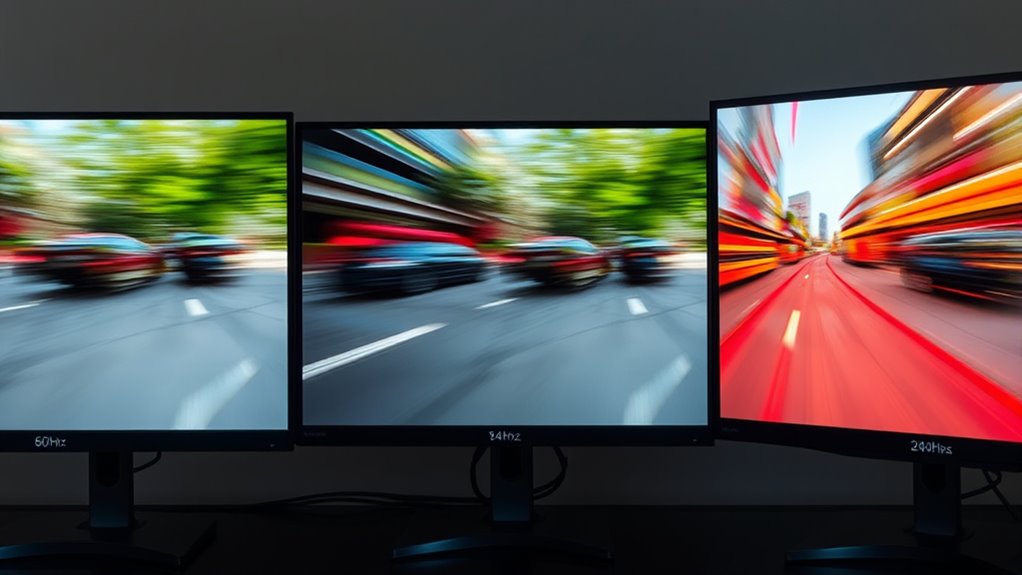
Different refresh rates can considerably influence your gaming experience by affecting smoothness, responsiveness, and visual clarity. At 60Hz, you’ll notice more motion blur during fast-paced action, and input lag can feel more pronounced, making quick reactions harder. Moving up to 144Hz reduces motion blur significantly and offers a smoother experience with less input lag, giving you a competitive edge. A 240Hz display enhances this even further, providing ultra-responsive gameplay and minimal motion blur, which is especially beneficial for fast reflex games. Higher refresh rates create a more immersive experience by delivering clearer, sharper visuals during rapid movements. Additionally, refresh rate plays a crucial role in reducing perceived latency, contributing to more precise controls. Faster refresh rates are also associated with visual fidelity improvements that make fast-moving objects easier to track. Overall, the jump from 60Hz to 240Hz improves motion clarity and reduces input lag, making your gameplay feel more fluid and responsive.
Choosing the Right Refresh Rate Based on Your Gaming Needs
Choosing the right refresh rate depends on your gaming style and priorities. If you value smooth visuals and minimal motion blur, a higher refresh rate like 240Hz can give you an edge, especially in fast-paced games. It reduces motion blur, making fast movements clearer, and lowers input lag, so your reactions feel more responsive. Additionally, understanding the refresh rate can help you optimize your gaming setup for better performance. Being aware of the gaming experience and how refresh rate impacts it can guide you in making an informed choice. For example, higher refresh rates can significantly enhance your competitive gaming experience by providing smoother visuals. However, if you mainly play casual or slower-paced games, a 144Hz display might be enough, offering smoother gameplay without the need for top-tier hardware. Consider your hardware capabilities too—higher refresh rates demand more powerful GPUs. Ultimately, match your refresh rate to your gameplay needs: prioritize 240Hz for competitive gaming and responsiveness, or stick with 144Hz for balanced performance and visual clarity. To maximize your gaming setup and ensure smooth visuals, it’s important to evaluate how your hardware aligns with your desired refresh rate. Being aware of how hardware capabilities influence your experience can help you make the best choice.
Frequently Asked Questions
Can a Higher Refresh Rate Improve Gaming on Lower-End Hardware?
A higher refresh rate can improve gaming even on lower-end hardware, but it’s limited by hardware restrictions. If your system struggles with frame rendering, you might not see much benefit from a 240Hz monitor. The key is that your GPU needs to produce enough frames to match the refresh rate; otherwise, you’ll experience screen tearing or stuttering. So, while a higher refresh rate can help, it depends on your hardware’s ability to deliver consistent frame rates.
Do All Games Benefit Equally From Higher Refresh Rates?
Not all games benefit equally from higher refresh rates. Fast-paced shooters and competitive titles see immediate gains, reducing motion blur and frame interpolation issues. However, slow-paced or graphically simple games may not notice much difference. The thrill lies in feeling the smoothness, but your experience depends on how the game’s design interacts with your monitor’s refresh rate. So, choose wisely, and enjoy the seamless gameplay where it counts most.
How Does Refresh Rate Impact Gaming Latency and Input Delay?
Higher refresh rates improve gaming latency and input delay by delivering smoother frame timing, reducing the delay between your input and on-screen action. With a faster refresh rate, your screen updates more frequently, minimizing screen tearing and lag. This makes your responses feel more immediate, especially in fast-paced games. So, upgrading your monitor can give you a competitive edge, ensuring your actions are reflected quickly and seamlessly on your display.
Are There Visual Differences Between 144HZ and 240HZ in Fast-Paced Games?
You’ll notice a difference in visual clarity and motion smoothness when switching from 144Hz to 240Hz. Studies show that higher refresh rates reduce motion blur, making fast-paced gameplay clearer. At 240Hz, your screen updates 66% more frequently than at 144Hz, delivering smoother visuals during quick movements. This means less ghosting and sharper images, giving you a competitive edge and an immersive experience in fast-paced games.
Is It Necessary to Upgrade Graphics Cards When Switching to Higher Refresh Rates?
You might need a graphics card upgrade when switching to higher refresh rates if your current GPU causes hardware bottlenecks, struggling to deliver smooth gameplay at 240Hz. Upgrading guarantees your system can handle the increased frame demands and maintain high performance. Without it, you’ll face choppy visuals or lag, negating the benefits of a higher refresh rate. So, assess your GPU’s capabilities before making the switch.
Conclusion
Choosing the right refresh rate depends on your gaming style and hardware. While higher rates like 144Hz and 240Hz offer smoother gameplay, they also require a powerful GPU to truly shine. Don’t worry if your system can’t hit those high refresh rates—60Hz still delivers a good experience for casual gaming. Just pick what fits your setup and priorities, and enjoy the game without stressing over numbers. Ultimately, the best refresh rate is the one that makes your gaming more enjoyable.