
Set up your wireless noise-cancelling earbuds, connect them to a phone or computer, and choose the right listening mode for your surroundings. This guide is for first-time users and anyone replacing an old pair. You will need about 15-25 minutes, including time to charge the earbuds and test their fit. By the end, you should be able to play audio, switch noise control modes, and check that both earbuds work.

Get the latest gadgets delivered free with Prime
- Fast, free delivery on millions of items
- Prime Video, Amazon Music and more included
- Member-only deals all year
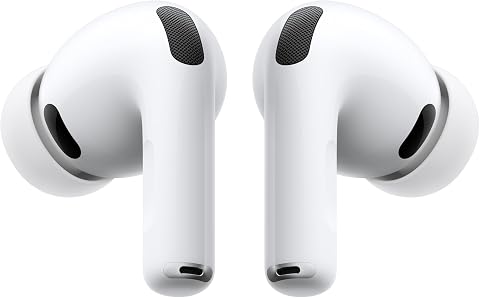
Apple AirPods Pro 3 Wireless Earbuds with Active Noise Cancellation
- ✔ Noise cancellation: Active Noise Cancellation
- ✔ Listening time with ANC: Up to 8 hours
- ✔ Ear-tip sizes: Five

Soundcore P30i Noise Cancelling Wireless Earbuds with Phone Stand Case
- ✔ Connectivity: Bluetooth 5.4
- ✔ Noise cancellation: Adaptive ANC; reduces noise by up to 42 dB
- ✔ Drivers: 10 mm with BassUp technology

JBL Vibe Beam 2 Noise-Cancelling Earbuds, Black
- ✔ Noise control: Active Noise Cancelling and Smart Ambient
- ✔ Drivers: 8 mm dynamic drivers with JBL Pure Bass
- ✔ Playback per charge: Up to 10 hours; stated maximum with ANC off
Difficulty: Beginner | Time: 15-25 minutes
What You’ll Need
Tools & Materials:
- Wireless earbuds and their charging case
- A phone, tablet, or computer with Bluetooth
- The earbud maker’s companion app, if available
- The supplied ear tips in several sizes
Knowledge:
- Basic ability to open Bluetooth settings on your device
- Ability to use an app store if the earbuds need a companion app
Check the quick-start card or maker’s website for model-specific pairing and control instructions. Button names and touch gestures vary. Charge the case and earbuds before setup; a low battery can interrupt pairing or testing.
Apple AirPods Pro 3 Wireless Earbuds with Active Noise Cancellation
The AirPods Pro 3 are the strongest all-around fit in this comparison for listeners already using Apple devices. Their stated up to 8 hours with ANC enabled gives us a useful point of comparison with the P30i, which list up to 6 hours per charge with ANC. Five ear-tip sizes also give buyers more fit options than the three sizes specified for JBL, a practical advantage when a secure seal matters for comfort and passive isolation.Noise cancellation is only part of the appeal. Three-dimensional audio, Adaptive EQ, Transparency mode, hearing-health features, and heart-rate sensing make these more versatile than the more focused Soundcore and JBL options. Automatic Switching and Audio Sharing add convenience across Apple devices. That ecosystem focus is also the central limitation: some functions need an iPhone or another Apple device, and Live Translation and Workout Buddy require Apple Intelligence. Buyers outside that ecosystem should weigh those dependencies against JBL’s app customization or Soundcore’s unusually functional case. We would choose the AirPods for ANC plus connected features, while recognizing they are less compelling if we only need basic noise control and playback.
Pros:
- Up to 8 hours of listening time with Active Noise Cancellation enabled
- Five ear-tip sizes support a more tailored fit
- Hearing-health tools, Transparency mode, Adaptive EQ, and three-dimensional audio
- Heart-rate sensing supports tracking across up to 50 workout types
Cons:
- Some features require an iPhone or other Apple devices
- Live Translation and Workout Buddy require Apple Intelligence
- The supplied specifications do not state total listening time with the charging case
Best for: Apple-device users who want ANC alongside hearing features, workout sensing, and convenient switching between Apple devices.
Not ideal for: Listeners who use Android or want every advertised software feature without Apple-device or Apple Intelligence requirements.
Bottom line: For Apple users seeking ANC with the widest set of connected listening, hearing, and workout features in this lineup, AirPods Pro 3 are the most complete choice.
“For Apple users seeking ANC with the widest set of connected listening, hearing, and workout features in this lineup, AirPods Pro 3 are the most complete choice.”
Soundcore P30i Noise Cancelling Wireless Earbuds with Phone Stand Case
The Soundcore P30i pair adaptive noise cancellation with a case that doubles as a phone stand, giving this pick a distinctly practical role. Their stated maximum of up to 45 hours with the case is the longest total figure in the lineup, edging JBL’s up-to-40-hour claim. But that comparison needs a condition: the P30i list up to 25 hours total with ANC enabled, and JBL’s 40-hour figure is with ANC off. For listeners who keep noise control switched on, the supplied per-charge figures—up to 6 hours for P30i with ANC—matter more than the headline maximum.Compared with the AirPods Pro 3, P30i focus on listening basics and utility rather than ecosystem features. Adaptive ANC and transparency mode let us move between reducing surrounding noise and hearing more of it; 10 mm drivers with BassUp target a bass-forward sound. Four microphones and AI-enhanced call processing are useful additions, while the stand built into the charging case may help during video calls or travel. The tradeoff is straightforward: ANC shortens the stated battery life, and buyers who prioritize longer listed ANC-on playback will find AirPods Pro 3’s up-to-8-hour figure more appealing. Choose P30i when case endurance and the stand feature earn their place in our routine.
Pros:
- Adaptive active noise cancellation and transparency mode
- Charging case doubles as a phone stand
- Up to 45 hours total playback as stated, or up to 25 hours with ANC enabled
- Four microphones with AI-enhanced call processing
Cons:
- ANC-on listening is listed at up to 6 hours per charge
- Total battery life with ANC is substantially below the ANC-off maximum
- No headphone jack
Best for: Listeners who want adaptive ANC, a phone-stand charging case, and long total playback between case charges.
Not ideal for: People who rely on ANC for long uninterrupted sessions and prefer not to trade listening time for noise cancellation.
Bottom line: Soundcore P30i make the most sense when we value a stand-equipped case and substantial case-supported playback, provided we account for lower endurance with ANC on.
“Soundcore P30i make the most sense when we value a stand-equipped case and substantial case-supported playback, provided we account for lower endurance with ANC on.”
JBL Vibe Beam 2 Noise-Cancelling Earbuds, Black
The JBL Vibe Beam 2 suit listeners who want noise cancellation with straightforward sound adjustments. Active Noise Cancelling is paired with Smart Ambient controls, so we can choose between reducing outside sound and letting more of it through. The JBL Headphones app adds EQ and sound customization, a different emphasis from P30i’s stand-equipped case or AirPods Pro 3’s Apple-centered hearing and workout tools.Battery claims deserve a closer look before we choose them for commuting or travel. JBL lists up to 10 hours per charge and up to 40 hours total with the case, but explicitly says that maximum applies with ANC off. The supplied specifications do not give a corresponding ANC-on playback figure, so we cannot compare its noise-cancelling endurance directly with the P30i’s up-to-6-hour or AirPods Pro 3’s up-to-8-hour figures. Four microphones support calls, and the earbuds can connect to up to eight devices, which may be convenient across a mix of gear. With three ear-tip sizes, they provide fewer stated fit choices than Apple’s five. We would pick JBL for customizable sound and ambient controls, while skipping it if a documented ANC-on battery estimate is essential to our decision.
Pros:
- Active Noise Cancelling with adjustable Smart Ambient mode
- JBL Headphones app offers EQ and sound customization
- Four microphones support calls
- Can connect to up to eight devices
Cons:
- Up-to-40-hour total playback figure applies with ANC off
- The supplied specifications do not state playback time with ANC enabled
- Three stated ear-tip sizes offer fewer fit options than AirPods Pro 3
Best for: Listeners who want active noise cancellation, Smart Ambient controls, app-based EQ, and connectivity across several devices.
Not ideal for: Buyers who need a stated ANC-on battery estimate or whose main priority is the longest documented listening time with ANC active.
Bottom line: JBL Vibe Beam 2 are the customization-focused pick, but the missing ANC-on battery figure makes them harder to assess for long noise-cancelling sessions.
“JBL Vibe Beam 2 are the customization-focused pick, but the missing ANC-on battery figure makes them harder to assess for long noise-cancelling sessions.”
As an Amazon Associate we earn from qualifying purchases.
Before You Start
Protect your hearing and stay aware. Start at a low volume, especially when testing noise cancellation. Noise-cancelling earbuds reduce some surrounding sounds but do not block every sound. Keep the volume low enough to hear important alerts, and use transparency or ambient mode around traffic, cyclists, or other hazards. Do not wear earbuds while driving.
Keep the case nearby during setup. If the earbuds were paired with another device before, turn off Bluetooth on that device for now. This helps prevent them from connecting to the wrong phone or computer.
Step-by-Step Instructions
Step 1: Charge the earbuds and case
Place both earbuds in the charging case and connect the case to power using its supplied cable or a compatible charging pad. Check the indicator light or the companion app for a charge signal. Let the earbuds charge until the maker’s guide says they have enough power for setup. Some models arrive partly charged, but a short initial charge prevents pairing from stopping unexpectedly.
Tip: Remove any protective film covering the charging contacts. If an earbud does not sit flat in its slot, adjust it until the case light responds.
Check: The case or app shows that both earbuds are charging, or the earbuds have enough charge to power on.
Step 2: Install the companion app
Search your device’s official app store for the app named in the earbud instructions. Check that the publisher matches the manufacturer, then install and open it. Follow the on-screen prompts and allow Bluetooth access when requested. If the app requests location access for nearby device discovery, follow the maker’s explanation and your device’s permission settings. Skip optional account setup if the app offers that choice.
Tip: Some earbuds work without an app. If there is no app listed in the instructions, continue to Bluetooth pairing.
Check: The app opens and either detects the earbuds or displays instructions for connecting them.
Step 3: Put the earbuds into pairing mode
Open the charging case with both earbuds inside. Many models enter pairing mode automatically the first time the case opens. If yours do not, press and hold the case button or the earbud touch controls as described in the maker’s instructions. Watch for a flashing light or a pairing message. Keep the earbuds close to your phone or computer while pairing.
Tip: Do not guess a long-press duration if the instructions specify one. Some controls reset the earbuds when held too long.
Check: A light flashes in the stated pairing pattern, or the app says the earbuds are ready to connect.
Step 4: Connect from Bluetooth settings
Open Bluetooth settings on your phone, tablet, or computer and turn Bluetooth on. Choose the earbuds’ model name from the available devices. If a pairing confirmation appears, accept it. Wait for the device status to show connected, then return to the companion app if you are using one. If the model name appears more than once, use the entry identified in the maker’s instructions.
Tip: Keep the case open until the connection completes. If the device asks for a PIN, check the instructions rather than trying common codes.
Check: Bluetooth settings show the earbuds as connected, and the app recognizes them if installed.
Step 5: Choose the right ear tips
Try the installed tips first. Insert each earbud gently and rotate it until it rests securely without pressure. If it feels loose, lets outside sound leak in, or slips when you move your jaw, try a different tip size. Change one side at a time because your ears may need different sizes. Never force a tip into your ear.
Tip: A seal helps bass and noise cancellation work as intended. Discomfort, soreness, or a blocked feeling that does not ease means you should try another size or shape.
Check: Both earbuds stay in place during a gentle head turn and feel secure without pain.
Step 6: Run the fit or seal test
If the companion app offers an ear-tip fit test, open it and follow its instructions in a quiet place. Keep still and avoid speaking while it plays its test tones. If the app reports a poor seal, reseat the earbuds or try another tip size, then repeat the test. If your model has no fit test, play a familiar track at a low volume and compare whether sound is balanced between ears.
Tip: Hair, glasses, hats, or a loose earbud can affect the seal. Move anything that presses against the earbuds before repeating the test.
Check: The app reports a good fit, or familiar audio sounds balanced and does not change noticeably when you move your head.
Step 7: Set noise control and listening preferences
Open the app or use the earbud controls to find noise cancellation, transparency or ambient mode, and off mode. Start with noise cancellation in a steady, safe environment. Compare it with transparency mode, which uses microphones to make nearby sounds easier to hear. Adjust the level if your model offers a slider. Set any hearing, spatial audio, or equalizer options only after you have a comfortable basic fit.
Tip: Noise cancellation may behave differently during wind, speech, or sudden changes in sound. Switch to transparency or off mode if the effect feels uncomfortable or makes it harder to notice your surroundings.
Check: You can identify each available mode and hear a clear difference when switching between them.
Step 8: Test audio and controls
Play a familiar song or spoken recording at a low volume. Confirm that sound comes from both earbuds and that pauses, volume changes, and mode switching work using the documented controls. Make a test call if you plan to use the earbuds for calls. If the model supports multipoint connections, set up another device only after the first connection works.
Tip: Touch gestures can vary by model. Use the app’s control guide instead of repeatedly tapping or pressing controls at random.
Check: Audio is clear and balanced, and the controls perform the actions shown in the app or manual.
Step 9: Store the earbuds after use
Remove the earbuds gently and return each one to its matching charging slot. Check that they sit correctly and that the case indicates charging. Wipe away sweat or moisture with a soft, dry cloth before closing the case. Keep the case away from water unless the maker specifically rates it for water exposure.
Tip: Do not charge wet earbuds or use sharp objects to clean the speaker mesh or charging contacts.
Check: Both earbuds appear in the case correctly and begin charging.
Common Mistakes to Avoid
- Choosing ear tips that are too loose or too tight. — Try the available sizes on each ear separately, then use the app’s fit test if offered. A secure fit should not cause pain.
- Pairing while the earbuds are still connected to another device. — Temporarily turn off Bluetooth on previously paired devices, then put the earbuds in pairing mode and connect to the intended device.
- Testing noise cancellation at high volume or in a hazardous setting. — Begin quietly in a safe place. Use transparency mode when you need to hear people, alerts, or traffic.
- Assuming noise cancellation removes every sound. — Expect lower levels of steady background noise, while voices, sudden sounds, and some high-pitched sounds may remain audible.
Troubleshooting
Problem: The earbuds do not appear in Bluetooth settings.
Solution:
Put them back in the case, close it briefly, then open it and repeat the maker’s pairing-mode steps. Move the earbuds close to the device and switch off Bluetooth on other devices they may connect to. If they still do not appear, follow the manual’s reset instructions and try pairing again.
Problem: Only one earbud produces sound.
Solution:
Check that both earbuds have charge and sit properly in the case. Clean the charging contacts with a dry, soft cloth. Reconnect the earbuds in Bluetooth settings. If the problem remains, use the maker’s instructions to reset and pair the set again.
Problem: Noise cancellation seems weak or uneven.
Solution:
Reseat the earbuds and try different tips, then repeat the seal test. Check that noise cancellation is selected rather than transparency or off mode. Clean the microphone openings gently according to the manual; blocked microphones can affect noise control.
Problem: Audio cuts out or connects to the wrong device.
Solution:
Keep the phone or computer within the maker’s recommended range and remove obstacles between it and the earbuds. Disconnect unused paired devices or disable multipoint temporarily. If needed, remove the earbuds from Bluetooth settings and pair them again.
What Success Looks Like
You have completed setup when the intended device shows the earbuds as connected, both earbuds play balanced audio, and you can switch between the available noise control modes. The fit should remain secure during gentle movement without pain. Noise cancellation should reduce some steady background sound, while transparency mode should make nearby sounds easier to hear. The case should charge both earbuds after use.
Next Steps
Use the companion app or maker’s website to check for firmware updates and read the control guide for your model. Clean the earbuds and case regularly with the method in the manual, and replace worn or damaged tips. If you use the earbuds across several devices, add each device through the maker’s pairing instructions and check which one connects automatically. Stop using an earbud that causes persistent pain or irritation, and contact the maker if a reset does not resolve a charging, connection, or audio fault.
Frequently Asked Questions
Do noise-cancelling earbuds block all outside sound?
No. They reduce some background noise, especially steady sounds, but voices, alerts, and sudden or high-pitched sounds may still come through. Keep enough awareness for the place you are in.
Should I use noise cancellation or transparency mode?
Use noise cancellation in a safe setting when you want to reduce background sound. Use transparency or ambient mode when you need to hear conversation, announcements, or nearby activity. Follow your model’s instructions because mode names and controls vary.
Why does noise cancellation work better in one ear?
An uneven seal is a common cause. Reseat each earbud, try another tip size on the affected side, and repeat the fit test if available. Check the microphone openings for dirt as described in the manual.
Can I connect the earbuds to a phone and a computer?
Some models support multipoint connections; others connect to one device at a time. Check the model’s instructions. If audio keeps switching unexpectedly, disconnect the unused device or turn multipoint off in the companion app.
What should I do if the earbuds will not reset?
Use the exact reset procedure for your model, including the required case position and button hold time. Charge the case first and check the maker’s support page if the reset sequence does not work.