
🔍 Read the full analysis: Make A Plan With This AI Workflow Automation Gear Checklist For 2026 on ThorstenMeyerAI.com

Get the latest gadgets delivered free with Prime
- Fast, free delivery on millions of items
- Prime Video, Amazon Music and more included
- Member-only deals all year
TL;DR
ThorstenMeyerAI.com published a planning checklist for people setting up an AI workflow workspace, covering audio, video, storage, desk connections, input and power protection. It names specific products in some categories but gives no benchmark testing, pricing, or universal compatibility claims; buyers are advised to check their own equipment and prioritize work interruptions.
ThorstenMeyerAI.com has published a 2026 gear-planning checklist for people building an AI workflow workspace, covering audio, video, storage, desk connectivity, input devices and power protection, as detailed in the original analysis. The guide is a buying framework, not a tested ranking: it advises readers to confirm compatibility with their own computers, ports, software and workspace before purchasing.
The checklist names six categories: a USB microphone, an autofocus webcam, a portable SSD, a USB-C docking station, an ergonomic wireless mouse and an uninterruptible power supply, or UPS. For related planning considerations, see this AI automation desk setup checklist. The supplied material identifies specific products for some categories, including the RØDE PodMic USB microphone, the SanDisk 2TB Extreme Portable SSD and a Targus USB-C Universal Quad 4K Docking Station with 100W power delivery. It does not provide a named webcam, mouse or UPS pick in the material provided.
For the microphone, the guide says the product name lists both USB-C and XLR connections. It recommends checking which connection suits the existing recording setup, along with cable reach and desk placement. For storage, it points to the SSD’s stated 2TB capacity as something to compare with working file needs, while cautioning readers to verify connection, performance and durability details from product information rather than infer them from a name.
The docking section begins by warning that advertised dock features should not be assumed to work with every computer and display combination. The source material provided ends partway through that section, so it does not supply the remainder of its checks or the full guidance for the mouse and UPS. The checklist’s overall instruction is to verify ports, operating setup, workspace and connected devices, then address the gaps that interrupt work most often instead of buying every category at once; an AI automation software checklist can help with the software side of that planning.
RØDE PodMic USB Dynamic Broadcast Microphone, XLR + USB-C
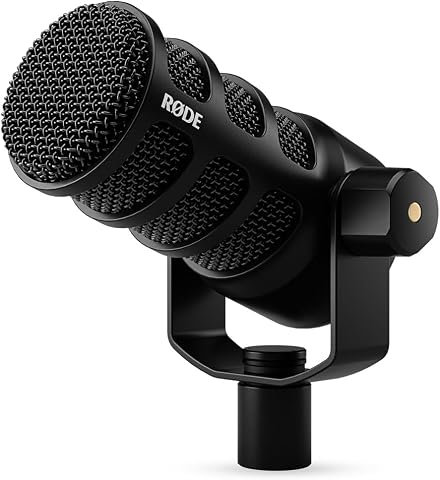
The RØDE PodMic USB is a versatile broadcast microphone with both XLR and USB-C connections, suitable for streaming, podcasts, and recording. It features onboard audio processing with APHEX DSP, noise rejection for speech clarity, and zero-latency monitoring for real-time audio feedback.
Pros:
- Versatile XLR and USB-C connectivity for flexible setup
- Built-in audio processing enhances sound quality
- Effective noise rejection for clear speech
- Zero-latency monitoring for real-time audio
Cons:
- May require additional equipment for professional XLR use
- Bulkier design compared to traditional microphones
Best for: Workspaces that want USB-C and XLR connection options
Not ideal for: Setups that cannot accommodate its listed connections
Bottom line: Choose it when its USB-C or XLR connections fit the equipment and recording workflow you already have.
Plan Around Existing Equipment
The checklist matters as a planning aid because these categories interact: a microphone needs a workable connection and position, a drive must fit the computers used, and a dock must match both its host and the intended displays. A product label alone does not establish that the full setup will work. Checking those dependencies before buying can help readers avoid equipment that does not fit their routine.
Its staged approach also pushes back against treating an AI workspace as a shopping list to complete in one order. People who mainly take calls may have different priorities from those who record regularly or move large project files between devices. The guide recommends starting with recurring workflow interruptions, which makes the checklist more useful as a way to plan purchases than as a blanket recommendation to acquire all six categories.
The source does not report tests, comparative results, prices, or evidence that these items improve AI output. Its value is narrower: it organizes common workspace decisions and flags compatibility as a central concern. Readers still need to check current manufacturer specifications and decide whether a given item solves a real need in their own setup.
Six Categories, Uneven Product Detail
The checklist is framed around work involving recording, calls, file handling and everyday computer use. Its categories extend beyond AI-specific hardware: microphones and webcams support audio and video, portable storage supports file movement, docks connect desk devices, and a mouse and UPS address input and power protection. The source presents these as parts of a workspace plan, not equipment required to use AI tools.
Product detail varies by category in the material supplied. The microphone, SSD and Targus dock are named, while the webcam advice is explicitly presented as selection guidance rather than a product recommendation. The supplied text lists a wireless mouse and UPS as checklist items but does not include their individual guidance. It also does not establish that the named products are new for 2026; the year appears in the checklist framing.
“Prioritize the gaps that interrupt your work most often, rather than buying every category at once.”
— ThorstenMeyerAI.com checklist
Compatibility and Missing Details
The supplied checklist does not include independent product tests, prices, availability, comparative performance data or evidence that any one item suits all users. It also does not provide a named webcam, mouse or UPS, and the available docking-station section ends before its full advice. As a result, the listed product names should not be treated as endorsements based on comparative testing.
Compatibility remains specific to each setup. The source does not establish how the named microphone or dock will work with a particular computer, operating system, monitor arrangement or accessory. It tells readers to verify these details but does not provide device-by-device checks. Readers should consult current product specifications and their computer’s documentation before buying.
Check Needs Before Buying
The next step for readers is to map each proposed item to a specific task and device: identify the computer and ports involved, the software used, available desk space and any connected displays or recording equipment. For storage, estimate the files that need to travel and verify connection and performance details. For audio and video, check positioning, mounting and software support against the actual workspace.
Because the provided source does not state a follow-up date or product-testing plan, no further publication milestone is confirmed. The practical decision remains with the buyer: rank current workflow problems, confirm compatibility using up-to-date manufacturer information, and purchase only the categories that address those needs.
Key Questions
What does the 2026 checklist cover?
It covers a USB microphone, autofocus webcam, portable SSD, USB-C dock, ergonomic wireless mouse and UPS for a workspace involving recording, calls, file handling and everyday computer use.
Does the guide recommend a product in every category?
No. The supplied material names a RØDE microphone, SanDisk SSD and Targus dock. It gives selection advice for a webcam without naming a pick, and lists a mouse and UPS without providing their full sections in the available text.
Does the checklist prove the named products are compatible?
No. It advises readers to check their own ports, computer setup, software, workspace and connected devices. The material does not provide device-specific compatibility testing.
Should readers buy all six items?
The guide advises against buying every category at once. It says to prioritize the gaps that interrupt work most often and choose gear that fits the tasks and equipment already in use.
Source: ThorstenMeyerAI.com