
🔍 Read the full analysis: What To Look For In 12 AI Productivity Apps For Smarter Workflows on ThorstenMeyerAI.com

Get the latest gadgets delivered free with Prime
- Fast, free delivery on millions of items
- Prime Video, Amazon Music and more included
- Member-only deals all year
TL;DR
A ThorstenMeyerAI.com roundup compares 12 AI productivity picks, including software, guides and a directory, by how well they support defined, repeatable work. It names Google Gemini AI Workspace as its overall pick for workflow-building and Conference Notes App as its focused choice for meeting capture, while noting that fit, setup and product details vary.
ThorstenMeyerAI.com has published a 12-pick guide to AI productivity apps and related resources, comparing options for workflow building, meeting notes, writing and automation. The roundup names Google Gemini AI Workspace as its overall pick for workflow support and Conference Notes App as its focused choice for meeting capture. It says the appropriate option depends on the task and the work systems a person already uses.
The guide says it ranked products by how clearly they support a repeatable productivity task, the practical direction available to buyers and the match between a product’s scope and its stated purpose. It gives added weight to defined uses such as meeting notes, writing and workflow building rather than broad assistants whose roles are less clear from the available product information. The ranking is presented as a guide to common needs, not a universal verdict.
The source identifies two specific products and describes other entries by category: AI Writer Pro is aimed at drafting, while SmartPrompt focuses on improving instructions for AI-generated work. The 12-item selection also includes broad assistants and companion products, plus an automation directory and handbooks for Gemini and Microsoft 365. The latter are learning resources, not working apps, and readers must apply their guidance themselves.
Rather than treating a long feature list as proof of productivity, the guide recommends trying a real task: use an actual draft, meeting record or workflow, then count the time required to check and correct the result, including when using AI apps for notes. It also advises checking how a product fits existing documents and calendars, whether work can be retrieved or exported, and what data-handling terms apply. Product names alone do not establish capabilities, and the source avoids filling in details that were not supplied.
The 12 picks
- 1
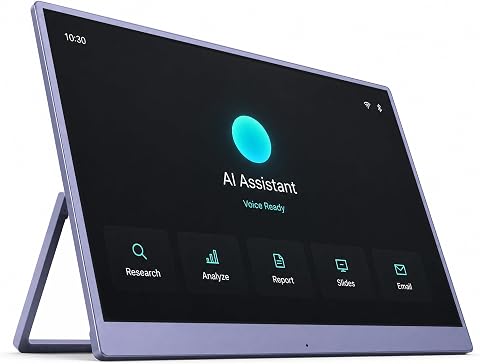 VAIMI AI Companion Hub with 15.6-Inch DisplayView on Amazon →
- 2
 The Complete Microsoft 365 and Copilot Handbook, Volume I: Core Apps and AI-E…View on Amazon →
- 3
 Aulax Smart AI Productivity, Writing, and Assistant AppView on Amazon →
- 4
 The Google Gemini AI Workspace: Build Smart AI Workflows, Automate Tasks, Cre…View on Amazon →
- 5
 The Complete Guide: The Ultimate Directory of 5,000+ Apps in 500+ Categories…View on Amazon →
- 6
 AI Writer Pro: Write SmartView on Amazon →
- 7
 SmartPrompt – AI Prompt Generator & EnhancerView on Amazon →
- 8
 AI NotebookView on Amazon →
- 9
 AIO AI ApexView on Amazon →
- 10
 GPT AI Chatbot: Chat, RPG Games, and AI AssistantView on Amazon →
- 11
 AI AssistantView on Amazon →
- 12
 Conference Notes AppView on Amazon →
Match Each Tool to a Work Task
The roundup compares AI productivity products designed for different tasks. It notes that general assistants may require users to develop prompts and routines, while focused meeting or writing products can be assessed against a specific need. The guide recommends considering whether a product’s output justifies the setup and review required.
The guide also distinguishes software from educational resources. A handbook or directory may provide information for planning an automation system, but does not carry out the work. It advises teams handling internal drafts or meeting details to review data policies and organizational rules before testing products with sensitive material.
Products Worth Considering

DJI Mic 2 Wireless Microphone System (2 Transmitters, Receiver, Charging Case)

LG UltraGear 32GS60QC-B 32-inch Curved QHD Gaming Monitor (180Hz, 1ms, 1000R, AMD FreeSync, HDR10)

Samsung Galaxy Tab A11+ 11-Inch Tablet, 6GB RAM, 128GB Storage, Expandable, Gray
As an affiliate, we earn on qualifying purchases.
How the 12 Picks Were Ranked
The supplied source describes the list as a mix of apps and reference materials, assessed for use case, workflow breadth and setup demands. It says broad workflow support helped Google Gemini AI Workspace rank highly, while task-focused products could better fit readers with a specific need. The ranking also considers overlap with existing software and the effort required to establish and maintain a process.
The material provided does not include a complete numbered list with descriptions of all 12 entries. It names Google Gemini AI Workspace, Conference Notes App, AI Writer Pro and SmartPrompt, and refers to broad assistant and companion products, an automation directory, and Gemini and Microsoft 365 handbooks. The guide’s stated method is to avoid assuming unreported features, so this article likewise does not assign names or capabilities to unspecified entries.
“The right choice depends on which work you want to improve.”
— ThorstenMeyerAI.com roundup
Product Details Not Fully Supplied
The supplied material does not identify every item in the 12-pick lineup or provide detailed feature, pricing, availability, privacy or performance information for the named products. It also does not state a publication date, disclose independent testing results or report measured time savings. The labels “best overall” and “most task-specific” are the roundup’s judgments, not independently verified findings.
Readers therefore cannot use this material alone to compare specific plans, integrations or data practices. Capabilities may also vary by version and account, but the source does not provide version information. Those details should be checked with the relevant provider before adopting a tool, especially for confidential work.
Test a Tool on Real Work
The guide’s practical next step is to select one recurring task and compare an app against the existing process using the same materials. Measure the usable final result, including time spent correcting errors, checking names and decisions, and organizing output—not only the speed of the initial response. Check export options, workflow fit and data terms before moving work into a new service.
No follow-up release or product milestone is specified in the source. For readers considering a purchase or workplace rollout, the next useful step is to consult current product documentation and organizational policies, then run a limited test before relying on generated material.
Key Questions
Which product does the roundup favor overall?
The source names Google Gemini AI Workspace as its overall pick for readers who want AI assistance connected to practical workflow building. That is the roundup’s assessment, not a claim that it suits every user.
Which option is focused on meeting notes?
Conference Notes App is described as the most task-specific pick, aimed at meeting capture. The supplied material does not give detailed information about its features or performance.
Are all 12 picks software apps?
No. The selection includes apps and learning resources, including an automation directory and Gemini and Microsoft 365 handbooks. The guides and directory can support planning, but readers must apply their material themselves.
How should readers decide whether an AI tool helps?
Try it on a real, recurring task and evaluate the finished work, including review and correction time. Also check how it fits current tools, whether results can be retrieved or exported, and how the provider handles submitted data.
Source: ThorstenMeyerAI.com