

The best MacBook Pro laptop for most buyers in this lineup is the 14-inch M5 model with 24GB of memory: it pairs current-generation performance and useful capacity with a more manageable size than the 16-inch models. For demanding creative work, the 16-inch M5 Pro with 48GB of memory adds a larger workspace, while the M5 Max models suit workloads that can use their extra graphics power. The main tradeoffs are portability versus screen area, M5 versus M5 Pro or Max performance, and the lower upfront cost of renewed Intel models versus their age and shorter software runway. Memory and storage also matter, since neither is a casual upgrade after purchase. Read on for the full breakdown of all 12 options and how I’d match each one to a buyer.

Get the latest gadgets delivered free with Prime
- Fast, free delivery on millions of items
- Prime Video, Amazon Music and more included
- Member-only deals all year
Complete the kit



Key Takeaways
- The 14-inch M5 with 24GB of memory is the most balanced pick: it offers more headroom than the 16GB configuration without the larger footprint or specialized performance focus of Pro and Max models.
- The 16-inch M5 Pro configurations favor sustained creative work: 48GB or 64GB of memory and a larger display suit demanding projects, but add size that everyday users may not need.
- The two M5 Max models serve different levels of demand: the 40-core GPU configuration is the most graphics-focused option here, while the 20-core GPU version pairs Max branding with a less extreme graphics setup.
- Display choice can matter as much as chip choice: the 16-inch M5 Pro with nano-texture is aimed at buyers who need to reduce reflections, while the standard display may suit most settings.
- Renewed Intel models are compromises, not direct peers to current M5 laptops: their 2019 and 2020 chips, memory, and storage make them better suited to limited or legacy needs than long-term primary-computer use.
| Apple MacBook Pro 14.2-inch with M5 Max, 18-Core CPU, 40-Core GPU, 128GB Memory, 2TB SSD, Space Black |  | Best for Maximum Performance in a Compact MacBook Pro | Display: 14.2-inch Liquid Retina XDR | Processor: Apple M5 Max, 18-core CPU | Graphics: 40-core GPU | VIEW LATEST PRICE | See Our Full Breakdown |
| Apple MacBook Pro 13-inch (2019), 8GB RAM, 256GB SSD, Space Gray (Renewed) |  | Best for Buyers Seeking a Lightweight Legacy MacBook Pro | Model year: 2019 | Display: 13-inch Retina LCD, 2560 x 1600 pixels, 60 Hz | Processor: 1.4 GHz 8th-generation Intel Core i5, 2 cores | VIEW LATEST PRICE | See Our Full Breakdown |
| Apple 2019 MacBook Pro 16-inch, 2.3GHz Intel Core i9, 16GB RAM, 1TB SSD, Space Gray (Renewed) |  | Best Renewed MacBook Pro for a Large Screen and Local Storage | Model year: 2019 | Display: 16 inches, 3072 x 1920 | Processor: Intel Core i9-9880H, 2.3 GHz, 6 cores | VIEW LATEST PRICE | See Our Full Breakdown |
| Apple 16.2-inch MacBook Pro (2026) with M5 Pro, 18-Core CPU, 20-Core GPU, 48GB Memory, 1TB SSD, Wi-Fi 7 – Space Black |  | Best Overall for Professional Work on a Large Display | Display: 16.2-inch Liquid Retina XDR | Processor: Apple M5 Pro, 18-core CPU | Graphics: 20-core GPU | VIEW LATEST PRICE | See Our Full Breakdown |
| Apple MacBook Pro 16.2-inch with M5 Pro, 18-Core CPU, 20-Core GPU, 48GB Memory, 1TB SSD, Nano-Texture Display, Space Black |  | Best for Reducing Reflections in Bright Workspaces | Display: 16.2-inch Liquid Retina XDR with Nano-Texture | Processor: Apple M5 Pro, 18-core CPU | Graphics: 20-core GPU | VIEW LATEST PRICE | See Our Full Breakdown |
| Apple 2025 MacBook Pro 14.2-inch with M5 Chip, 10-Core CPU and GPU, 24GB Memory, 1TB SSD, Space Black |  | Best Overall 14-Inch MacBook Pro | Chip: Apple M5 | CPU and GPU: 10-core CPU and 10-core GPU | Memory: 24GB unified memory | VIEW LATEST PRICE | See Our Full Breakdown |
| Apple 2025 MacBook Pro 14.2-inch with M5 Chip, 16GB Memory, 1TB SSD, Space Black | | Best for Everyday Pro Work | Processor: Apple M5, 10-core CPU | Graphics: 10-core GPU | Memory: 16GB unified memory | VIEW LATEST PRICE | See Our Full Breakdown |
| Apple 2024 MacBook Pro 16-inch with M4 Pro Chip, 24GB RAM, 512GB SSD, QWERTY Keyboard (Renewed, Space Black) |  | Best Renewed Large-Screen Pick | Model year and condition: 2024, renewed | Processor: Apple M4 Pro | GPU: 20-core GPU | VIEW LATEST PRICE | See Our Full Breakdown |
| Apple MacBook Pro 16.2-Inch Laptop with M5 Pro, 18-Core CPU, 20-Core GPU, 64GB Memory, 1TB SSD, Space Black | | Best for Heavy Professional Workloads | Processor: Apple M5 Pro, 18-core CPU | Graphics: 20-core GPU | Display: 16.2-inch Liquid Retina XDR | VIEW LATEST PRICE | See Our Full Breakdown |
| Apple 2020 MacBook Pro 13-inch, Intel Core i5 2.0GHz, 16GB RAM, 512GB SSD, Space Gray (Renewed) |  | Best for Buyers Seeking a Compact Renewed MacBook Pro | Model year and condition: 2020, renewed | Display: 13.3-inch Retina, 2560 × 1600 | Processor: Intel Core i5, 2.0GHz | VIEW LATEST PRICE | See Our Full Breakdown |
| Apple MacBook Pro 14.2-inch with M5 Max, 18-Core CPU, 20-Core GPU, 48GB Memory, 2TB SSD, Space Black | | Best Compact Max-Power Pick | Processor: Apple M5 Max, 18-core CPU | Graphics: 20-core GPU | Display: 14.2-inch Liquid Retina XDR | VIEW LATEST PRICE | See Our Full Breakdown |
| Apple MacBook Pro 16-inch (Late 2019), Intel Core i7, 16GB RAM, 512GB SSD, Space Gray (Renewed) | 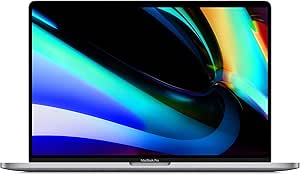 | Best for a Large Screen on a Renewed Intel Mac | Model year and condition: Late 2019, renewed | Processor: 2.6GHz 6-core Intel Core i7, 9th generation | Memory: 16GB, 2666MHz | VIEW LATEST PRICE | See Our Full Breakdown |
| MacBook Pro laptop | Display | Memory | Storage | Processor |
|---|---|---|---|---|
| Apple MacBook Pro 14.2-inch wi | 14.2-inch Liquid Retina XDR | 128GB | 2TB SSD | Apple M5 Max, 18-core CPU |
| Apple MacBook Pro 13-inch | 13-inch Retina LCD, 2560 x 1600 pixels, 60 Hz | 8GB DDR3, 2133 MHz | 256GB SSD | 1.4 GHz 8th-generation Intel Core i5, 2 cores |
| Apple 2019 MacBook Pro 16-inch | 16 inches, 3072 x 1920 | 16GB DDR4 | 1TB SSD | Intel Core i9-9880H, 2.3 GHz, 6 cores |
| Apple 16.2-inch MacBook Pro | 16.2-inch Liquid Retina XDR | 48GB unified memory | 1TB SSD | Apple M5 Pro, 18-core CPU |
| Apple MacBook Pro 16.2-inch wi | 16.2-inch Liquid Retina XDR with Nano-Texture | 48GB | 1TB SSD | Apple M5 Pro, 18-core CPU |
| Apple 2025 MacBook Pro 14.2-in | 14.2-inch Liquid Retina XDR | 24GB unified memory | 1TB SSD | — |
| Apple 2025 MacBook Pro 14.2-in | 14.2-inch Liquid Retina XDR | 16GB unified memory | 1TB SSD | Apple M5, 10-core CPU |
| Apple 2024 MacBook Pro 16-inch | 16.2-inch Liquid Retina XDR, 3456 × 2234 pixels | 24GB RAM | 512GB SSD | Apple M4 Pro |
| Apple MacBook Pro 16.2-Inch La | 16.2-inch Liquid Retina XDR | 64GB | 1TB SSD | Apple M5 Pro, 18-core CPU |
| Apple 2020 MacBook Pro 13-inch | 13.3-inch Retina, 2560 × 1600 | 16GB LPDDR4 | 512GB SSD | Intel Core i5, 2.0GHz |
| Apple MacBook Pro 14.2-inch wi | 14.2-inch Liquid Retina XDR | 48GB | 2TB SSD | Apple M5 Max, 18-core CPU |
| Apple MacBook Pro 16-inch | 16-inch Retina, 3072 × 1920 | 16GB, 2666MHz | 512GB SSD | 2.6GHz 6-core Intel Core i7, 9th generation |
More Details on Our Top Picks
Apple MacBook Pro 14.2-inch with M5 Max, 18-Core CPU, 40-Core GPU, 128GB Memory, 2TB SSD, Space Black
I’d choose this 14.2-inch configuration when demanding work needs exceptional memory and graphics power without moving to a larger laptop. Its M5 Max 40-core GPU and 128GB of memory are aimed at heavy creative projects and AI workloads; compared with the 16.2-inch M5 Pro models in this lineup, it prioritizes graphics capacity and memory over a bigger built-in workspace. The Liquid Retina XDR display, Thunderbolt 5, HDMI, and SDXC slot make it easier to work with detailed media and connect accessories without relying entirely on adapters. The tradeoff is that this is far beyond what routine office, browsing, or study tasks need. Buyers should also note that the listing says all-day battery life but gives no runtime figure.
Pros:- M5 Max chip with a 40-core GPU for demanding graphics work
- 128GB of memory supports large and complex workloads
- Bright, high-contrast Liquid Retina XDR display
- Thunderbolt 5, HDMI, SDXC, and support for up to four external displays
Cons:- The high-capacity configuration is excessive for everyday tasks
- No specific battery runtime is provided
- A 14.2-inch screen offers less working area than the 16.2-inch M5 Pro models
Best for: Video, 3D, and AI professionals who need high GPU capacity and large memory in a more compact MacBook Pro.
Not ideal for: Students and everyday users who mainly browse, write, and stream; the M5 Max and 128GB memory are more capability than those workloads call for.
- Display:14.2-inch Liquid Retina XDR
- Processor:Apple M5 Max, 18-core CPU
- Graphics:40-core GPU
- Memory:128GB
- Storage:2TB SSD
- Wireless:Wi-Fi 7, Bluetooth 6
- Ports:Three Thunderbolt 5, MagSafe 3, SDXC card slot, HDMI, headphone jack
- Camera:12MP Center Stage
Our verdict“Choose this model if you need M5 Max graphics and 128GB of memory in a smaller MacBook Pro, and skip it if your workload is routine.”
Apple MacBook Pro 13-inch (2019), 8GB RAM, 256GB SSD, Space Gray (Renewed)
This renewed 13-inch MacBook Pro is the compact, basic-work option in a lineup otherwise dominated by newer Apple silicon models. Its 2.6-pound weight and sharp Retina display suit light travel and everyday documents, while Touch ID offers convenient sign-in. Compared with the renewed 2019 16-inch Core i9 MacBook Pro here, this model is easier to carry but gives up screen space, memory, and storage. The 8GB of RAM and two Thunderbolt/USB-C ports make the limits clear: heavy creative apps, large multitasking loads, and peripheral-heavy desks are poor matches. It is also a renewed Intel-era laptop with a 90-day limited warranty, so buyers should weigh its older platform and shorter warranty against newer M-series alternatives in the roundup.
Pros:- Lightweight 2.6-pound design
- 13-inch Retina display with True Tone
- Touch ID for fingerprint sign-in
- 256GB SSD storage
Cons:- 8GB of RAM limits demanding apps and multitasking
- Only two Thunderbolt/USB-C ports
- Renewed condition and a 90-day limited warranty
Best for: A buyer who specifically wants a small, lightweight renewed MacBook Pro for documents, web use, and basic tasks.
Not ideal for: Creative professionals, heavy multitaskers, and buyers seeking a current Apple silicon model or a wide range of built-in ports.
- Model year:2019
- Display:13-inch Retina LCD, 2560 x 1600 pixels, 60 Hz
- Processor:1.4 GHz 8th-generation Intel Core i5, 2 cores
- Memory:8GB DDR3, 2133 MHz
- Storage:256GB SSD
- Graphics:Intel Iris Plus Graphics 645
- Ports:Two Thunderbolt / USB-C ports
- Battery life:Up to 10 hours
- Warranty:90-day limited warranty
Our verdict“Pick this renewed model for a lightweight MacBook Pro and basic tasks, but choose a newer M-series option for demanding work or longer-term headroom.”
Apple 2019 MacBook Pro 16-inch, 2.3GHz Intel Core i9, 16GB RAM, 1TB SSD, Space Gray (Renewed)
I’d shortlist this renewed 16-inch MacBook Pro for buyers who value a large display and 1TB of local storage above having a current-generation chip. Its 3072 x 1920 screen gives documents and timelines more room than the 13-inch 2019 model in this roundup, and the six-core Intel Core i9 is paired with 16GB of memory. Four ports also make it more practical for connected desk setups than that smaller renewed model’s two-port arrangement. The tradeoffs are substantial: this is a 2019 Intel laptop, its graphics are listed as integrated, and its renewed condition means it is not equivalent to a new M5 Pro system for buyers seeking the latest platform. At four pounds, it is also less appealing for frequent travel.
Pros:- Large 16-inch display with 3072 x 1920 resolution
- Six-core Intel Core i9 processor
- 1TB SSD and 16GB of memory
- Four ports and fingerprint recognition
Cons:- Renewed, pre-owned condition rather than a new laptop
- Integrated graphics are a weaker fit for demanding graphics workloads
- Four-pound weight makes it less convenient to carry than the 13-inch renewed model
Best for: Buyers who want a renewed MacBook Pro with a roomy display and 1TB SSD for general productivity and older software needs.
Not ideal for: People doing graphics-intensive work, carrying a laptop every day, or seeking a current Apple silicon MacBook Pro.
- Model year:2019
- Display:16 inches, 3072 x 1920
- Processor:Intel Core i9-9880H, 2.3 GHz, 6 cores
- Memory:16GB DDR4
- Storage:1TB SSD
- Graphics:Integrated
- Ports:Four; Thunderbolt, USB Type-C, headphone
- Weight:4 pounds
- Condition:Renewed
Our verdict“Choose this renewed 16-inch model if screen space and 1TB storage matter more than current-generation performance and portability.”
Apple 16.2-inch MacBook Pro (2026) with M5 Pro, 18-Core CPU, 20-Core GPU, 48GB Memory, 1TB SSD, Wi-Fi 7 – Space Black
This is my best-balanced choice for professionals who want a large MacBook Pro display and strong current-generation performance without stepping up to the M5 Max configuration. The M5 Pro 18-core CPU, 20-core GPU, and 48GB of unified memory are suited to serious creative and productivity workloads, while the 16.2-inch Liquid Retina XDR screen gives projects more room than the 14.2-inch M5 Max model. That smaller model has a much larger GPU and memory allocation, so it is the better fit for especially demanding graphics or AI work; this M5 Pro configuration makes more sense for a broader range of professional tasks. Thunderbolt 5, HDMI, SDXC, and Wi-Fi 7 add useful flexibility. Its main cost in daily use is physical: at 4.71 pounds, it is less convenient to carry.
Pros:- M5 Pro with an 18-core CPU and 20-core GPU
- 48GB unified memory for demanding multitasking and creative work
- 16.2-inch Liquid Retina XDR display
- Thunderbolt 5, HDMI, SDXC, Wi-Fi 7, and Bluetooth 6
Cons:- 4.71-pound weight is a drawback for frequent travel
- Less GPU capacity than the 14.2-inch M5 Max configuration
- 1TB SSD may be limiting for users keeping large media libraries locally
Best for: Creative professionals and power users who want a large high-quality screen, substantial memory, and M5 Pro performance in one laptop.
Not ideal for: Frequent travelers who prioritize a lighter machine, or GPU-heavy specialists who need the M5 Max model’s 40-core GPU.
- Display:16.2-inch Liquid Retina XDR
- Processor:Apple M5 Pro, 18-core CPU
- Graphics:20-core GPU
- Memory:48GB unified memory
- Storage:1TB SSD
- Wireless:Wi-Fi 7, Bluetooth 6
- Ports:Three Thunderbolt 5, MagSafe 3, SDXC card slot, HDMI, headphone jack
- Weight:4.71 pounds
- Camera:12MP Center Stage
Our verdict“Choose this M5 Pro configuration for a large-screen professional MacBook Pro with ample memory, unless you need M5 Max graphics or a lighter carry.”
Apple MacBook Pro 16.2-inch with M5 Pro, 18-Core CPU, 20-Core GPU, 48GB Memory, 1TB SSD, Nano-Texture Display, Space Black
The defining reason to choose this 16.2-inch MacBook Pro over the standard-display M5 Pro model is its Nano-Texture display, which is aimed at people working in bright environments where reflections can interrupt viewing. It otherwise shares a broadly similar core setup with the 16.2-inch M5 Pro pick: an 18-core CPU, 20-core GPU, 48GB of memory, and 1TB SSD. That makes it a capable professional machine, but the display finish—not a major performance difference—is the key point of separation. Three Thunderbolt 5 ports, HDMI, SDXC, and support for up to three external displays help with desk-based workflows. The listing gives a 9.9-pound weight, far above the other M5 Pro model’s 4.71 pounds, so portability deserves careful attention. No specific battery runtime is provided.
Pros:- Nano-Texture Liquid Retina XDR display for bright workspaces
- M5 Pro with an 18-core CPU and 20-core GPU
- 48GB memory and 1TB SSD
- Thunderbolt 5, HDMI, SDXC, and support for up to three external displays
Cons:- Listed weight of 9.9 pounds is substantially higher than the other M5 Pro model’s 4.71 pounds
- No specific battery runtime is provided
- The main distinction from the similar M5 Pro configuration is the display finish
Best for: Photographers, editors, and other professionals who work in bright rooms and specifically want a Nano-Texture display.
Not ideal for: People who prioritize portability or do not need the Nano-Texture finish; the other 16.2-inch M5 Pro model offers similar core specs with a listed lower weight.
- Display:16.2-inch Liquid Retina XDR with Nano-Texture
- Processor:Apple M5 Pro, 18-core CPU
- Graphics:20-core GPU
- Memory:48GB
- Storage:1TB SSD
- Weight:9.9 pounds
- Wireless:Wi-Fi 7, Bluetooth 6
- External display support:Up to three displays with M5 Pro
- Camera:12MP Center Stage
Our verdict“Choose this M5 Pro model if its Nano-Texture display suits your bright workspace, but favor the standard-display M5 Pro if lower listed weight matters more.”
Apple 2025 MacBook Pro 14.2-inch with M5 Chip, 10-Core CPU and GPU, 24GB Memory, 1TB SSD, Space Black
This configuration is my strongest all-around pick for buyers who want a portable MacBook Pro with room for demanding work. Its M5 chip, 24GB unified memory, and 1TB SSD give it a more comfortable workload buffer than the otherwise similar 16GB M5 model, especially when juggling creative apps and large projects. The 14.2-inch Liquid Retina XDR display and broad built-in port selection also make it easier to use as a capable workstation without carrying extra adapters.
Compared with the 16-inch M5 Pro with 64GB memory, this model is lighter and better suited to regular travel, but it gives up that machine’s higher-end processing configuration and larger screen. It is still a premium-sized laptop at 3.41 pounds, and buyers who routinely work with very memory-intensive projects may want more than 24GB.
Pros:- 24GB unified memory provides more headroom for demanding multitasking than the 16GB M5 model.
- 1TB SSD gives ample room for apps and active project files.
- Liquid Retina XDR display offers high brightness and contrast in a portable size.
- Three Thunderbolt 4 ports, HDMI, SDXC, and MagSafe reduce reliance on dongles.
Cons:- The 14.2-inch display offers less working space than the 16-inch models.
- Its 10-core M5 configuration is below the M5 Pro options for heavier professional workloads.
- At 3.41 pounds, it is not as light as ultraportable laptops.
Best for: Creative professionals and frequent travelers who want a compact MacBook Pro with more memory and storage than the 16GB M5 configuration.
Not ideal for: People running memory-heavy professional workloads or who want the largest display and higher-end M5 Pro performance.
- Chip:Apple M5
- CPU and GPU:10-core CPU and 10-core GPU
- Memory:24GB unified memory
- Storage:1TB SSD
- Display:14.2-inch Liquid Retina XDR
- Ports:Three Thunderbolt 4, MagSafe 3, SDXC, HDMI, headphone jack
- External displays:Supports up to two
- Weight:3.41 pounds
Our verdict“Choose this 14-inch M5 configuration for a well-rounded portable Pro with more memory and storage than the standard 16GB version.”
Apple 2025 MacBook Pro 14.2-inch with M5 Chip, 16GB Memory, 1TB SSD, Space Black
I’d pick this version for buyers who want the current 14-inch MacBook Pro essentials without stepping up to 24GB of memory. It shares the M5 10-core CPU and GPU, XDR screen, 1TB SSD, and useful port selection with the 24GB model, so day-to-day creative work, office tasks, and media editing get the same core platform. The 1TB drive is particularly useful for keeping projects and media locally rather than depending on external storage.
The tradeoff is the 16GB unified memory: it is a sensible fit for moderate workloads, but offers less room for large projects and heavy simultaneous apps than the 24GB M5 configuration. Both models support up to two external displays and weigh 3.41 pounds, so this choice comes down mainly to memory needs. Buyers who expect their workload to grow should favor the 24GB option.
Pros:- M5 chip pairs a 10-core CPU with a 10-core GPU.
- 1TB SSD offers substantial local storage for files and applications.
- Bright 14.2-inch Liquid Retina XDR display.
- Includes Thunderbolt 4, HDMI, SDXC, MagSafe 3, and a headphone jack.
Cons:- 16GB unified memory leaves less headroom than the 24GB M5 configuration.
- The 14.2-inch screen is more limiting for extensive timelines or side-by-side work than a 16-inch model.
- Its M5 chip is a lower performance tier than the M5 Pro options for demanding workloads.
Best for: Students, office professionals, and independent creators who want an M5 MacBook Pro with 1TB storage for moderate multitasking and creative workloads.
Not ideal for: Video editors, developers, or 3D creators who routinely work with large projects and would benefit from the 24GB model’s extra memory.
- Processor:Apple M5, 10-core CPU
- Graphics:10-core GPU
- Memory:16GB unified memory
- Storage:1TB SSD
- Display:14.2-inch Liquid Retina XDR
- Peak brightness:Up to 1600 nits
- Ports:Three Thunderbolt 4, MagSafe 3, SDXC, HDMI, headphone jack
- External displays:Supports up to two
Our verdict“Choose this model if you want the M5 MacBook Pro platform and 1TB storage but do not need the 24GB configuration’s extra multitasking headroom.”
Apple 2024 MacBook Pro 16-inch with M4 Pro Chip, 24GB RAM, 512GB SSD, QWERTY Keyboard (Renewed, Space Black)
This renewed 16-inch MacBook Pro is the lineup’s large-screen option for buyers who value workspace and M4 Pro capability over having a new M5 machine. Its 16.2-inch Liquid Retina XDR display gives timelines, documents, and split-screen apps more room than either 14-inch M5 laptop, while the M4 Pro and 24GB RAM make it a more capable fit for demanding work than the older Intel model here. Thunderbolt 5 and a full set of ports suit a desk setup with fast peripherals.
The compromises are clear: it is renewed, has a 512GB SSD rather than the 1TB drives in the two M5 14-inch options, and its listing has an inconsistency around the storage description. I’d choose it over those compact models for screen space, not for the newest chip generation or maximum portability.
Pros:- 16.2-inch XDR display provides more room for editing, documents, and multitasking than the 14-inch models.
- M4 Pro chip and 24GB RAM suit demanding creative and professional workflows.
- Three Thunderbolt 5 ports support high-speed peripherals.
- Includes HDMI, SDXC, MagSafe 3, and a headphone jack.
Cons:- Renewed condition may not suit buyers who want a new laptop.
- 512GB SSD is smaller than the 1TB storage in the M5 14-inch options.
- The product information has an inconsistency about the listed storage size.
Best for: Home-studio creators and desk-based professionals who want a spacious display, M4 Pro performance, and are comfortable buying renewed.
Not ideal for: Frequent travelers who prioritize a lighter laptop, or buyers who require a new device and clearly documented 1TB storage.
- Model year and condition:2024, renewed
- Processor:Apple M4 Pro
- GPU:20-core GPU
- Memory:24GB RAM
- Storage:512GB SSD
- Display:16.2-inch Liquid Retina XDR, 3456 × 2234 pixels
- Ports:Three Thunderbolt 5, MagSafe 3, SDXC, HDMI, headphone jack
- Weight:2.14 kg
Our verdict“Pick this renewed M4 Pro if screen space and a larger working canvas matter more than new condition, 1TB storage, or the latest M5 generation.”
Apple MacBook Pro 16.2-Inch Laptop with M5 Pro, 18-Core CPU, 20-Core GPU, 64GB Memory, 1TB SSD, Space Black
For buyers whose work pushes past the needs of a typical laptop, this 16-inch M5 Pro configuration is the performance-focused pick. Its 18-core CPU, 20-core GPU, and 64GB memory are suited to large creative projects, demanding multitasking, and on-device AI workloads; that memory capacity is well above the 24GB in the 14-inch M5 and renewed M4 Pro models. The 1TB SSD and support for up to three external displays also make it a strong fit for a multi-screen production setup.
This power comes with a portability penalty. At a listed 9.1 pounds, it is far heavier than the 3.41-pound 14-inch M5 laptops, and its 16.2-inch form is less convenient for frequent commuting. The listing also gives no specific runtime figure, so buyers who need predictable unplugged hours have less detail to work with.
Pros:- M5 Pro combines an 18-core CPU and 20-core GPU for demanding work.
- 64GB memory provides substantial capacity for large projects and heavy multitasking.
- Supports up to three external displays.
- Thunderbolt 5, HDMI, SDXC, and MagSafe 3 offer a versatile workstation connection set.
Cons:- Listed weight of 9.1 pounds makes it much less convenient to carry than the 14-inch M5 models.
- The 16.2-inch display and chassis take up more space in a bag and on a desk.
- The product information says all-day battery life but does not specify a runtime.
Best for: Video professionals, developers, and AI-focused users who need high memory capacity, strong graphics, and support for multiple external displays.
Not ideal for: Commuters and students who carry a laptop daily, or buyers whose workloads do not need 64GB memory and an M5 Pro chip.
- Processor:Apple M5 Pro, 18-core CPU
- Graphics:20-core GPU
- Display:16.2-inch Liquid Retina XDR
- Memory:64GB
- Storage:1TB SSD
- Wireless:Wi-Fi 7 and Bluetooth 6
- Ports:Three Thunderbolt 5, MagSafe 3, SDXC, HDMI, headphone jack
- External displays:Supports up to three
- Weight:9.1 pounds
Our verdict“Choose this M5 Pro when demanding workloads and 64GB memory matter more than carrying comfort.”
Apple 2020 MacBook Pro 13-inch, Intel Core i5 2.0GHz, 16GB RAM, 512GB SSD, Space Gray (Renewed)
This renewed 2020 MacBook Pro is the compact, older-generation choice for buyers whose priorities are a familiar 13.3-inch Retina screen, a backlit keyboard, and a fingerprint reader rather than current Pro-level performance. Its 16GB RAM and 512GB SSD offer a more useful baseline than the 2019 13-inch model with 8GB memory and 256GB storage elsewhere in the roundup. The listed battery life of up to 10 hours may also suit lighter work away from a desk.
Its age is the central tradeoff: the Intel Core i5 and integrated Iris Plus graphics are a step behind the M5 14-inch models for demanding creative tasks, and the screen is smaller than every 14- or 16-inch option here. Renewed condition adds another reason to check the seller’s terms before buying. This is best treated as a modest-use MacBook Pro, not a substitute for an M-series workstation.
Pros:- 13.3-inch Retina display keeps the laptop compact.
- 16GB RAM and 512GB SSD exceed the configuration of the older 2019 13-inch option in this roundup.
- Backlit keyboard and fingerprint reader support convenient everyday use.
- Listed battery life is up to 10 hours.
Cons:- Intel Core i5 and integrated graphics are less suited to demanding creative workloads than the M5 models.
- Renewed condition may not suit buyers who want a new device.
- The 13.3-inch display gives less working space than the 14.2- and 16.2-inch options.
Best for: Budget-conscious buyers who need a compact MacBook Pro for writing, browsing, and routine office work and accept a renewed Intel model.
Not ideal for: Creative professionals running graphics-heavy software, buyers who want current-generation performance, or anyone who requires a new laptop.
- Model year and condition:2020, renewed
- Display:13.3-inch Retina, 2560 × 1600
- Processor:Intel Core i5, 2.0GHz
- Memory:16GB LPDDR4
- Storage:512GB SSD
- Graphics:Intel Iris Plus integrated graphics
- Battery life:Up to 10 hours
- Weight:3.1 pounds
Our verdict“Consider this renewed 2020 model for light everyday tasks if compact size matters more than current performance and graphics capability.”
Apple MacBook Pro 14.2-inch with M5 Max, 18-Core CPU, 20-Core GPU, 48GB Memory, 2TB SSD, Space Black
I’d choose this 14-inch configuration for demanding creative work when portability matters as much as performance. Its M5 Max chip, 48GB of memory, and 2TB SSD provide room for demanding projects and large working files, while the Liquid Retina XDR display and built-in SDXC and HDMI ports suit photographers and video editors who want fewer adapters. Compared with the 16.2-inch M5 Pro models in this roundup, this MacBook Pro pairs a smaller body with a higher-tier chip, but its 20-core GPU is less expansive than the 40-core GPU in the 14-inch M5 Max configuration with 128GB of memory. That higher-spec option is a better fit for especially memory- and graphics-heavy workloads. Here, the tradeoff is paying for substantial performance that everyday office and browsing tasks may not use, and no exact battery runtime is provided.
Pros:- M5 Max with an 18-core CPU and 20-core GPU supports demanding professional workloads.
- 48GB of memory and a 2TB SSD provide generous capacity for active projects and files.
- Liquid Retina XDR display pairs with SDXC and HDMI ports for creative work and direct connections.
- Thunderbolt 5, Wi-Fi 7, a 12MP Center Stage camera, and six-speaker audio offer versatile connectivity and conferencing.
Cons:- The M5 Max performance may be unnecessary for routine productivity and web use.
- Its 20-core GPU is less capable on paper than the 40-core GPU in the other 14-inch M5 Max configuration.
- The supplied product details do not state a specific battery runtime.
Best for: Mobile video editors, 3D artists, and developers who need a powerful MacBook Pro, ample memory, and a 2TB workspace in a 14-inch size.
Not ideal for: Everyday users and buyers with exceptionally graphics- or memory-intensive workflows; the former may not use the M5 Max capabilities, while the latter may prefer the 40-core GPU and 128GB-memory configuration.
- Processor:Apple M5 Max, 18-core CPU
- Graphics:20-core GPU
- Display:14.2-inch Liquid Retina XDR
- Memory:48GB
- Storage:2TB SSD
- Ports:Three Thunderbolt 5, MagSafe 3, SDXC card slot, HDMI, headphone jack
- Wireless:Wi-Fi 7, Bluetooth 6
- Camera:12MP Center Stage
- Dimensions:14.01 x 9.77 x 0.66 inches
Our verdict“Choose this 14-inch MacBook Pro if you need M5 Max performance and generous memory and storage in a more portable size than the 16-inch options.”
Apple MacBook Pro 16-inch (Late 2019), Intel Core i7, 16GB RAM, 512GB SSD, Space Gray (Renewed)
This renewed 16-inch MacBook Pro is the screen-first choice for buyers who want a large workspace and prefer an Intel Mac. Its 3072 × 1920 Retina display gives documents, timelines, and side-by-side windows more room than the 14.2-inch M5 Max model, while the six-core Core i7, 16GB of RAM, and 512GB SSD cover general productivity and lighter creative work. But the gap in age and capability is substantial: the newer 14-inch model offers an M5 Max chip, 48GB of memory, 2TB of storage, and Thunderbolt 5. The 2019 model’s listed battery life is up to 11 hours, though actual runtime and condition can vary because it is renewed. I’d treat the 90-day warranty and older Intel platform as key tradeoffs, not minor details.
Pros:- Large 16-inch Retina display offers more workspace than the 14-inch MacBook Pro models.
- Six-core Intel Core i7 and 16GB of RAM support everyday productivity and lighter creative work.
- 512GB SSD provides built-in storage for common work files and applications.
- Four USB ports, including Thunderbolt and USB-C connectivity, support peripherals and external displays.
Cons:- The 2019 Intel configuration is substantially older and less capable than the M5-based MacBook Pro options in this roundup.
- Renewed condition means battery life and physical condition may vary.
- The 90-day warranty is limited, and 512GB of storage may constrain larger creative libraries.
Best for: Budget-conscious buyers who prioritize a large 16-inch display for documents or light creative tasks and specifically want a renewed Intel MacBook Pro.
Not ideal for: Professionals needing current high-performance workflows, substantial memory or storage, or buyers who want a new laptop and predictable battery condition.
- Model year and condition:Late 2019, renewed
- Processor:2.6GHz 6-core Intel Core i7, 9th generation
- Memory:16GB, 2666MHz
- Storage:512GB SSD
- Display:16-inch Retina, 3072 × 1920
- Graphics:AMD Radeon Pro 5300M, 4GB GDDR6
- Battery life:Up to 11 hours
- Ports:Four USB ports; Thunderbolt and USB-C
- Warranty:90 days
Our verdict“Pick this renewed 2019 model only if a large display and Intel platform matter more to you than newer performance, longer-term support, and a new-device condition.”

How We Picked
I ranked these MacBook Pro configurations by how well their chip, memory, storage, screen size, and age match the needs of likely buyers. Current M5 models lead because they offer a newer platform and a clearer path for demanding work; M5 Pro and Max versions rise when their added graphics capability, memory, or larger screen serves a specific workload. I gave extra weight to configurations that avoid obvious bottlenecks without asking typical buyers to carry unnecessary size or pay for unused performance.
I placed renewed Intel models lower because they are substantially older than the M5 generation, even when they offer a large display or seemingly useful memory and storage. Their possible fit is narrower: a legacy workflow, a secondary computer, or a tightly limited budget where compatibility and condition have been checked carefully. Within the newer group, I distinguish configurations by practical use rather than chip name alone: memory capacity, display finish, and portability can change the better choice as much as raw processor tiers.
| MacBook Pro laptop | Ports |
|---|---|
| Apple MacBook Pro 14.2-inch wi | Three Thunderbolt 5, MagSafe 3, SDXC card slot, HDMI, headphone jack |
| Apple MacBook Pro 13-inch | Two Thunderbolt / USB-C ports |
| Apple 2019 MacBook Pro 16-inch | Four; Thunderbolt, USB Type-C, headphone |
| Apple 16.2-inch MacBook Pro | Three Thunderbolt 5, MagSafe 3, SDXC card slot, HDMI, headphone jack |
| Apple MacBook Pro 16.2-inch wi | — |
| Apple 2025 MacBook Pro 14.2-in | Three Thunderbolt 4, MagSafe 3, SDXC, HDMI, headphone jack |
| Apple 2025 MacBook Pro 14.2-in | Three Thunderbolt 4, MagSafe 3, SDXC, HDMI, headphone jack |
| Apple 2024 MacBook Pro 16-inch | Three Thunderbolt 5, MagSafe 3, SDXC, HDMI, headphone jack |
| Apple MacBook Pro 16.2-Inch La | Three Thunderbolt 5, MagSafe 3, SDXC, HDMI, headphone jack |
| Apple 2020 MacBook Pro 13-inch | — |
| Apple MacBook Pro 14.2-inch wi | Three Thunderbolt 5, MagSafe 3, SDXC card slot, HDMI, headphone jack |
| Apple MacBook Pro 16-inch | Four USB ports; Thunderbolt and USB-C |
Factors to Consider When Choosing Best MacBook Pro Laptops
Choosing among these models is less about buying the most powerful chip and more about matching the laptop to the work it will actually do. I’d weigh the following factors before choosing a configuration, especially because upgrades to memory and storage can’t be treated like routine future add-ons.
Match the chip tier to your real workload
The base M5 is the sensible starting point for everyday productivity, coding, photo work, and many creative tasks. M5 Pro makes more sense when your work regularly involves heavier editing, larger projects, or sustained workloads that can use added graphics resources. M5 Max is a specialist choice for graphics-intensive work; its premium capabilities bring little benefit if your apps rarely use them. A common mistake is choosing by chip label alone instead of checking how the specific software uses CPU, GPU, and memory. If your work is mostly browser tabs, documents, and video calls, a well-configured M5 can be a better fit than a Max model. Pay for a higher tier when the workload—not the possibility of someday needing it—supports that choice.
Choose memory for the projects you keep open
Memory affects how comfortably a Mac handles large projects, many applications, and demanding workflows at once. The 16GB M5 configuration may work for lighter use, while 24GB offers more breathing room for a primary computer expected to handle varied tasks. Buyers editing complex media, working with large datasets, or keeping several professional tools open should look closely at the 48GB and 64GB M5 Pro options, or the 48GB M5 Max configuration. Do not treat a larger SSD as a substitute for more memory: storage capacity and working memory solve different problems. Since memory is not a simple later upgrade, choose based on the heaviest workload you expect to run regularly. Avoid paying for capacity you cannot explain with a concrete task.
Decide whether 14 inches or 16 inches suits your routine
A 14-inch MacBook Pro is easier to carry and takes up less room on a small desk, making it a natural choice for commuting or working in different locations. The 16-inch models provide more screen space for timelines, code, side-by-side windows, and detailed editing, which can reduce reliance on an external monitor. That larger display also means a bigger laptop to transport, so think about how often it will leave your desk. Buyers sometimes choose the larger screen for its appeal without factoring in daily handling and workspace. If the laptop will stay docked most of the time, screen size may matter less than memory or chip tier. If it is your only display for long work sessions, the extra area can be genuinely useful.
Treat storage as part of the initial configuration
Storage needs depend on the size and location of the files you work with, not just the number of apps installed. A 512GB drive can feel restrictive when active video, audio, or photo projects live on the laptop, while 1TB gives many users more room for software and current work. The 2TB configurations suit people who keep substantial libraries or project files internal, though external drives and network storage can reduce the need. Remember that external storage adds another item to carry and manage, and it may not fit every workflow. Before choosing, check the size of your current working files and leave room for future projects and system data. Avoid assuming cloud storage will behave like a fast local drive when offline access or large media files matter.
Choose a display finish for your actual work setting
The nano-texture option on the 16-inch M5 Pro is aimed at people whose work environment has persistent reflections, such as bright studios or spaces with difficult lighting. It is not an automatic upgrade for every buyer: screen finish is a personal preference, and a standard display may suit controlled lighting just as well. Think about where you work during the day and whether reflections interfere with color-sensitive or detail-heavy tasks. If color decisions matter, maintain a consistent viewing environment rather than expecting a surface finish alone to solve every issue. The standard 16-inch M5 Pro also keeps the same broad appeal for buyers who want a large workspace without specifically seeking glare reduction. Choose the finish based on your room and habits, not the assumption that one is universally superior.
Approach renewed Intel models as a separate category
The renewed 2019 and 2020 MacBook Pros are much older machines than the M5 options, so a lower cost should not make them seem like equivalent alternatives. They may suit legacy software, a secondary role, or a buyer who has confirmed that a specific Intel-only workflow is required. Before choosing one, verify the seller’s return terms, battery condition, keyboard and display condition, and the exact configuration being supplied. An older model can also have a shorter remaining period of software support and less performance headroom for future applications. Avoid selecting a renewed laptop based only on a familiar Intel Core label or a large SSD. If this will be your main computer for years, a current-generation M5 model is the more sensible starting point.
Frequently Asked Questions
Is the 16GB M5 MacBook Pro enough, or should I choose the 24GB version?
The 16GB configuration can suit everyday work, lighter creative tasks, and buyers who do not keep many demanding apps open at once. The 24GB model is a safer fit for heavier multitasking, larger projects, and a laptop expected to stay useful across changing workloads. Because memory is not a routine upgrade after purchase, think about your busiest real-world use rather than your average day. If you already know your work pushes memory limits on your current computer, choose more capacity. If your use is simple and predictable, 16GB may be adequate.
Should I choose an M5 Max MacBook Pro over an M5 Pro?
Choose M5 Max when your applications can make meaningful use of its additional graphics resources, such as demanding visual or media workflows. The 16-inch M5 Pro options are a more balanced fit for many professional users who need a large screen and substantial memory but do not rely on the highest graphics tier. A stronger chip does not automatically make ordinary tasks feel proportionally faster. Check the requirements and performance behavior of your main applications before paying for a specialized configuration. If your work is mostly general productivity, the M5 or M5 Pro is likely a more appropriate match.
Is a renewed 2019 or 2020 MacBook Pro a good long-term primary laptop?
It is a riskier long-term choice than a current M5 MacBook Pro because the renewed Intel models are several generations older and offer less room for future demands. They may still make sense for a specific legacy application, a temporary machine, or a secondary computer. Check the exact condition, battery health, return policy, and software compatibility before committing. Also compare the age-related tradeoffs against the value of a newer platform, rather than judging the older models by memory or SSD capacity alone. For a main computer intended to last, I would favor an M5 configuration.
Does the 16-inch MacBook Pro make sense if I mostly work at a desk?
It can, especially if the laptop itself is your main work display and your projects benefit from room for multiple windows or detailed timelines. If you usually connect an external monitor, a 14-inch model may be easier to move and leave more of your budget and carrying capacity for other needs. The 16-inch size is most valuable when you regularly work directly on the built-in screen for long sessions. Consider your desk space, travel habits, and whether an external display already solves your screen-area needs. Bigger is useful when it changes your daily workflow, not just because it sounds more capable.
Is the nano-texture display worth choosing over the standard 16-inch M5 Pro screen?
Nano-texture is most relevant if reflections regularly disrupt work in bright rooms, near windows, or under strong lighting. If you work in controlled lighting or do not find glare distracting, the standard display may be the more straightforward choice. The finish alone does not replace good color management or a consistent work environment for visual tasks. Consider where the laptop will be used most often, not only the occasional bright location. If possible, compare the finishes in lighting similar to your own workspace before deciding.
Conclusion
For most buyers, I recommend the 14-inch M5 with 24GB of memory as the best overall choice: it balances portability, current-generation performance, and useful headroom. The best value for everyday use is the 14-inch M5 with 16GB if your work stays light and predictable; the 24GB version is the better value for a longer-term primary computer. For the best premium pick, choose the 16-inch M5 Pro with 64GB for memory-heavy professional work, or the 14-inch M5 Max with a 40-core GPU for graphics-intensive tasks. Beginners should start with the 14-inch M5 rather than paying for Pro or Max performance they may not use. For a glare-prone workspace, the 16-inch M5 Pro with nano-texture targets a specific need; for legacy Intel software or a secondary laptop, review the renewed models carefully, but I would not make them my default choice for a long-term main computer.
Black Friday Picks

Bose TV Speaker Compact Soundbar with Bluetooth and HDMI-ARC, Black
As an affiliate, we earn on qualifying purchases.