Smart home automation devices are transforming how we manage our living spaces, offering convenience, energy savings, and enhanced security. The best overall pick this year is the Amazon Smart Thermostat, renowned for seamless Alexa integration and reliable performance. For those seeking versatility, the Echo Hub 8” Smart Home Control Panel stands out as a comprehensive control center, while the Lutron Caseta Smart Hub offers impressive device capacity for larger setups. However, choosing the right device involves balancing features, compatibility, ease of use, and price. Keep reading to find the perfect smart home automation solutions tailored to your needs.

Get the latest gadgets delivered free with Prime
- Fast, free delivery on millions of items
- Prime Video, Amazon Music and more included
- Member-only deals all year
Key Takeaways
- Top-tier hubs like the Echo Hub excel in centralized control, but require more setup effort.
- Compatibility across ecosystems (Alexa, Google, Apple) remains a key factor for seamless integration.
- Device capacity and scalability are important for expanding smart home systems in the future.
- Budget-friendly options like Amazon Smart Plugs deliver convenience without complexity, but may lack advanced features.
- In-wall touchscreens and control panels provide a unified interface, but often come at a higher price point.
| Amazon Smart Thermostat – Works with Alexa and Ring (C-wire Required) |  | Best Overall Smart Thermostat for Alexa Ecosystems | Size: 3.56 x 3.56 x 0.84 in | Weight: 3.86 oz | Compatibility: Most 24V HVAC systems (C-wire or power adapter required) | VIEW LATEST PRICE | See Our Full Breakdown |
| MOES WiFi Smart IR Remote Controller – Universal Infrared Blaster for AC, TV, DVD, etc. with Alexa & Google Assistant Support |  | Best Universal IR Remote for Voice-Controlled Device Management | Connectivity Technology: Infrared (38KHZ) | Compatible Devices: TV, Air Conditioners, Fans, DVD Players, STBs | Maximum Range: 15 Meters | VIEW LATEST PRICE | See Our Full Breakdown |
| Echo Hub 8” Smart Home Control Panel | 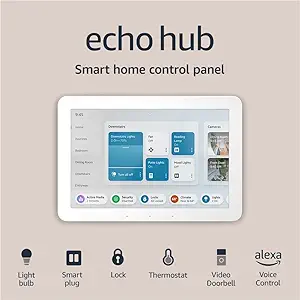 | Best Centralized Control Panel with Multi-Protocol Support | Display: 8” touch screen (1280 x 800) | Power Requirements: USB-C PD, PoE | Connectivity: Wi-Fi, Bluetooth, Zigbee, Thread, Matter | VIEW LATEST PRICE | See Our Full Breakdown |
| Lutron Caseta Smart Hub for Alexa, HomeKit & Google Home (75 Device Capacity) |  | Best Multi-Platform Hub for Light and Shade Control | Compatibility: Alexa, HomeKit, Google Assistant | Device Capacity: 75 devices | Color: White | VIEW LATEST PRICE | See Our Full Breakdown |
| Smart Home Starter Kit with Echo Hub, Smart Plug, and 4 Smart Bulbs for Alexa+ |  | Best Beginner-Friendly All-in-One Kit | Power Requirements: USB-C PD, 5V/2.4A, 9V/3A | Dimensions: 7.9″W x 5.4″H x 0.6″D | Included Items: Echo Hub, Smart Plug, 4 Smart Bulbs | VIEW LATEST PRICE | See Our Full Breakdown |
| MOES In-Wall Smart Touchscreen Panel with Alexa |  | Best In-Wall Control Panel for Integrated Smart Home Management | Manufacturer: WENZHOU NOVA NEW ENERGY CO.,LTD | Weight: 13.1 ounces | Dimensions: 1 x 1 x 1 inches | VIEW LATEST PRICE | See Our Full Breakdown |
| Amazon Basics Smart Plug, Works with Alexa Only, 4-Pack, White |  | Best Budget-Friendly Smart Plug for Alexa Users | Connector Type: 2 Pin | Number of Poles: 12 | Amperage: 15 Amps | VIEW LATEST PRICE | See Our Full Breakdown |
| SONOFF NSPanel Pro 120 Smart Home Control Panel |  | Best Dedicated Wall Panel for Home Management & Security | Dimensions: 4.8 x 3 x 1.7 inches | Weight: 0.32 oz | Display: 4.7-inch touchscreen | VIEW LATEST PRICE | See Our Full Breakdown |
| Aqara Smart Home Hub M3 |  | Best Multi-Protocol Hub for Privacy and Flexibility | Brand: Aqara | Connectivity: Zigbee, Thread, Wi-Fi, Bluetooth | Storage: 8GB encrypted local | VIEW LATEST PRICE | See Our Full Breakdown |
| Kasa Smart Plug HS103P4, 4-Pack – Voice-Controlled Wi-Fi Outlet with Alexa and Google Assistant | 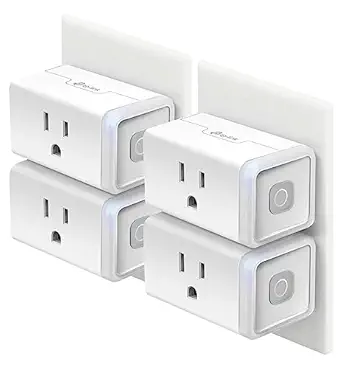 | Best Versatile Smart Outlet for Voice and App Control | Model Number: HS103P4 | Pack Size: 4-Pack | Current Rating: 15 Amps | VIEW LATEST PRICE | See Our Full Breakdown |
| Amazon Smart Air Quality Monitor |  | Best for Indoor Air Quality Monitoring | Dimensions: 65x65x45mm | Weight: 120 grams | Connectivity: 2.4GHz Wi-Fi and BLE 4.2 | VIEW LATEST PRICE | See Our Full Breakdown |
| Aeotec Smart Home Hub with Z-Wave, Zigbee & Matter Support |  | Best for Centralized Smart Home Integration | Weight: 1.1 Pounds | Connectivity Technology: Ethernet, Wi-Fi, Z-Wave, ZigBee, Matter | Compatibility: SmartThings, Alexa, Google Assistant, Z-Wave Plus (V3), Zigbee | VIEW LATEST PRICE | See Our Full Breakdown |
| Tapo Smart IR & IoT Hub with Chime – Universal Remote for TVs, ACs, and 18+ Device Types |  | Best for Controlling Legacy Infrared Devices | ASIN: B0FNXCFN6J | WiFi: 2.4 GHz | IR Compatibility: 8,000+ brands | VIEW LATEST PRICE | See Our Full Breakdown |
| Amazon Smart Plug with Alexa Compatibility |  | Best for Simple Device Automation | Compatibility: Alexa and compatible devices | Setup Requirement: No smart home hub needed | Supported Devices: Lamps, fans, coffee makers | VIEW LATEST PRICE | See Our Full Breakdown |
More Details on Our Top Picks
Amazon Smart Thermostat – Works with Alexa and Ring (C-wire Required)
This thermostat stands out for its seamless integration with Alexa and Ring, making it ideal for those already invested in these ecosystems. Compared to the Echo Hub, it offers more straightforward installation for DIYers with existing C-wires but falls short with its limited Wi-Fi support, only operating on 2.4 GHz networks. Its energy savings potential, up to $90 annually, appeals to budget-conscious users focused on reducing utility bills. However, the necessity of a C-wire or power adapter can complicate installation in some homes, and voice control relies on external Alexa devices. This pick makes the most sense for homeowners seeking a budget-friendly, Alexa-compatible thermostat with proven energy benefits, willing to handle installation constraints.
Pros:- Potential annual energy savings of $90
- Seamless integration with Alexa and Ring ecosystems
- Guided DIY installation via the Alexa app
Cons:- Requires C-wire or separate power adapter for installation
- Limited to 2.4 GHz Wi-Fi networks; no 5 GHz support
- Voice control depends on external Alexa devices
Best for: Homeowners with existing Alexa or Ring devices who want to optimize energy use easily
Not ideal for: Renters or those without a C-wire looking for a wireless option, as installation may be challenging
- Size:3.56 x 3.56 x 0.84 in
- Weight:3.86 oz
- Compatibility:Most 24V HVAC systems (C-wire or power adapter required)
- Certifications:ENERGY STAR, ECOLOGO Gold
- Wi-Fi Support:2.4 GHz only
- Voice Control:Requires Alexa-enabled device
Bottom line: This thermostat is best for Alexa-compatible homes seeking easy energy management, provided you can handle installation requirements.
MOES WiFi Smart IR Remote Controller – Universal Infrared Blaster for AC, TV, DVD, etc. with Alexa & Google Assistant Support
This IR remote controller excels at transforming traditional devices into smart ones, supporting a wide range of appliances like TVs, ACs, and fans. Compared to the Echo Hub, it offers direct app control and voice commands without the need for additional hubs, but it’s limited to infrared signals, restricting its effectiveness across walls or multiple rooms. Its DIY learning feature makes setup flexible, yet the 15-meter range can be restrictive if your devices are spread out or placed far apart. It’s ideal for renters or small households with line-of-sight devices, but not suitable for larger homes or those needing broader coverage. This makes it perfect for users wanting simple, universal IR control integrated with Alexa or Google Assistant, with some placement restrictions.
Pros:- Universal compatibility with multiple IR devices
- Voice control via Alexa and Google Assistant
- DIY learning to replicate remote commands
Cons:- Limited to IR signals, which cannot penetrate walls
- 15-meter range restricts placement flexibility
- Compatibility confirmation needed for specific devices
Best for: Small households or renters seeking easy voice-controlled IR device management within a single room
Not ideal for: Large homes or multi-room setups where IR signals cannot reach all devices due to range or obstacles
- Connectivity Technology:Infrared (38KHZ)
- Compatible Devices:TV, Air Conditioners, Fans, DVD Players, STBs
- Maximum Range:15 Meters
- Battery Type:Lithium
- Smart Home Compatibility:Alexa, Google Assistant
- Button Quantity:12
Bottom line: Ideal for those wanting a simple, voice-controlled IR remote within a single room, accepting some placement limitations.
Echo Hub 8” Smart Home Control Panel
The Echo Hub offers a sizable 8-inch touchscreen, making it a strong contender for centralized smart home management. Compared to the Lutron Caseta Hub, it supports a broader range of protocols, including Zigbee, Thread, and Matter, enabling control over thousands of devices from different brands. Its ability to integrate security, lighting, and camera control via a single interface adds to its appeal. However, it requires wall mounting and lacks portability, which could be inconvenient for some users. Its eco-friendly design and built-in control of security systems set it apart for those seeking a dedicated, all-in-one control point. This device is a fit for tech-savvy homeowners who want a robust, protocol-agnostic hub, but not for renters or those needing a portable solution.
Pros:- Supports thousands of devices across multiple protocols
- Large 8-inch touchscreen for easy control
- Integrated home security system management
- Eco-friendly, recycled materials
Cons:- Requires wall mounting; no portability
- No built-in battery, needs power connection
- Setup may be complex for non-technical users
Best for: Tech-savvy homeowners seeking a centralized, multi-protocol smart home control panel
Not ideal for: Renters or users prioritizing portability, as it needs wall mounting and is not battery-powered
- Display:8” touch screen (1280 x 800)
- Power Requirements:USB-C PD, PoE
- Connectivity:Wi-Fi, Bluetooth, Zigbee, Thread, Matter
- Included Items:Echo Hub, power adapter, wall mount hardware
- Sustainability:27% recycled materials
Bottom line: Best for homeowners wanting a powerful, protocol-agnostic control panel with a large display, not suited for portable needs.
Lutron Caseta Smart Hub for Alexa, HomeKit & Google Home (75 Device Capacity)
The Lutron Caseta hub shines when it comes to reliable, multi-platform lighting control, supporting Alexa, Apple HomeKit, and Google Assistant. Compared to the Echo Hub, it offers a straightforward setup for smart lighting, with compatibility for up to 75 devices, making it ideal for expanding your lighting or shade automation. However, it’s limited to Lutron-compatible dimmers and switches, which means additional purchases if you want full functionality. Its dependence on separate Caséta dimmers and switches can add to initial costs, but it provides highly reliable performance and seamless integration across major voice platforms. This device suits homeowners already invested in Lutron’s ecosystem or those prioritizing stable, multi-platform lighting automation over broader protocol support.
Pros:- Works with Alexa, HomeKit, and Google Assistant
- Supports up to 75 devices for extensive control
- Reliable, proven platform for lighting automation
Cons:- Requires separate purchase of compatible dimmers/switches
- Limited to Lutron ecosystem for full functionality
- Initial setup costs can be higher with additional devices
Best for: Homeowners focused on reliable, multi-platform lighting and shading automation with existing Lutron devices
Not ideal for: Users seeking a universal hub that supports a wide variety of third-party devices beyond Lutron ecosystem
- Compatibility:Alexa, HomeKit, Google Assistant
- Device Capacity:75 devices
- Color:White
- Model Number:L-BDG2-WH
Bottom line: Perfect for those invested in Lutron lighting who want a dependable, multi-platform hub, but less ideal for broad device compatibility.
Smart Home Starter Kit with Echo Hub, Smart Plug, and 4 Smart Bulbs for Alexa+
This starter kit simplifies smart home setup by bundling an Echo Hub, a smart plug, and smart bulbs, making it ideal for beginners. Compared to purchasing the Echo Hub and devices separately, it offers a streamlined, guided setup process that minimizes confusion for new users. The inclusion of smart bulbs allows for immediate lighting automation, and the hub supports thousands of Alexa-compatible devices for future expansion. However, the kit’s limited security features beyond lighting automation make it less suitable for users seeking comprehensive security solutions. Its need for a separate stand and wall mounting adds some setup complexity. Overall, this kit is a great entry point for those starting their smart home journey, especially if they already use Alexa.
Pros:- Complete starter kit with hub, plug, and bulbs
- Quick and guided setup process
- Works with thousands of Alexa-compatible devices
- Affordable entry point for smart home newbies
Cons:- Requires separate stand for the Echo Hub (not included)
- Wall mounting needed; setup can be a bit involved
- Limited security features beyond lighting automation
Best for: Beginners seeking an easy, all-in-one smart home starter package with Alexa compatibility
Not ideal for: Advanced users or those wanting integrated security features beyond lighting automation
- Power Requirements:USB-C PD, 5V/2.4A, 9V/3A
- Dimensions:7.9″W x 5.4″H x 0.6″D
- Included Items:Echo Hub, Smart Plug, 4 Smart Bulbs
- Weight:12.9 oz
- Connectivity:Dual-band Wi-Fi, Bluetooth
Bottom line: Best for newcomers wanting an easy, all-in-one setup to start automating their home with Alexa, accepting some mounting requirements.
MOES In-Wall Smart Touchscreen Panel with Alexa
This in-wall touchscreen stands out for its ability to serve as a centralized hub for smart home control, especially with its built-in Alexa and Zigbee gateway, which eliminates the need for extra hubs—an advantage over standalone devices like the Amazon Basics Smart Plug. Its 5-inch display offers quick access to lights, locks, and cameras, making it ideal for wall-mounted convenience. Compared with the larger control panels like the Echo Hub, this model offers a sleek, integrated solution with a focus on local Zigbee connectivity, but may lack the durability or extensive features of premium panels. This pick is best suited for those wanting a sleek, integrated control point without extra hubs, and who are comfortable with a smaller display and limited review data.
Pros:- Wide compatibility with Smart Life devices and Zigbee integration
- Built-in Alexa for voice commands without additional hubs
- Integrated touchscreen simplifies control from a single interface
Cons:- Limited review volume and average rating suggest uncertain reliability
- Compact size may restrict visibility and ease of interaction
Best for: Homeowners seeking a stylish, wall-mounted control panel with built-in voice and Zigbee support, especially in fixed locations like kitchens or hallways.
Not ideal for: Users needing a highly durable, highly reviewed control panel for critical security or extensive automation, as its limited reviews and compact size may not inspire confidence.
- Manufacturer:WENZHOU NOVA NEW ENERGY CO.,LTD
- Weight:13.1 ounces
- Dimensions:1 x 1 x 1 inches
- Model Number:CCP-US-MS
- Color:Black
- Connectivity:Zigbee gateway, Alexa built-in
Bottom line: This in-wall panel is ideal for those wanting a discreet, integrated control point, but should be chosen with an awareness of its review limitations.
Amazon Basics Smart Plug, Works with Alexa Only, 4-Pack, White
This compact 4-pack of smart plugs makes controlling multiple devices via Alexa straightforward, with no need for hubs or apps beyond the Alexa ecosystem. Its simple remote scheduling and sunrise/sunset automation are convenient for everyday routines, especially compared to more complex systems like the Aqara Hub, which supports multiple ecosystems but requires additional setup. The major limitation is its exclusive compatibility with Alexa, which may not suit households using Google Assistant or Apple HomeKit. Also, its 15-amp capacity might restrict use with high-power appliances like space heaters, making it better suited for lamps and fans. The 4-pack could be overkill for a single room but offers good value for larger setups or multiple rooms. This choice is best for Alexa-centric households seeking easy, reliable outlet control without added complexity.
Pros:- Seamless Alexa voice and app control
- Compact design preserves outlet space for other devices
- No hubs or extra apps needed for setup
- Supports scheduling and automation features
Cons:- Limited to Alexa ecosystem, reducing flexibility
- 15A capacity may not support high-power appliances
Best for: Budget-conscious households wanting simple voice control over multiple outlets using Alexa.
Not ideal for: Homes with Google Assistant or Apple HomeKit users, or those needing to control high-wattage appliances regularly.
- Connector Type:2 Pin
- Number of Poles:12
- Amperage:15 Amps
- Color:White
- Dimensions:2.7″D x 2.1″W x 1.5″H
- Smart Home Compatibility:Alexa Only
Bottom line: This smart plug offers straightforward Alexa control and convenience at a low cost, ideal for basic automation needs.
SONOFF NSPanel Pro 120 Smart Home Control Panel
The SONOFF NSPanel Pro offers a larger 4.7-inch touchscreen that makes managing energy, security, and cameras more accessible than smaller panels like the MOES In-Wall. Its ability to support multiple camera streams and customizable alarm modes makes it a versatile choice for security-focused users, especially when compared to the Aqara Hub, which lacks a dedicated display. However, its lightweight build may raise questions about durability, and it requires a separate purchase of batteries, adding to setup complexity. While not as feature-rich as premium panels like the Echo Hub, this device excels for those wanting a dedicated control surface in a compact form. It’s best for users who prefer an intuitive, centralized control interface for security and energy management without the bulk of larger panels.
Pros:- Large 4.7-inch touchscreen for easy navigation
- Integrated security with customizable alarm modes
- Supports energy consumption tracking
Cons:- Lightweight build may impact perceived durability
- Requires separate batteries, complicating setup
Best for: Homeowners wanting an intuitive, wall-mounted control panel for security, energy management, and camera monitoring at an affordable price.
Not ideal for: Users seeking a highly durable, battery-powered unit or a device with extensive third-party ecosystem support beyond basic functions.
- Dimensions:4.8 x 3 x 1.7 inches
- Weight:0.32 oz
- Display:4.7-inch touchscreen
- Supported Functions:Energy, security, cameras
- Connectivity:Wi-Fi
Bottom line: This control panel is well-suited for users seeking an accessible, dedicated interface for security and energy control in a compact form.
Aqara Smart Home Hub M3
The Aqara M3 hub stands out for its support of Zigbee, Thread, Wi-Fi, and Matter, making it a versatile central controller for diverse devices—an edge over single-protocol hubs like the Kasa Smart Plug. Its local automation capabilities with Edge Hub support prioritize privacy and reliability, appealing to those wary of cloud dependency. The inclusion of a 360° IR blaster expands control to traditional appliances like AC units, further enhancing its role as a smart home backbone. However, its need for repeaters to scale Thread devices and the absence of a power adapter may hinder some users from a seamless setup. While it supports Apple HomeKit, Alexa, and SmartThings, its limited support for Matter devices and USB power supply are potential drawbacks. This hub is best for users seeking a multi-protocol, privacy-focused controller capable of integrating a broad ecosystem of smart devices.
Pros:- Supports Zigbee, Thread, Wi-Fi, and Matter for broad compatibility
- Local automation with Edge Hub enhances privacy
- Includes 360° IR blaster for AC and device control
- PoE and dual-band Wi-Fi ensure stable connectivity
Cons:- Requires repeaters for Thread device support
- Limited support for Matter devices in current form
- Power adapter not included, requiring extra purchase
Best for: Tech-savvy homeowners wanting a multi-protocol hub with local automation and IR control for a flexible, privacy-conscious setup.
Not ideal for: Users seeking plug-and-play solutions with minimal setup or those relying heavily on Matter devices without additional accessories.
- Brand:Aqara
- Connectivity:Zigbee, Thread, Wi-Fi, Bluetooth
- Storage:8GB encrypted local
- Power:PoE, USB-C
- Supported Ecosystems:Apple HomeKit, Alexa, SmartThings
Bottom line: This hub suits experienced users aiming for a multi-protocol, privacy-focused core for their smart home ecosystem.
Kasa Smart Plug HS103P4, 4-Pack – Voice-Controlled Wi-Fi Outlet with Alexa and Google Assistant
The Kasa HS103P4 offers a reliable, easy-to-use solution for controlling home electronics via Alexa and Google Assistant, making it a versatile addition for those who want voice or remote scheduling. Its 4-pack provides good value for multiple rooms or devices, especially compared to single-unit options like the MOES touchscreen. Its 15-amp capacity suits most household appliances but limits high-wattage devices like space heaters. The absence of a hub means straightforward setup, but it also means limited ecosystem support beyond Alexa and Google. The need for 2.4GHz Wi-Fi can be a hurdle in congested networks, but overall, its safety certification and ease of control make it a solid choice for everyday automation. It’s best for users needing reliable, multi-device control without extra complexity or cost.
Pros:- Works seamlessly with Alexa and Google Assistant
- Remote scheduling and control via app
- UL certified for safety
- No hub required for setup
Cons:- Limited to 15A capacity, restricting high-power devices
- Requires 2.4GHz Wi-Fi, which may be crowded
Best for: Households wanting simple, reliable voice and remote control over multiple devices across different rooms.
Not ideal for: Users needing integration with Apple HomeKit or requiring support for high-power appliances beyond 15A.
- Model Number:HS103P4
- Pack Size:4-Pack
- Current Rating:15 Amps
- Operating Voltage:120 Volts (AC)
- Connectivity:Wi-Fi
- Compatibility:Alexa, Google Assistant, IFTTT
Bottom line: This smart plug delivers dependable, multi-voice platform control suitable for most household devices, with some limitations on power and ecosystems.
Amazon Smart Air Quality Monitor
This compact monitor excels at tracking five key air quality factors—PM 2.5, VOCs, CO, humidity, and temperature—making it ideal for households concerned with indoor air health. Its integration with Alexa allows for real-time alerts and automation, setting it apart from simpler sensors that lack smart connectivity. Compared to standalone air monitors, this model’s use of color-coded LED indicators provides immediate visual cues, while Alexa app compatibility enables more detailed data analysis and automation triggers. However, its indoor-only use and moderate accuracy levels mean it isn’t suitable for professional-grade air quality assessments. The device’s small size and eco-friendly materials make it unobtrusive, but users should be aware that it may not meet strict industrial standards.
Pros:- Monitors 5 key air quality factors for comprehensive indoor assessment
- Alexa integration enables real-time alerts and automation
- Compact size with clear color-coded LED status indicator
Cons:- Limited to indoor use only, restricting versatility
- Accuracy may not meet professional or industrial standards
Best for: Homeowners seeking real-time air quality insights with smart automation for a healthier indoor environment
Not ideal for: Professional settings requiring precise, certified air quality measurements or outdoor monitoring
- Dimensions:65x65x45mm
- Weight:120 grams
- Connectivity:2.4GHz Wi-Fi and BLE 4.2
- Included Items:Monitor, Micro-USB cable, power adapter, Quick Start Guide
- Power Supply:100-240V AC, 5.0V 1A
- Warranty:One year limited
Bottom line: This monitor suits those wanting smart, real-time air quality insights for home use, but isn’t designed for professional-grade requirements.
Aeotec Smart Home Hub with Z-Wave, Zigbee & Matter Support
This hub offers broad compatibility with Z-Wave, Zigbee, and Matter devices, making it a versatile control center for complex smart setups. Unlike the Amazon Smart Plug or Kasa Switch, which focus on individual device control, this hub aggregates numerous protocols, enabling seamless automation across different ecosystems. Its support for local automation ensures faster response times compared to cloud-dependent systems, but Z-Wave Plus compatibility is limited to the V3 model, which could restrict integration if you use older Z-Wave devices. Additionally, the device’s design targets North American homes, so international users might face limitations. It’s best suited for users who want a robust, centralized control point rather than simple plug-and-play devices.
Pros:- Supports multiple protocols including Z-Wave, Zigbee, and Matter
- Easy setup via Wi-Fi or Ethernet for reliable connectivity
- Supports local automation for quick response
Cons:- Limited Z-Wave Plus compatibility to V3 devices
- Designed primarily for North American use, less international flexibility
Best for: Advanced smart home enthusiasts needing a reliable, multi-protocol hub for complex setups
Not ideal for: Casual users or those with only Alexa or Google Assistant devices, who might prefer simpler, device-specific solutions
- Weight:1.1 Pounds
- Connectivity Technology:Ethernet, Wi-Fi, Z-Wave, ZigBee, Matter
- Compatibility:SmartThings, Alexa, Google Assistant, Z-Wave Plus (V3), Zigbee
- Control Methods:App, Voice Assistant
- Color:White
Bottom line: This hub makes the most sense for users managing diverse, protocol-heavy smart ecosystems who prioritize local automation and reliability.
Tapo Smart IR & IoT Hub with Chime – Universal Remote for TVs, ACs, and 18+ Device Types
The Tapo Smart IR & IoT Hub excels at managing a wide variety of IR-controlled appliances—over 8,000 brands and 18 device types—making it invaluable for homes with legacy devices. Unlike the Amazon Smart Plug or Smart Thermostat, which focus on smart outlets or climate control, this hub acts as a universal remote, bridging traditional appliances into the smart ecosystem. Its Matter certification points to future compatibility, but setup can be complex, especially with older IR devices that require line-of-sight. The 93 dB alarm adds security and alert features, but users should be aware that IR remotes require direct line-of-sight, limiting placement options. It’s a fit for users who want seamless remote control over IR appliances via voice or app automation.
Pros:- Controls over 8,000 IR brands and 18 device types
- Voice assistant integration (Alexa/Google/Siri)
- App-based automation and remote access with real-time alerts
Cons:- Requires line-of-sight for IR device operation
- Setup can be complex for legacy appliances
Best for: Homeowners with multiple IR-controlled devices seeking integrated voice and app control
Not ideal for: Modern smart homes relying solely on Wi-Fi or Z-Wave devices, or those without line-of-sight access to appliances
- ASIN:B0FNXCFN6J
- WiFi:2.4 GHz
- IR Compatibility:8,000+ brands
- Supported Devices:18 types including TVs and ACs
- Alarm Volume:93 dB
Bottom line: This remote hub is best for users with IR appliances wanting seamless voice and app automation, provided line-of-sight is available.
Amazon Smart Plug with Alexa Compatibility
The Amazon Smart Plug provides an easy way to add voice-controlled automation for lamps, fans, and small appliances without needing a hub. Its straightforward setup works well for users already invested in the Alexa ecosystem, offering routines and scheduling that enhance daily convenience. Compared to the Kasa switch, which requires wiring, this plug is truly plug-and-play, making it ideal for renters or those hesitant about electrical work. However, its compatibility is limited to devices with physical on/off switches, and it doesn’t support other ecosystems outside Alexa. For basic automation needs, this plug offers a reliable, space-saving option, but it doesn’t support complex or multi-device automation beyond individual outlets.
Pros:- Voice-controlled automation via Alexa
- Easy setup without a hub
- Compact design preserves outlet space
- Supports scheduling and routines
Cons:- Only compatible with devices that have physical switches
- Limited to Alexa ecosystem, not cross-platform
Best for: Users seeking quick and simple voice-controlled automation for household devices
Not ideal for: Homes with non-Alexa ecosystems or appliances without physical on/off switches
- Compatibility:Alexa and compatible devices
- Setup Requirement:No smart home hub needed
- Supported Devices:Lamps, fans, coffee makers
- Design Feature:Compact with second outlet
- Automation Features:Voice commands, scheduling, outage recovery
Bottom line: This smart plug is best for those who want quick, reliable automation for simple appliances within the Alexa environment.
How We Picked
Our evaluation focused on performance, usability, build quality, and ecosystem compatibility. Devices were chosen based on their ability to integrate smoothly into existing smart home setups, ease of installation, and longevity. We also considered value for money, scalability, and user interface design. The ranking reflects how well each device balances these factors, prioritizing versatility and reliability for a variety of home automation needs.Factors to Consider When Choosing Smart Home Automation Devices
When choosing smart home automation devices, consider how they fit into your existing ecosystem, your technical comfort level, and your long-term expansion plans. The right device should enhance your lifestyle without adding unnecessary complexity or cost. It’s also worth thinking about compatibility, security features, and ease of control, as these impact daily usability and system stability.Compatibility and Ecosystem Integration
Ensuring your chosen devices work seamlessly with your preferred voice assistants and smart home platforms is vital. Devices supporting multiple ecosystems like Alexa, Google Assistant, and Apple HomeKit offer flexibility, but may come at a premium or with limited features. Consider whether you want a dedicated hub for centralized control or prefer individual smart plugs and switches that work directly with your voice assistant. Mismatched systems can lead to frustrations and reduced functionality.
Ease of Installation and Use
Devices that are straightforward to set up save time and reduce frustration. In-wall panels and control hubs often require professional installation, which adds cost but offers a sleek look and centralized control. Conversely, smart plugs and switches are generally DIY-friendly and ideal for renters or those who prefer minimal wiring. The user interface, app design, and voice command responsiveness also influence daily ease of use.
Scalability and Device Capacity
If you plan to expand your smart home, choose hubs or systems that support a large number of devices. The Lutron Caseta and Aeotec hubs, for example, support dozens of devices and protocols like Z-Wave and Zigbee, making future additions smoother. Smaller systems or individual devices may suffice for limited setups but can become cumbersome or incompatible as your system grows.
Security and Privacy
Smart home devices handle sensitive data like voice commands, location, and network access. Prioritize products with robust encryption and privacy controls. Devices from reputable brands tend to have better security updates and transparency about data handling. Avoid overly cheap options that might lack security features, potentially exposing your home network to vulnerabilities.
Budget and Long-term Value
While budget devices like basic smart plugs are affordable, investing in more capable hubs or control panels can pay off in future-proofing and convenience. Consider how much you’re willing to spend upfront versus long-term savings and functionality. Sometimes, spending more on a versatile system reduces the need for multiple single-purpose devices, offering better overall value.
Frequently Asked Questions
Do I need a central hub for my smart home devices?
Not necessarily. Many smart devices, such as smart plugs and bulbs, can connect directly to Wi-Fi and work without a hub. However, a central hub simplifies management, increases compatibility across different devices and protocols, and offers a more cohesive control experience. For larger or more complex systems, a dedicated hub like the Echo Hub or Aeotec can streamline operation and reduce network congestion.
Can I mix different brands and ecosystems in my smart home?
Mixing brands is often possible, especially if devices support common standards like Zigbee, Z-Wave, or Matter. Compatibility varies, so checking each device’s ecosystem support is essential. Using a universal hub or platform that consolidates multiple protocols can help unify control, but be aware that some features may be limited or require extra setup. Compatibility issues can lead to frustration, so plan your ecosystem carefully.
Are in-wall control panels worth the investment?
In-wall panels offer a sleek, centralized interface that simplifies managing multiple devices, making them ideal for fixed control points in your home. However, they come at a higher initial cost and often require professional installation. If you prefer a minimalist aesthetic and want quick access to your automation system, these panels can be worthwhile, but for casual users, simpler options like smart plugs or voice commands may suffice.
How secure are smart home automation devices?
Security varies widely among brands and devices. Reputable manufacturers implement encryption, regular updates, and privacy controls to protect your data. Devices with open standards like Zigbee and Z-Wave tend to be more secure when properly configured. Always keep firmware up to date, use strong passwords, and enable two-factor authentication where available to minimize risks.
Should I prioritize compatibility over advanced features?
Compatibility often matters more than having the latest features, especially if you want a reliable and cohesive smart home. Devices that integrate smoothly into your existing ecosystem reduce frustration and troubleshooting. While advanced features can add convenience, they are less useful if the device doesn’t work well with your setup. Balancing compatibility and features based on your current needs is key to a satisfying smart home experience.
Conclusion
For most new users, the Amazon Smart Thermostat offers a reliable, easy-to-integrate option that provides excellent value. Those seeking a comprehensive control system should consider the Echo Hub 8” for its versatility, while budget-conscious buyers will find the Amazon Basics Smart Plugs a practical starting point. If you want advanced scalability and protocol support, the Aeotec Smart Home Hub stands out, but it requires a higher investment. Overall, your choice depends on your comfort with technology, the size of your system, and your long-term plans for home automation.
Halloween Picks
halloween
As an affiliate, we earn on qualifying purchases.