
The best mesh Wi-Fi system for most homes is the TP-Link Deco 7 Pro BE10000, which pairs Wi-Fi 7 capacity with a three-node kit for whole-home coverage. For a premium setup, the NETGEAR Orbi 970 Series targets demanding networks, while the TP-Link Deco X55 offers a more practical Wi-Fi 6 route. The key tradeoffs are speed and newer wireless features versus coverage needs, device compatibility, setup simplicity, and the cost of buying capacity you may not use. Older Wi-Fi 6 and Wi-Fi 6E kits can still make sense when your devices and internet plan do not call for Wi-Fi 7. Read on for how all 15 systems differ and which one fits your home.

Get the latest gadgets delivered free with Prime
- Fast, free delivery on millions of items
- Prime Video, Amazon Music and more included
- Member-only deals all year
Complete the kit



Key Takeaways
- Wi-Fi 7 has several tiers here: the Orbi 970 is the premium outlier, while the Orbi 370 and the Deco 7 Pro models offer other Wi-Fi 7 paths for different needs.
- Tri-band is not the same as guaranteed fast backhaul: compare each kit’s band and node arrangement, and check whether a wired connection between nodes is practical in your home.
- Wi-Fi 6 remains a sensible choice: the Deco X55, eero 6+, and Nighthawk MK6W can suit households that do not need newer Wi-Fi 7 capabilities.
- There are repeated and closely related options: the two Google WiFi AC1200 entries are nearly identical on the provided names, while the Deco 7 Pro BE10000 and BE67 should be compared by exact configuration.
- Three-node kits are not automatically the right size: the best choice depends on floor plan, building materials, wired options, and where coverage drops—not only the advertised coverage area.
| Google WiFi AC1200 Mesh WiFi Router System, 3-Pack, Snow |  | Best for Simple, App-Managed Coverage | Pack size: 3 routers | Wi-Fi standard: 802.11ac (Wi-Fi 5) | Bands: Dual-band | VIEW LATEST PRICE | See Our Full Breakdown |
| TP-Link Deco 7 Pro BE10000 Tri-Band Wi-Fi 7 Whole-Home Mesh System, 3-Pack |  | Best for High-Capacity Wi-Fi 7 Homes | Wi-Fi standard: Wi-Fi 7 (802.11be) | Bands: Tri-band: 6 GHz, 5 GHz, and 2.4 GHz | Maximum combined speed: Up to 10 Gbps | VIEW LATEST PRICE | See Our Full Breakdown |
| eero Pro 6E Mesh WiFi System (3-pack) |  | Best for Easy Wi-Fi 6E Setup | Pack size: 3 units | Wi-Fi standard: Wi-Fi 6E (AX5400) | Coverage: Up to 6,000 sq. ft. | VIEW LATEST PRICE | See Our Full Breakdown |
| TP-Link Deco XE75 AXE5400 Tri-Band WiFi 6E Mesh System, 3-Pack |  | Best Wi-Fi 6E Coverage Value | Pack size: 3 units | Wi-Fi standard: Wi-Fi 6E | Bands: Tri-band: 6 GHz, 5 GHz, and 2.4 GHz | VIEW LATEST PRICE | See Our Full Breakdown |
| Google Wifi AC1200 Mesh Wi-Fi System, 3-Pack, Snow |  | Best Refurbished Mesh Pick | Condition: Certified refurbished | Pack size: 3 units | Wi-Fi standard: Wi-Fi 5 (802.11ac) | VIEW LATEST PRICE | See Our Full Breakdown |
| NETGEAR Orbi 370 Series WiFi 7 Mesh System, 3-Pack |  | Best for Mid-Size Homes | Wi-Fi generation: Wi-Fi 7 (802.11be) | Bands: Dual-band | Maximum data transfer rate: Up to 5 Gbps | VIEW LATEST PRICE | See Our Full Breakdown |
| NETGEAR Orbi 970 Series WiFi 7 Mesh System, 3-Pack | 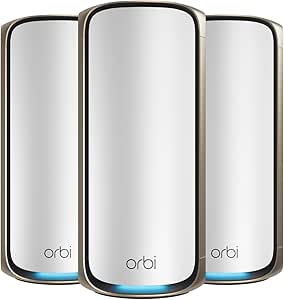 | Best for Maximum Coverage and Capacity | Wi-Fi standard: Wi-Fi 7 | Maximum wireless speed: Up to 27 Gbps | Bands and backhaul: Quad-band with dedicated satellite backhaul | VIEW LATEST PRICE | See Our Full Breakdown |
| Tenda Nova MW6 AC1200 Dual-Band Mesh WiFi System, 3-Pack |  | Best Basic Mesh on a Wi-Fi 5 Network | Wi-Fi standard: Wi-Fi 5 (802.11ac) | Speed class: AC1200; up to 1,200 Mbps | Bands: Dual-band | VIEW LATEST PRICE | See Our Full Breakdown |
| Amazon eero Pro 7 Tri-Band Mesh Wi-Fi 7 Router, 3-Pack |  | Best for Smart-Home Integration | Wi-Fi standard: Wi-Fi 7 | Radio configuration: Tri-band | Wireless speed: Up to 3.9 Gbps | VIEW LATEST PRICE | See Our Full Breakdown |
| TP-Link Deco 7 Pro BE67 Wi-Fi 7 Tri-Band Mesh System, 3-Pack |  | Best for Mixed Wired and Wireless Networks | Wi-Fi standard: Wi-Fi 7 | Bands: Tri-band: 6 GHz, 5 GHz, and 2.4 GHz | Maximum total bandwidth: Up to 14 Gbps | VIEW LATEST PRICE | See Our Full Breakdown |
| Amazon eero 7 Dual-Band Wi-Fi 7 Mesh Router, 3-Pack |  | Best Wi-Fi 7 Value for Smart Homes | Wi-Fi standard: Wi-Fi 7 (IEEE 802.11a/b/g/n/ac/ax/be) | Frequency bands: 2.4 GHz and 5 GHz | Pack size: 3 routers | VIEW LATEST PRICE | See Our Full Breakdown |
| NETGEAR Orbi 770 Series WiFi 7 Tri-Band Mesh System, 3-Pack |  | Best for High Wireless Throughput | Wi-Fi generation: Wi-Fi 7 | Frequency band: Tri-band | Maximum data transfer rate: Up to 11 Gbps | VIEW LATEST PRICE | See Our Full Breakdown |
| Netgear Nighthawk Mesh WiFi 6 System (MK6W) 3-Pack |  | Best for Basic Wi-Fi 6 Coverage | Wireless standard: Wi-Fi 6 (802.11ax) | Frequency band: Dual-band, 2.4 GHz and 5 GHz | Coverage: Up to 4,500 sq. ft. | VIEW LATEST PRICE | See Our Full Breakdown |
| Amazon eero 6+ Wi-Fi 6 Mesh System, 3-Pack |  | Best for Easy Smart-Home Setup | Wi-Fi: Wi-Fi 6 dual-band concurrent 2:2 (802.11ax) | Pack size: 3 routers | Coverage: Up to 4,500 sq. ft. | VIEW LATEST PRICE | See Our Full Breakdown |
| TP-Link Deco X55 AX3000 Wi-Fi 6 Mesh System, 3-Pack |  | Best for Large Device-Heavy Homes | Wi-Fi generation and class: Wi-Fi 6, AX3000 | Frequency band: Dual-band | Pack size: 3 units | VIEW LATEST PRICE | See Our Full Breakdown |
| mesh Wi-Fi system | Coverage | Wi-Fi standard |
|---|---|---|
| Google WiFi AC1200 Mesh WiFi R | Up to 4,500 sq. ft. | 802.11ac (Wi-Fi 5) |
| TP-Link Deco 7 Pro BE10000 Tri | Up to 7,600 sq. ft. (3-pack) | Wi-Fi 7 (802.11be) |
| eero Pro 6E Mesh WiFi System | Up to 6,000 sq. ft. | Wi-Fi 6E (AX5400) |
| TP-Link Deco XE75 AXE5400 Tri- | Up to 7,200 sq. ft. | Wi-Fi 6E |
| Google Wifi AC1200 Mesh Wi-Fi | Up to 4,500 sq. ft. | Wi-Fi 5 (802.11ac) |
| NETGEAR Orbi 370 Series WiFi 7 | Up to 6,000 sq. ft. | — |
| NETGEAR Orbi 970 Series WiFi 7 | Up to 10,000 sq. ft. | Wi-Fi 7 |
| Tenda Nova MW6 AC1200 Dual-Ban | Conflicting listings: up to 3,500 sq. ft. and 6,000 sq. ft. | Wi-Fi 5 (802.11ac) |
| Amazon eero Pro 7 Tri-Band Mes | Up to 6,000 sq. ft. for three routers | Wi-Fi 7 |
| TP-Link Deco 7 Pro BE67 Wi-Fi | Up to 8,100 sq. ft. | Wi-Fi 7 |
| Amazon eero 7 Dual-Band Wi-Fi | Up to 6,000 sq. ft. | Wi-Fi 7 (IEEE 802.11a/b/g/n/ac/ax/be) |
| NETGEAR Orbi 770 Series WiFi 7 | Up to 8,000 sq. ft. | — |
| Netgear Nighthawk Mesh WiFi 6 | Up to 4,500 sq. ft. | — |
| Amazon eero 6+ Wi-Fi 6 Mesh Sy | Up to 4,500 sq. ft. | — |
| TP-Link Deco X55 AX3000 Wi-Fi | Up to 6,500 sq. ft. | — |
More Details on Our Top Picks
Google WiFi AC1200 Mesh WiFi Router System, 3-Pack, Snow
This three-node Google WiFi system is the straightforward pick for households that want one network across a modest-to-large home without stepping up to newer Wi-Fi generations. Its Wi-Fi 5 dual-band design and stated coverage of up to 4,500 sq. ft. suit everyday browsing, streaming, and connected-home use, while the Google Home app puts parental controls and guest access in one place. Compared with the TP-Link Deco XE75, it lacks a 6 GHz band and the larger stated coverage area, so it is less suited to high-demand households or newer Wi-Fi 6E devices. Its appeal is a simpler feature set, not maximum throughput. The tradeoffs are app-dependent setup and performance that can change with node placement, walls, and the home layout.
Pros:- Three-node system is specified for coverage up to 4,500 sq. ft.
- Google Home app includes device management, parental controls, and guest networks.
- WPA3 security support.
- Compact, minimalist design can blend into home spaces.
Cons:- Wi-Fi 5 dual-band hardware lacks the newer 6 GHz band offered by the TP-Link Deco XE75.
- Setup and management require the Google Home app.
- Actual coverage and performance depend on layout and node placement.
Best for: Households seeking app-managed whole-home Wi-Fi for everyday use, with guest access and parental controls.
Not ideal for: Homes with multi-gigabit plans, heavy simultaneous traffic, or Wi-Fi 6E devices that would benefit from newer bands and higher capacity.
- Pack size:3 routers
- Wi-Fi standard:802.11ac (Wi-Fi 5)
- Bands:Dual-band
- Maximum data transfer rate:1,200 Mbps
- Coverage:Up to 4,500 sq. ft.
- Ethernet:Gigabit LAN ports
- Security:WPA3
- Management:Google Home app
Our verdict“Choose this Google WiFi kit for simple app-based coverage and household controls, not for the latest Wi-Fi speeds or bands.”
TP-Link Deco 7 Pro BE10000 Tri-Band Wi-Fi 7 Whole-Home Mesh System, 3-Pack
Among these five systems, the Deco 7 Pro is the strongest fit for a large, device-heavy home that can make use of Wi-Fi 7, tri-band operation, and multi-gigabit wired connections. It is rated for up to 7,600 sq. ft. and more than 200 devices; four 2.5 Gbps WAN/LAN ports on each unit also give wired equipment and compatible backhaul options room to grow. Compared with the Wi-Fi 6E TP-Link Deco XE75, this model adds Wi-Fi 7 and faster 2.5 Gbps ports, while the Google WiFi AC1200 is a much simpler, lower-capacity choice. That extra capability can be wasted if most devices and the internet plan are slower. A separate modem is required, and the stated coverage and speeds depend on placement, obstacles, and network conditions.
Pros:- Wi-Fi 7 tri-band system with stated combined speeds up to 10 Gbps.
- Rated to cover up to 7,600 sq. ft. and support over 200 devices.
- Four 2.5 Gbps WAN/LAN ports and a USB 3.0 port per system specification.
- Supports wired and wireless backhaul, plus VPN client and server features.
Cons:- Requires a separate modem.
- Wi-Fi 7 and multi-gigabit capabilities may go unused with older client devices or slower internet service.
- Real-world wireless speed varies with distance, obstacles, and conditions.
Best for: Large households with many connected devices, Wi-Fi 7 clients, and wired equipment that can use 2.5 Gbps ports.
Not ideal for: Smaller homes or households with older devices and standard-speed internet that are unlikely to use Wi-Fi 7 or multi-gigabit networking.
- Wi-Fi standard:Wi-Fi 7 (802.11be)
- Bands:Tri-band: 6 GHz, 5 GHz, and 2.4 GHz
- Maximum combined speed:Up to 10 Gbps
- Coverage:Up to 7,600 sq. ft. (3-pack)
- Device capacity:Over 200 devices
- Ethernet ports:Four 2.5 Gbps WAN/LAN ports
- Additional port:USB 3.0
- Backhaul:Wired and wireless; requires at least two Deco units
- Management:TP-Link Deco app
Our verdict“Pick the Deco 7 Pro if your large, busy home can use Wi-Fi 7 and multi-gigabit connections; otherwise, the Deco XE75 offers a less advanced alternative.”
eero Pro 6E Mesh WiFi System (3-pack)
The eero Pro 6E suits buyers who want a current-feeling mesh system without the Wi-Fi 7 specification and port emphasis of the TP-Link Deco 7 Pro. Its Wi-Fi 6E support and coverage rated up to 6,000 sq. ft. make it a capable option for larger homes, and TrueMesh routing is designed to steer traffic around weak links and reduce dead spots. Each unit has a 2.5 Gb Ethernet port alongside a 1 Gb port, giving a wired connection a faster path than the Google WiFi AC1200 provides. The 6 GHz band benefits only compatible devices, though, and the listed wireless speed is below the Deco 7 Pro’s combined headline figure. Advanced security requires a separate subscription; some features also rely on an Amazon account or Alexa, which may not suit every household.
Pros:- Wi-Fi 6E system rated for coverage up to 6,000 sq. ft.
- TrueMesh routing is designed to reduce dead spots and connection drop-offs.
- Each unit has one 2.5 Gb and one 1 Gb Ethernet port.
- eero app supports setup and management.
Cons:- Advanced security features require a separate subscription.
- The 6 GHz band is available to compatible Wi-Fi 6E devices only.
- Some features require an Amazon account and Alexa.
Best for: Households wanting Wi-Fi 6E coverage, app-guided setup, and mesh routing for a larger home without moving to Wi-Fi 7.
Not ideal for: Buyers seeking included advanced security without a subscription, or homes whose devices cannot use the 6 GHz band.
- Pack size:3 units
- Wi-Fi standard:Wi-Fi 6E (AX5400)
- Coverage:Up to 6,000 sq. ft.
- Supported speeds:Up to 2.3 Gbps; wired up to 1 Gbps and wireless up to 1.6 Gbps
- Ethernet ports:One 2.5 Gb and one 1 Gb per unit
- Processor:1 GHz dual-core
- Smart home support:Alexa, Zigbee, Thread, and Bluetooth Low Energy 5.0
- Management:eero app
Our verdict“Choose the eero Pro 6E for app-led Wi-Fi 6E coverage and mesh routing, but compare it with the Deco 7 Pro if you want Wi-Fi 7 and more multi-gigabit ports.”
TP-Link Deco XE75 AXE5400 Tri-Band WiFi 6E Mesh System, 3-Pack
The Deco XE75 offers a useful middle ground: it adds tri-band Wi-Fi 6E and a dedicated 6 GHz option without moving up to the Deco 7 Pro’s Wi-Fi 7 generation. Its three units are rated to cover up to 7,200 sq. ft. and support up to 200 devices, making it a better fit for broad coverage and busy homes than the Google WiFi AC1200. The 6 GHz band can serve as backhaul between nodes or connect compatible devices, helping keep network traffic separated when the home supports it. Compared with the eero Pro 6E, the XE75 has a larger stated coverage area, while the eero provides a specified 2.5 Gb port per unit. Its Ethernet ports are Gigabit, and most internet providers require a separate modem.
Pros:- Three-unit system rated for coverage up to 7,200 sq. ft.
- Tri-band Wi-Fi 6E includes a 6 GHz band for compatible clients or backhaul.
- Rated to support up to 200 devices.
- Deco app provides setup and network management.
Cons:- Gigabit Ethernet ports do not match the 2.5 Gb ports on the eero Pro 6E or Deco 7 Pro.
- Direct 6 GHz client connections require Wi-Fi 6E-compatible devices.
- A modem is required for most internet service providers.
Best for: Households that want broad Wi-Fi 6E mesh coverage and support for many devices without choosing a Wi-Fi 7 system.
Not ideal for: Users who need multi-gigabit Ethernet ports or whose devices and backhaul cannot benefit from 6 GHz.
- Pack size:3 units
- Wi-Fi standard:Wi-Fi 6E
- Bands:Tri-band: 6 GHz, 5 GHz, and 2.4 GHz
- Maximum combined data rate:Up to 5,400 Mbps
- Coverage:Up to 7,200 sq. ft.
- Device capacity:Up to 200 devices
- Ports:9 Gigabit Ethernet ports
- Security:WPA-Personal, WPA2-Personal, and WPA3-Personal
- Management:TP-Link Deco app
Our verdict“Choose the Deco XE75 for wide-area Wi-Fi 6E coverage and high device capacity, but look to the Deco 7 Pro for Wi-Fi 7 and faster Ethernet.”
Google Wifi AC1200 Mesh Wi-Fi System, 3-Pack, Snow
This certified refurbished Google Wifi kit is the practical choice for buyers who want a three-node mesh with familiar Google Home controls and accept an older Wi-Fi 5 dual-band platform. Its stated coverage reaches 4,500 sq. ft., and the app’s parental controls can manage screen time, restrict adult content, or pause selected devices. Compared with the new Google WiFi AC1200 listing in this roundup, the core mesh and app appeal is similar; this refurbished version adds a 90-day limited hardware warranty and may show some wear. It falls well behind the TP-Link Deco XE75 and Deco 7 Pro for newer bands, capacity, and performance potential. The shorter warranty and refurbished condition are meaningful compromises, while actual coverage still depends on the home and node placement.
Pros:- Three-unit mesh is rated for coverage up to 4,500 sq. ft.
- Google Home app supports setup and device management.
- Parental controls include screen-time management and device pausing.
- Includes original accessories and a 90-day limited hardware warranty.
Cons:- Certified refurbished condition may include limited wear.
- The 90-day limited hardware warranty is short compared with buyers seeking longer coverage.
- Wi-Fi 5 dual-band hardware is less capable than the Wi-Fi 6E Deco XE75.
Best for: Budget-conscious buyers who want Google Home parental controls and whole-home mesh coverage and are comfortable buying certified refurbished hardware.
Not ideal for: Buyers who want a longer warranty, new hardware, Wi-Fi 6E or Wi-Fi 7, or greater capacity for demanding connected homes.
- Condition:Certified refurbished
- Pack size:3 units
- Wi-Fi standard:Wi-Fi 5 (802.11ac)
- Bands:Dual-band
- Coverage:Up to 4,500 sq. ft.
- Data transfer rate:1 Gbps
- Security:WPA3
- Warranty:90-day limited hardware warranty
- Management:Google Home app
Our verdict“Choose this refurbished Google Wifi kit if app-based parental controls and broad coverage matter more than newer Wi-Fi standards or a longer warranty.”
NETGEAR Orbi 370 Series WiFi 7 Mesh System, 3-Pack
The Orbi 370 is a sensible fit for households that want Wi-Fi 7 coverage across a large home without stepping up to the much more elaborate Orbi 970. Its router-and-two-satellite setup is rated for up to 6,000 sq. ft. and 70 devices, while the dual-band design keeps the system simpler than the 970’s quad-band arrangement. The stated 5 Gbps maximum and 2.5 Gbps LAN port also suit cable or fiber plans up to 2.5 Gbps, rather than the 970’s 10-gigabit tier. App-guided setup and support for older Wi-Fi 5 and Wi-Fi 6 devices make upgrades less disruptive. The tradeoffs are the lack of a dedicated backhaul band and Armor’s subscription after its 30-day trial. Coverage also depends on layout and placement.
Pros:- Three-piece system is rated to cover up to 6,000 sq. ft.
- Wi-Fi 7 support with stated speeds up to 5 Gbps
- Works with Wi-Fi 7, Wi-Fi 6, and Wi-Fi 5 devices
- Orbi app supports setup, guest Wi-Fi, and network management
Cons:- Dual-band design does not provide the Orbi 970’s dedicated satellite backhaul
- NETGEAR Armor requires a separate subscription after the 30-day trial
- Designed for use in the United States only
Best for: Households with a larger, multi-room home, a cable or fiber plan up to 2.5 Gbps, and a mix of newer and older Wi-Fi devices.
Not ideal for: Owners of very large homes or 10 Gbps internet plans who want the Orbi 970’s broader coverage, device capacity, and dedicated backhaul.
- Wi-Fi generation:Wi-Fi 7 (802.11be)
- Bands:Dual-band
- Maximum data transfer rate:Up to 5 Gbps
- Coverage:Up to 6,000 sq. ft.
- System configuration:One router and two satellites
- Maximum connected devices:Up to 70
- LAN port bandwidth:2.5 Gbps
- Security:WPA3 and WPA2-PSK
Our verdict“Choose the Orbi 370 for straightforward Wi-Fi 7 coverage in a large home with internet service up to 2.5 Gbps, but choose the Orbi 970 for more capacity and multi-gig headroom.”
NETGEAR Orbi 970 Series WiFi 7 Mesh System, 3-Pack
For a sprawling home with many connected devices, the Orbi 970 has the most headroom in this group: its three units are rated for up to 10,000 sq. ft. and 200 devices. Quad-band Wi-Fi 7 and a dedicated satellite backhaul are aimed at keeping communication between nodes separate from much of the household traffic. That makes it a stronger fit for demanding multi-room networks than the dual-band Orbi 370, while its 10 Gig internet port and 10 Gig and 2.5 Gig LAN options accommodate faster wired connections. The tradeoff is scale: many homes will not use its coverage or port capacity, and the 30-day Armor trial becomes a separate subscription. It is also US-only, and real coverage varies with construction and satellite placement.
Pros:- Rated to cover up to 10,000 sq. ft. with three units
- Supports up to 200 devices
- Quad-band Wi-Fi 7 includes dedicated satellite backhaul
- 10 Gig internet and LAN ports support multi-gig wired networking
Cons:- Its coverage and connection capacity may be excessive for typical homes
- NETGEAR Armor requires a separate subscription after the 30-day trial
- Designed for use in the United States only
Best for: People with very large homes, many simultaneous users or devices, and cable or fiber service approaching 10 Gbps.
Not ideal for: Smaller households or buyers with slower internet plans who would not use its extensive coverage, dedicated backhaul, or 10 Gig ports.
- Wi-Fi standard:Wi-Fi 7
- Maximum wireless speed:Up to 27 Gbps
- Bands and backhaul:Quad-band with dedicated satellite backhaul
- Coverage:Up to 10,000 sq. ft.
- System configuration:One router and two satellites
- Maximum connected devices:Up to 200
- Internet port:10 Gig
- LAN ports:10 Gig and 2.5 Gig
Our verdict“Pick the Orbi 970 when a very large home and fast internet plan justify its dedicated backhaul and 10 Gig connections; otherwise, the Orbi 370 is a less expansive match.”
Tenda Nova MW6 AC1200 Dual-Band Mesh WiFi System, 3-Pack
The Tenda Nova MW6 is the straightforward, older-generation choice for buyers who need multiple access points and seamless roaming more than the latest wireless standard. Its three-node system uses one network name and supports up to 90 devices, making it a basic coverage upgrade for a busy home still using Wi-Fi 5 clients. Compared with the Wi-Fi 7 NETGEAR Orbi 370, however, the MW6’s AC1200 ceiling is much lower, and its listed security is WPA2-PSK rather than WPA3. There is also an uncertainty buyers should not overlook: the supplied coverage figures conflict, listing both 3,500 and 6,000 sq. ft. App management, guest networking, parental controls, and gigabit Ethernet are useful basics, but the phone app’s stated minimum OS versions may limit compatibility.
Pros:- Three nodes provide roaming under one network name
- Supports up to 90 devices
- Gigabit Ethernet ports are available
- App management includes guest networking and parental controls
Cons:- Wi-Fi 5 AC1200 offers less speed headroom than newer Wi-Fi 7 systems such as the Orbi 370
- Coverage information conflicts between 3,500 and 6,000 sq. ft.
- Listed security is WPA2-PSK, and app management requires a compatible phone
Best for: Households with modest broadband and mostly Wi-Fi 5 devices that want three mesh nodes, guest access, and basic app management.
Not ideal for: Buyers seeking Wi-Fi 6 or Wi-Fi 7, stronger listed security, or a dependable coverage estimate for a large home.
- Wi-Fi standard:Wi-Fi 5 (802.11ac)
- Speed class:AC1200; up to 1,200 Mbps
- Bands:Dual-band
- Nodes:Three
- Coverage:Conflicting listings: up to 3,500 sq. ft. and 6,000 sq. ft.
- Maximum devices:Up to 90
- Ports:Six gigabit Ethernet ports
- Security:WPA2-PSK
Our verdict“Choose the Tenda MW6 for basic Wi-Fi 5 mesh coverage and simple network features, but skip it if you need newer wireless standards or clear coverage guidance.”
Amazon eero Pro 7 Tri-Band Mesh Wi-Fi 7 Router, 3-Pack
The eero Pro 7 stands apart by pairing Wi-Fi 7 mesh coverage with a built-in smart-home hub, so the routers can also connect devices using Thread, Zigbee, Bluetooth Low Energy, and Matter. That makes this three-pack especially appealing to households building a connected home, while two auto-sensing 5 GbE ports per router give wired devices and compatible internet equipment more flexibility than the Orbi 370’s 2.5 Gbps LAN port. The system is rated for up to 6,000 sq. ft. and more than 600 devices, though that device figure does not mean every connection will receive high throughput. Its stated wireless speed is up to 3.9 Gbps, below the Orbi 370’s stated 5 Gbps. Setup also requires a supported phone and internet connection; advanced security features require an optional eero Plus subscription.
Pros:- Built-in smart-home hub supports Thread, Zigbee, Bluetooth Low Energy, and Matter
- Two auto-sensing 5 GbE ports on each router
- Three routers are rated to cover up to 6,000 sq. ft.
- Supports more than 600 devices
Cons:- Advanced security features require an optional eero Plus subscription
- Setup requires an internet connection and a supported iOS or Android device
- Stated wireless speed of up to 3.9 Gbps is lower than the Orbi 370’s listed 5 Gbps
Best for: Smart-home households that want Wi-Fi 7 mesh coverage, 5 GbE ports, and built-in support for Thread, Zigbee, and Matter devices.
Not ideal for: Buyers who want setup without a phone and internet connection, or who need advanced security features without an optional subscription.
- Wi-Fi standard:Wi-Fi 7
- Radio configuration:Tri-band
- Wireless speed:Up to 3.9 Gbps
- Coverage:Up to 6,000 sq. ft. for three routers
- Device capacity:More than 600 devices
- Ethernet:Two auto-sensing 5 GbE ports per router
- Smart-home features:Thread, Bluetooth Low Energy 5.0, Zigbee, Alexa, and Matter
- Network security:WPA3 and WPA2 wireless encryption
Our verdict“Choose the eero Pro 7 if smart-home connectivity and 5 GbE ports matter as much as mesh coverage, but compare its stated speed and subscription needs with the Orbi 370.”
TP-Link Deco 7 Pro BE67 Wi-Fi 7 Tri-Band Mesh System, 3-Pack
The Deco 7 Pro BE67 is the most versatile port-equipped option here for a home mixing fast wired devices with Wi-Fi 7 clients. Each unit has 10 Gbps, 2.5 Gbps, and 1 Gbps WAN/LAN ports plus USB 3.0, giving it more wired connection choices than the eero Pro 7’s two 5 GbE ports per router. Tri-band Wi-Fi 7, Multi-Link Operation, and coverage rated up to 8,100 sq. ft. also make it a stronger fit than the Orbi 370 for buyers who need more listed space and support for up to 200 devices. Its up-to-14-Gbps total bandwidth is a combined specification, not a promise of single-device speed. A modem is sold separately, and some capabilities need compatible Wi-Fi 7 devices.
Pros:- Tri-band Wi-Fi 7 includes Multi-Link Operation
- Rated coverage of up to 8,100 sq. ft. and support for up to 200 devices
- Each unit offers 10 Gbps, 2.5 Gbps, and 1 Gbps WAN/LAN ports
- USB 3.0, VPN client and server support, and app-based setup
Cons:- Modem is sold separately
- Some listed capabilities require compatible Wi-Fi 7 devices
- Up-to-14-Gbps total bandwidth does not represent the speed a single device will receive
Best for: Households that want Wi-Fi 7 mesh coverage for a large home, several wired devices, and a mix of multi-gig and standard Ethernet connections.
Not ideal for: Buyers who need a modem included or whose devices and internet plan cannot make use of Wi-Fi 7 and multi-gig connections.
- Wi-Fi standard:Wi-Fi 7
- Bands:Tri-band: 6 GHz, 5 GHz, and 2.4 GHz
- Maximum total bandwidth:Up to 14 Gbps
- Coverage:Up to 8,100 sq. ft.
- Device capacity:Up to 200 devices
- Ports per unit:10 Gbps, 2.5 Gbps, and 1 Gbps WAN/LAN; USB 3.0
- Mesh features:AI-driven roaming and Multi-Link Operation
- VPN:VPN client and server support
Our verdict“Choose the Deco 7 Pro BE67 for a large home that needs varied multi-gig wired connections as well as Wi-Fi 7 mesh, and look elsewhere if you need an included modem.”
Amazon eero 7 Dual-Band Wi-Fi 7 Mesh Router, 3-Pack
The eero 7 three-pack brings Wi-Fi 7 to a large-home mesh setup without relying on tri-band hardware. Its rated coverage reaches 6,000 sq. ft., and each router has two 2.5 GbE ports, giving faster wired options than the gigabit ports on the eero 6+. The built-in Thread and Zigbee controller features also suit households that want to connect compatible smart-home devices through the network equipment they already need.
The tradeoff is that this is dual-band Wi-Fi 7, with a listed wireless speed of up to 1.8 Gbps; buyers focused on high wireless throughput have a stronger fit in the tri-band NETGEAR Orbi 770. Setup also requires a supported phone or tablet and an internet connection, while some security features require a subscription. I’d pick this eero for broad coverage, multi-gigabit wired connections, and smart-home convenience rather than maximum wireless speed.
Pros:- Three routers are rated to cover up to 6,000 sq. ft.
- Two 2.5 GbE ports on every router support faster wired connections.
- Supports more than 120 devices.
- Thread and Zigbee controller features add smart-home connectivity.
Cons:- Dual-band design and listed wireless speed of up to 1.8 Gbps trail the tri-band Orbi 770’s maximum data rate.
- Setup requires a supported iOS or Android device and internet service.
- Some advanced security and eero Plus features require a subscription.
Best for: Large-home households that want Wi-Fi 7, multi-gigabit Ethernet ports, and a built-in controller for compatible Thread and Zigbee devices.
Not ideal for: Buyers prioritizing the highest wireless throughput or those who want advanced security features without a subscription.
- Wi-Fi standard:Wi-Fi 7 (IEEE 802.11a/b/g/n/ac/ax/be)
- Frequency bands:2.4 GHz and 5 GHz
- Pack size:3 routers
- Coverage:Up to 6,000 sq. ft.
- Supported internet plans:Up to 2.5 Gbps
- Wireless speed:Up to 1.8 Gbps
- Ethernet:Two auto-sensing 2.5 GbE ports per router
- Device capacity:120+ devices
- Warranty:3-year limited warranty
Our verdict“Choose the eero 7 if you want a wide-coverage Wi-Fi 7 system with 2.5 GbE ports and smart-home controls, but not the Orbi 770’s tri-band speed focus.”
NETGEAR Orbi 770 Series WiFi 7 Tri-Band Mesh System, 3-Pack
Among these five systems, the Orbi 770 is the clearest choice for buyers who prioritize wireless capacity: its tri-band Wi-Fi 7 design is rated up to 11 Gbps and covers up to 8,000 sq. ft. with a router and two satellites. That combination gives it an advantage over the dual-band Amazon eero 7 for households seeking a higher stated wireless ceiling across a large area. It also supports up to 100 devices and works with existing cable or fiber modems.
The expansive coverage rating does not guarantee the same results in every layout; walls and satellite placement affect reach. Its device capacity is lower than the TP-Link Deco X55’s 150-device figure, and the Orbi is designed for use in the US only. NETGEAR Armor has a 30-day trial, then requires a separate subscription. I’d choose it for tri-band Wi-Fi 7 and broad coverage, not for subscription-free security or international use.
Pros:- Tri-band Wi-Fi 7 is rated for data rates up to 11 Gbps.
- Router and two satellites are rated to cover up to 8,000 sq. ft.
- Supports Wi-Fi 6 and Wi-Fi 5 devices as well as Wi-Fi 7 devices.
- The Orbi app supports setup, guest Wi-Fi management, and automatic firmware updates.
Cons:- Coverage varies with home layout, building materials, and satellite placement.
- NETGEAR Armor requires a separate subscription after its 30-day trial.
- Designed for use in the US only.
Best for: US households with cable or fiber service that want a tri-band Wi-Fi 7 mesh system for a large home and many active devices.
Not ideal for: Buyers outside the US, households needing more than 100 supported devices, or anyone who wants Armor security features without a separate subscription.
- Wi-Fi generation:Wi-Fi 7
- Frequency band:Tri-band
- Maximum data transfer rate:Up to 11 Gbps
- Coverage:Up to 8,000 sq. ft.
- Supported devices:Up to 100
- Package contents:Router and two satellites
- Internet compatibility:Cable or fiber plans up to 2.5 Gbps
- Security protocol:WPA3
- Availability:Made for use in the US only
Our verdict“Pick the Orbi 770 for a US home where tri-band Wi-Fi 7 capacity and a large stated coverage area matter more than subscription-free security.”
Netgear Nighthawk Mesh WiFi 6 System (MK6W) 3-Pack
The Nighthawk MK6W is the straightforward Wi-Fi 6 option here: its router-and-two-satellite setup is rated for up to 4,500 sq. ft., with three ports listed for wired connections. That makes it a fit for homes that need mesh coverage and a few Ethernet connections but have no immediate need for Wi-Fi 7. The app-based management is simpler than a setup built around separate networking controls, while the newer Amazon eero 7 offers a longer warranty and 2.5 GbE ports.
This model’s listed upstream rate is 750 Mbps, and its LAN ports are limited to 1,000 Mbps, so it is not the pick for multi-gigabit plans or fast wired transfers. Its WPA2 security protocol is also older than the WPA3 support listed for the TP-Link Deco X55. I’d reserve the MK6W for buyers who want basic Wi-Fi 6 mesh coverage and can accept those limits.
Pros:- Three-unit mesh system is rated to cover up to 4,500 sq. ft.
- Wi-Fi 6 supports a modern mix of connected devices.
- Three LAN ports provide wired connection options.
- Setup and network management use the Netgear app.
Cons:- Gigabit LAN ports limit wired connections to 1,000 Mbps.
- Listed maximum upstream data rate is 750 Mbps.
- WPA2 support lacks the WPA3 option listed for the TP-Link Deco X55.
Best for: Households seeking a basic Wi-Fi 6 mesh system for up to 4,500 sq. ft. with a few wired connections and app management.
Not ideal for: Buyers with multi-gigabit internet, a need for WPA3, or plans to invest in a newer Wi-Fi 7 system.
- Wireless standard:Wi-Fi 6 (802.11ax)
- Frequency band:Dual-band, 2.4 GHz and 5 GHz
- Coverage:Up to 4,500 sq. ft.
- Maximum upstream data rate:750 Mbps
- LAN port bandwidth:1,000 Mbps
- Number of ports:3
- Security protocol:WPA2
- Included items:Router, two satellites, and Ethernet cable
Our verdict“Choose the Nighthawk MK6W for basic Wi-Fi 6 mesh coverage and wired ports, but skip it if multi-gigabit speeds or WPA3 are priorities.”
Amazon eero 6+ Wi-Fi 6 Mesh System, 3-Pack
The eero 6+ makes the most sense for buyers who want mesh Wi-Fi and basic smart-home connectivity in one simple system. Its three routers are rated to cover up to 4,500 sq. ft., and each has two gigabit Ethernet ports. Built-in Thread and Zigbee support lets compatible devices connect through the system, while TrueMesh routing is designed to help route traffic around weak spots. Compared with the newer eero 7, it gives up Wi-Fi 7 and 2.5 GbE ports, but its Wi-Fi 6 specification suits plans up to a gigabit.
The tradeoff is a 1-year limited warranty and setup that depends on a supported mobile device and internet service. Some management or security features may require a subscription, and some smart-home features need an Amazon account or Alexa app. The TP-Link Deco X55 offers greater stated coverage and device capacity, so I’d favor this eero for its integrated smart-home role rather than maximum scale.
Pros:- Three routers are rated to cover up to 4,500 sq. ft.
- Two auto-sensing gigabit Ethernet ports on each router.
- Built-in hub supports compatible Thread and Zigbee devices.
- TrueMesh routing is designed to help reduce dead spots and drop-offs.
Cons:- Wi-Fi 6 and gigabit Ethernet are less suited to multi-gigabit plans than the eero 7.
- Some network management and security features require a subscription.
- Setup and some smart-home features depend on a supported device, internet service, or Amazon services.
Best for: Households with a gigabit-or-slower plan that want mesh coverage and a built-in hub for compatible Thread and Zigbee devices.
Not ideal for: Buyers who need Wi-Fi 7, multi-gigabit Ethernet, a longer warranty, or smart-home functions that do not depend on Amazon services.
- Wi-Fi:Wi-Fi 6 dual-band concurrent 2:2 (802.11ax)
- Pack size:3 routers
- Coverage:Up to 4,500 sq. ft.
- Supported internet plans:Up to 1 gigabit
- Ethernet:Two auto-sensing gigabit ports per router
- Smart-home connectivity:Alexa, Zigbee, Thread, Bluetooth Low Energy 5.0
- Memory:512 MB RAM
- Warranty:1-year limited warranty
Our verdict“Choose the eero 6+ if you want approachable Wi-Fi 6 mesh with Thread and Zigbee support, not newer Wi-Fi 7 or broader capacity like the Deco X55.”
TP-Link Deco X55 AX3000 Wi-Fi 6 Mesh System, 3-Pack
The Deco X55 is the capacity-focused Wi-Fi 6 pick in this group. Its three units are rated for up to 6,500 sq. ft. and 150 connected devices, exceeding the eero 6+’s 4,500-square-foot coverage rating and giving connected-device-heavy households more headroom on paper. Each unit also has three gigabit ports, and wired backhaul support lets you connect units by Ethernet where possible; that can help maintain mesh links when wireless paths are obstructed.
It remains a dual-band Wi-Fi 6 system, not a tri-band Wi-Fi 7 option like the NETGEAR Orbi 770, so its stated 3,000 Mbps maximum does not make it the better choice for shoppers seeking the latest wireless standard. Real coverage depends on walls and placement, and most providers require a modem. I’d choose the X55 for broad Wi-Fi 6 coverage, many devices, and flexible wired connections—not for next-generation Wi-Fi.
Pros:- Three units are rated to cover up to 6,500 sq. ft.
- Supports up to 150 connected devices.
- Three Gigabit Ethernet ports per unit, with wired backhaul support.
- Supports WPA-Personal, WPA2-Personal, and WPA3-Personal.
Cons:- Dual-band Wi-Fi 6 lacks the newer standard and tri-band design of the Orbi 770.
- Coverage and performance vary with distance, walls, and other conditions.
- A modem is required for most internet service providers.
Best for: Families or shared households with many connected devices and a large home where Ethernet backhaul and multiple wired ports are useful.
Not ideal for: Buyers seeking Wi-Fi 7, tri-band operation, or a system that can connect to an internet provider without a modem where one is required.
- Wi-Fi generation and class:Wi-Fi 6, AX3000
- Frequency band:Dual-band
- Pack size:3 units
- Coverage:Up to 6,500 sq. ft.
- Maximum connected devices:150
- Maximum data transfer rate:3,000 Mbps
- Ethernet ports:Three Gigabit ports per unit
- Ethernet backhaul:Supported
- Warranty:2 years
Our verdict“Pick the Deco X55 for a large, device-heavy home that benefits from Wi-Fi 6 coverage and wired backhaul, rather than Wi-Fi 7 tri-band performance.”
How We Picked
I ranked these systems by how well their stated capabilities match real household needs: whole-home coverage, wireless generation, band configuration, and the practical value of the included three-node kit. I also weighed ease of setup and management, likely compatibility with existing devices, and whether a model’s added capacity gives a clear benefit over a simpler system. The strongest overall positions go to kits that balance newer features with broadly useful home-networking capability; specialist and premium systems rank lower for buyers who may not need their extra capacity.
Where the supplied product names do not specify details such as wired port speeds, security subscription terms, or exact coverage conditions, I avoid treating those as confirmed advantages. Closely related models are distinguished by their stated generation and tier rather than assumed performance. The repeated Google WiFi AC1200 listing is treated as a near-duplicate, not as evidence of a separate capability. This ranking is a guide to fit and tradeoffs, not a claim that every home will see the same wireless results.
Factors to Consider When Choosing Best Mesh Wi-Fi Systems
Before choosing among these kits, match the system to your home’s layout and the devices you actually use. A higher wireless generation can add capacity, but it cannot remove every obstacle between a node and a device or make an older phone support newer Wi-Fi. I’d start with the placement and connection options, then weigh bands, device age, and management needs.
Plan Node Placement Before Buying a Three-Pack
A mesh system works best when its nodes can communicate reliably with one another, so a three-pack is not a simple promise of coverage in every corner. Dense walls, multiple floors, metal appliances, and long distances can weaken the link between nodes even when a device is near one of them. Sketch the home and identify open, central locations before choosing a kit. If you can connect nodes with Ethernet, that may improve the link between them and leave more wireless capacity for your devices. Avoid placing every node in the room where coverage is weakest; a node needs a usable connection back to the network. For a smaller home, fewer well-placed nodes may be preferable to a crowded setup.
Match Wi-Fi Generation to Your Devices and Internet Plan
Wi-Fi 7 can make sense when you own compatible devices, expect to keep the system for years, or run a busy network with substantial local traffic. It will not make older Wi-Fi devices use Wi-Fi 7, and your internet plan can limit the speed available from online services. A Wi-Fi 6 or 6E kit may be a better fit if most household devices are from earlier generations or your broadband connection is modest. Think about the devices you plan to keep, not only the newest one in the house. Paying for a newer standard can buy room to grow, but it is not a substitute for sound node placement or sufficient coverage.
Understand What Dual-Band and Tri-Band Mean at Home
More bands can give a mesh system more ways to handle traffic, but the result depends on how the system assigns connections and how your nodes communicate. Tri-band designs may help busy homes or wireless links between nodes, while dual-band systems can be adequate for less demanding use. Do not assume that every additional band is dedicated to backhaul; check the manufacturer’s specifications for the exact model. If your nodes can use wired Ethernet, that can change how much you benefit from a separate wireless link. Household device count matters too: many simultaneous video calls, streams, and transfers place different demands on a network than a few devices browsing. Choose by your traffic pattern, not the band count alone.
Check Wired Ports and Your Existing Network Equipment
Mesh routers still connect to a modem or gateway, and their wired ports determine how easily you can attach a desktop, network storage, or a wired node. Port details vary by model and are not fully specified in every product name here, so verify the exact unit before ordering. If your internet service uses a separate provider gateway, check whether it can run in bridge mode or whether you will need to manage two router layers. That setup can affect device discovery, gaming, and port forwarding. Homes with Ethernet already installed may get more from a system that supports wired node connections. A wireless-only installation is simpler, but it puts more weight on node placement and the quality of the inter-node link.
Compare Setup, Controls, and Ongoing Management
A mesh system becomes part of the household routine, so app quality and network controls matter beyond the initial setup. Check whether the app provides guest access, device pause controls, parental tools, and clear alerts for a node that loses its connection. Some brands tie advanced security or parental features to ongoing subscriptions; verify the current terms before deciding. If several people will manage the network, a straightforward interface can be more useful than a long list of advanced settings. Also check how the maker handles firmware updates and how long the system is expected to receive support. A system with excellent wireless specifications may still be a poor fit if its controls do not suit your household.
Choose Capacity for Your Home, Not a Headline Number
Coverage figures are estimates, not guarantees for every floor plan, and performance changes with wall materials, interference, node placement, and connected devices. A larger advertised area does not automatically make a kit better for a narrow multi-story home than a smaller system placed well. Similarly, paying for a premium Wi-Fi 7 kit makes more sense when you can use its capacity across compatible devices or demanding workloads. For a household with basic browsing and streaming, a mature Wi-Fi 6 system may leave more of the budget available for other network needs. Compare the whole kit, its generation, and your layout rather than selecting by one large number. If coverage remains uneven, relocating nodes or using Ethernet may help more than adding another node blindly.
Frequently Asked Questions
Should I choose Wi-Fi 7 if most of my devices are Wi-Fi 6?
Not automatically. Wi-Fi 7 systems can support a mixed-device household, but Wi-Fi 6 devices continue to connect using the capabilities they support. The extra capacity may be useful if you expect to replace devices soon or have heavy simultaneous traffic, but it may not improve everyday use on an older device. Compare the system’s other features and your broadband speed before paying for newer wireless capability. If your current devices and internet plan are modest, a Wi-Fi 6 option from this roundup may be a more balanced fit.
Do I need a three-node mesh kit, or would two nodes be enough?
The right node count depends on the shape and construction of your home, not only its floor area. A compact open-plan home may need fewer nodes than a smaller house divided by thick walls or multiple floors. Too many nodes can add setup complexity and may not help if they are placed where their connection to the main router is already weak. Start by mapping the areas where coverage drops and plan a central location for each node. Check whether the product line lets you add compatible nodes later if your needs change.
Is a tri-band mesh system worth choosing over a dual-band one?
It can be worthwhile for a busy household or a setup where nodes communicate wirelessly and many devices are active at once. The benefit depends on the system’s design; the name alone does not tell you whether a band is reserved for node-to-node traffic. A wired Ethernet connection between nodes can reduce reliance on wireless backhaul and alter the value of an extra band. For lighter use, a dual-band system may cover your needs without the added capacity. Check the exact model specifications and your home’s connection layout before choosing.
Can a mesh system improve Wi-Fi if my internet service is slow?
A mesh system can improve signal distribution around the home, but it cannot raise the speed supplied by your internet plan. It may still help if your current router leaves dead zones or delivers an inconsistent connection in distant rooms. If speeds are poor beside the modem as well as across the house, check your service, modem, and gateway before replacing the Wi-Fi system. For local tasks such as file sharing, wireless capability can matter separately from broadband speed. Decide whether the problem is coverage or the internet connection itself.
Can I mix mesh nodes from different brands or product generations?
Do not assume that nodes from different brands will form one coordinated mesh. Mesh compatibility is generally tied to the manufacturer’s supported product family, and features may vary between generations even within a brand. Before adding a node, confirm that the exact model is listed as compatible and check whether it will support the features you expect. A separate access point can extend coverage in some networks, but it may require its own setup and may not offer seamless roaming. Buying a matching supported node is usually the clearer route when expanding a mesh kit.
Conclusion
For the broadest mix of newer capability and whole-home flexibility, I’d start with the TP-Link Deco 7 Pro BE10000 as the best overall pick. The TP-Link Deco X55 is my best value direction for households that do not need Wi-Fi 7, while the NETGEAR Orbi 970 Series is the best premium option for buyers seeking a high-capacity Wi-Fi 7 system. Beginners who want a familiar app-led setup may prefer an Amazon eero kit, choosing between eero 7 for Wi-Fi 7 and eero 6+ for Wi-Fi 6 based on their devices and needs. For a large or demanding network, compare the Orbi 370, 770, and 970 tiers against the Deco 7 Pro models; for a simpler home with older devices, the Google WiFi AC1200 or Tenda Nova MW6 may be enough. Verify the exact model specifications, node compatibility, and wired options before ordering, especially where listings describe closely related products.