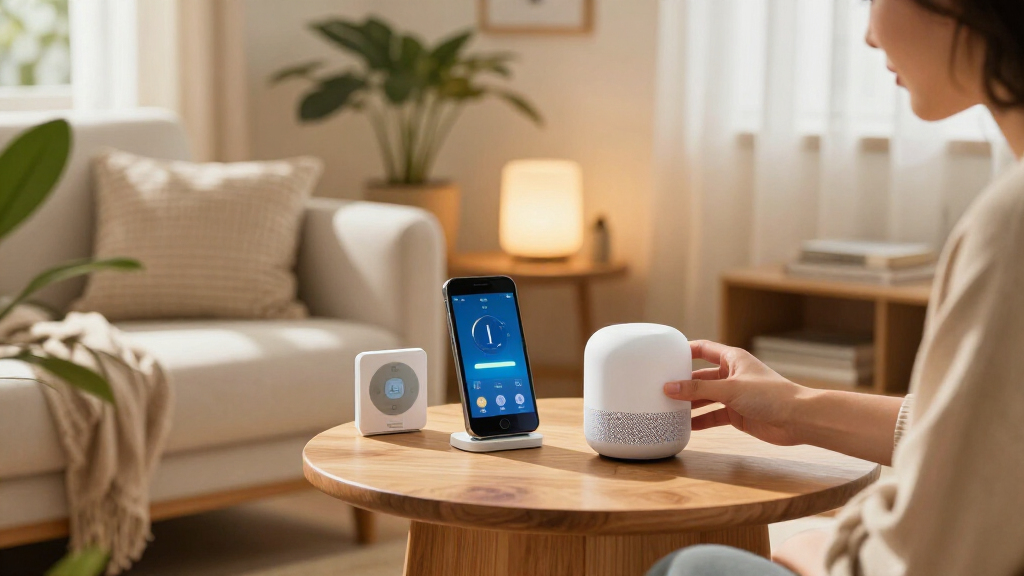

Choosing the best smart home devices requires balancing ecosystem compatibility, reliability, and cost. The Amazon Echo Show 15 (2nd Gen) stands out as the top overall pick for its versatile hub capabilities and large interface, while the Google Nest Smart Thermostat offers unmatched efficiency for climate control. Buyers often face a tradeoff between affordable entry-level plugs and premium displays that serve as central command centers. This guide breaks down fifteen essential devices to help you build a cohesive system without overspending. Continue reading for a detailed comparison of features, integration limits, and ideal use cases for each option.

Get the latest gadgets delivered free with Prime
- Fast, free delivery on millions of items
- Prime Video, Amazon Music and more included
- Member-only deals all year
Complete the kit



Key Takeaways
- Ecosystem lock-in is the primary differentiator; mixing Amazon and Google devices without a hub like Home Assistant creates fragmentation.
- Budget smart plugs often lack Matter support, limiting future interoperability compared to newer models like the TP-Link Tapo P125M.
- Smart displays with screens under 8 inches are better suited for bedside use, while 10-inch-plus models function as effective kitchen or living room hubs.
- Energy monitoring features in premium thermostats and plugs provide tangible ROI through utility bill reduction, unlike standard on/off switches.
- Audio quality varies drastically among budget speakers, making the Echo Dot Max a necessary upgrade for rooms where music quality matters.
| Govee Smart Plug, Wi-Fi and Bluetooth, 4-Pack |  | Best Multi-Assistant Plug Pack | Quantity: 4 plugs | Connectivity: Bluetooth and 2.4 GHz Wi-Fi | Voice assistants: Amazon Alexa and Google Assistant | VIEW LATEST PRICE | See Our Full Breakdown |
| Amazon Echo Dot Max Smart Speaker with Alexa, Graphite |  | Best Smart Home Hub Speaker | Dimensions: 4.27 × 4.27 × 3.9 in | Weight: 17.82 oz | Drivers: 1 × 0.8 in tweeter and 1 × 2.5 in woofer | VIEW LATEST PRICE | See Our Full Breakdown |
| Amazon Basics Smart Plug, 4-Pack, Works with Alexa, White | 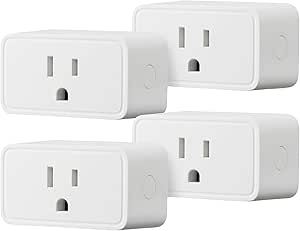 | Best Value for Alexa Homes | Pack size: 4 | Compatibility: Alexa only | Connectivity: 2.4 GHz Wi-Fi | VIEW LATEST PRICE | See Our Full Breakdown |
| Amazon Smart Plug, Works with Alexa |  | Best Single Plug for Alexa Beginners | Dimensions: 3.2 × 1.5 × 2.2 in | Weight: 3.1 oz | Input: 120 VAC, 60 Hz, 15 A max | VIEW LATEST PRICE | See Our Full Breakdown |
| Google Nest Smart Thermostat, Snow |  | Best Smart Thermostat | Connectivity: 2.4 GHz and 5 GHz Wi-Fi; Bluetooth Low Energy | Power source: Battery powered | Voltage: 24 V | VIEW LATEST PRICE | See Our Full Breakdown |
| Amazon Echo Show 15 (2nd Gen) 15.6-Inch Full HD Smart Display |  | Best for Family Organization | Display: 15.6-inch Full HD, 1920 × 1080 | Dimensions: 16.1 × 10.1 × 1.4 inches | Weight: 4.96 lb | VIEW LATEST PRICE | See Our Full Breakdown |
| Govee A19 Smart Color-Changing LED Bulbs, 800 Lumens, E26 Base, 4-Pack |  | Best for Colorful Room Lighting | Quantity: 4 bulbs | Bulb shape and base: A19, E26 | Maximum light output: 800 lumens | VIEW LATEST PRICE | See Our Full Breakdown |
| TP-Link Tapo P125M Matter Smart Plug Mini, 3-Pack |  | Best for Cross-Platform Smart Home Control | Pack size: 3 | Maximum current: 15 A | Maximum power: 1800 W | VIEW LATEST PRICE | See Our Full Breakdown |
| Amazon Echo Show 11 Smart Display with Full HD Screen and Spatial Audio, Graphite |  | Best Mid-Size Smart Home Display | Display: 10.95-inch Full HD touchscreen, 1920 × 1200 | Camera: 13 MP with auto-framing and 3.3× zoom | Audio: One 2.8-inch woofer and two full-range drivers | VIEW LATEST PRICE | See Our Full Breakdown |
| GHome Smart Plug Mini, 4-Pack, White | 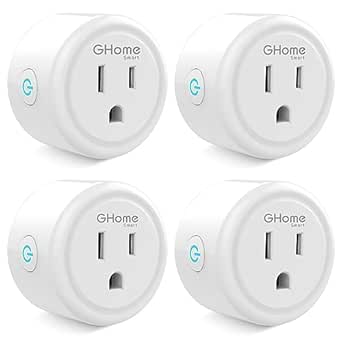 | Best for Basic Appliance Scheduling | Pack size: 4 | Wi-Fi requirement: 2.4 GHz | Hub required: No | VIEW LATEST PRICE | See Our Full Breakdown |
| Amazon Echo Dot (5th Gen) Smart Speaker, Deep Sea Blue |  | Best Compact Alexa Hub | Generation: 5th Gen | Color: Deep Sea Blue | Dimensions: 3.9 × 3.9 × 3.5 in (100 × 100 × 89 mm) | VIEW LATEST PRICE | See Our Full Breakdown |
| Amazon Echo Spot Smart Alarm Clock, Glacier White | 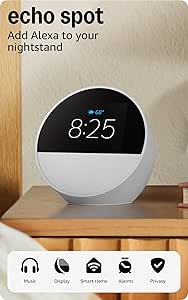 | Best for Bedside Routines | Color: Glacier White | Dimensions: 4.5 × 4.1 × 4.4 in (113 × 103 × 111 mm) | Weight: 14.3 oz (405 g) | VIEW LATEST PRICE | See Our Full Breakdown |
| Kasa Smart Plug HS103P4, 4-Pack |  | Best Value Smart Plug Set | Model: HS103P4 | Pack size: 4 | Operating voltage: 120 V AC | VIEW LATEST PRICE | See Our Full Breakdown |
| Linkind Matter Smart Plug, 4-Pack | 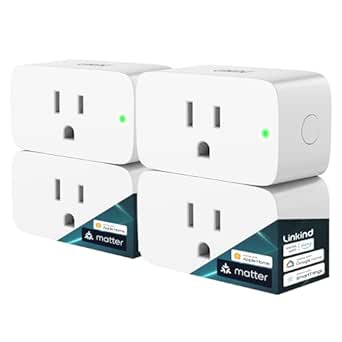 | Best for Matter-Compatible Homes | Model: LC09003256 | Pack size: 4 | Plug type: Type A | VIEW LATEST PRICE | See Our Full Breakdown |
| Amazon Echo Show 5 Smart Display, Cloud Blue |  | Best Compact Smart Display | Display: 5.5-inch touchscreen | Camera: 2 MP with built-in shutter | Dimensions: 5.8 × 3.6 × 3.2 in (147 × 91 × 82 mm) | VIEW LATEST PRICE | See Our Full Breakdown |
| smart home device | Dimensions |
|---|---|
| Govee Smart Plug | — |
| Amazon Echo Dot Max Smart Spea | 4.27 × 4.27 × 3.9 in |
| Amazon Basics Smart Plug | 2.7 × 2.1 × 1.5 in |
| Amazon Smart Plug | 3.2 × 1.5 × 2.2 in |
| Google Nest Smart Thermostat | — |
| Amazon Echo Show 15 | 16.1 × 10.1 × 1.4 inches |
| Govee A19 Smart Color-Changing | — |
| TP-Link Tapo P125M Matter Smar | — |
| Amazon Echo Show 11 Smart Disp | — |
| GHome Smart Plug Mini | 2 × 2 × 1 inches |
| Amazon Echo Dot | 3.9 × 3.9 × 3.5 in (100 × 100 × 89 mm) |
| Amazon Echo Spot Smart Alarm C | 4.5 × 4.1 × 4.4 in (113 × 103 × 111 mm) |
| Kasa Smart Plug HS103P4 | 1.57 × 1.5 × 2.62 in |
| Linkind Matter Smart Plug | — |
| Amazon Echo Show 5 Smart Displ | 5.8 × 3.6 × 3.2 in (147 × 91 × 82 mm) |
More Details on Our Top Picks
Govee Smart Plug, Wi-Fi and Bluetooth, 4-Pack
I’d choose the Govee Smart Plug 4-Pack for a home that needs several basic appliances brought into one app, especially when the household uses both Alexa and Google Assistant. Scheduling and group control make it easier to coordinate lamps or other compatible devices, while Bluetooth and 2.4 GHz Wi-Fi give it a connection option beyond Wi-Fi alone. Unlike the Amazon Basics Smart Plug 4-Pack, Govee isn’t limited to Alexa, though Amazon’s pack keeps setup within the Alexa app and avoids a separate third-party app. Govee’s main tradeoff is that it still won’t join 5 GHz Wi-Fi, and its listing gives conflicting current ratings: 10 A in the description and 15 A in a highlight. I’d verify suitability for the intended appliance before buying.
Pros:- Pack of four supports controlling several compatible appliances
- Works with Alexa and Google Assistant
- App scheduling and group control can coordinate devices
- Bluetooth and 2.4 GHz Wi-Fi connectivity without a hub
Cons:- Does not support 5 GHz Wi-Fi
- Product information conflicts on the amperage rating
- Uses the Govee app rather than keeping setup entirely within Alexa
Best for: Households that want four remotely controlled plugs with Alexa or Google Assistant support and group scheduling.
Not ideal for: Buyers who need 5 GHz Wi-Fi support, or anyone planning to connect an appliance whose load requires a clearly confirmed power rating.
- Quantity:4 plugs
- Connectivity:Bluetooth and 2.4 GHz Wi-Fi
- Voice assistants:Amazon Alexa and Google Assistant
- Voltage:120 V
- Amperage:11 A listed in specifications; product description has conflicting ratings
- Plug type:Type B
- Hub required:No
- Certifications:ETL and FCC
Our verdict“Choose Govee when you want a four-plug setup that works with Alexa or Google Assistant, but check the rating against your appliances first.”
Amazon Echo Dot Max Smart Speaker with Alexa, Graphite
The Echo Dot Max is the strongest fit here for someone who wants a smart home control point that also serves as a room-filling speaker. Its Zigbee, Matter, and Thread support can reduce the need for separate hubs, while presence and temperature sensors let routines respond to conditions in the room. Compared with the smaller Amazon Echo Dot (5th Gen), this model adds broader hub functions, Wi-Fi 6E, and more substantial sound; that extra capability makes it a better anchor for a growing setup than a simple voice speaker. The tradeoff is that eero Built-in coverage only applies with a compatible eero network, so it won’t extend every router’s signal. Buyers who mainly want plug control may get more practical value from a dedicated plug pack instead.
Pros:- Built-in hub supports Zigbee, Matter, and Thread
- Presence, temperature, and ambient-light sensing can inform routines
- Room-filling sound with automatic playback adaptation
- Wi-Fi 6E and eero Built-in support for compatible networks
Cons:- eero Built-in requires a compatible eero router and additional setup
- Some Bluetooth uses are limited, including PIN-required speakers
- Larger feature set may be unnecessary for buyers seeking only basic smart control
Best for: Alexa households building a connected home with Matter, Zigbee, or Thread devices who also want a capable speaker in the same room.
Not ideal for: Buyers who only need a basic voice assistant or plug controller, or who expect Wi-Fi extension without a compatible eero network.
- Dimensions:4.27 × 4.27 × 3.9 in
- Weight:17.82 oz
- Drivers:1 × 0.8 in tweeter and 1 × 2.5 in woofer
- Audio bandwidth:53 Hz–16 kHz at volume 6
- Wi-Fi:Wi-Fi 6E
- Smart home hub:Zigbee, Matter, and Thread Border Router
- Sensors:Ambient temperature, ambient light, and presence detection
- eero Built-in coverage:Up to 1,000 sq. ft. with a compatible eero network
Our verdict“Pick the Echo Dot Max as an Alexa-centered smart home hub when you’ll use its device support and speaker features, not just its voice control.”
Amazon Basics Smart Plug, 4-Pack, Works with Alexa, White
For Alexa users who want multiple outlets controlled without adding a hub, the Amazon Basics Smart Plug 4-Pack keeps the setup straightforward: control and schedules live in the Alexa app, with no third-party app required. Its timed routines can follow set hours, sunrise, or sunset, making it useful for lamps and other compatible appliances that benefit from predictable operation. Compared with the Govee Smart Plug 4-Pack, this option gives up Google Assistant support and Bluetooth connectivity, but avoids splitting setup across another brand’s app. The 2.4 GHz-only Wi-Fi requirement also rules out networks that don’t provide that band. I’d favor it over a single Amazon Smart Plug when several Alexa-controlled outlets are needed, but skip it if the household uses mixed assistants.
Pros:- Four plugs provide control for multiple compatible appliances
- Alexa app supports remote control and flexible schedules
- No hub or third-party app required
- Compact design is intended to leave the neighboring outlet available
Cons:- Works with Alexa only
- Requires a 2.4 GHz Wi-Fi connection
- Offers less platform flexibility than the Govee four-pack
Best for: Alexa users who want a coordinated set of four plugs controlled and scheduled directly in the Alexa app.
Not ideal for: Households using Google Assistant or another platform, or buyers whose Wi-Fi network lacks 2.4 GHz support.
- Pack size:4
- Compatibility:Alexa only
- Connectivity:2.4 GHz Wi-Fi
- Plug type:Type B
- Amperage:15 A
- Dimensions:2.7 × 2.1 × 1.5 in
- Item weight:2.4 oz
- Warranty:1-year limited
Our verdict“Choose this pack if you want several simple smart outlets managed entirely through Alexa and don’t need support for other assistants.”
Amazon Smart Plug, Works with Alexa
The Amazon Smart Plug suits a buyer who wants to automate one lamp or small appliance without building a broader smart home system. It pairs with Alexa routines and app control, needs no hub, and is designed to reconnect to Alexa after power or Wi-Fi interruptions. That last detail makes it a sensible first step for someone who wants a simple outlet rather than a hub-equipped speaker like the Echo Dot Max. The tradeoff is a strict Alexa-only setup: unlike the Govee Smart Plug 4-Pack, it doesn’t support Google Assistant, and the single-plug format is less useful when several outlets need automation. It also depends on 2.4 GHz Wi-Fi and is specified for indoor use, so it isn’t a flexible choice for every network or location.
Pros:- Adds Alexa app control and routines to a compatible appliance
- No smart home hub required
- Compact size leaves the second outlet free
- Designed to reconnect to Alexa after power or Wi-Fi outages
Cons:- Compatible only with Alexa, not other voice assistants or smart hubs
- Supports 2.4 GHz Wi-Fi only
- Indoor use only and sold as a single plug
Best for: Alexa users who want to automate one indoor appliance and prefer a basic plug with no hub or multi-device setup.
Not ideal for: People using Google Assistant or smart home hubs, buyers who need several plugs at once, or anyone seeking an outdoor-rated device.
- Dimensions:3.2 × 1.5 × 2.2 in
- Weight:3.1 oz
- Input:120 VAC, 60 Hz, 15 A max
- Maximum output:15 A
- Wi-Fi:2.4 GHz, 802.11 b/g/n
- Compatibility:Alexa only
- Use:Indoor only
- Warranty:1-year limited
Our verdict“Buy this as a simple first smart outlet for one Alexa-controlled indoor device; choose a four-pack if you need to automate several.”
Google Nest Smart Thermostat, Snow
The Google Nest Smart Thermostat brings smart-home control to heating and cooling rather than just plugged-in appliances. Its programmable schedule and ability to adjust temperature when the home is unoccupied can help reduce needless heating or cooling, while remote access through Google Home lets users change settings away from home. It also works with Alexa and Matter-certified voice assistants, giving it broader assistant support than the Amazon Smart Plug. Unlike a plug, though, this thermostat is not a quick add-on for any outlet: compatibility depends on the existing HVAC system, and some installations need a C wire or compatible power accessory. The listed DIY installation time is about 30 minutes, but that estimate doesn’t remove the need to check system compatibility first. I’d choose it for climate automation, not for a simple smart-home starter purchase.
Pros:- Programmable schedules can automate heating and cooling
- Can adjust temperature when the home is unoccupied
- Remote control through the Google Home app
- Works with Google Assistant, Alexa, and Matter-certified voice assistants
Cons:- Some HVAC systems require a C wire or compatible power accessory
- Compatibility depends on the home’s heating and cooling system
- Remote features and voice control require internet and Wi-Fi
Best for: Homeowners with a compatible heating and cooling system who want scheduled climate control, occupancy-based adjustments, and remote access.
Not ideal for: Renters without permission to replace the thermostat, buyers with an incompatible HVAC system, or anyone who cannot accommodate a required C wire or power accessory.
- Connectivity:2.4 GHz and 5 GHz Wi-Fi; Bluetooth Low Energy
- Power source:Battery powered
- Voltage:24 V
- Display:1.07-inch LCD
- Temperature control:Heating and cooling
- Programmable:Yes
- Voice assistant compatibility:Google Assistant, Alexa, and Matter-certified voice assistants
- C wire:Not required in most homes; may be required for some systems
Our verdict“Choose the Nest thermostat if your HVAC system is compatible and you want climate schedules and remote adjustments, rather than a basic smart plug.”
Amazon Echo Show 15 (2nd Gen) 15.6-Inch Full HD Smart Display
I’d choose the Echo Show 15 when a shared household screen matters as much as voice control. Its 15.6-inch Full HD display gives calendars, reminders, and customizable widgets room to be read from across a kitchen, while Fire TV adds streaming without needing a separate screen. Compared with the smaller Echo Show 11, this model favors visibility and a wall-display feel over a compact counter footprint. It also connects to Zigbee, Matter, and Thread devices, making it a capable control point rather than just a family dashboard.
The tradeoff is its size: at more than 16 inches wide and nearly five pounds, it needs deliberate placement. The camera shutter and mic/camera-off button offer direct privacy controls, but some services may involve extra fees, and it does not support ad-hoc Wi-Fi networks. I’d skip it if you want a small display or have limited wall or counter space.
Pros:- Large Full HD screen gives shared calendars and widgets room to be legible.
- Fire TV supports entertainment apps on the display.
- Zigbee, Matter, and Thread support broaden smart home device connectivity.
- Camera shutter and mic/camera-off button provide physical privacy controls.
Cons:- Large, heavy form factor needs substantial counter or wall space.
- Some skills and services may require subscriptions or additional fees.
- Does not support ad-hoc Wi-Fi networks.
Best for: Households that want a large shared calendar, smart home controls, video calls, and streaming in a kitchen or family room.
Not ideal for: People with limited counter or wall space, or buyers who want a small display primarily for quick voice commands.
- Display:15.6-inch Full HD, 1920 × 1080
- Dimensions:16.1 × 10.1 × 1.4 inches
- Weight:4.96 lb
- Camera:13 MP with shutter
- Audio:Two 2-inch woofers and two 0.6-inch tweeters
- Wi-Fi:Wi-Fi 6E; tri-band, dual-antenna MIMO
- Smart home connectivity:Zigbee, Matter, Thread Border Router
- Orientation:Landscape or portrait
Our verdict“Choose the Echo Show 15 if your household needs a large, shared smart home and media hub; skip it if space is tight.”
Govee A19 Smart Color-Changing LED Bulbs, 800 Lumens, E26 Base, 4-Pack
I’d pick these Govee A19 bulbs for rooms where lighting effects matter more than adding a central smart home hub. Their 16 million colors, preset scenes, dimming, and music synchronization offer more ways to change a room’s mood than a basic smart plug can. Four bulbs also make it easier to coordinate several fixtures through group control. Compared with the TP-Link Tapo P125M, which makes ordinary appliances smart, these bulbs change the light itself and can respond to schedules or voice commands through supported assistants.
The limitation is network and switch compatibility: they need 2.4 GHz Wi-Fi and should not be used with smart switches. Music sync relies on phone microphone access, which may not suit every household. I’d pass if you need simple, reliable white lighting on a switch-controlled circuit or want a bulb that avoids app setup.
Pros:- Offers 16 million colors and 54 preset scenes for varied room lighting.
- Four-bulb pack supports group control and scheduled routines.
- App and voice control work with several listed assistants.
- Dimming and music synchronization add flexibility beyond basic on/off lighting.
Cons:- Requires a stable 2.4 GHz Wi-Fi connection and does not support 5 GHz.
- Cannot be used with smart switches.
- Music synchronization requires phone microphone access.
Best for: Renters and smart lighting beginners who want colorful, dimmable light and schedules across several E26 fixtures.
Not ideal for: Households using smart switches, 5 GHz-only networks, or people who only need straightforward white lighting.
- Quantity:4 bulbs
- Bulb shape and base:A19, E26
- Maximum light output:800 lumens
- Power:9 watts
- Color temperature:6500 K
- Connectivity:Wi-Fi and Bluetooth
- Control:App and voice
- Usage:Indoor
Our verdict“Choose these Govee bulbs for expressive, app-controlled color lighting, but skip them if your setup depends on smart switches.”
TP-Link Tapo P125M Matter Smart Plug Mini, 3-Pack
I’d make the Tapo P125M my pick for a home that mixes smart home platforms or may change ecosystems later. Matter support lets these plugs work with Apple Home, Alexa, Google Home, and SmartThings, while local network control can keep configured devices responsive when internet access is unavailable. That flexibility sets it apart from the GHome Smart Plug Mini, which lists Alexa and Google Assistant support but does not offer Matter. Scheduling and timers cover the everyday jobs—lamps, seasonal lights, or other compatible devices—without adding a hub.
The three-pack is a practical way to automate several outlets, and its compact shape helps preserve access to neighboring sockets. The tradeoff is setup and network dependence: it needs 2.4 GHz Wi-Fi, and local control depends on devices being configured on the same network. Its 15 A and 1800 W limits also mean buyers should check appliance requirements rather than assume every device is suitable.
Pros:- Matter compatibility supports several major smart home platforms.
- Local network control can work without internet after setup.
- Compact design helps avoid blocking an adjacent outlet.
- Three plugs include app, voice, schedule, and timer controls.
Cons:- Requires a 2.4 GHz Wi-Fi network.
- Local control requires devices to be configured on the same network.
- The 15 A and 1800 W limits rule out some higher-load appliances.
Best for: Households using Apple Home, Alexa, Google Home, or SmartThings that want Matter-compatible control for multiple plug-in devices.
Not ideal for: People on 5 GHz-only Wi-Fi or buyers who need a plug for devices exceeding its 15 A or 1800 W limits.
- Pack size:3
- Maximum current:15 A
- Maximum power:1800 W
- Operating voltage:120 V AC
- Connectivity:Matter, Wi-Fi, and Bluetooth
- Wi-Fi band:2.4 GHz
- Compatible platforms:Apple Home, Amazon Alexa, Google Home, and Samsung SmartThings
- Warranty:2-year limited
Our verdict“Choose the Tapo P125M if cross-platform Matter support and local control matter more than the simplest possible setup.”
Amazon Echo Show 11 Smart Display with Full HD Screen and Spatial Audio, Graphite
The Echo Show 11 is the better fit when I want a substantial touchscreen and a smart home hub without stepping up to the wall-filling Echo Show 15. Its 10.95-inch Full HD display is suited to video calls, photo slideshows, and everyday controls, while Zigbee, Matter, and Thread support helps connect compatible devices directly. The 13 MP auto-framing camera and spatial audio make it more capable for calls and media than a small voice-only speaker, and temperature, light, and presence sensors can inform personalized routines.
That versatility comes with a real footprint: it takes room on a desk or counter, so it is not the compact choice in this lineup. The Show 15 offers a larger canvas for family organization, while the Show 11 favors a more contained placement. I’d also check the privacy settings, since Amazon Sidewalk is enabled by default unless it was previously turned off.
Pros:- Full HD touchscreen balances everyday viewing with a smaller footprint than the Echo Show 15.
- Zigbee, Matter, and Thread hub support connects compatible smart home devices.
- 13 MP camera with auto-framing and zoom supports video calls.
- Temperature, light, and presence sensors can inform routines.
Cons:- Still occupies substantial counter or desk space compared with compact displays.
- Amazon Sidewalk is enabled by default unless previously turned off.
Best for: People who want a counter-friendly but substantial Alexa display with a built-in hub, video calling, and sensor-based routines.
Not ideal for: Buyers with very limited desk or counter space, or those who prefer not to review default connectivity settings such as Amazon Sidewalk.
- Display:10.95-inch Full HD touchscreen, 1920 × 1200
- Camera:13 MP with auto-framing and 3.3× zoom
- Audio:One 2.8-inch woofer and two full-range drivers
- Connectivity:Wi-Fi 6E and Bluetooth 5.4
- Smart home hub:Zigbee, Matter, Thread Border Router
- Processor:AZ3 Pro with AI Accelerator
- Sensors:Ambient temperature, ambient light, presence detection, and camera
- Dimensions and weight:10 × 5 × 7.2 inches; 45.92 oz (1302 g)
Our verdict“Choose the Echo Show 11 for a capable Alexa display and smart home hub in a more contained format than the Echo Show 15.”
GHome Smart Plug Mini, 4-Pack, White
I’d choose the GHome Smart Plug Mini when the goal is simple remote control and scheduling for several everyday devices. The four-pack, hub-free setup, and Alexa and Google Assistant voice commands make it a straightforward way to automate lamps or other compatible appliances. Compared with the Tapo P125M, GHome sticks to a simpler platform list and does not offer Matter, but it gives you four plugs and basic app controls for timers, schedules, and groups.
There are limits to that simplicity. Setup requires the GHome app before linking to Alexa or Google Home, and the plugs work only on 2.4 GHz Wi-Fi. Their 10 A, 1200 W maximum is lower than the Tapo’s stated capacity, so they are not the pick for higher-load appliances. I’d skip them if you need Apple Home or SmartThings compatibility, Matter, or a higher power rating.
Pros:- Four plugs provide app-based remote control, schedules, timers, and group controls.
- Works with Alexa and Google Assistant voice commands.
- No separate hub is required.
- ETL and FCC certifications are listed.
Cons:- Requires 2.4 GHz Wi-Fi.
- Must be set up in the GHome app before linking to Alexa or Google Home.
- Maximum 10 A and 1200 W capacity is lower than the Tapo P125M.
Best for: Alexa or Google Assistant households that want to schedule lamps and other compatible, lower-load devices without a separate hub.
Not ideal for: Buyers who need Matter or Apple Home and SmartThings support, use 5 GHz-only Wi-Fi, or plan to control devices above 1200 W.
- Pack size:4
- Wi-Fi requirement:2.4 GHz
- Hub required:No
- Voice assistant compatibility:Amazon Alexa and Google Assistant
- Voltage:120 V
- Amperage and maximum power:10 A; 1200 W
- Dimensions:2 × 2 × 1 inches
- Certifications:ETL, FCC
Our verdict“Choose the GHome four-pack for basic Alexa or Google scheduling across several lower-load devices, not for cross-platform Matter control.”
Amazon Echo Dot (5th Gen) Smart Speaker, Deep Sea Blue
I’d choose the Echo Dot (5th Gen) when a small speaker should also handle everyday smart-home commands. Its motion and temperature sensors can support routines without adding separate sensors, while Alexa voice control and Matter compatibility give it broader smart-home utility than a speaker alone. Compared with the Echo Spot, it gives up the visible clock display but takes up less space and suits rooms where audio and voice control matter more than bedside information. It can also pair with other Echo devices or Fire TV, though its mono 1.6-inch speaker is better suited to casual listening than room-filling sound. The eero extension feature may help in a compatible setup, but it depends on an eero network and has limits. I’d skip it if a screen or stronger audio is the priority.
Pros:- Combines Alexa voice control with motion and temperature sensors for compatible routines
- Supports Matter alongside Wi-Fi and Bluetooth Low Energy Mesh
- Pairs with other Echo devices or Fire TV for multi-room audio or home theater
- Offers microphone-off and other privacy controls
Cons:- Mono audio from the small full-range driver is limited for listeners who want fuller room sound
- Some smart-home features depend on compatible devices, accounts, or subscriptions
- eero extension requires a compatible eero network and comes with device and speed limits
Best for: Alexa households seeking a compact speaker for voice control, routines, and casual listening in a bedroom, office, or kitchen
Not ideal for: Buyers who want a display, stereo sound, or mesh Wi-Fi extension without a compatible eero network
- Generation:5th Gen
- Color:Deep Sea Blue
- Dimensions:3.9 × 3.9 × 3.5 in (100 × 100 × 89 mm)
- Weight:10.7 oz (304 g)
- Speaker:1.6-inch full-range driver; mono playback
- Audio bandwidth:62 Hz–19 kHz
- Wi-Fi:Dual-band 802.11a/b/g/n/ac, 2.4 and 5 GHz
- Smart home compatibility:Wi-Fi, Bluetooth Low Energy Mesh, Matter
- eero Built-in:Up to 1,000 sq. ft. with a compatible eero network
Our verdict“Pick the Echo Dot if you want a small Alexa speaker that can also support sensor-based routines, but choose the Echo Spot if a bedside display matters more.”
Amazon Echo Spot Smart Alarm Clock, Glacier White
The Echo Spot is the most purposeful bedside pick here: its 2.83-inch touchscreen puts the time, weather, and song information where a clock belongs, while Alexa handles alarms, routines, and compatible smart-home controls. I’d choose it over the Echo Dot (5th Gen) when glanceable information matters more than a slightly simpler speaker-focused setup. The tradeoff is that the screen is small, so it is not a substitute for the larger viewing area or video-call features of the Echo Show 5. It has no camera, which may suit buyers who want a clock without a lens, but rules out video calls. Its eero extension can add coverage only in a compatible setup, with a stated 100 Mbps limit and up to 10 connected devices in the 5 GHz band. I’d pass if a larger display is central to the purchase.
Pros:- Customizable screen shows clock faces, weather, and song titles
- Supports Alexa alarms, routines, and compatible smart-home controls
- Built-in speaker plays music, podcasts, and audiobooks
- Can extend a compatible eero network
Cons:- Small 2.83-inch display is less suited to video and detailed on-screen information than the Echo Show 5
- No camera, so it cannot support video calls
- eero extension requires a compatible router, linked accounts, and the eero app, with stated speed and device limits
Best for: People who want an Alexa alarm clock with glanceable time and weather, bedside routines, and no camera
Not ideal for: Buyers who want video calls, a larger screen for watching content, or eero extension without a compatible router
- Color:Glacier White
- Dimensions:4.5 × 4.1 × 4.4 in (113 × 103 × 111 mm)
- Weight:14.3 oz (405 g)
- Display:2.83-inch touchscreen, 240 × 320 pixels
- Camera:None
- Speaker:1.73-inch full-range built-in speaker
- Wi-Fi:Dual-band 802.11a/b/g/n/ac, 2.4 and 5 GHz
- Bluetooth:A2DP and AVRCP support
- eero Built-in:Up to 1,000 sq. ft. additional coverage; up to 100 Mbps and 10 or fewer connected devices in the 5 GHz band
Our verdict“Choose the Echo Spot for a bedside Alexa clock with useful glanceable information, and choose the Echo Show 5 if you need video calls or a larger screen.”
Kasa Smart Plug HS103P4, 4-Pack
I’d put the Kasa Smart Plug HS103P4 on the shortlist for households that want straightforward scheduling across several lamps or small appliances. This four-pack works with Alexa and Google Assistant, needs no hub, and lets you control connected devices through the Kasa app or voice commands. Compared with the Linkind Matter Smart Plug, Kasa avoids the need for a Matter hub for the listed voice assistants, making setup a simpler fit for homes already using Alexa or Google Assistant. The tradeoff is narrower platform flexibility: the Linkind plug is the more appealing choice for a mixed ecosystem or local control during an internet outage. Kasa also requires 2.4 GHz Wi-Fi and its app for setup and app-based control. I’d skip this set if your home relies on Apple Home or SmartThings.
Pros:- Four plugs provide control for multiple appliances from one set
- Works with Amazon Alexa and Google Assistant without a hub
- Kasa app supports remote control, timers, and schedules
- UL certified and rated for loads up to 1800 W
Cons:- Requires a 2.4 GHz Wi-Fi connection
- Setup and app-based control depend on the Kasa app
- Listed voice assistant compatibility is narrower than the Linkind Matter plug’s multi-platform support
Best for: Alexa or Google Assistant households that want to schedule and remotely control several lamps, fans, or other suitable appliances
Not ideal for: Apple Home or SmartThings users, or buyers whose Wi-Fi setup lacks 2.4 GHz support
- Model:HS103P4
- Pack size:4
- Operating voltage:120 V AC
- Maximum wattage:1800 W
- Connectivity:2.4 GHz Wi-Fi
- Voice assistants:Amazon Alexa, Google Assistant
- Control methods:App, voice, scheduling
- Dimensions:1.57 × 1.5 × 2.62 in
- Certification and warranty:UL certified; 2-year warranty
Our verdict“Choose this Kasa set for simple Alexa or Google Assistant scheduling across several devices, but look at the Linkind plug if cross-platform Matter support matters more.”
Linkind Matter Smart Plug, 4-Pack
The Linkind Matter Smart Plug is the stronger fit for buyers building around more than one smart-home platform. Its four plugs support Apple Home, Alexa, Google Home, and SmartThings with a compatible Matter hub, while the AiDot app provides a hub-free control path. Local control can continue over the home network during an internet outage, a practical difference from relying only on remote app access. Compared with the Kasa HS103P4, Linkind reaches more named ecosystems, but that flexibility comes with more setup conditions: the listed platforms need a Matter-certified hub, and the Wi-Fi connection must support 2.4 GHz and IPv6. I’d choose Kasa for a simpler Alexa or Google setup; Linkind makes more sense for a multi-platform home that already has the right hub and network.
Pros:- Supports Apple Home, Alexa, Google Home, and SmartThings with a compatible Matter hub
- AiDot app offers control without a hub
- Local control can continue over the home network during an internet outage
- Includes schedules, timers, voice control, and short-circuit and overload protection
Cons:- Most listed smart-home platforms require a compatible Matter hub
- Requires 2.4 GHz Wi-Fi with IPv6 support
- Setup has more compatibility conditions than the Kasa HS103P4 for a single-platform household
Best for: Households using multiple Matter-compatible platforms that have a compatible hub and 2.4 GHz IPv6 Wi-Fi
Not ideal for: Buyers who want plug-and-play platform control without checking hub and network requirements, or whose router does not support IPv6
- Model:LC09003256
- Pack size:4
- Plug type:Type A
- Amperage:15 A
- Power capacity:1800 W
- Wi-Fi:2.4 GHz only; IPv6 required
- Hub requirement:Matter-certified hub for Apple Home, Alexa, Google Home, and SmartThings; AiDot app can be used without a hub
- Certifications:FCC, ETL
Our verdict“Pick Linkind if you want one plug set across Matter-compatible platforms and already meet its hub and network requirements.”
Amazon Echo Show 5 Smart Display, Cloud Blue
The Echo Show 5 adds a useful visual layer to Alexa, with a 5.5-inch touchscreen for photos, weather, news, and compatible smart-home controls. Its built-in camera also supports video calls, a feature the Echo Spot lacks; a physical shutter and microphone/camera off button give privacy-conscious buyers ways to disable them. Compared with the Echo Show 15, this is a compact option for a desk or bedside table rather than a wall-centered household dashboard. That small footprint limits viewing comfort for longer video sessions, and its 1.75-inch speaker is not the choice for buyers seeking stronger sound from a smart display. Some services may require subscriptions or other fees, and the device does not support ad-hoc Wi-Fi networks. I’d choose it for a small screen and calls, not as a replacement for a larger display.
Pros:- 5.5-inch touchscreen presents photos, news, weather, and smart-home controls
- 2 MP camera supports video calls
- Camera shutter and microphone/camera off button provide physical privacy controls
- Fabric yarn and aluminum use 100% recycled materials
Cons:- Small screen is less suited to shared viewing than the Echo Show 15
- Some skills and services may require subscriptions or other fees
- Does not support ad-hoc Wi-Fi networks
Best for: Alexa users who want a compact touchscreen for calls, photos, quick information, and compatible smart-home control
Not ideal for: Households seeking a large shared display, extended video viewing, or support for ad-hoc Wi-Fi networks
- Display:5.5-inch touchscreen
- Camera:2 MP with built-in shutter
- Dimensions:5.8 × 3.6 × 3.2 in (147 × 91 × 82 mm)
- Weight:16.1 oz (456 g)
- Speaker:1.75-inch full-range speaker
- Wi-Fi:Dual-band 802.11a/b/g/n/ac
- Processor:MediaTek MT 8169
- Color:Cloud Blue
- Recycled materials:Fabric yarn and aluminum made from 100% recycled materials
Our verdict“Choose the Echo Show 5 for a compact Alexa display with video calls and privacy controls, but opt for the Echo Show 15 if you need a larger household screen.”
How We Picked
I evaluated these fifteen devices based on three core pillars: interoperability, build quality, and value proposition. Interoperability was weighted heavily because a smart home is only as strong as its weakest link; devices that support the Matter standard or seamlessly integrate into major ecosystems like Alexa and Google Home ranked higher. I also prioritized build quality, favoring devices with physical buttons or responsive touch interfaces over those relying solely on app connectivity, which can fail during network outages.
Value was assessed not just by price, but by utility per dollar. For example, a four-pack of smart plugs was compared against a single premium thermostat by calculating their impact on daily convenience and energy savings. I excluded devices with poor reliability histories or those requiring proprietary hubs that add hidden costs, ensuring every recommendation serves a clear purpose in a modern home setup.
Factors to Consider When Choosing Best Smart Home Devices
Selecting smart home hardware involves more than matching brand names. These factors will help you avoid common integration headaches and maximize the utility of your new devices.Ecosystem Compatibility and Standards
Most beginners underestimate how difficult it is to mix ecosystems. If you start with Amazon Echo devices, adding Google Nest products often requires a third-party bridge or results in limited functionality. I strongly recommend choosing one primary voice assistant and sticking to it unless you are comfortable managing local hubs. Matter support is emerging as a universal translator, but it is not yet perfect. Check if a device supports Matter over Wi-Fi or Thread, as Thread offers better battery life and mesh networking for sensors and locks.
Connectivity Protocols: Wi-Fi vs. Zigbee vs. Thread
Not all smart devices communicate the same way. Wi-Fi plugs are easy to set up but can clog your router if you have dozens of them. Zigbee and Thread devices require a compatible hub or bridge but create a self-healing mesh network that reduces latency. For large homes, a mix of Wi-Fi for high-bandwidth devices like cameras and Thread/Zigbee for low-power sensors and switches is often the most stable approach. Always verify your hub’s capacity before expanding your network.
Physical Interface and Reliability
A smart device is useless if your internet goes down. I prioritize devices with physical buttons or reliable local control capabilities. Smart plugs with a manual toggle allow you to override automation during outages, whereas purely digital switches may lock you out. Similarly, smart displays with touchscreens offer a fallback when voice commands fail due to background noise. Consider how often you will interact with the device; frequent manual overrides should be easy and intuitive.
Privacy and Data Security
Smart home devices collect significant data, from voice snippets to usage patterns. Google and Amazon offer robust privacy controls, but you must actively manage them. I advise enabling local processing features where available, which keep voice data on the device rather than the cloud. For cameras and doorbells, look for devices with end-to-end encryption and local storage options. Reviewing the privacy policy for data retention periods is a critical step before installation.
Scalability and Future-Proofing
Buying individual devices often leads to higher costs and compatibility issues later. I suggest starting with a starter kit or a hub that supports a broad range of protocols. Devices released in 2025 and later are more likely to support the latest Matter standards, ensuring they remain compatible with new ecosystems. Avoid proprietary protocols that do not have a clear path to Matter integration, as these may become obsolete as the industry converges on universal standards.
Frequently Asked Questions
Do I need a separate hub for these smart devices?
It depends on the connectivity protocol of the specific devices you choose. Most Wi-Fi devices, like the Amazon Smart Plug and Google Nest Thermostat, connect directly to your router without a hub. However, devices using Zigbee or Z-Wave, such as certain sensors or older smart bulbs, often require a dedicated hub like the Amazon Echo Hub or a compatible bridge. Some newer Echo devices include built-in Zigbee radios, reducing the need for extra hardware. Always check the product specifications to confirm if a hub is required before purchasing.
Can I mix Amazon and Google smart home devices?
While possible, mixing ecosystems is generally discouraged for beginners due to setup complexity. Native integration is limited; for instance, you cannot natively control Google Nest lights with an Amazon Echo speaker without a third-party service like Home Assistant. This adds a layer of technical maintenance that may not be worth the effort for casual users. If you already have devices from both brands, I recommend using a Matter-compatible hub to bridge them. Otherwise, sticking to one ecosystem ensures smoother automation and fewer connectivity issues.
Are smart plugs worth it for energy saving?
Smart plugs save energy primarily by eliminating phantom power loads from devices that stay in standby mode, such as TVs, consoles, and chargers. They do not make the plugged-in device itself more efficient. For significant energy savings, investing in a smart thermostat or smart lighting with motion sensors is more effective. However, smart plugs offer excellent value for convenience, allowing you to schedule coffee makers or lamps, which indirectly reduces waste by preventing forgetfulness. They are best viewed as a convenience tool with secondary energy benefits.
How secure are smart home devices against hacking?
Security risks exist but are manageable with basic hygiene. Always change default passwords and enable two-factor authentication on your account. Use a separate IoT network on your router to isolate smart devices from your personal computers and phones. Keep firmware updated, as manufacturers frequently patch vulnerabilities. Devices from major brands like Amazon and Google have dedicated security teams, but no system is immune. Avoid cheap, unbranded devices that lack regular firmware updates, as they are more susceptible to exploits.
What is the best smart home device to start with?
The best starting point is usually a smart speaker or a smart display that acts as your central controller. For Alexa users, the Amazon Echo Dot is a low-risk, low-cost entry that introduces voice control. If you want visual feedback and a hub interface, the Echo Show 5 is a better choice. Starting with a control hub allows you to expand with compatible bulbs and plugs later. Avoid starting with complex security systems or lighting rewiring until you are comfortable with the basic voice and app interface.
Conclusion
Building a smart home in 2027 is less about collecting gadgets and more about creating a reliable, integrated system. For most users, the Amazon Echo Show 15 (2nd Gen) remains the Best Overall choice due to its dual role as a media center and automation dashboard. If you are on a strict budget, the Amazon Basics Smart Plug 4-Pack offers the Best Value, providing essential automation without breaking the bank. Beginners should start with the Amazon Echo Dot (5th Gen) for its simplicity and low entry cost. For those prioritizing energy efficiency and premium design, the Google Nest Smart Thermostat is the Best Premium option for climate control. Finally, if you need a compact bedside solution, the Amazon Echo Spot serves as the Best Compact choice. Choose based on your primary ecosystem and the specific pain points you wish to solve in your daily routine.