

Get the latest gadgets delivered free with Prime
- Fast, free delivery on millions of items
- Prime Video, Amazon Music and more included
- Member-only deals all year
Complete the kit



Key Takeaways
- The Anker Prime 200W 6-Port stands out as the strongest balanced pick for buyers who want GaN charging and high output without a sprawling multiport unit.
- The 20-Port 270W and Zobirez 10-Port 750W prioritize charging many devices at once; their large port counts make more sense for shared spaces than minimalist desks.
- Several models include USB-A alongside USB-C, so older accessories can share a station without adapters; check the port split before choosing by total port count alone.
- Built-in cables distinguish the 10-Port 245W and 380W 8-in-1 models from stations that rely on your own cords, trading tidiness for less cable-length flexibility.
- The lineup spans 50W and 60W multiport stations through 380W and 750W claims, showing why total output and per-port allocation matter more than port count by itself.
| Anker 9-in-1 Desktop Charger with 100W USB-C | 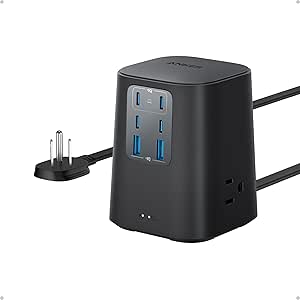 | Best for Laptop Desks | Ports: 3 AC outlets, 4 USB-C ports, 2 USB-A ports | USB-C1 output: Up to 100W when used individually | USB-C2 output: Up to 100W when used individually | VIEW LATEST PRICE | See Our Full Breakdown |
| Zobirez 10-Port 750W Charging Station with 5 USB-C and 5 USB-A Ports |  | Best for Mixed-Device Families | Total output: Up to 750W | USB-C ports: 5, up to 120W each | USB-A ports: 5, up to 30W each | VIEW LATEST PRICE | See Our Full Breakdown |
| 20-Port 270W USB Charging Station with 10 USB-C and 10 USB-A Ports |  | Best for Large Device Fleets | Total ports: 20 | USB-C ports: 10, up to 5V/3A per port | USB-A ports: 10, up to 5V/2.4A per port | VIEW LATEST PRICE | See Our Full Breakdown |
| 100W 6-Port GaN USB Charging Station |  | Best Compact Pick | Total output: Up to 100W | USB-C ports: 3, up to 20W each | USB-A ports: 3, up to 18W each | VIEW LATEST PRICE | See Our Full Breakdown |
| 60W 12-Port USB-C Charging Station |  | Best for USB-C Phone Fleets | Total power: 60W | Ports: 12 USB-C | Output per port: 5V/3A | VIEW LATEST PRICE | See Our Full Breakdown |
| Anker Prime 200W 6-Port GaN Charging Station |  | Best for Laptop-Focused Desks | Total output: 200W | Ports: 6 | Maximum USB-C output: Up to 100W per port when two USB-C ports are used simultaneously | VIEW LATEST PRICE | See Our Full Breakdown |
| 10-Port USB-C Charging Station with 4 Cables, 245W GaN Charger |  | Best for Shared Charging | Ports: 6 USB-C and 4 USB-A | Maximum total output: 245W stated; product details also list 200W | First USB-C port: Up to 65W | VIEW LATEST PRICE | See Our Full Breakdown |
| 50W 12-Port USB Charging Station with 6 USB-C and 6 USB-A Ports |  | Best Compact Multi-Device Hub | Total USB ports: 12 | Port mix: 6 USB-C and 6 USB-A | Wattage: 50W | VIEW LATEST PRICE | See Our Full Breakdown |
| Lcssio 300W 8-Port Charging Station |  | Best for an Organized Laptop Desk | Total output: Up to 300W | USB ports: 8 total, including 5 USB-C | High-power ports: 2 × 65W | VIEW LATEST PRICE | See Our Full Breakdown |
| 380W 8-in-1 USB-C Charging Station with Four Cables |  | Best High-Output Eight-Port Pick | Total output: 380W | Ports: 8 total: 5 USB-C and 3 USB-A | USB-C output: 2 × 100W and 3 × 30W | VIEW LATEST PRICE | See Our Full Breakdown |
| 200W 8-Port GaN III USB-C Charging Station |  | Best for Mixed USB-C and USB-A Setups | Total power: 200W | Ports: 4 USB-C and 4 USB-A | Maximum USB-C output: 65W | VIEW LATEST PRICE | See Our Full Breakdown |
| 100W 6-in-1 USB Charging Station with 3 USB-C and 3 USB-A Ports |  | Best Compact Value | Total power: 100W | Ports: 3 USB-C and 3 USB-A | Maximum USB-C output: 20W per port | VIEW LATEST PRICE | See Our Full Breakdown |
| Zobirez 420W 10-Port USB Charging Station, Black |  | Best for Organized Shared Charging | Maximum output: 420W | Ports: 10 total, including 5 USB-C | Port outputs: 2 × 65W, 3 × 45W, 5 × 30W | VIEW LATEST PRICE | See Our Full Breakdown |
| 8-in-1 Retractable Charging Station, 105W |  | Best for Reducing Cable Clutter | Maximum output: 105W | Retractable cables: 4, up to 80 cm each | USB ports: 2 USB-C and 2 USB-A | VIEW LATEST PRICE | See Our Full Breakdown |
| MEKIOJEO 380W 12-Port Aluminum Alloy Charging Station |  | Best for USB-C-Heavy Desks | Total ports: 12 (8 USB-C, 4 USB-A) | Maximum power: 380W | Dedicated USB-C output: 65W | VIEW LATEST PRICE | See Our Full Breakdown |
| USB-C charging station | Ports |
|---|---|
| Anker 9-in-1 Desktop Charger w | 3 AC outlets, 4 USB-C ports, 2 USB-A ports |
| Zobirez 10-Port 750W Charging | — |
| 20-Port 270W USB Charging Stat | — |
| 100W 6-Port GaN USB Charging S | — |
| 60W 12-Port USB-C Charging Sta | 12 USB-C |
| Anker Prime 200W 6-Port GaN Ch | 6 |
| 10-Port USB-C Charging Station | 6 USB-C and 4 USB-A |
| 50W 12-Port USB Charging Stati | — |
| Lcssio 300W 8-Port Charging St | — |
| 380W 8-in-1 USB-C Charging Sta | 8 total: 5 USB-C and 3 USB-A |
| 200W 8-Port GaN III USB-C Char | 4 USB-C and 4 USB-A |
| 100W 6-in-1 USB Charging Stati | 3 USB-C and 3 USB-A |
| Zobirez 420W 10-Port USB Charg | 10 total, including 5 USB-C |
| 8-in-1 Retractable Charging St | — |
| MEKIOJEO 380W 12-Port Aluminum | — |
More Details on Our Top Picks
Anker 9-in-1 Desktop Charger with 100W USB-C
The Anker 9-in-1 Desktop Charger is the clearest fit here for a desk shared by laptops, phones, and gear that still needs a wall outlet. Its four USB-C ports and three AC outlets cover more kinds of devices than the phone-focused 12-port model from the same roundup. USB-C1 and USB-C2 can each deliver up to 100W when used alone, giving compatible laptops a direct charging option. That individual-port qualifier matters: the supplied details do not say both ports can deliver 100W at the same time. At 19.75 ounces, it is better suited to a permanent workspace than a bag. The eight-point safety system adds protection, but buyers needing clearly specified simultaneous laptop output should compare its power-sharing details before choosing.
Pros:- Combines four USB-C ports with three AC outlets and two USB-A ports.
- USB-C1 and USB-C2 can each supply up to 100W when used individually.
- Eight-point safety system covers overvoltage and short circuits.
- Supports a mix of USB-C devices and conventional AC-powered equipment.
Cons:- The 100W rating is specified for each of the first two USB-C ports when used individually, not for simultaneous full output.
- At 19.75 ounces, it is less convenient to carry than the compact six-port charger.
- The supplied product details do not state total output across all ports.
Best for: Home-office users who need USB-C laptop charging alongside AC outlets for desk equipment.
Not ideal for: Travelers seeking a lightweight charger or buyers who need confirmed high-wattage output from several USB-C ports at once.
- Ports:3 AC outlets, 4 USB-C ports, 2 USB-A ports
- USB-C1 output:Up to 100W when used individually
- USB-C2 output:Up to 100W when used individually
- Safety:8-point safety system
- Weight:19.75 oz (560 g)
- USB-C port count:4
Our verdict“Choose the Anker for a fixed desk where laptop-capable USB-C ports and AC outlets matter more than travel weight.”
Zobirez 10-Port 750W Charging Station with 5 USB-C and 5 USB-A Ports
For a household charging a jumble of newer USB-C devices and older USB-A gear, the Zobirez 10-Port Station combines unusually high stated port ratings with a device organizer. Its five USB-C and five USB-A ports offer more USB-C connections than the 20-port, 270W station, while the wide slots are described as accommodating devices with cases. The included power cord and ten cables can reduce setup work; the bundle includes one 100W USB-C-to-C cable plus other cable types. The headline 750W total output needs careful reading, since the details do not establish that all ports can deliver their individual maximums at once. Its 120W USB-C rating also depends on compatible devices and cables, so this makes most sense for an organized shared charging spot rather than a buyer who needs verified full-load output.
Pros:- Ten charging ports split evenly between USB-C and USB-A.
- Wide device slots are specified to accommodate devices with thick cases.
- Includes a power cord and ten cables in several connector types.
- Lists protections for overcurrent, overvoltage, overload, overheating, overcharging, and short circuits.
Cons:- The 750W total-output claim is not detailed as simultaneous output across all ports.
- 120W USB-C charging requires compatible devices and cables.
- The supplied details do not give the station’s dimensions or weight.
Best for: Families or shared offices with a mix of USB-C phones, tablets, and older USB-A devices to charge and store together.
Not ideal for: Buyers who need confirmed simultaneous maximum output across every port or who already have the cables they prefer.
- Total output:Up to 750W
- USB-C ports:5, up to 120W each
- USB-A ports:5, up to 30W each
- Material:Flame-retardant ABS
- Included cables:10: 1 USB-C to C (100W, 3.28 ft), 5 USB-C, 2 iPhone, 2 Micro USB
- Safety protections:Overcurrent, overvoltage, overload, overheat, overcharge, and short-circuit
Our verdict“Pick the Zobirez if you want a cable-equipped organizer for a mixed household, and check its power-sharing details if simultaneous high output is essential.”
20-Port 270W USB Charging Station with 10 USB-C and 10 USB-A Ports
When the main job is charging a crowd, the 20-Port 270W Station offers twice as many connections as the Zobirez ten-port model and includes 11 adjustable dividers to keep devices separated. Ten USB-C and ten USB-A ports give a school, office, or family room room to park a broad collection of phones and tablets. The tradeoff is charging speed: each port is listed at just 5V, with USB-C up to 3A and USB-A up to 2.4A. That makes this a high-capacity organizer, not the right pick for laptop charging or buyers seeking high-wattage USB-C. Unlike the Anker desktop charger, it has no AC outlets listed. An on/off switch, safety protections, mixed cables, and two-year replacement coverage round out a practical shared station.
Pros:- Twenty ports accommodate more devices than the ten-port Zobirez station.
- Eleven adjustable dividers help organize phones and tablets, including devices with cases.
- Includes ten mixed USB cables and an on/off switch.
- Lists protections against overheating, overvoltage, overload, short circuits, and overcurrent.
Cons:- USB-C and USB-A outputs are limited to 5V per port, with no laptop charging capability specified.
- The supplied details do not give dimensions or weight.
- Ten included cables may not match every device’s connector needs.
Best for: Classrooms, offices, and large households that need to charge many phones or tablets in one organized location.
Not ideal for: Laptop owners or anyone who prioritizes fast charging over the number of devices connected.
- Total ports:20
- USB-C ports:10, up to 5V/3A per port
- USB-A ports:10, up to 5V/2.4A per port
- Total output:270W
- Adjustable dividers:11
- Included USB cables:10 mixed cables
- Safety features:Over-temperature, over-voltage, overload, short-circuit, and overcurrent protection
- Warranty:2-year free replacement coverage
Our verdict“Choose this station when organizing and connecting up to 20 phones or tablets matters more than high-speed or laptop charging.”
100W 6-Port GaN USB Charging Station
The 100W 6-Port GaN Station suits buyers who want a small charger for phones, tablets, earbuds, and other compact electronics. At 3.27 x 2.36 x 1.1 inches, it takes less room than either multi-device organizer, and the detachable five-foot extension cord gives flexibility when the outlet is awkwardly placed. Its three USB-C ports are rated up to 20W each, so despite the 100W total rating, this is explicitly not intended for laptops. That separates it from the Anker desktop charger, whose first two USB-C ports can each reach 100W individually. The six-port layout can charge more devices than a basic wall charger, but its modest per-port ratings make it a less suitable choice for buyers whose priority is the quickest charge for several devices at once.
Pros:- Compact 3.27 x 2.36 x 1.1-inch body.
- Three USB-C and three USB-A ports support up to six devices.
- Detachable five-foot AC extension cord helps with awkward outlet placement.
- Lists protection against overcharging, overheating, short circuits, and overcurrent.
Cons:- Not intended for laptop charging.
- USB-C ports are rated at up to 20W each.
- The total output is up to 100W, so buyers should not assume every port can deliver its individual maximum simultaneously.
Best for: Travelers and small households charging phones, earbuds, and tablets who want a compact station with a long detachable cord.
Not ideal for: Laptop users or people who need high output from an individual USB-C port.
- Total output:Up to 100W
- USB-C ports:3, up to 20W each
- USB-A ports:3, up to 18W each
- Dimensions:3.27 x 2.36 x 1.1 inches
- AC extension cord:5 feet, detachable
- Device capacity:Up to 6 devices
- Laptop support:Not intended for laptops
- Safety protections:Overcharging, overheating, short circuit, and overcurrent
Our verdict“Choose this compact station for everyday phone and tablet charging where portability and outlet reach matter more than laptop support.”
60W 12-Port USB-C Charging Station
The 60W 12-Port USB-C Station is a straightforward choice for a group that mostly needs to top up phones: all twelve connections use USB-C, so it avoids the mixed-port layout of the Zobirez station. Its 13.6 × 6 × 3.3 cm footprint keeps the unit compact for a desk or shared charging area. Each port is rated at 5V/3A, which fits the stated phone-oriented use but does not provide the higher-voltage USB-C output listed for the Anker’s laptop-capable ports. The 60W total also means buyers should not expect twelve ports to deliver their individual maximum simultaneously. Only the station is listed in the package contents, so users need their own cables. This is a focused phone charger, not a universal replacement for a laptop charging hub.
Pros:- Twelve USB-C ports make it easy to connect a group of compatible phones.
- Compact 13.6 × 6 × 3.3 cm design fits a shared desk or travel bag.
- Lists compatibility with selected iPhone, Samsung Galaxy, and Google Pixel devices.
- Built-in protections cover overheating, overcharging, overcurrent, overload, and short circuits.
Cons:- Each port is rated at 5V/3A, with no laptop charging capability specified.
- The 60W total does not support twelve ports delivering their individual maximum simultaneously.
- Package contents list the station only, so cables must be supplied separately.
Best for: Families or small teams with several USB-C phones who already own suitable charging cables.
Not ideal for: Laptop users, households with many USB-A devices, or buyers who need included cables and high-speed charging.
- Total power:60W
- Ports:12 USB-C
- Output per port:5V/3A
- Dimensions:13.6 × 6 × 3.3 cm
- Compatibility:Selected iPhone, Samsung Galaxy, Google Pixel, and other USB-C devices
- Safety features:Overheat, overcharge, overcurrent, overload, and short-circuit protection
- Package contents:1 charging station
Our verdict“Choose this station for compact, cable-ready USB-C phone charging across a group, and skip it if you need laptop power or cables in the box.”
Anker Prime 200W 6-Port GaN Charging Station
Two 100W USB-C ports give this Anker a clear advantage for a desk shared by two laptop users: each can draw substantial power even when both ports are occupied. Its 200W total output and six ports also leave room for phones and accessories, while temperature monitoring adds a layer of protection during extended use. Compared with the 10-Port USB-C Charging Station, it gives up port count and included cables but offers a stronger stated output for each of two USB-C connections. The tradeoff is its desktop-first design: at 1.24 lb, it is heavier than a travel adapter, and the corded setup is better suited to a fixed workspace. I’d choose it for fewer devices that need more power, rather than a large collection of low-power gadgets.
Pros:- Two USB-C ports can each provide up to 100W when used together
- Six-device capacity covers a typical laptop desk setup
- Temperature monitoring helps manage heat during desktop use
- Compact footprint and stable design suit a fixed workstation
Cons:- Not designed for travel and weighs 1.24 lb
- Six ports provide less connection capacity than the 10-Port USB-C Charging Station
- No USB-C cables are listed among the included items
Best for: Two-person home offices where both users need to charge laptops alongside phones or accessories.
Not ideal for: Travelers or households that need ten or more charging connections in one station.
- Total output:200W
- Ports:6
- Maximum USB-C output:Up to 100W per port when two USB-C ports are used simultaneously
- Dimensions:4.4 × 3.0 × 1.4 in
- Weight:1.24 lb
- Included:5 ft AC power cord and welcome guide
- Intended use:Desktop; not intended for travel
Our verdict“Choose this Anker for a stable desk setup where two laptops need strong USB-C power at once.”
10-Port USB-C Charging Station with 4 Cables, 245W GaN Charger
With six USB-C and four USB-A ports, this station is built for a shared counter or workspace where many devices need a place to plug in. Its first USB-C port supports up to 65W for a laptop, while the included four cables make it easier to start charging several USB-C devices without supplying every lead separately. Compared with the Anker Prime 200W 6-Port, this model prioritizes connection count and bundled cables over two high-output USB-C ports: the other ports are listed at up to 20W each. There is also a product-data discrepancy—the description states 245W maximum combined output, while another listed wattage is 200W—so I would not base a setup on the higher figure without checking the manufacturer’s current specifications. It suits a busy shared station, but less so a desk with several power-hungry laptops.
Pros:- Ten ports accommodate a large collection of devices
- First USB-C port supports laptop charging up to 65W
- Includes four USB-C cables in two lengths
- Detachable 5-foot power cord can simplify station placement
Cons:- Only the first port is specified for laptop charging
- Listed maximum output figures conflict: 245W and 200W
- Other ports are limited to up to 20W each
Best for: Families or small teams charging a mix of phones, tablets, and one laptop in a shared area.
Not ideal for: People who need high-wattage USB-C charging across several laptops, since only the first port is specified for laptop charging.
- Ports:6 USB-C and 4 USB-A
- Maximum total output:245W stated; product details also list 200W
- First USB-C port:Up to 65W
- Other port output:Up to 20W each
- Power cord:Detachable, 5 ft
- Included cables:2 × 6.6 ft and 2 × 3.3 ft USB-C to USB-C
- Input voltage:110V AC
- Warranty:24 months
Our verdict“Pick this station for a shared device hub with one laptop and many lower-power devices.”
50W 12-Port USB Charging Station with 6 USB-C and 6 USB-A Ports
This is the most compact way in this group to give a dozen devices a shared charging point: the unit measures 13.5 × 6 × 3 cm and weighs 150 g. Six USB-C and six USB-A ports make it flexible for households with newer phones alongside older accessories. Its 50W total output, however, changes what those twelve ports mean in practice: it is a low-power organizer for phones and small devices, not a laptop station. The Anker Prime 200W 6-Port offers far more power to fewer devices, while this model favors breadth and a lighter footprint. Each port is listed at up to 2.4A, and the station supplies 5V output. The power cord detaches, but no power plug is included, so buyers should account for that when setting it up.
Pros:- Twelve ports combine USB-C and USB-A connections
- Lightweight, compact body takes little desk or bedside space
- Detachable 1.4 m power cord
- Listed protections cover overheating, overload, and short circuits
Cons:- 50W total output is modest for twelve occupied ports
- Maximum stated current is 2.4A per port at 5V
- No power plug is included
Best for: People who want a small bedside or family charging hub for phones, earbuds, and other low-power USB devices.
Not ideal for: Laptop owners or anyone expecting multiple devices to charge quickly from a high-output USB-C station.
- Total USB ports:12
- Port mix:6 USB-C and 6 USB-A
- Wattage:50W
- Total current:10A
- Maximum current per port:2.4A
- Output voltage:5V
- Input voltage:100–240V
- Dimensions and weight:13.5 × 6 × 3 cm; 150 g
- Power cord:Detachable, 1.4 m
Our verdict“Choose it to organize many phones and small devices in little space, provided laptop charging is not a requirement.”
Lcssio 300W 8-Port Charging Station
For a desk where devices need both charging and a designated place to sit, the Lcssio pairs eight USB ports, including five USB-C, with built-in device slots and anti-slip pads. Two 65W ports give compatible laptops a dedicated higher-power option, while 30W and 20W ports cover smaller devices. That makes it more desk-oriented than the 380W 8-in-1 USB-C Charging Station, whose listed strengths center on output and included cables rather than device organization. The Lcssio also includes six short charging cables, which can keep a desktop tidy, but their reach may constrain where devices sit. Its slots are fixed rather than adjustable or removable, so larger devices or cases may not fit the layout well. I’d pick it for a set workspace with predictable devices, not a flexible charging setup.
Pros:- Five USB-C ports among eight total connections
- Two 65W ports support laptop charging
- Device slots and anti-slip pads help keep a desk orderly
- Includes six short cables and a power cord
Cons:- Included charging cables may be too short for flexible placement
- Device slots are neither adjustable nor removable
- 110V input specification may limit suitability where mains voltage differs
Best for: Home-office users who want two laptop-capable ports and fixed places for phones or tablets on the desk.
Not ideal for: People with larger tablets, bulky cases, or devices that need to sit farther from the station because the slots are fixed and cables are short.
- Total output:Up to 300W
- USB ports:8 total, including 5 USB-C
- High-power ports:2 × 65W
- Additional ports:30W and 20W
- Input voltage:110V
- Output voltage and current:20V; 20A
- Mounting type:Tabletop
- Included accessories:Power cord and 6 short charging cables
Our verdict“This is a good fit for a fixed desk that needs laptop power and built-in device organization.”
380W 8-in-1 USB-C Charging Station with Four Cables
Among the eight-port options here, this model lists the broadest spread of high-power connections: two 100W USB-C ports, three 30W USB-C ports, and three 30W USB-A ports. That mix can serve laptops, phones, and tablets from one station, while the four included USB-C cables reduce the number of extras a buyer needs to source. Compared with the Lcssio 300W 8-Port, it lists higher output and more 30W ports, but lacks that model’s device slots and desk-organizing features. The stated 380W total does not mean every port can deliver its maximum simultaneously; the product notes that power is distributed across ports as devices connect. Its 100–240V input and five-foot cord support varied setups, though the listed 3A output current makes the port-level details worth checking for a specific device mix.
Pros:- Two USB-C ports are rated up to 100W each
- Five USB-C and three USB-A ports support a varied device mix
- Four USB-C cables and a 5-foot power cord are included
- 100–240V input suits a wider range of mains voltages
Cons:- Power is shared across ports when multiple devices are connected
- No device slots or other desk-organizing features are listed
- Listed 3A output current may require clarification against the high total-output claim
Best for: People charging a laptop or two alongside several phones and tablets who value high listed output and included cables.
Not ideal for: Buyers who want built-in device stands or need confidence that all ports can sustain their maximum output at once.
- Total output:380W
- Ports:8 total: 5 USB-C and 3 USB-A
- USB-C output:2 × 100W and 3 × 30W
- USB-A output:3 × 30W
- Technology:GaN III
- Input voltage:100–240V
- Output voltage and current:20V; 3A listed
- Included cables:1 × 3.3 ft 100W braided USB-C cable, 2 × 3.3 ft USB-C cables, and 1 × 6.6 ft USB-C cable
- Power cord:5 ft
Our verdict“Choose this station for a cable-ready multi-device desk with high-power laptop ports, while checking shared-output behavior for your setup.”
200W 8-Port GaN III USB-C Charging Station
I’d shortlist this station for a desk shared by newer USB-C devices and older USB-A accessories: its four USB-C and four USB-A ports cover both without adapters. The stated 65W maximum USB-C output gives it a stronger laptop-charging option than the 100W 6-in-1 USB Charging Station, whose listed USB-C ports top out at 20W each. Its 200W total output and eight-port layout suit a busy workspace, while the included five-foot cord offers flexibility when the outlet is inconveniently placed. The key tradeoff is that the listing does not say how power is divided among ports when several devices are connected, so I can’t tell whether the 65W port stays available under a full load. Choose it for port variety; skip it if you need clear per-port sharing details.
Pros:- Eight ports split evenly between USB-C and USB-A
- Up to 65W USB-C output can serve compatible laptops
- 200W total output is suited to charging several devices
- Includes a five-foot power cord
Cons:- Power allocation across ports during simultaneous charging is not specified
- The listing provides no verified performance details
Best for: Households or office desks charging USB-C laptops alongside USB-A phones, headphones, and other accessories
Not ideal for: Buyers who need a guaranteed laptop charging speed while several ports are in use, since shared output is unspecified
- Total power:200W
- Ports:4 USB-C and 4 USB-A
- Maximum USB-C output:65W
- Technology:GaN III
- Power cord:5 ft (1.5 m)
- Compatible devices:Phones, tablets, laptops, game consoles, headphones, cameras, speakers, and smartwatches
Our verdict“Pick this for a mixed-device desk that needs four USB-C ports and four USB-A ports, provided you can accept unspecified power sharing.”
100W 6-in-1 USB Charging Station with 3 USB-C and 3 USB-A Ports
For a small desk or travel bag, I’d favor this station over the bulkier high-port-count options in the roundup. Its 3.26 × 2.73 × 1.1-inch body combines three USB-C and three USB-A ports, enough for a phone, tablet, and a few accessories without turning a work surface into a charging hub. The three-year limited warranty and listed over-current and over-voltage safeguards add useful ownership detail that the 200W 8-Port GaN III USB-C Charging Station does not provide in its supplied specs. The tradeoff is modest speed: USB-C tops out at 20W per port, so it is better for phones and tablets than powering a laptop. I’d skip it if laptop charging or more than six connections is part of the plan.
Pros:- Compact dimensions suit crowded desks and travel
- Three USB-C and three USB-A ports support mixed devices
- Listed safeguards cover over-current and over-voltage
- Includes a five-foot power cord and a three-year limited warranty
Cons:- USB-C output is limited to 20W per port
- No charging cables are listed as included
- Six ports offer less capacity than the 200W 8-Port GaN III station
Best for: Travelers and small-workspace users charging phones, tablets, and accessories who want both USB-C and USB-A
Not ideal for: Laptop owners who need high-wattage USB-C charging or users who regularly charge more than six devices
- Total power:100W
- Ports:3 USB-C and 3 USB-A
- Maximum USB-C output:20W per port
- Maximum USB-A output:18W per port
- Dimensions:3.26 × 2.73 × 1.1 in
- Power cord:5 ft
- Input voltage:120 V
- Warranty:3-year limited warranty
Our verdict“Choose this compact six-port option for phones, tablets, and accessories, but look elsewhere if a laptop needs fast USB-C charging.”
Zobirez 420W 10-Port USB Charging Station, Black
I’d put this Zobirez ahead of a plain multiport block when several people need to park devices in one place: built-in slots and eight included short cables help keep a shared counter orderly. It has ten ports, including five USB-C, and the listed outputs—two at 65W, three at 45W, and five at 30W—make its power layout more explicit than the 200W 8-Port GaN III station’s. That can help buyers match a compatible laptop or tablet to a higher-output port. The tradeoff is a crowded specification: the description says eight cables, while another part calls them a 10-pack, so the accessory count is unclear. Fast charging also depends on device compatibility and how power is allocated. I’d choose it for a family charging station, not for buyers who require exact accessory details.
Pros:- Ten ports include five USB-C connections
- Listed port outputs include two 65W ports for compatible devices
- Device slots and short cables help organize a shared charging area
- Non-slip feet and multiple listed electrical protections
Cons:- Cable count is inconsistent in the supplied listing
- Charging speed depends on device compatibility and port allocation
- Slot dimensions may not fit every device or case
Best for: Families or shared offices that want a central charging spot with device slots, mixed ports, and included short cables
Not ideal for: Buyers who need certainty about exactly which cables are included or guaranteed charging speed across all ports
- Maximum output:420W
- Ports:10 total, including 5 USB-C
- Port outputs:2 × 65W, 3 × 45W, 5 × 30W
- Maximum devices charged simultaneously:10
- Slot dimensions:Two slots measure 1.57 in wide × 1.77 in high
- Material:Flame-retardant ABS
- Included accessories:Power cord and 8 short mixed charging cables; listing also refers to a 10-pack
- Safety protections:Overcurrent, overvoltage, overcharge, overload, overheating, and short-circuit protection
Our verdict“Choose this for a shared charging area where slots and listed higher-output ports matter more than certainty about the included cable count.”
8-in-1 Retractable Charging Station, 105W
If loose cables are the main nuisance on your desk, I’d pick this retractable model over the 100W 6-in-1 USB Charging Station. Its four built-in retractable cables, each extending up to 80 cm, can charge devices without requiring a separate cable for every connection. Two USB-C and two USB-A ports add flexibility, and the compact 442 g design is easier to move between a desk and a bag than a large station such as the Zobirez 420W 10-Port. The compromise is capacity per connection: its 105W maximum is shared across devices, and four of the eight charging connections are fixed cables rather than open ports. It suits phones and smaller accessories well; buyers with several laptops or their own preferred cables should choose a port-heavy alternative.
Pros:- Four retractable cables extend up to 80 cm
- Two USB-C and two USB-A ports supplement the built-in cables
- Compact dimensions and 442 g weight support portability
- GaN technology and up to 105W total output
Cons:- 105W maximum output is shared across connected devices
- Retractable leads may not suit users who prefer their own cable lengths or types
- Listing does not specify per-port output
Best for: Desk users who charge phones and accessories daily and want built-in cables to reduce loose-cable clutter
Not ideal for: Laptop-heavy households or users who need many open ports and dedicated high-power outputs
- Maximum output:105W
- Retractable cables:4, up to 80 cm each
- USB ports:2 USB-C and 2 USB-A
- Simultaneous device capacity:Up to 8 devices
- Technology:GaN
- Dimensions:13.3 × 8.7 × 3.9 cm
- Weight:442 g
- Included:Charging station, instruction manual, and adapter
Our verdict“Choose this for a portable, tidy phone-and-accessory setup; pick a higher-output station with more open ports for laptop-heavy charging.”
MEKIOJEO 380W 12-Port Aluminum Alloy Charging Station
Among these five picks, this MEKIOJEO is the clearest fit for a desk with lots of USB-C devices: eight USB-C ports leave fewer connections stranded on USB-A than the 200W 8-Port GaN III station, which splits its ports evenly between the two types. A dedicated 65W USB-C output gives a compatible laptop a more defined place in the setup, while the 30W and 20W outputs suit other devices. Its 12-port count can reduce the need for multiple chargers, and the aluminum body may appeal to buyers who want a sturdier desk unit. The listing does not explain how outputs are shared when several devices draw power, so the 380W headline alone cannot tell you what each connected device will receive. I’d skip it if precise simultaneous charging rates are a requirement.
Pros:- Twelve ports include eight USB-C connections
- Dedicated 65W USB-C output is listed for compatible laptops
- Additional 30W and 20W outputs cover lower-power devices
- Aluminum alloy body, five-foot cord, and listed safety protections
Cons:- Power sharing across connected ports is not specified
- Only four USB-A ports may limit setups with many older USB-A devices
- The listing does not state how many devices can charge simultaneously at particular output levels
Best for: USB-C-focused home offices charging a laptop, phones, tablets, and several other devices from one desk station
Not ideal for: Buyers who need confirmed per-port speeds under a full load or who primarily use USB-A devices
- Total ports:12 (8 USB-C, 4 USB-A)
- Maximum power:380W
- Dedicated USB-C output:65W
- Other listed outputs:30W and 20W
- Technology:GaN
- Safety protections:Overcharging, overheating, short circuit, overcurrent, and overvoltage
- Power cord:5 ft (1.5 m)
- Material:Aluminum alloy
Our verdict“Choose this for a USB-C-heavy desk that needs many connections and a listed 65W laptop port, provided shared power details are not essential.”

How We Picked
I compared these stations on the factors that change how useful they are in a real charging setup: stated total output, USB-C and USB-A mix, port count, GaN design where specified, cable integration, and likely desk footprint. I also gave weight to flexibility: a station with a sensible mix of ports can suit a household better than one with more ports but a narrow charging role. Product names and stated specifications provide the basis for comparison; the roundup does not assume independent performance testing or undisclosed per-port power behavior.The ranking favors options that balance useful output, clear everyday fit, and flexibility. The Anker Prime leads for its 200W GaN design and six-port layout, while the 100W Anker 9-in-1 brings a different kind of versatility through its desktop-oriented port mix. High-port-count and high-output models rank well for shared charging needs, but their broad claims do not automatically make them the best fit for a typical desk. Compact, lower-output, and built-in-cable options earn their place for specific priorities rather than universal appeal.
Factors to Consider When Choosing USB-C Charging Stations
Start with the devices you expect to charge together, then match output, ports, and cable layout to that routine. The details below help prevent common mismatches that a headline wattage or large port count can hide.Match total output to your charging routine
Add up the kinds of devices that will be connected at the same time, especially laptops, tablets, and phones. A high total wattage can be useful in a shared workspace, but it does not tell you how much power reaches each device when every port is occupied. Check the product details for per-port limits and whether output is shared across ports, since the listing names alone may not specify that behavior. A phone-and-earbuds setup rarely needs the same headroom as a desk charging multiple laptops. Avoid choosing by the largest wattage number alone; allocation is what determines whether your key device charges at the pace you expect. If those details are not available, treat the headline figure as a total rather than a promise for each port.Count the right ports, not just the most ports
List your USB-C devices and older USB-A accessories separately before comparing stations. A 12-port model may offer only six USB-C connections, while a smaller station could better match a mostly USB-C desk. USB-A remains useful for older cables, smartwatches, and accessories, but adapters can add clutter and occupy space. Leave some spare capacity if people may add devices later, but do not let unused ports drive your choice. Port placement also affects whether larger plugs or neighboring cables crowd each other. The practical target is enough of each port type for your routine, with a little room for change.Decide whether built-in cables suit your space
Integrated or retractable cables can make a shared desk easier to tidy because the charging leads stay with the station. They can be handy when several people need a quick connection without bringing their own cables. Fixed cable length and connector reach may limit where the station can sit, though, and a damaged built-in lead may be harder to replace than a separate cable. Retractable designs also need enough clearance for the cable to extend and return. If your devices move around the room or use varied cable lengths, ports that accept your own cords offer more freedom. Choose built-in leads for a defined setup where their reach fits your layout.Check the physical layout before buying
A station with many ports can take up more desk or counter space than its product name suggests. Think about where the unit will sit, where its power cord can reach, and whether plugged-in devices can rest nearby without pulling on their cables. Vertical or angled port layouts may keep cords easier to reach, while a compact body can fit a crowded workstation. Large groups of devices can also create cable tangles even when the charger itself is tidy. Measure the intended spot and allow room for connected cables, not only the charging unit. This matters most when comparing multiport desktop stations with slimmer options.Choose GaN and premium features for a reason
GaN appears across several higher-output stations in this lineup, including compact multiport designs. It can support a high-power charger in a smaller form, which helps when desk space or portability matters. A premium model makes more sense when its output, port arrangement, and build fit your devices and routine; the label alone does not tell you how power is divided. For a handful of phones and small accessories, a simpler low-output station may cover the need with fewer unused ports. Compare the features you will use against the extra complexity of a more capable unit. Prioritize a known charging requirement over a specification that sounds impressive but does not change your setup.Frequently Asked Questions
Can a multiport USB-C station charge a laptop and several phones at the same time?
It can if its total output and port allocation suit that combination, but the port count alone cannot confirm it. Check the station’s listed per-port output and whether the available power is shared as more devices connect. The 200W and higher-output options in this roundup are aimed at heavier simultaneous use, while lower-output stations are a better match for phones and smaller accessories. If the listing does not explain allocation, avoid assuming every port can deliver its maximum at once. Match the station to the demanding device first, then see how many other devices it can support.Should I choose more USB-C ports or a mix of USB-C and USB-A?
Choose based on the cables and devices you already use, not on a port count in isolation. A mostly modern setup benefits from more USB-C connections, while older accessories may make USB-A useful without adapters. Several stations here combine both types, including 12-port options with six of each. Remember that ports may share total output, so the right mix also depends on what will be connected at the same time. If you are replacing cables soon, favor the port type your next devices are likely to use.Are built-in charging cables better than using separate cables?
Built-in cables reduce the number of loose leads and can make a communal charging station easier to use. They also limit cable length and may be awkward if the station sits far from the device, or if a connector needs replacement. Separate cables let you choose reach and replace a damaged lead, at the cost of more desk clutter. The retractable 105W option favors neat storage, while models with four integrated cables favor ready access. Pick fixed leads for a stable layout and separate cables when devices move around.Is a 750W charging station a better choice than a 200W model?
Not automatically: the total figure only helps if you need to charge many power-hungry devices together and the station distributes power as required. A 750W claim can suit a shared environment, but it may be unnecessary for a home desk with phones and a single laptop. Compare the per-port limits and supported charging standards in the product details before treating headline output as usable power for your particular device. A 200W GaN station may be a more practical fit for a smaller number of demanding devices. The best match is the one that meets your simultaneous charging needs without leaving most of its capacity unused.What should I prioritize for a family or shared office charging area?
Start with how many people will plug in at once, then count their USB-C and USB-A devices. High-port-count choices such as the 20-Port 270W station are designed around access for many devices, while a model with built-in cables can reduce the need for people to bring leads. Check whether the total output can support the expected mix, since many connected phones can share a station with tablets or laptops. Leave a little room for guests and new devices, but avoid sacrificing clear placement and cable reach for unused ports. For a shared area, easy access and a balanced port mix can matter as much as maximum output.Conclusion
For a balanced desk setup, I recommend the Anker Prime 200W 6-Port GaN as the best overall pick: it combines substantial stated output with a manageable port count. The best value depends on how many devices you need to connect; the 20-Port 270W model is the most compelling fit for a shared charging area, while a lower-output station can be a simpler choice for everyday phones and accessories. For a premium-focused setup, choose the Anker Prime for its GaN design and focused layout. Beginners can start with the Anker 9-in-1 100W desktop charger, which offers a straightforward mix of charging connections. If tidy cables matter most, look at the retractable 105W station or a four-cable model; for a large group of devices, compare the 20-Port 270W and Zobirez 10-Port 750W by their port mix and per-port details.Fall Picks
fall essentials
As an affiliate, we earn on qualifying purchases.