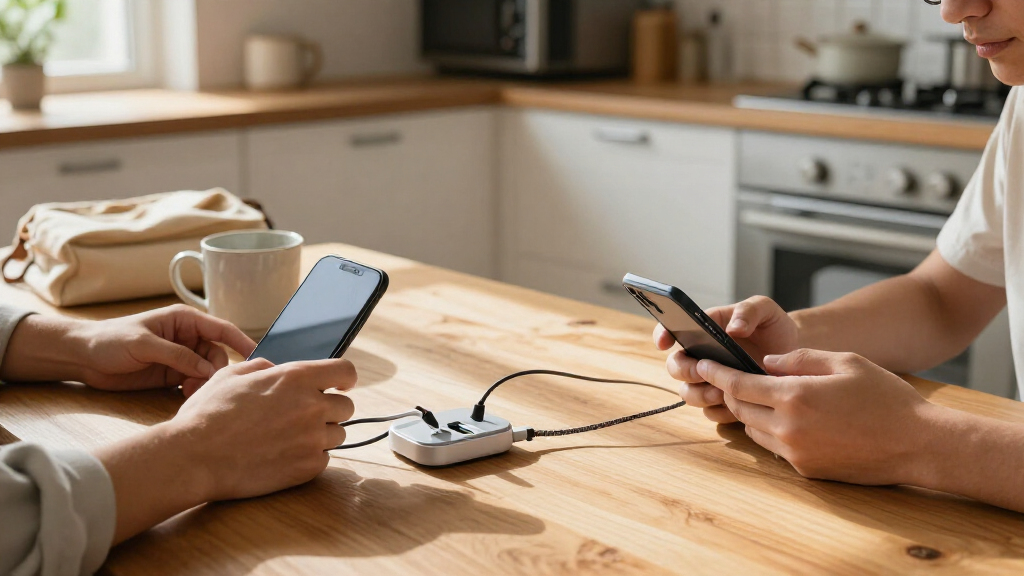
USB-C charging stations range from compact desktop chargers to high-port-count hubs for families and shared workspaces. I rank the Anker Prime 200W 6-Port GaN Desktop Charging Station as the best overall for its balance of power and a manageable six-port layout. The Anker 9-in-1 Desktop Charger and Power Strip adds AC outlets for a mixed-device desk, while the 20-Port 270W USB Charging Station suits users who need to charge many devices at once. The main tradeoff is between port count and usable power per device: a large number of ports does not mean every port can deliver its maximum output simultaneously. Read on for the full breakdown, selection criteria, and guidance on choosing a station that fits your devices and charging habits.

Get the latest gadgets delivered free with Prime
- Fast, free delivery on millions of items
- Prime Video, Amazon Music and more included
- Member-only deals all year
Complete the kit



Key Takeaways
- The Anker Prime 200W 6-Port GaN Desktop Charging Station is the best overall fit for buyers who want a powerful desktop charger without moving to a bulky, high-port-count station.
- The Anker 9-in-1 stands apart by adding AC outlets, making it more useful for a desk that needs both USB-C charging and conventional plug-in power.
- The 20-Port 270W model prioritizes shared charging capacity; its 10 USB-C and 10 USB-A ports suit device collections that mix newer and older hardware.
- High advertised wattage and port count are not interchangeable: check per-port limits and shared output to understand what happens when several devices charge together.
- Built-in or retractable cables trade convenience for flexibility, while stations with open ports let you choose cable length and replace worn cables more easily.
| 150W 30-Port USB-C Charging Station |  | Best for High-Device Counts | Ports: 30 USB-C | Total output: 150W | Output voltage: 5V | VIEW LATEST PRICE | See Our Full Breakdown |
| Anker 9-in-1 Desktop Charger and Power Strip with 100W USB-C Charging | 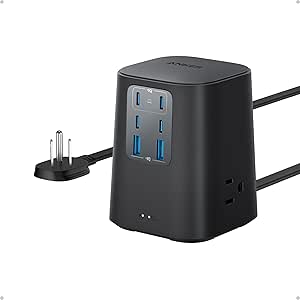 | Best for Mixed Desk Setups | AC outlets: 3 | USB ports: 4 USB-C and 2 USB-A | USB-C1 and USB-C2 output: Up to 100W each when used individually | VIEW LATEST PRICE | See Our Full Breakdown |
| 150W 30-Port USB Charging Station |  | Best for Mixed USB-C and USB-A Devices | Ports: 30 total: 15 USB-A and 15 USB-C | Total output: 150W | Output voltage: 5V | VIEW LATEST PRICE | See Our Full Breakdown |
| 20-Port 270W USB Charging Station with 10 USB-C and 10 USB-A Ports |  | Best for Organized Shared Charging | Total output: 270W | Ports: 20 total: 10 USB-C and 10 USB-A | USB-C output: Up to 5V/3A per port | VIEW LATEST PRICE | See Our Full Breakdown |
| 10-Port 245W GaN USB Charging Station with 4 USB-C Cables |  | Best for a Compact USB-C Desk Hub | Ports: 10 total: 6 USB-C and 4 USB-A | USB-C output: 1 port up to 65W; 5 ports up to 20W each | USB-A output: Up to 20W per port | VIEW LATEST PRICE | See Our Full Breakdown |
| 8-in-1 Retractable Charger for iPhone, Samsung and Multiple Devices |  | Best for Tidy Shared Desks | Maximum output: 105 W | Concurrent devices: Up to 8 | Retractable USB-C cables: 4 | VIEW LATEST PRICE | See Our Full Breakdown |
| Zobirez 420W 10-Port USB Charging Station with 5 USB-C Ports, Black |  | Best for Large Device Collections | Total output: 420 W | Ports: 10 total, including 5 USB-C | Included cables: 8 short mixed charging cables | VIEW LATEST PRICE | See Our Full Breakdown |
| Lcssio 300W 8-Port Charging Station |  | Best for Laptop-and-Phone Organization | Total output: Up to 300 W | USB ports: 8 total, including 5 USB-C | High-power ports: 2 × 65 W | VIEW LATEST PRICE | See Our Full Breakdown |
| Anker Prime 200W 6-Port GaN Desktop Charging Station |  | Best for High-Power USB-C Charging | Total output: 200 W | Ports: 6 USB ports | USB-C output: Up to 100 W per port when two USB-C ports are used simultaneously | VIEW LATEST PRICE | See Our Full Breakdown |
| BREEKET 6-Port 100W GaN USB Charging Station |  | Best for Phones and Accessories | Ports: 3 USB-C and 3 USB-A | Total output: Up to 100 W | USB-C output: Up to 20 W per port | VIEW LATEST PRICE | See Our Full Breakdown |
| Anker 112W 6-Port Desktop Charger | 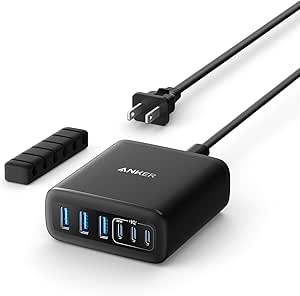 | Best for Mixed USB-C and USB-A Setups | Total output: 112W | Ports: 3 USB-C, 3 USB-A | Maximum USB-C output: 30W per port | VIEW LATEST PRICE | See Our Full Breakdown |
| 380W 8-Port USB-C Charging Station with Four Cables and Dual 100W Ports |  | Best for High-Power Laptop Sharing | Total output: 380W | Total ports: 8 | USB-C ports: 5: 2 × 100W and 3 × 30W | VIEW LATEST PRICE | See Our Full Breakdown |
| MEKIOJEO 12-Port 380W Aluminum Alloy Charging Station |  | Best for a Large Mixed-Device Desk | Total power: 380W | USB ports: 12 total: 8 USB-C, 4 USB-A | Maximum PD output: 65W | VIEW LATEST PRICE | See Our Full Breakdown |
| Zobirez 10-Port 750W Charging Station with 5 USB-C and 5 USB-A Ports |  | Best for an Organized Charging Shelf | Total USB ports: 10 | USB-C ports: 5, up to 120W each | USB-A ports: 5, up to 30W each | VIEW LATEST PRICE | See Our Full Breakdown |
| 24-Port 100W USB-C Charging Station |  | Best for Many Low-Power USB-C Devices | Ports: 24 USB-C | Total power: 100W | Total current: 20A | VIEW LATEST PRICE | See Our Full Breakdown |
| USB-C charging station | Input voltage | Ports | Total output |
|---|---|---|---|
| 150W 30-Port USB-C Charging St | 240V | 30 USB-C | 150W |
| Anker 9-in-1 Desktop Charger a | — | — | — |
| 150W 30-Port USB Charging Stat | 120V | 30 total: 15 USB-A and 15 USB-C | 150W |
| 20-Port 270W USB Charging Stat | 110V | 20 total: 10 USB-C and 10 USB-A | 270W |
| 10-Port 245W GaN USB Charging | 110V AC | 10 total: 6 USB-C and 4 USB-A | — |
| 8-in-1 Retractable Charger for | 120 V; supports 220 V | — | — |
| Zobirez 420W 10-Port USB Charg | 110 V AC | 10 total, including 5 USB-C | 420 W |
| Lcssio 300W 8-Port Charging St | 110 V | — | Up to 300 W |
| Anker Prime 200W 6-Port GaN De | — | 6 USB ports | 200 W |
| BREEKET 6-Port 100W GaN USB Ch | — | 3 USB-C and 3 USB-A | Up to 100 W |
| Anker 112W 6-Port Desktop Char | — | 3 USB-C, 3 USB-A | 112W |
| 380W 8-Port USB-C Charging Sta | 100–240V in description; 110V AC in product information | — | 380W |
| MEKIOJEO 12-Port 380W Aluminum | 120V | — | — |
| Zobirez 10-Port 750W Charging | 120V | — | — |
| 24-Port 100W USB-C Charging St | 240V | 24 USB-C | — |
More Details on Our Top Picks
150W 30-Port USB-C Charging Station
When the main task is charging a large collection of phones, tablets, and other USB-powered devices, this station’s 30 USB-C ports set it apart from the 20-port 270W USB Charging Station. Its 150W total output is spread across all ports, with each port limited to 5V/2.4A; that makes it a fit for routine device charging, not a choice for fast laptop charging. The all-USB-C layout also avoids mixing cable types, which can simplify a shared desk or device cabinet. Overcurrent, overcharging, and short-circuit protection add safeguards for a crowded setup. The tradeoff is capacity over speed: the 20-port model offers higher stated total output and includes dividers and cables, while this one’s fixed 5V output may leave power-hungry devices waiting longer.
Pros:- 30 USB-C ports support a high number of connected devices
- All ports use USB-C, avoiding a mix of USB-A and USB-C connections
- Overcurrent, overcharging, and short-circuit protections are included
- Compact desktop layout helps consolidate charging
Cons:- Each port is limited to 5V/2.4A rather than higher-power charging
- 150W total output must be shared across as many as 30 devices
- Not suited to high-current testing or laptop charging
Best for: Schools, offices, and households that need many USB-C devices charging at once and can accept standard 5V charging speeds
Not ideal for: Laptop owners and buyers whose priority is fast charging, since every port is limited to 5V/2.4A
- Ports:30 USB-C
- Total output:150W
- Output voltage:5V
- Maximum output per port:5V/2.4A
- Total current:30A
- Input voltage:240V
- Protection:Overcurrent, overcharging, and short-circuit protection
- Package contents:Charging station and power cable
Our verdict“Choose this station for charging many low-power USB-C devices together, not for speed or laptop support.”
Anker 9-in-1 Desktop Charger and Power Strip with 100W USB-C Charging
I’d choose this Anker when a desk needs both USB-C charging and AC outlets, rather than the sheer port count offered by the 150W 30-Port USB-C Charging Station. Three AC outlets, four USB-C ports, and two USB-A ports make it easier to power a laptop, monitor, and smaller devices from one desktop unit. Its first two USB-C ports can each deliver up to 100W when used individually, a better match for laptop charging than the 5V-only multiport stations in this roundup. That maximum has a condition: it applies when each port is used on its own, so buyers should not assume both deliver 100W simultaneously. Built-in surge protection and an eight-point safety system are useful additions, but this compact mix-and-match approach serves fewer USB devices than dedicated charging banks.
Pros:- Combines three AC outlets with four USB-C and two USB-A ports
- First two USB-C ports support up to 100W each when used individually
- Built-in 300-joule surge protection
- Eight-point safety system
Cons:- The 100W maximum applies to each of the first two USB-C ports when used individually
- Six USB ports provide less device capacity than the 20- and 30-port stations
- Product information gives differing weight figures
Best for: Home-office users who need AC outlets alongside USB-C laptop and accessory charging in one desktop unit
Not ideal for: Classrooms or families charging many USB devices at once, since it has only six USB ports
- AC outlets:3
- USB ports:4 USB-C and 2 USB-A
- USB-C1 and USB-C2 output:Up to 100W each when used individually
- Voltage:125V
- Maximum current:3A
- Cord length:5 ft
- Plug type:Type B
- Safety:300-joule surge protection and eight-point safety system
- Model:A91C6
Our verdict“Pick this Anker for a mixed-use desk where AC outlets and high-output USB-C ports matter more than a large number of charging slots.”
150W 30-Port USB Charging Station
This 30-port station is the more flexible choice for a group with both older USB-A devices and newer USB-C ones: it provides 15 ports of each type, unlike the all-USB-C 150W 30-Port USB-C Charging Station. Its listed maximum of 15W per port can support faster charging for compatible devices, though it remains a 5V station rather than a laptop-oriented high-output charger. A built-in fan and protections against overheating, overload, and electrical faults address the demands of running many devices together. The fan and 120V input requirement are worth factoring into placement and setup. Compared with the 20-Port 270W model, this one gives you ten more ports and a balanced connector mix, but less stated total output and no included device dividers or cable set.
Pros:- 30 ports split evenly between USB-C and USB-A
- Up to 15W per port for compatible devices
- Cooling fan and multiple electrical protections
- Anti-slip pads help keep the station in place
Cons:- 150W total output is shared across connected devices
- 15W maximum per port is not suitable for laptop charging
- Requires a 120V input
Best for: Shared charging areas with a mix of USB-C phones and USB-A accessories that need many connections in one station
Not ideal for: Laptop users or buyers seeking high-power USB-C charging, since output is 5V and capped at 15W per port
- Ports:30 total: 15 USB-A and 15 USB-C
- Total output:150W
- Output voltage:5V
- Maximum output per port:15W
- Input voltage:120V
- Dimensions:6.3 x 3.03 x 3.43 in
- Weight:1.1 lb
- Certifications:UL, FCC, CE
- Warranty:2 years; 18-month quality assurance
Our verdict“Choose this model for a crowded mixed-connector charging station, rather than for laptop power or the highest per-device output.”
20-Port 270W USB Charging Station with 10 USB-C and 10 USB-A Ports
The standout here is not just its 20-port mix, but the way the station is set up to hold devices upright: 11 adjustable dividers create separate spaces for phones and tablets while they charge. That makes it more orderly than the 150W 30-Port USB-C Charging Station, which offers more connections but no listed dividers. It also includes ten mixed USB cables, useful for a shared charging shelf, though the assortment may not fit every device. The headline 270W total output needs context: USB-C ports are limited to 5V/3A each and USB-A ports to 5V/2.4A, so this is not a substitute for a high-wattage laptop charger. Its 20 ports and multiple safety protections make more sense for organized group charging than for high-speed charging of a few devices.
Pros:- 20 ports split evenly between USB-C and USB-A
- 11 adjustable, removable dividers help organize devices
- Includes 10 mixed USB cables
- Protections cover overheating, overvoltage, overload, short circuits, and overcurrent
Cons:- USB-C output is limited to 5V/3A per port
- USB-A output is limited to 5V/2.4A per port
- Included cable selection may not match every connected device
Best for: Families, classrooms, or front desks that want devices separated and supported while charging from a shared station
Not ideal for: Laptop users and buyers who need higher-voltage USB-C charging or a cable tailored to every device
- Total output:270W
- Ports:20 total: 10 USB-C and 10 USB-A
- USB-C output:Up to 5V/3A per port
- USB-A output:Up to 5V/2.4A per port
- Dividers:11 removable, adjustable dividers
- Included cables:10 mixed USB cables
- Input voltage:110V
- Safety features:Over-temperature, overvoltage, overload, short-circuit, and overcurrent protection
- Warranty:2-year replacement coverage
Our verdict“Choose this station for a tidy, divided charging area with many phones and tablets, not for high-power laptop charging.”
10-Port 245W GaN USB Charging Station with 4 USB-C Cables
For buyers who want a smaller port count with a dedicated laptop connection, this station offers a useful middle ground between the Anker 9-in-1 Desktop Charger and Power Strip and the larger 20- or 30-port stations. It has six USB-C ports and four USB-A ports, plus four included USB-C cables, so a basic multi-device setup can be ready without sourcing every lead separately. The first USB-C port is the only one listed for laptops, with up to 65W; the other USB-C and USB-A ports are listed at up to 20W each. That split makes port choice matter, especially if several devices are connected. There is also an output-spec discrepancy: the description claims 245W total, while product information lists 200W. I’d treat its per-port figures as the clearer guide and avoid buying it on the larger total alone.
Pros:- Six USB-C and four USB-A ports support up to 10 connected devices
- First USB-C port supports up to 65W for laptop charging
- Includes four USB-C cables in two lengths
- Detachable 5-foot power cord and multiple electrical protections
Cons:- Only the first USB-C port is listed for laptop support
- Maximum total output is inconsistent: 245W in the description and 200W in product information
- The remaining USB-C ports are listed at up to 20W each
Best for: Desk users who need one USB-C laptop port, several phone or tablet ports, and bundled USB-C cables
Not ideal for: People who need multiple laptops charged at once or rely on a confirmed high combined output across every port
- Ports:10 total: 6 USB-C and 4 USB-A
- USB-C output:1 port up to 65W; 5 ports up to 20W each
- USB-A output:Up to 20W per port
- Maximum total output:245W in description; 200W in product information
- Laptop support:First USB-C port only
- Input voltage:110V AC
- Included cables:2 x 6.6 ft and 2 x 3.3 ft USB-C to USB-C cables
- Power cord:Detachable, 5 ft
- Warranty:24 months
Our verdict“Pick this station for a compact desk setup with one USB-C laptop and several smaller devices, but not for charging multiple laptops.”
8-in-1 Retractable Charger for iPhone, Samsung and Multiple Devices
Four retractable USB-C cables set this charger apart from the Lcssio 300W 8-Port Charging Station, which instead relies on fixed slots and included short cables. Pull-out leads help keep a desk or nightstand orderly and reduce the need to bring separate cables for everyday devices. With 105W total output and capacity for eight devices, it suits a mixed collection of phones, tablets, and accessories, though the listing does not specify how power is divided among ports. Its compact footprint makes it easier to place than the larger multi-device organizers in this roundup, but at 442 g it is less of a lightweight travel charger. The mix of USB-C and USB-A adds flexibility, yet buyers with several older USB-A devices may need extra adapters because USB-A ports are limited.
Pros:- Four retractable 80 cm USB-C cables help keep a shared charging area neat
- Supports up to eight devices across USB-C cables and mixed ports
- 105W GaN output offers more capacity than a basic phone-only charger
- Compact footprint fits a desk or nightstand
Cons:- Port-by-port power allocation is not specified
- Limited USB-A ports may mean adapters for older devices
- Heavier and bulkier than a simple wall charger
Best for: Households or desk users charging several USB-C phones and accessories who want built-in cables to reduce clutter
Not ideal for: Laptop users who need a clearly specified high-wattage USB-C output, or buyers with many USB-A devices
- Maximum output:105 W
- Concurrent devices:Up to 8
- Retractable USB-C cables:4
- Cable length:80 cm each
- Input voltage:120 V; supports 220 V
- Weight:442 g
- Dimensions:13.3 × 8.7 × 3.9 cm
Our verdict“Choose this for a tidy multi-device desk where retractable cables matter more than dedicated laptop-power specifications.”
Zobirez 420W 10-Port USB Charging Station with 5 USB-C Ports, Black
With 10 ports and five USB-C connections, this Zobirez is aimed at a crowded charging station rather than a compact personal desk charger. It offers more connection points than the Anker Prime 200W 6-Port Desktop Charging Station, making it a better fit for families or shared work areas with many phones and accessories. Eight included short cables and wider slots help keep devices together, but those leads limit how far a device can sit from the unit. The headline 420W total output sounds generous, yet the listing does not explain individual port allocation, so I would not choose it for a set of laptops that each require a known charging rate. Its 110V AC input also makes it a less flexible choice for buyers who need broad voltage support.
Pros:- Ten ports, including five USB-C ports, accommodate a large device collection
- Eight included mixed charging cables help get a shared setup started
- Wider slots can hold larger devices or cases
- Listed protections cover overcurrent, overheating, and short circuits
Cons:- Individual port power allocation is not clearly specified
- Included charging cables are short and may constrain device placement
- 110V AC input limits suitability where mains voltage differs
Best for: Families, classrooms, or shared desks that need many charging connections for phones, tablets, and accessories
Not ideal for: Laptop owners who need clear per-port wattage, or international users who need input-voltage flexibility
- Total output:420 W
- Ports:10 total, including 5 USB-C
- Included cables:8 short mixed charging cables
- Input voltage:110 V AC
- Material:Flame-retardant ABS
- Weight:1.6 lb
- Dimensions:1.77 × 1.57 × 1.77 in
Our verdict“Pick this for high device count and organized group charging, not for predictable high-wattage laptop charging.”
Lcssio 300W 8-Port Charging Station
The Lcssio combines eight ports, five of them USB-C, with two specified 65W outputs, giving laptop owners more useful guidance than the Zobirez 420W 10-Port Station, whose per-port allocation is unclear. Those 65W ports can serve compatible laptops while the remaining connections handle phones and accessories, making this a practical shared tabletop setup. Fixed slots and anti-slip pads keep devices grouped, but the dividers cannot be rearranged, so bulky cases or unusually wide devices may not fit the layout well. Six included short cables reduce setup friction, though they also limit placement distance. The stated total output is up to 300W, but actual speed depends on the connected device and port; this is better for organized mixed-device charging than for buyers who want a flexible, cable-free desktop charger.
Pros:- Two 65W ports provide a stated output for compatible laptops
- Five USB-C ports support a predominantly USB-C device lineup
- Fixed slots and anti-slip pads keep devices grouped on a tabletop
- Includes a power cord and six short charging cables
Cons:- Fixed dividers cannot be removed or rearranged
- Short included cables restrict where devices can sit
- Charging speed and compatibility vary by device
Best for: Households or small teams charging compatible laptops alongside phones and tablets in a fixed tabletop arrangement
Not ideal for: People with bulky devices, changing device mixes, or a preference for freely arranged cables and slots
- Total output:Up to 300 W
- USB ports:8 total, including 5 USB-C
- High-power ports:2 × 65 W
- Input voltage:110 V
- Output voltage:20 V
- Output current:20 A
- Included accessories:Power cord and 6 short charging cables
- Safety features:Over-current, over-voltage, overcharge, overload, overheat, and short-circuit protection
Our verdict“Choose this when a stable tabletop organizer and two specified 65W laptop ports matter more than adjustable slots.”
Anker Prime 200W 6-Port GaN Desktop Charging Station
The Anker Prime prioritizes powerful USB-C charging over a high port count. Its USB-C ports can supply up to 100W each when two are used simultaneously, a more useful specification for compatible laptops than the BREEKET 6-Port 100W Station, which is limited to 20W per USB-C port and is not designed for laptops. Six total USB ports still leave room for phones and accessories, while temperature monitoring adds a layer of oversight during desktop use. The tradeoff is that this unit organizes connections rather than devices: unlike the Lcssio, it has no fixed slots or included charging cables. At 1.24 lb, it is sturdy but not a natural travel pick, and the listed guidance does not establish the output available across every port combination.
Pros:- Two USB-C ports can each provide up to 100W when used simultaneously
- Six USB ports allow charging of laptops alongside smaller devices
- Temperature monitoring helps manage charging heat
- Includes a 5 ft AC cord and a 24-month warranty
Cons:- Not intended for travel and weighs 1.24 lb
- No included device slots or charging cables
- Power allocation across all port combinations is not specified
Best for: Laptop users who want a desktop charger with two high-output USB-C connections and several additional ports
Not ideal for: Travelers seeking a lightweight charger, or households that want built-in device slots and included charging leads
- Total output:200 W
- Ports:6 USB ports
- USB-C output:Up to 100 W per port when two USB-C ports are used simultaneously
- Dimensions:4.4 × 3.0 × 1.4 in
- Weight:1.24 lb
- Power cord length:5 ft
- Warranty:24 months
Our verdict“Choose the Anker Prime for a desk setup that needs strong USB-C laptop output rather than a portable or slot-based organizer.”
BREEKET 6-Port 100W GaN USB Charging Station
The BREEKET is the straightforward choice when the charging lineup is mostly phones, tablets, and small accessories. Its three USB-C and three USB-A ports cover newer and older devices, while the cube-style body and detachable 5-foot cord offer a simpler setup than the retractable-cable 8-in-1 charger. That convenience comes with a clear ceiling: USB-C output is listed at up to 20W per port, and the product is not designed for laptops. The Anker Prime 200W is a better match for laptop charging, while the BREEKET makes more sense for a bedside or family phone station where six connections are enough. Its stated 100W total output should not be confused with 100W from any single USB-C port.
Pros:- Three USB-C and three USB-A ports support a mix of newer and older devices
- Compact cube design suits desks and bedside tables
- Detachable 5-foot AC cord offers flexible placement
- Listed protection covers overcharging, overheating, short circuits, and overcurrent
Cons:- Not designed for laptop charging
- USB-C ports provide up to 20W each
- Plastic enclosure and six-port capacity offer less of a workstation setup than slot-based stations
Best for: Phone- and tablet-focused households that need a compact charger with both USB-C and USB-A connections
Not ideal for: Laptop owners or anyone who needs more than 20W from an individual USB-C port
- Ports:3 USB-C and 3 USB-A
- Total output:Up to 100 W
- USB-C output:Up to 20 W per port
- USB-A output:Up to 18 W per port
- Dimensions:3.27 × 2.36 × 1.1 in
- Extension cord:5 ft detachable AC cord
- Enclosure material:Plastic
- Warranty:1 year
Our verdict“Choose this compact six-port station for phones and accessories, but pick the Anker Prime if laptop charging is part of the job.”
Anker 112W 6-Port Desktop Charger
I’d choose the Anker 112W 6-Port Desktop Charger for a desk where newer USB-C devices share space with older USB-A accessories. Its three ports of each type make it more flexible than the Anker Prime 200W 6-Port GaN Desktop Charging Station for buyers who still rely on USB-A, though the Prime’s higher total output is better suited to heavier charging loads. Here, 112W total output and a maximum 30W per USB-C port are a sensible fit for phones, tablets, and smaller devices, but not the strongest choice for powering multiple demanding laptops. The compact body and included silicone cable organizer help keep a desktop tidy. I’d factor in that charging cables are not included, so the six ports may require extra accessories before they’re all useful.
Pros:- Three USB-C and three USB-A ports support a mix of device generations.
- 112W total output can serve several everyday devices at once.
- Compact, lightweight body takes up little desk space.
- Included silicone organizer helps manage charging cables.
Cons:- USB-C output tops out at 30W per port, limiting suitability for demanding laptops.
- Charging cables are not included.
- Total output is lower than higher-capacity options such as the Anker Prime 200W.
Best for: Desk users charging a mix of USB-C phones and tablets alongside USB-A accessories, who value a compact footprint and cable organization.
Not ideal for: People who need high-wattage laptop charging or want a ready-to-use station with cables included.
- Total output:112W
- Ports:3 USB-C, 3 USB-A
- Maximum USB-C output:30W per port
- Maximum USB-A output:18W per port
- Dimensions:3.0 × 3.2 × 1.3 in (77 × 82 × 33 mm)
- Weight:10.65 oz (302 g)
- Included:Silicone cable organizer, welcome guide
- Warranty:18 months
Our verdict“Choose this Anker for a compact mixed-port desk setup, but pick a higher-output station if laptop charging is a priority.”
380W 8-Port USB-C Charging Station with Four Cables and Dual 100W Ports
For a shared workspace with several laptops in the rotation, I’d put this 380W 8-Port Charging Station ahead of the Anker 112W 6-Port Desktop Charger. Two 100W USB-C ports give compatible laptops room to charge at higher power, while three additional USB-C ports and three USB-A ports cover phones and accessories. The included four USB-C cables also make setup easier than with the Anker, which ships without charging cables. GaN III technology is intended to support a compact design and heat dissipation, but the headline total doesn’t mean every port can deliver its maximum at once: power is shared as devices are added. I’d also check the input-voltage details before buying, since the listing gives both a 100–240V range and a 110V AC specification.
Pros:- Two USB-C ports rated up to 100W support compatible laptops.
- Eight total ports accommodate several device types.
- Four included USB-C cables and a power cord simplify setup.
- GaN III technology is designed to support compactness and heat dissipation.
Cons:- Output is distributed among connected devices, so individual port performance can vary.
- Input-voltage details conflict between the description and product information.
- The 380W total rating does not mean every port can provide its maximum at once.
Best for: Home-office teams or households with compatible laptops that need multiple high-power USB-C connections plus ports for phones and accessories.
Not ideal for: Buyers who need clearly documented input specifications or expect all ports to deliver their maximum rated output simultaneously.
- Total output:380W
- Total ports:8
- USB-C ports:5: 2 × 100W and 3 × 30W
- USB-A ports:3 × 30W
- Technology:GaN III
- Input voltage:100–240V in description; 110V AC in product information
- Included cables:One 3.3 ft 100W braided USB-C cable, two 3.3 ft USB-C-to-USB-C cables, one 6.6 ft USB-C-to-USB-C cable
- Power cord:5 ft
Our verdict“Pick this station for a cable-included, laptop-capable shared desk, provided you’re comfortable with shared output and the voltage listing discrepancy.”
MEKIOJEO 12-Port 380W Aluminum Alloy Charging Station
The MEKIOJEO earns its place for buyers who want 12 ports in a mixed USB-C and USB-A layout, rather than the eight-port arrangement on the 380W 8-Port USB-C Charging Station. Its eight USB-C ports and four USB-A ports give a busy household or desk more places to plug in, while a dedicated 65W PD port can serve a compatible laptop. That laptop connection is a useful distinction, but it is not a promise of 65W from every USB-C port; the other listed outputs are 30W and 20W. The aluminum body, GaN technology, and stated electrical and temperature protections add practical appeal. I’d be cautious about buying it for a tightly measured setup, though: dimensions and weight aren’t provided, and the 65W capability is limited to its dedicated port.
Pros:- Twelve ports provide more connection points than the eight-port 380W station.
- Eight USB-C and four USB-A ports cover mixed device collections.
- Dedicated 65W PD port supports a compatible laptop.
- Aluminum body and listed protection features suit a busy shared charging area.
Cons:- Only the dedicated port is specified for 65W PD output.
- Product dimensions and weight are not provided.
- The listing does not clarify how output is divided across all 12 ports.
Best for: Families, classrooms, or shared work areas charging many phones, tablets, and accessories, with one compatible laptop needing a dedicated higher-output port.
Not ideal for: Buyers who need verified size and weight before fitting a station into a specific desk space, or who expect high-power output on every port.
- Total power:380W
- USB ports:12 total: 8 USB-C, 4 USB-A
- Maximum PD output:65W
- Other listed outputs:30W and 20W
- Material:Aluminum alloy
- Technology:GaN
- Power cord length:5 ft (1.5 m)
- Input voltage:120V
Our verdict“Choose MEKIOJEO when port count and mixed-device support matter more than precise size information or laptop-level power across multiple ports.”
Zobirez 10-Port 750W Charging Station with 5 USB-C and 5 USB-A Ports
The Zobirez stands out for combining 10 charging ports with device slots and included cables, making it more of an organized charging hub than a basic desktop block. Five USB-C ports rated up to 120W each and five USB-A ports rated up to 30W each offer broad device coverage on paper. Against the MEKIOJEO 12-Port 380W station, this model gives up two ports but lists higher per-port USB-C ratings and supplies 10 cables. That makes it appealing for a family charging area where devices need a place to rest as well as a place to plug in. My main reservation is the 750W total-output claim: the stated port ratings may not all be available simultaneously, and real output depends on compatible devices and cables. The ABS body is practical, but less reassuring for buyers seeking metal construction.
Pros:- Five USB-C and five USB-A ports serve a range of devices.
- Device slots help keep a shared charging area organized.
- Includes a power cord and 10 charging cables.
- Lists multiple protections, including overcurrent, overheating, and short-circuit protection.
Cons:- The 750W total rating may not be available alongside every stated port maximum.
- Actual output depends on compatible devices and cables.
- Flame-retardant ABS construction may not suit buyers who prefer a metal body.
Best for: Households or shared spaces that want a cable-included station with slots to keep up to 10 devices organized while charging.
Not ideal for: Buyers who need independently verified simultaneous high-power output or prefer an aluminum-bodied charger.
- Total USB ports:10
- USB-C ports:5, up to 120W each
- USB-A ports:5, up to 30W each
- Maximum stated total output:750W
- Input voltage:120V
- Material:Flame-retardant ABS
- Included accessories:Power cord and 10 charging cables
- Protection features:Overcurrent, overvoltage, overload, overheat, overcharge, and short-circuit protection
Our verdict“Choose Zobirez for a ready-to-organize family charging shelf, not if you require certainty that all listed power ratings can run simultaneously.”
24-Port 100W USB-C Charging Station
If the main challenge is finding enough USB-C sockets, this 24-port station offers a different kind of capacity from the 380W 8-Port USB-C Charging Station. It can connect up to 24 devices, but its 100W total power is shared across them; that makes it a better match for phones, headphones, and smartwatches than for charging several power-hungry tablets or laptops quickly. Its all-USB-C layout also avoids the mixed-port compromise found on the Anker 112W 6-Port Desktop Charger, but older USB-A cables won’t plug in directly. The detachable five-foot power cord and listed protection features suit a fixed charging area. I’d treat the listed 2A output as a sign to check device needs before buying, since the product data doesn’t describe high-wattage USB-C charging.
Pros:- Twenty-four USB-C ports accommodate many devices at one station.
- Detachable 5 ft power cord can make placement and storage easier.
- Listed compatibility includes phones, headphones, smartwatches, and tablets.
- Includes over-voltage, over-current, short-circuit, overcharge, and overload protection.
Cons:- 100W total output is shared across connected devices.
- Listed output current is 2A, which may not meet the needs of devices requiring higher-power charging.
- No USB-A ports are available for older cables and accessories.
Best for: Schools, families, or offices with many phones, headphones, and other modest-power devices that use USB-C cables.
Not ideal for: Laptop users, people seeking fast charging across many connected devices, or anyone with USB-A-only cables and accessories.
- Ports:24 USB-C
- Total power:100W
- Total current:20A
- Output voltage:5V
- Output current:2A
- Input voltage:240V
- Power cord:Detachable, 5 ft (1.5 m)
- Warranty:12 months
Our verdict“Pick this station for sheer USB-C port count on low-power devices, but choose a higher-output model for laptops or faster charging.”
How We Picked
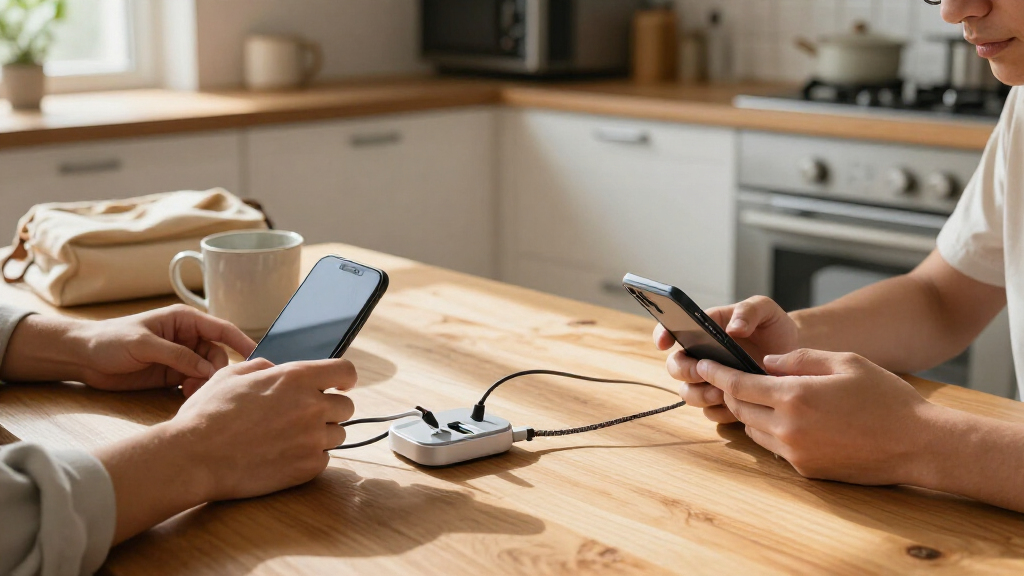
I compared these stations by how well their port mix, total output, and layout fit real charging setups, rather than treating the largest wattage or port count as an automatic win. I gave weight to whether a product offers useful USB-C capacity, supports a practical range of devices, and makes sense on a desk or in a shared charging area. Features such as integrated cables, retractable designs, AC outlets, and GaN construction matter when they solve a specific usability problem, but they can also limit flexibility or add bulk.
The ranking favors balanced everyday usefulness over extreme capacity. That puts the Anker Prime 200W high for its six-port desktop format, while the Anker 9-in-1 earns a distinct place for combining USB charging with AC outlets. High-capacity options rank better for households, classrooms, or teams that charge many devices at once, but I weigh their larger footprint and the need to check shared power allocation. I also distinguish USB-C-only or USB-C-heavy stations from models with substantial USB-A capacity, since buyers should not assume all ports support the same charging behavior.
Factors to Consider When Choosing USB-C Charging Stations
Before choosing a station, match its charging behavior to your own devices and the place where it will sit. A bigger number on the box can be less useful than a sensible port layout, reachable connectors, and enough power for the devices you charge at the same time.
Count the Devices You Charge at the Same Time
Start with your busiest normal charging moment, not the total number of devices in your home. A phone, tablet, and laptop charging together create a different demand from a family charging several phones overnight. Add a little capacity for occasional devices, but avoid choosing a 20- or 30-port station just because the number sounds future-proof. More ports can mean a larger unit and more cable clutter, with no benefit if most sockets sit empty. For shared spaces, a high port count makes sense when several people charge at once; for an individual desk, a smaller desktop unit may be easier to place and use.
Read Total Output and Per-Port Limits Together
Total wattage describes the station’s overall power budget, not a promise that every port delivers its maximum at once. Check the output listed for individual ports and look for information about how power is divided when multiple devices connect. This matters most if you plan to charge a laptop alongside phones or tablets, since a low-output port may charge a laptop slowly or not suit its needs. Do not compare two stations by headline wattage alone: the number of USB-C ports and their individual capabilities can change the result. If the product information does not explain shared output clearly, treat its simultaneous high-power performance as uncertain.
Choose a Port Mix That Matches Your Cables and Devices
USB-C ports are useful for modern phones, tablets, and many laptops, but older accessories may still rely on USB-A. Take inventory before buying so you do not end up with unused ports of one type and too few of another. A USB-C-heavy station suits a newer device collection, while a mixed USB-C and USB-A layout can reduce the need for adapters in a household with older gear. Also check whether USB-C ports support the power level your devices expect; the connector shape alone does not tell you how quickly a device will charge. When multiple people share the station, a balanced mix can be more practical than maximizing one port type.
Decide Whether Built-In Cables Are a Convenience or a Constraint
Integrated and retractable cables can make a charging area tidier and keep a cable ready for quick use. They also fix the available cable length and may be harder to replace if damaged or incompatible with where a device sits. Stations with open ports let you pick cable lengths, angles, and device-specific cables, though that flexibility can add clutter. Consider where the station will live: short built-in cables may work well on a bedside table but fall short across a wide desk. For devices that need a particular cable or connector, open ports are often the safer choice.
Account for Placement, Heat, and Cable Management
A charging station needs room for both its body and the cables plugged into it. Measure the intended surface and check whether ports are easy to reach once the unit is placed against a wall or among other desk items. A high-capacity model can simplify a shared charging area, but its footprint and cluster of connected cables may make a small desk feel crowded. Keep ventilation in mind when a station will run several devices for long periods; avoid trapping it under papers or inside a closed, poorly ventilated compartment. A tidy layout is not just cosmetic, since reachable ports and separated cables make it easier to unplug the right device.
Pay More for a Capability You Will Use
Higher output, more ports, GaN construction, and AC outlets are useful only when they solve a real need in your setup. A laptop-focused user may value strong USB-C output more than a large collection of lower-powered ports, while a family may benefit more from broad device capacity. An AC outlet can help when a desk also needs power for equipment that does not charge over USB, but it adds less value if every device already uses USB. Integrated cables can reduce loose accessories, yet they are not a substitute for checking compatibility and charging limits. Choose based on the devices you use concurrently and the flexibility you need, not a headline spec you may never use.
Frequently Asked Questions
Can a USB-C charging station charge a laptop and phones at the same time?
Often, but the result depends on the station’s per-port limits and how it shares power across connected devices. Check the laptop’s charging requirements against the output available on the port you plan to use, then review whether connecting phones reduces that output. A high total wattage alone does not confirm that one port can supply enough power to a laptop. If laptop charging is a priority, favor a station with clearly listed USB-C port ratings and shared-output details. For a setup with several devices, test the expected combination against the manufacturer’s output table before buying.
Is a station with more ports always better for a family?
No; port count helps only when the ports match the family’s devices and enough power is available for them together. A station with many USB-A ports may be less useful to a household whose newer devices mostly charge over USB-C. Families should count the devices likely to charge at the same time and include a mix of connector types where needed. A very large unit can also take up more counter or desk space and create a dense cluster of cables. Choose the smallest layout that covers your regular shared use with some room for occasional additions.
Should I choose built-in cables or a station with open USB ports?
Built-in cables suit buyers who value a quick, tidy charging spot and whose devices match the supplied connectors and cable reach. Open ports are a better fit when devices sit at different distances, need longer cables, or may require cable replacement. Fixed cables can become a limitation if a device is moved or a cable wears out, while separate cables require more storage and can make a desk messier. Check the cable type and length rather than assuming an integrated cable will reach comfortably. If flexibility matters more than a compact setup, open ports usually give you more control.
What should I check if a station advertises very high wattage?
Look for the maximum output of each port and the station’s power allocation when several ports are occupied. Some products advertise a large total figure that does not translate into high output from every USB-C port at once. Confirm that the station’s supported output suits the device you most need to charge, especially a laptop or tablet. Also check whether the stated figure describes USB charging alone or includes other power features. If the listing does not explain how output is divided, avoid relying on the headline number to predict simultaneous charging performance.
When does an AC outlet on a charging station make a meaningful difference?
An AC outlet is useful when your desk or bedside area also needs power for equipment that cannot connect through USB, such as a lamp or another plug-in device. It can reduce the number of separate power accessories on the surface and make a station more versatile than a USB-only charger. It adds little if all your regular devices charge through USB-C or USB-A. Check the outlet arrangement and the station’s placement so plugged-in items do not block USB ports or crowd nearby space. For a USB-only setup, prioritize port layout and charging output instead.
Conclusion
For a single desktop charger that balances capacity and a manageable footprint, I recommend the Anker Prime 200W 6-Port GaN Desktop Charging Station as the best overall pick. The Anker 9-in-1 Desktop Charger and Power Strip is the better value in versatility for buyers who need USB charging alongside AC outlets, while the 20-Port 270W USB Charging Station makes more sense for a family or shared space with many devices and mixed USB-C and USB-A needs. For beginners, I would favor a straightforward six-port desktop layout over a station chosen mainly for extreme port count or wattage. If you need integrated cables or a retractable design, compare the 10-Port 245W GaN station and the 8-in-1 Retractable Charger against your preferred cable reach and device mix. Before choosing any high-capacity model, confirm its per-port output and simultaneous power sharing so the station fits the way you actually charge.
Halloween Picks

Gemmy Bluey Family Halloween Inflatable Scene, 5.5 ft Lighted Yard Decoration

Gemmy 6-Foot Leatherface Animatronic Halloween Decoration

JOYIN 5-Foot Halloween Animatronic Drinking Skeleton
As an affiliate, we earn on qualifying purchases.