When searching for the best USB-C splitter cables, the primary challenge is balancing simultaneous charging power with data transfer capabilities. My top recommendation is the Duttek USB-C Splitter, which stands out for its robust 140W Power Delivery and reliable 480Mbps data transfer, making it ideal for users who need both speed and power. For those prioritizing simplicity and budget, the IFlash Dual-Port offers a dependable no-frills solution, while the Anker 2-in-1 provides a premium compact option for travelers. The main tradeoff in this category lies between power distribution and portability; many splitters reduce amperage when both ports are active, so choosing the right wattage rating is critical. Continue reading to see how these models compare in build quality, connector durability, and real-world utility.

Get the latest gadgets delivered free with Prime
- Fast, free delivery on millions of items
- Prime Video, Amazon Music and more included
- Member-only deals all year
Complete the kit



Key Takeaways
- High-wattage support (100W+) is the primary differentiator between premium splitters and budget options, affecting charging speed for laptops.
- Data transfer speeds vary widely; most splitters are charging-only, but models like the Duttek include data lines, adding versatility at a higher cost.
- Braided nylon jackets appear on top-ranked models, offering superior resistance to tangling and fraying compared to standard PVC cables.
- Right-angle or L-shaped connectors are a significant design advantage for tight spaces, such as bedside tables or car dashboards.
- Many ‘splitter’ cables are passive, meaning they do not actively manage power distribution, so users must manually manage load to avoid overheating.
| IFLASH Dual-Port USB-C Splitter Charging Cable, 6 ft, Black |  | Best for Basic Dual Charging | Connector Type: USB-C to 2x USB-C | Cable Length: 6 ft | Construction: Double-braided nylon | VIEW LATEST PRICE | See Our Full Breakdown |
| Duttek USB-C Splitter (1-in-2-Out), 140W PD Braided Y-Cable |  | Best High-Power Splitter | Max Power Output: 140W | Cable Length: 1.5m (4.92ft) | Data Transfer Rate: 480Mbps | VIEW LATEST PRICE | See Our Full Breakdown |
| KAYQINHO USB-C Female to Dual USB-C Male Charging Splitter |  | Best for Low-Power Accessories | Configuration: 1 Female to 2 Male | Max Current: 3 A per port | Max Output: 15 W per port | VIEW LATEST PRICE | See Our Full Breakdown |
| UGREEN Magnetic USB-C Splitter for Headphones and Charging |  | Best for Audio and Charging Combo | Ports: 1 Input, 2 Outputs | Max Power: 60W PD | Material: Braided nylon & Aluminum | VIEW LATEST PRICE | See Our Full Breakdown |
| LISEN 2-in-1 USB-C to USB-C Charging Cable, 140W, 6 ft |  | Best Premium Build Quality | Max Power: 140W | Cable Length: 6 ft | Material: Liquid silicone & Aluminum | VIEW LATEST PRICE | See Our Full Breakdown |
| 3-in-1 USB-C Charging Cable, 5 ft, Right-Angle Connectors |  | Best for Tight Spaces and Travel | Connector Type: USB Type-C | Cable Length: 5 ft | Number of Connectors: 3 | VIEW LATEST PRICE | See Our Full Breakdown |
| iFlash Dual-Port USB-C Charging and Data Cable, Red |  | Best for Multi-Device Data Transfer | Connector Type: USB Type-C | Data Transfer Rate: Up to 480 Mbps | Material: Nylon braided | VIEW LATEST PRICE | See Our Full Breakdown |
| IFLASH 6ft Dual Port USB-C Splitter Charging Cable (Black) |  | Best Long-Reach Option | Length: 6 feet | Connector Type: USB Type-C (Female-to-Female) | Data Transfer Rate: 480 Mbps | VIEW LATEST PRICE | See Our Full Breakdown |
| KiwiBird USB-C Splitter, 1 Male to 2 Female Ports |  | Best for Expanding Ports on Laptops | Configuration: 1 male to 2 female ports | Data Transfer Rate: Up to 480 Mbps | Maximum Current: 1.5 A | VIEW LATEST PRICE | See Our Full Breakdown |
| Bismdky 2-Pack 4 ft 4-in-1 USB-C Charging Cable, Nylon Braided, Green |  | Best Value Multi-Pack | Cable Configuration: 4-in-1 splitter with four USB-C connectors | Charging Standard: QC 3.0 | Maximum Current: 3.1 A | VIEW LATEST PRICE | See Our Full Breakdown |
| 4-in-1 USB-C Multi-Charging Cable, 5 ft, 2-Pack |  | Best Multi-Device Charging Pack | Cable Length: 5 ft | Connectors: USB Type-A and USB Type-C | Charging Ports: 4 USB-C ports | VIEW LATEST PRICE | See Our Full Breakdown |
| 4 ft 140W USB-C Y-Splitter Charging Cable with 90° Connector | 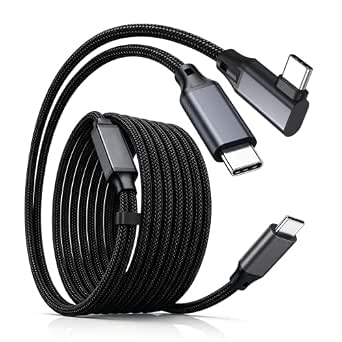 | Best High-Wattage Splitter | Cable Length: 4 ft | Configuration: One input, two outputs | Max Wattage: 140 W | VIEW LATEST PRICE | See Our Full Breakdown |
| 4-in-2 USB-C Splitter Charging Cable, 2-Pack, 4 ft |  | Best Value Multi-Port Option | Cable Length: 4 ft | Quantity: 2 | Connectors: USB-A/C input; 4 USB-C outputs | VIEW LATEST PRICE | See Our Full Breakdown |
| MOGOOD 60W USB-C Splitter Cable, Male to Dual Female |  | Best for Peripheral Connectivity | Connector Type: USB Type-C Male to Dual Female | Ports: 1 Data, 1 Charging | Max Power: 60W PD | VIEW LATEST PRICE | See Our Full Breakdown |
| Anker 2-in-1 USB-C to USB-C Cable, 140W, 4 ft |  | Best Premium Travel Cable | Brand: Anker | Cable Length: 4 ft | Max Wattage: 140 W | VIEW LATEST PRICE | See Our Full Breakdown |
More Details on Our Top Picks
IFLASH Dual-Port USB-C Splitter Charging Cable, 6 ft, Black
This cable stands out for its straightforward design, splitting a single USB-C source into two charging ports without unnecessary complexity. Unlike the Duttek model, which prioritizes high-wattage power delivery, the IFLASH unit focuses on reliability for standard 2A charging, making it a solid choice for users who don’t need 140W speeds. The double-braided nylon construction offers better durability against fraying compared to the silicone jacket on the LISEN cable. However, a significant tradeoff is the lack of simultaneous data transfer; only one device can sync at a time. This limits its utility for users who frequently transfer large files while charging. It requires a native USB-C charger, so those with legacy USB-A bricks will need an adapter.Pros:- Durable double-braided nylon exterior resists tangling and wear
- Generous 6-foot length provides flexibility for desk or bed use
- Simple plug-and-play functionality for basic charging needs
Cons:- Data transfer is restricted to only one device at a time
- Not compatible with USB-A chargers, requiring a USB-C source
- Input current is split, potentially slowing charge times for both devices
Best for: Users with multiple low-power devices who primarily need to charge two phones or tablets simultaneously without worrying about fast-charge protocols.
Not ideal for: Gamers or creators who need to transfer large video files to two devices at once, as data support is single-device only.
- Connector Type:USB-C to 2x USB-C
- Cable Length:6 ft
- Construction:Double-braided nylon
- Max Current:2 A
- Data Transfer:480 Mb/s (one device)
- Compatibility:USB-C chargers only
- Warranty:1-year replacement
Our verdict“A reliable, no-frills splitter for charging two devices, provided you don’t need simultaneous data sync.”
Duttek USB-C Splitter (1-in-2-Out), 140W PD Braided Y-Cable
If raw power is your priority, the Duttek splitter leads this group with its 140W Power Delivery support. This allows it to charge high-demand laptops like MacBooks much faster than the IFLASH or KAYQINHO options, which are limited to lower amperages. The reinforced connectors rated for 10,000 bends suggest a longer lifespan than standard TPE cables. Compared to the LISEN model, the Duttek is more compact at 1.5 meters, making it less prone to clutter on small desks. However, like most splitters in this category, data transfer remains capped at USB 2.0 speeds (480Mbps), which is slow for large backups. It is the best pick for users who need to keep powerful devices topped up quickly.Pros:- Supports up to 140W PD charging for rapid power delivery
- Reinforced connectors designed to withstand over 10,000 bend cycles
- Compact 1.5m length reduces desk clutter compared to longer cables
Cons:- Data transfer speed is limited to USB 2.0 standards
- Power distribution dynamically adjusts, which may vary by device
Best for: Professionals using high-wattage laptops or tablets who need to maintain fast charging speeds while tethering two devices.
Not ideal for: Users who need to transfer large media files simultaneously, as the 480Mbps speed is a bottleneck for modern workflows.
- Max Power Output:140W
- Cable Length:1.5m (4.92ft)
- Data Transfer Rate:480Mbps
- Max Current:5A
- Material:Braided Nylon
- Durability:10,000+ bend cycles
- Weight:12g
Our verdict“The go-to choice for high-speed charging of power-hungry devices, despite limited data transfer capabilities.”
KAYQINHO USB-C Female to Dual USB-C Male Charging Splitter
This adapter serves a specific niche: charging two low-power accessories from a single USB-C source. Unlike the LISEN or Duttek cables, which are designed for phones and laptops, the KAYQINHO unit is best suited for earbuds, smartwatches, or LED lights. It lacks data transfer and video capabilities entirely, making it unsuitable for smartphones or tablets that require syncing. The TPE material is flexible but less durable than the braided nylon found on the IFLASH or Duttek models. Its primary advantage is simplicity and cost-effectiveness for users who already have a USB-C charger and just need to split power for small gadgets. It is a dedicated utility tool, not a general-purpose cable.Pros:- Ideal for low-power devices like earbuds and smartwatches
- Simple TPE construction is lightweight and flexible
- Nickel-plated connectors help resist oxidation over time
Cons:- No support for data transfer or video output
- Limited to low-power charging scenarios (max 15W per port)
Best for: Users who need to charge small accessories like headphones, fans, or lights simultaneously without using multiple wall bricks.
Not ideal for: Anyone needing to charge phones, tablets, or laptops, as it lacks the power output and data protocols for these devices.
- Configuration:1 Female to 2 Male
- Max Current:3 A per port
- Max Output:15 W per port
- Material:TPE
- Data Transfer:Not supported
- Use Case:Charging only
- Connectors:Nickel plated
Our verdict“A specialized splitter for small gadgets, not a replacement for standard device charging cables.”
UGREEN Magnetic USB-C Splitter for Headphones and Charging
The UGREEN splitter addresses a different problem than the pure charging splitters in this list: it allows simultaneous charging and audio playback on a single device. This is a critical feature for users who have dropped the headphone jack but still want to listen while charging. Unlike the LISEN or Duttek cables, which split power to two devices, this unit cannot charge two devices at once. The magnetic connection adds a layer of convenience and safety, reducing strain on the port. The aluminum housing helps with heat dissipation, a common issue with passive splitters. However, its utility is strictly limited to one device, making it a poor choice for multitaskers who need to charge two phones.Pros:- Enables simultaneous charging and audio on one device
- Magnetic connection reduces wear on the USB-C port
- Aluminum housing aids in heat dissipation during charging
Cons:- Cannot charge two devices at the same time
- Does not support data transfer or screen mirroring
Best for: Smartphone users who want to listen to music or take calls while their phone charges, without using a battery pack.
Not ideal for: Users who need to charge two separate devices simultaneously, as this splitter only serves one device’s audio and power needs.
- Ports:1 Input, 2 Outputs
- Max Power:60W PD
- Material:Braided nylon & Aluminum
- Dimensions:0.63 × 1.1 × 0.35 inches
- Weight:1.76 ounces
- Function:Audio + Charging
- Data Support:None
Our verdict“The perfect accessory for single-device users who refuse to sacrifice audio quality while charging.”
LISEN 2-in-1 USB-C to USB-C Charging Cable, 140W, 6 ft
The LISEN cable justifies its premium positioning with a liquid silicone exterior that resists dirt and feels softer than the braided nylon on the Duttek or IFLASH models. It supports up to 140W for a single device, matching the top-tier power delivery of the Duttek. The inclusion of an adjustable split slider is a thoughtful design touch, allowing users to manage cable slack and organization, a feature absent in most competitors. However, it has a strict directional requirement (IN to charger, OUT to device), which can confuse new users. Additionally, when charging two devices, advanced fast-charge protocols like PPS and QC are disabled, falling back to standard PD. This makes it a luxury option for organization and feel, rather than raw versatility.Pros:- Liquid silicone material is easy to clean and resistant to dirt
- Adjustable slider helps organize cable slack and prevent tangles
- Supports up to 140W PD for single-device fast charging
Cons:- Must be connected in a specific direction (IN/OUT)
- Dual-device charging disables PPS and QC fast-charge protocols
Best for: Users who value cable aesthetics and organization, and primarily charge one high-power device at a time.
Not ideal for: Users who need to charge two phones simultaneously using proprietary fast-charge protocols like QC or PPS.
- Max Power:140W
- Cable Length:6 ft
- Material:Liquid silicone & Aluminum
- Data Speed:480 Mbps (single device)
- Protocols:PD 3.1, PPS, QC 4.0
- Dual Charging:Standard PD only
- Warranty:12 months
Our verdict“A premium, well-organized splitter for users who prioritize build quality and single-device speed.”
3-in-1 USB-C Charging Cable, 5 ft, Right-Angle Connectors
This cable stands out for its low-profile right-angle connectors, which make it ideal for charging phones in cars or on desks where space is limited. Unlike the Bismdky 4-in-1, which is bulkier, this 5-foot design tucks neatly against devices. The nylon-braided construction offers solid durability for daily handling. However, it is strictly a standard charging cable; it lacks the fast-charging capabilities found in premium options like the 4 ft 140W USB-C Y-Splitter. While convenient for topping up multiple devices simultaneously, power distribution may reduce charging speeds when all three ports are active. It is a practical choice for travelers who prioritize fit over speed.
Pros:- Right-angle connectors reduce strain and save space.
- Nylon braiding enhances durability against fraying.
- Three USB-C ports allow simultaneous charging of multiple devices.
- 5-foot length offers flexibility for desk or car use.
Cons:- Does not support fast charging standards.
- Charging speed may drop when multiple devices are connected.
- Limited to standard 5V charging speeds.
Best for: Travelers and drivers who need to charge multiple devices in tight spaces without bulky connectors.
Not ideal for: Users who need to charge modern phones quickly, as this cable does not support fast charging protocols.
- Connector Type:USB Type-C
- Cable Length:5 ft
- Number of Connectors:3
- Connector Design:90-degree right angle
- Cable Material:Nylon braided
- Fast Charging:Not supported
- Compatible Devices:Laptops, PCs, smartphones, tablets
Our verdict“This is the best choice for travelers who value a compact, space-saving design over high-speed charging performance.”
iFlash Dual-Port USB-C Charging and Data Cable, Red
The iFlash Dual-Port distinguishes itself by supporting data transfer up to 480 Mbps, a feature absent in many purely charging-focused splitters. This makes it suitable for users who need to sync devices while charging, unlike the 3-in-1 USB-C Charging Cable, which is charge-only. The female-to-female configuration allows you to use your existing USB-C-to-USB-C cables, offering flexibility. However, data transfer is limited to one device at a time, and charging current is split between connected devices. While the nylon braided exterior is durable, the requirement for a USB-C charger limits compatibility with older USB-A power bricks. It is a versatile tool for tech-savvy users who need both power and data in a single compact unit.
Pros:- Supports data transfer up to 480 Mbps.
- Female-to-female design allows use of existing USB-C cables.
- Compact and lightweight at 14.2 g.
- Nylon braided construction resists damage.
Cons:- Data transfer works with only one device at a time.
- Charging current is split between connected devices.
- Incompatible with USB-A chargers.
Best for: Users who need to transfer data between devices and charge them simultaneously using existing USB-C cables.
Not ideal for: People with older USB-A chargers, as this splitter requires a USB-C power source to function.
- Connector Type:USB Type-C
- Data Transfer Rate:Up to 480 Mbps
- Material:Nylon braided
- Color:Red
- Item Weight:14.2 g
- Warranty:1-year manufacturer replacement
- Compatible Devices:iPhone 15–17, Samsung Galaxy S20–S25, Pixel 2–8, MacBook, iPad
Our verdict“This splitter is ideal for users who require data syncing capabilities alongside charging, offering more utility than standard power-only cables.”
IFLASH 6ft Dual Port USB-C Splitter Charging Cable (Black)
With a 6-foot length, this cable offers significantly more reach than the Bismdky 4 ft model, making it perfect for bedside charging or reaching distant outlets. The double-braided nylon construction feels more robust than standard single-braid options, providing better resistance to bending and tangling. Like its shorter sibling, it supports data transfer for one device at a time, adding versatility beyond simple charging. However, the 2A total current is split between devices, meaning charging speeds will be slower if both ports are in use. While the black color is discreet, the lack of fast charging support means it is not ideal for powering up large laptops quickly. It is a solid, durable choice for users who prioritize cable length and build quality over maximum charging speed.
Pros:- 6-foot length provides ample reach for distant outlets.
- Double-braided nylon offers superior durability.
- Supports data transfer for one connected device.
- Broad compatibility with modern USB-C devices.
Cons:- Charging speed is reduced when both devices are connected.
- Requires a USB-C power source.
- Data transfer is limited to one device at a time.
Best for: Users who need extra cable length for bedside or office setups and prefer a durable, long-lasting build.
Not ideal for: Those who need to charge two high-power devices simultaneously at full speed, as the current is split.
- Length:6 feet
- Connector Type:USB Type-C (Female-to-Female)
- Data Transfer Rate:480 Mbps
- Maximum Current:2A total
- Material:Double-Braided Nylon
- Color:Black
- Warranty:1 Year Manufacturer Replacement
Our verdict“This is the best option for users who need a longer, more durable cable for charging multiple devices from a single port.”
KiwiBird USB-C Splitter, 1 Male to 2 Female Ports
This compact adapter is designed to expand a single USB-C port into two, making it invaluable for ultrabooks with limited connectivity. Unlike the iFlash Dual-Port, which is a cable, this male-to-female design plugs directly into the device, reducing cable clutter. It supports USB 2.0 data transfer and basic charging, but the 1.5 A limit means it is not suitable for fast charging phones or powering laptops. Simultaneous charging and data transfer may not work in all configurations, a notable drawback compared to more robust splitters. It is best viewed as a peripheral expander for low-power devices like mice or keyboards, rather than a primary charging solution. For users needing more ports on a laptop, this offers a sleek, driver-free solution.
Pros:- Compact, lightweight design for easy portability.
- Expands one USB-C port into two without drivers.
- Supports USB 2.0 data transfer.
- Plug-and-play functionality.
Cons:- Limited to 1.5 A charging current.
- Simultaneous charging and data transfer may fail.
- Not suitable for high-power devices.
Best for: Laptop users who need to connect two low-power peripherals or devices to a single USB-C port.
Not ideal for: Users looking to fast-charge smartphones or power laptops, as the 1.5 A output is insufficient for high-demand devices.
- Configuration:1 male to 2 female ports
- Data Transfer Rate:Up to 480 Mbps
- Maximum Current:1.5 A
- Maximum Voltage:5 V
- Weight:14.2 g
- Warranty:1 year
- Compatibility:USB-C chargers, computers, phones, tablets
Our verdict“This adapter is best suited for expanding connectivity on laptops for low-power peripherals, not for heavy charging duties.”
Bismdky 2-Pack 4 ft 4-in-1 USB-C Charging Cable, Nylon Braided, Green
Getting two cables in one package makes this the best value option for households or offices with multiple users. Each cable features four USB-C connectors, allowing you to charge up to four devices simultaneously, far exceeding the two-device limit of the iFlash Dual-Port. The aluminum housing adds a premium feel and improves heat dissipation compared to plastic alternatives. With support for QC 3.0 fast charging and a 3.1 A maximum current, it offers faster charging speeds than the standard splitters in this lineup. However, the 4-foot length is shorter than the 6-foot IFLASH model, which may be restrictive for some setups. This pack is ideal for those who want to charge multiple phones or tablets at once without buying individual cables.
Pros:- Two-pack offers excellent value for money.
- Four USB-C connectors per cable for multi-device charging.
- Supports QC 3.0 fast charging.
- Aluminum housing enhances durability and heat resistance.
Cons:- 4-foot length may be too short for some users.
- Limited to USB-C devices only.
- Current is split among four devices, potentially slowing speeds.
Best for: Families or offices needing to charge multiple devices simultaneously with a cost-effective multi-pack.
Not ideal for: Users who need long cables for distant outlets, as the 4-foot length may be too short for some setups.
- Cable Configuration:4-in-1 splitter with four USB-C connectors
- Charging Standard:QC 3.0
- Maximum Current:3.1 A
- Materials:Nylon braid and aluminum housing
- Quantity:2 cables
- Color:Green
- Item Weight:0.24 kg
- Cable Length:4 ft
Our verdict“This multi-pack is the best choice for users who want to charge many devices at once with fast-charging support and good build quality.”
4-in-1 USB-C Multi-Charging Cable, 5 ft, 2-Pack
This two-pack stands out for simultaneous multi-device charging, offering four USB-C endpoints per cable. While the Anker 2-in-1 focuses on high-wattage single-device speed, this option prioritizes volume, allowing you to charge a phone, tablet, and two smaller accessories from one power source. The braided nylon construction resists tangling better than standard PVC cables, a common weakness in budget splitters. However, data transfer is severely limited, functioning through only one port, which makes it unsuitable for syncing multiple devices at once. Compared to the MOGOOD 60W Splitter, which is designed for peripheral usage, this cable is strictly for power delivery. The included USB-A adapter adds flexibility for older chargers, but the lack of simultaneous data sync means you must choose between charging speed and file transfer capability.
Pros:- Charges four devices simultaneously from one input
- Includes a USB-A adapter for broader charger compatibility
- Braided nylon resists tangling and wear
- Two-pack provides backup or multi-room coverage
Cons:- Data transfer and CarPlay work through only one port
- Not suitable for high-power laptop charging
- Bulkier than single-output splitters
Best for: Families or travelers who need to charge multiple low-power USB-C devices simultaneously from a single adapter.
Not ideal for: Users who need to transfer data from multiple devices at once or charge high-wattage laptops.
- Cable Length:5 ft
- Connectors:USB Type-A and USB Type-C
- Charging Ports:4 USB-C ports
- Data Transfer:One USB-C port only
- Cable Material:Braided nylon
- Package Quantity:2 cables
- Protection:Overheat, overvoltage, overcurrent
Our verdict“Ideal for households needing to charge several gadgets at once, though it sacrifices multi-device data syncing.”
4 ft 140W USB-C Y-Splitter Charging Cable with 90° Connector
This cable is engineered for maximum power delivery, supporting up to 140W PD 3.1 charging. Unlike the 4-in-1 Multi-Charging Cable, which splits power thinly across four devices, this Y-splitter divides 140W between two outputs, making it capable of charging modern high-performance laptops. The 90-degree connector and cable management slider are thoughtful touches for desk setups where cable clutter is an issue. While the Anker 2-in-1 offers similar wattage, this model adds reinforced aluminum connectors and a slider for better storage. The tradeoff is data transfer; like many splitters, it only supports data for one device at a time. It is a premium build choice for users who prioritize charging speed and durability over multi-device flexibility.
Pros:- Supports up to 140W PD 3.1 charging
- 90° connector reduces strain on ports
- Reinforced aluminum connectors enhance durability
- Cable slider aids in storage and organization
Cons:- Data transfer works for only one device at a time
- Requires a separate 140W power adapter
- Heavier and stiffer than standard cables
Best for: Professionals charging two high-wattage devices (like a laptop and phone) from a single powerful adapter.
Not ideal for: Users with multiple low-power accessories who don’t need 140W throughput.
- Cable Length:4 ft
- Configuration:One input, two outputs
- Max Wattage:140 W
- Data Transfer Rate:480 Mbps (one device)
- Connector Material:Aluminum alloy
- Bend Testing:25,000+ bends
- Outer Material:Braided nylon
Our verdict“The best choice for high-power dual-device charging, though it requires a compatible high-wattage adapter.”
4-in-2 USB-C Splitter Charging Cable, 2-Pack, 4 ft
This two-pack offers an economical entry point into multi-device charging, providing four USB-C outputs per cable. While the 4-in-1 Multi-Charging Cable includes a USB-A adapter, this model focuses on native USB-C inputs, which may require specific wall adapters. It supports QC 3.0 fast charging up to 3.1 A, which is sufficient for phones and tablets but lacks the 140W capacity of the Anker 2-in-1 or Sufywupe Y-Splitter. The nylon-braided jacket ensures durability comparable to more expensive options, and the inclusion of overcurrent protection adds peace of mind. However, the 40W maximum output means it cannot handle power-hungry laptops. It is a practical choice for charging multiple smaller devices without the premium price tag or complex feature set.
Pros:- Charges up to four devices simultaneously
- Affordable two-pack value
- Braided construction with reinforced connectors
- Supports QC 3.0 fast charging
Cons:- Maximum output capped at 40W
- Fast charging depends on compatible charger
- No USB-A input adapter included
Best for: Budget-conscious users needing to charge several phones or tablets from a single USB-C source.
Not ideal for: Anyone needing to charge laptops or devices requiring more than 40W.
- Cable Length:4 ft
- Quantity:2
- Connectors:USB-A/C input; 4 USB-C outputs
- Max Wattage:40 W
- Max Current:3.1 A
- Data Transfer Rate:480 Mbps
- Material:Nylon braided
Our verdict“A solid, affordable choice for charging multiple low-power devices, though it lacks high-wattage capability.”
MOGOOD 60W USB-C Splitter Cable, Male to Dual Female
This cable serves a distinct niche: charging while using a peripheral. Unlike the Y-Splitters that divide power between two phones, this MOGOOD model provides one data port and one charging port, allowing you to connect a DAC, SSD, or VR headset while maintaining power. It supports up to 60W PD, which is adequate for most tablets and smaller laptops, but falls short of the 140W capacity found in the Anker 2-in-1. The braided construction matches the durability of competitors, but its primary limitation is the lack of video output support and Samsung fast charging compatibility. This makes it a specialized tool rather than a general-purpose charging cable, best suited for users who refuse to sacrifice peripheral connectivity for battery life.
Pros:- Allows simultaneous charging and peripheral usage
- Supports up to 60W PD charging
- Durable braided nylon construction
- Dedicated USB 2.0 data port for peripherals
Cons:- Does not support video output
- No support for Samsung fast charging
- Charging port is input-only
Best for: Gamers, audiophiles, or creators who need to use USB-C accessories while keeping their device charged.
Not ideal for: Users looking to charge two devices simultaneously or transfer video signals.
- Connector Type:USB Type-C Male to Dual Female
- Ports:1 Data, 1 Charging
- Max Power:60W PD
- Data Transfer:480 Mbps
- Cable Material:Nylon braided
- Video Output:Not supported
- Compatibility:Quest VR, DAC, GoPro, Steam Deck
Our verdict“Essential for users who need to charge their device while maintaining a connection to a USB-C peripheral.”
Anker 2-in-1 USB-C to USB-C Cable, 140W, 4 ft
Anker’s 2-in-1 cable is a premium travel companion, balancing high-wattage performance with smart design. It supports 140W charging, matching the raw power of the Sufywupe Y-Splitter, but adds an adjustable section and cable slider for superior portability. While the 4-in-1 Multi-Charging Cable offers more ports, this Anker model focuses on reliability and build quality, rated for over 10,000 bends. The 18-month warranty provides reassurance that many generic competitors lack. However, it only offers two outputs, limiting it compared to four-port splitters, and the data transfer rate remains capped at 480 Mbps. This is the choice for those who value brand trust, compact design, and high-speed charging for two devices over maximum port count.
Pros:- Supports up to 140W charging
- Adjustable length and cable slider for travel
- Durable braided design (10,000+ bends)
- Backed by a 18-month warranty
Cons:- Only two output ports
- Data transfer limited to 480 Mbps
- Higher price point than generic alternatives
Best for: Frequent travelers who need a reliable, high-power cable for two devices with easy storage.
Not ideal for: Users who need to charge more than two devices at once or require high-speed data transfer.
- Brand:Anker
- Cable Length:4 ft
- Max Wattage:140 W
- Data Transfer:480 Mbps
- Weight:54.8 g
- Warranty:18 months
- Outer Material:Nylon
Our verdict“A top-tier choice for travelers who prioritize build quality and high-wattage charging for two devices.”
How We Picked
I evaluated these fifteen USB-C splitter cables by focusing on three core pillars: power delivery efficiency, physical durability, and connector compatibility. I prioritized models that maintain stable voltage output when multiple devices are connected, as this is the most common failure point in cheaper alternatives. Build quality was assessed by examining materials, specifically looking for braided nylon jackets and reinforced stress relief at the connector heads, which significantly extend the lifespan of the cable.
Ranking logic favored versatility and reliability. Products offering both charging and data transfer capabilities were ranked higher than charging-only models, provided they maintained competitive power ratings. I also gave weight to user-friendly design features, such as right-angle connectors for tight spaces and compact form factors for travel. Brands with a track record of safety certifications and consistent warranty support were preferred over unbranded generic options, ensuring peace of mind for high-power charging applications.
Factors to Consider When Choosing Best USB-C Splitter Cables
Choosing the right splitter requires understanding how USB-C power negotiation works, as not all cables are created equal. This guide breaks down the technical and practical factors that separate a reliable cable from a frustrating accessory.Understanding Power Distribution and Wattage
Most USB-C splitters are passive, meaning they do not actively negotiate power between ports. If you plug in two high-power devices, the total wattage from the source is split, often resulting in slower charging for both. Check the maximum total wattage of your source charger; a 60W charger split between two phones may only deliver 30W each, which can be insufficient for fast charging. For laptops, look for splitters rated for 100W or 140W to ensure one port can still provide enough juice for full-speed charging while the other handles a smaller device.
Data Transfer vs. Charging Only
A critical distinction in this category is whether the cable supports data transfer. Many inexpensive splitters are wired only for power, meaning you cannot sync files or connect peripherals through them. If you need to connect a hard drive or use a USB-C hub, you must verify that the cable supports USB 2.0 or higher data speeds. The Duttek model, for instance, includes data lines, whereas many generic ‘charging splitters’ do not. Assume it is charging-only unless the product description explicitly states data transfer rates.
Connector Durability and Build Materials
Splitter cables are subject to more stress than standard cables because they often sit stationary on a desk or nightstand while devices are plugged and unplugged. Braided nylon exteriors offer better resistance to abrasion and tangling than standard PVC. Pay attention to the strain relief area where the cable meets the connector; a rigid or thin connection here is a common failure point. Metal housings on the connectors themselves also provide better heat dissipation during high-wattage charging sessions, which can prolong the life of the internal wiring.
Form Factor and Space Constraints
The physical shape of the splitter matters more than you might think. Standard straight connectors can block adjacent ports on laptops or wall adapters. Right-angle (L-shaped) connectors are superior for tight spaces, such as bedside charging or car dashboards, as they allow the cable to lie flat. Compact splitters are also easier to store in a tech pouch. If you plan to use the splitter with a laptop that has closely spaced ports, a slim or right-angle design is not just a convenience, but a necessity for usability.
Frequently Asked Questions
Can I charge two laptops simultaneously with a USB-C splitter?
Generally, no. Most USB-C splitters are designed to split power from one source to two smaller devices, not to power two high-draw devices like laptops. If you plug in two laptops, the total power available (e.g., 60W or 100W) is divided, often resulting in insufficient wattage for either device to charge effectively or at all. Some advanced active splitters with external power sources can handle this, but standard passive Y-cables cannot. It is best to use a single splitter for one laptop and one smaller device, or two phones/tablets.Why does my device charge slower when I use a splitter?
This happens because USB-C power delivery is negotiated based on the maximum current the source can provide. When a splitter is used, the source adapter typically defaults to a lower amperage per port to prevent overheating or overload, as it cannot distinguish between one or two connected devices. For example, a 20W charger might drop to 10W per port when two devices are connected. To minimize this drop, use a high-wattage charger (65W+) and ensure the splitter supports high-amp pass-through, though the inherent split in power is a physical limitation of passive cables.Are USB-C splitter cables safe for my phone’s battery?
Yes, provided you use a certified or reputable brand. USB-C devices include internal charging controllers that prevent drawing more power than they can handle, so overcharging is not a risk. However, low-quality, unbranded cables may lack proper shielding or use substandard wiring, which can lead to overheating or voltage instability. Look for cables with safety certifications like E-Marker chips for high-wattage cables, which help the charger and device negotiate the correct power profile safely. Avoid extremely cheap, no-name options for expensive electronics.What is the difference between a 1-to-2 and a 1-to-3 splitter?
A 1-to-2 splitter has one male USB-C connector and two female ports, allowing you to charge two devices from one source. A 1-to-3 splitter adds a third port, usually for a small device like a smartwatch or earbuds, which draws minimal power. The main difference is power distribution; a 1-to-3 splitter will further dilute the available wattage across three outputs, making it unsuitable for charging two laptops or tablets simultaneously. Choose a 1-to-3 only if you frequently need to charge multiple small accessories at once from a single outlet.Can I use a USB-C splitter for data transfer with an iPhone?
You can, but only if the specific splitter cable supports data transfer and your iPhone model has a USB-C port. Most older iPhones (Lightning) require a Lightning cable, so a USB-C splitter will only charge them, not transfer data. For iPhone 15 and newer models with USB-C, ensure the splitter explicitly lists ‘data transfer’ or ‘sync’ capabilities. Many charging-only splitters lack the data pins required for file transfer, so check the specifications carefully before assuming it will work for backing up your phone.Conclusion
Selecting the right USB-C splitter depends on your specific power and connectivity needs. For the best overall balance of power, data, and durability, I recommend the Duttek USB-C Splitter. Its 140W rating and data capabilities make it the most versatile option for professionals and power users. If you are looking for the best value and don’t need data transfer, the IFlash Dual-Port provides reliable charging at a lower cost. For premium travelers, the Anker 2-in-1 offers compact design and trusted build quality. Beginners should stick to well-known brands like Anker or UGREEN to ensure safety and compatibility. If you have tight spaces, prioritize models with right-angle connectors like the 3-in-1 Right-Angle Cable to avoid port blockage.