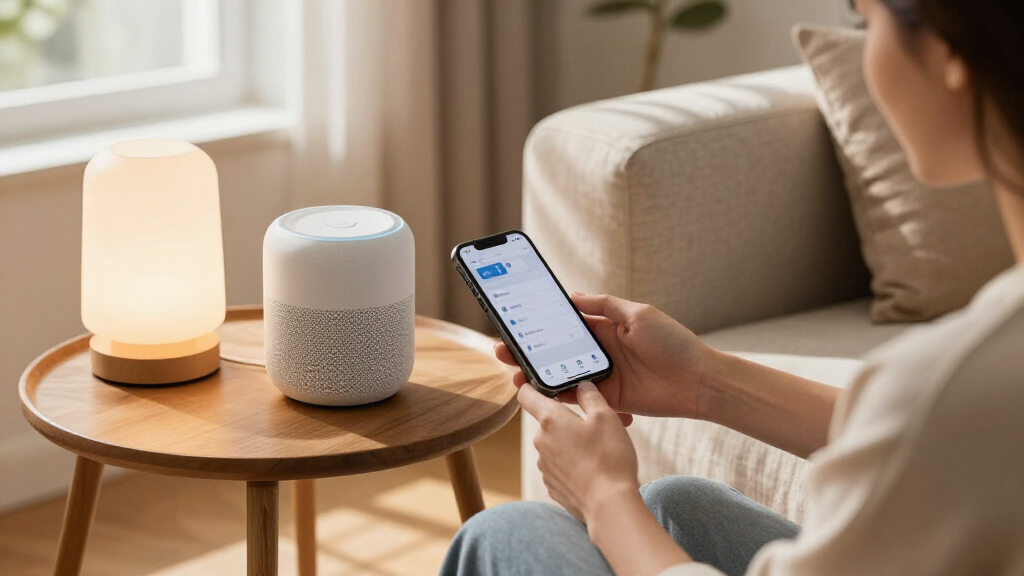

For most Apple households, the Apple HomePod (2nd Generation) is the best overall HomeKit pick because it combines Siri control, smart-home hub functions, and room-filling audio. The Kasa KS200P3 is a practical choice for controlling existing lights at the wall, while the TP-Link Tapo P125M offers a simple Matter-based way to add plug-in devices. The tradeoffs are mainly about whether you need a hub, want to control a whole circuit or one outlet, and prefer native HomeKit support or Matter compatibility. This roundup also covers scene controls, bulbs, a table lamp, and garage access, so you can match the device to the job. Continue reading for the full breakdown and the buying advice that helps narrow your choice.

Get the latest gadgets delivered free with Prime
- Fast, free delivery on millions of items
- Prime Video, Amazon Music and more included
- Member-only deals all year
Complete the kit



Key Takeaways
- The HomePod is the broadest starting point: it adds Siri speaker control and can act as a home hub, while the other picks focus on specific devices or routines.
- Wall switches and smart plugs solve different problems: the Kasa KS200P3 controls compatible hardwired lighting, while plug-in models are better for lamps and other corded devices.
- Matter support appears across several picks, including Linkind bulbs and plugs and the Tapo plug, but Matter compatibility does not remove the need to check Apple Home setup and network requirements.
- The Onvis controller fills a physical-control gap: its five keys can trigger scenes without asking Siri or opening an app, though it has an iOS version requirement.
- Specialty devices are only compelling when they fit the task: the Meross garage opener adds HomeKit control to garage access, while the table lamp and bulbs suit different lighting setups.
| Apple HomePod (2nd Generation) Smart Speaker with Siri, Midnight |  | Best HomeKit Hub and Speaker | Brand: Apple | Model: MDEW4LL/A | Color: Midnight | VIEW LATEST PRICE | See Our Full Breakdown |
| Kasa KS200P3 Apple HomeKit Smart Light Switch, Single Pole |  | Best for Replacing a Wall Switch | Model: KS200P3 | Switch type: Single-pole, on/off | Operating voltage: 100–120 VAC, 50/60 Hz | VIEW LATEST PRICE | See Our Full Breakdown |
| Onvis Smart Button – 5-Key Thread & Bluetooth Scene Controller for Apple HomeKit |  | Best Physical Scene Controller | Controller: Apple HomeKit, iOS | Connectivity protocols: Thread and Bluetooth | Programmable keys: 5 | VIEW LATEST PRICE | See Our Full Breakdown |
| Linkind Matter Smart LED Bulbs, 6-Pack, A19 E26, 60W Equivalent |  | Best Multi-Bulb Color Upgrade | Pack size: 6 bulbs | Bulb shape and base: A19, E26 | Light output: 800 lumens | VIEW LATEST PRICE | See Our Full Breakdown |
| meross Smart Table Lamp with HomeKit, Alexa, and SmartThings Compatibility |  | Best All-in-One Bedside Lamp | Bulb base and shape: E26 medium, A19 | Light source: LED | Wattage: 6 watts | VIEW LATEST PRICE | See Our Full Breakdown |
| Meross Smart Garage Door Opener Remote (Works with HomeKit, Alexa, Google Assistant) |  | Best HomeKit Garage Upgrade | Compatible platforms: Apple HomeKit, Amazon Alexa, SmartThings, Google Home | Connectivity: 2.4 GHz Wi-Fi | Supported devices: 1 | VIEW LATEST PRICE | See Our Full Breakdown |
| Kasa Smart Plug Mini 15A with Energy Monitoring and Apple HomeKit Support |  | Best HomeKit Plug for Energy Tracking | Model: EP25P4 | Maximum current: 15 A | Maximum wattage: 1800 W | VIEW LATEST PRICE | See Our Full Breakdown |
| TP-Link Tapo P125M Matter Smart Plug Mini, 15A/1800W, 3-Pack |  | Best Matter Smart Plug Pack | Model: Tapo P125M | Pack size: 3 plugs | Maximum current: 15 A | VIEW LATEST PRICE | See Our Full Breakdown |
| Linkind Matter Smart Plug, 4-Pack | 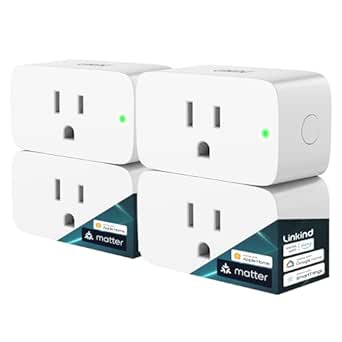 | Best Four-Pack for Multi-Room Setups | Model: LC09003256 | Pack size: 4 plugs | Plug type: Type A | VIEW LATEST PRICE | See Our Full Breakdown |
| Apple HomeKit smart home device | Connectivity | Model |
|---|---|---|
| Apple HomePod | — | MDEW4LL/A |
| Kasa KS200P3 Apple HomeKit Sma | 2.4 GHz Wi-Fi | KS200P3 |
| Onvis Smart Button | — | — |
| Linkind Matter Smart LED Bulbs | 2.4 GHz Wi-Fi and Matter | — |
| meross Smart Table Lamp with H | Wi-Fi | — |
| Meross Smart Garage Door Opene | 2.4 GHz Wi-Fi | — |
| Kasa Smart Plug Mini 15A with | 2.4 GHz Wi-Fi | EP25P4 |
| TP-Link Tapo P125M Matter Smar | Matter, Wi-Fi, Bluetooth | Tapo P125M |
| Linkind Matter Smart Plug | — | LC09003256 |
More Details on Our Top Picks
Apple HomePod (2nd Generation) Smart Speaker with Siri, Midnight
The HomePod (2nd Generation) is the strongest choice here for buyers who want a capable HomeKit control point alongside room-filling audio. Siri handles voice requests, while the built-in temperature and humidity sensors can contribute to home automations; Matter and Thread support also broadens the range of compatible accessories. Compared with the Kasa KS200P3 switch, which upgrades one wired lighting circuit, the HomePod can anchor voice control and automations across multiple devices. Its woofer and five beamforming tweeters make it a more complete speaker than a scene controller or smart bulb, but it takes up tabletop space and costs more in complexity than a single-purpose accessory. Choose it if audio and smart-home control belong in one device; skip it if you only need to automate a light.
Pros:- Combines Siri voice control with high-fidelity audio from a 4-inch woofer and five beamforming tweeters
- Matter and Thread support works with a wider range of compatible smart-home accessories
- Temperature and humidity sensors can inform Home automations
- Two HomePods can be paired for stereo sound
Cons:- Its tabletop speaker design takes more room than compact controls such as the Onvis Smart Button
- May be more device than needed for buyers seeking only a switch or lighting control
Best for: Apple households seeking a central voice-control device that also delivers substantial music playback and supports Thread accessories
Not ideal for: Buyers who only need to control one light or already have a suitable HomeKit hub and do not want another tabletop speaker
- Brand:Apple
- Model:MDEW4LL/A
- Color:Midnight
- Woofer:1 × 4-inch
- Tweeters:5 beamforming
- Microphones:4
- Maximum output power:38 watts
- Smart home compatibility:Matter and Thread
- Sensors:Temperature and humidity
Our verdict“Choose the HomePod if you want one device for Siri, HomeKit control, Thread support, and serious listening; skip it for a single-purpose automation.”
Kasa KS200P3 Apple HomeKit Smart Light Switch, Single Pole
The Kasa KS200P3 makes the most sense when you want to bring an existing light circuit into Apple Home without replacing the bulbs. Its single-pole on/off control keeps familiar wall-switch operation, while schedules, timers, Away Mode, and Siri access add remote management. Unlike the Linkind Matter Smart LED Bulbs, it can control compatible fixtures using ordinary bulbs, which suits rooms where changing every lamp would be inconvenient. It also needs no hub, but installation is less plug-and-play: the circuit must have a neutral wire, and the switch depends on 2.4 GHz Wi-Fi. This is a practical fixed-lighting upgrade, not a dimmer or a solution for homes without the required wiring.
Pros:- Adds Apple HomeKit, Alexa, and Google Assistant control to a hardwired light
- No separate hub is required
- Schedules, timers, remote control, and Away Mode support everyday routines
- Works with existing compatible bulbs rather than requiring smart bulbs
Cons:- Requires a neutral wire, which some older switch boxes lack
- Connects over 2.4 GHz Wi-Fi rather than Thread
- Single-pole on/off design does not provide dimming
Best for: Homeowners with a neutral wire who want Siri, scheduling, and remote control for a hardwired single-pole light without changing bulbs
Not ideal for: Renters or buyers with no neutral wire, multi-way lighting, or a need for dimming rather than simple on/off control
- Model:KS200P3
- Switch type:Single-pole, on/off
- Operating voltage:100–120 VAC, 50/60 Hz
- Connectivity:2.4 GHz Wi-Fi
- Compatible assistants:Apple Siri, Amazon Alexa, Google Assistant
- Installation requirement:Neutral wire
- Hub requirement:No hub required
- Dimensions:5.04 × 3.33 × 1.41 inches
- Warranty:2 years
Our verdict“Pick the Kasa switch for a wired single-pole light and an available neutral wire; choose Linkind bulbs instead if you want color control without switch installation.”
Onvis Smart Button – 5-Key Thread & Bluetooth Scene Controller for Apple HomeKit
The Onvis Smart Button is for Apple Home users who prefer a quick press to a spoken command or phone app. Five programmable keys, each supporting single, double, and long presses, provide up to 15 scene actions from one compact surface. That gives it a different job from the meross Smart Table Lamp: the lamp is a controllable light, while Onvis can trigger scenes across compatible bulbs, plugs, and accessories. Its Thread and Bluetooth connectivity offer connection options, and local encrypted control suits buyers who want commands kept within the HomeKit setup. The catch is that Thread operation requires a Thread-enabled Apple Home hub, and the button is limited to Apple HomeKit. Skip it if you want a standalone switch or cross-platform controller.
Pros:- Five programmable keys support single, double, and long presses for up to 15 scenes
- Thread and Bluetooth provide two connection protocols
- Local operation with end-to-end encryption avoids cloud reliance for control
- Compact surface-mount design includes tape and a magnetic strip
Cons:- Thread use requires a Thread-enabled Apple Home hub
- Limited to Apple HomeKit rather than broad multi-platform control
- Controls scenes and accessories rather than supplying its own lighting or power function
Best for: Apple Home users who want a wall- or fridge-mounted button to trigger several lighting and accessory scenes without reaching for a phone
Not ideal for: Households without a Thread-enabled Apple Home hub or buyers who need a controller that works across multiple smart-home ecosystems
- Controller:Apple HomeKit, iOS
- Connectivity protocols:Thread and Bluetooth
- Programmable keys:5
- Press actions:Single, double, and long press
- Scene capacity:Up to 15 scenes
- Operating voltage:3 V
- Mounting type:Surface mount
- Dimensions:2.17 × 0.79 × 2.17 inches
- Compatible devices:Apple HomeKit-enabled smart bulbs, plugs, and other accessories
Our verdict“Choose Onvis if you want one compact physical control for many Apple Home scenes and already have the required hub.”
Linkind Matter Smart LED Bulbs, 6-Pack, A19 E26, 60W Equivalent
For outfitting several lamps or fixtures at once, Linkind’s six-bulb pack brings color and app-based control to more rooms than a single smart lamp. Each A19 bulb delivers 800 lumens while using 9 watts, and Matter compatibility lets it join Apple Home alongside Alexa and Google Home setups. Compared with the meross Smart Table Lamp, these bulbs are better for spreading smart lighting across existing fixtures; the Meross is the simpler single-device choice when you want an integrated lamp with touch controls. Linkind adds 16 million colors and preset scenes, but its 2.4 GHz Wi-Fi connection and dimmer-switch incompatibility narrow where it fits. The music-sync feature also depends on the AiDot app accessing a phone microphone.
Pros:- Six bulbs let buyers extend smart lighting across multiple fixtures
- Matter support works with Apple Home, Alexa, and Google Home
- Offers 16 million colors and 104 preset scenes
- Provides 800 lumens at 9 watts per bulb
Cons:- Generally incompatible with traditional dimmer switches
- Uses 2.4 GHz Wi-Fi rather than Thread
- Music sync requires the AiDot app to access the phone microphone
Best for: Apple Home households ready to add color and app control to several indoor A19 fixtures while keeping their existing lamps
Not ideal for: Buyers with traditional dimmer switches, non-A19 fixtures, or a preference for Thread-connected bulbs rather than Wi-Fi
- Pack size:6 bulbs
- Bulb shape and base:A19, E26
- Light output:800 lumens
- Power:9 watts
- Incandescent equivalent:60 watts
- Connectivity:2.4 GHz Wi-Fi and Matter
- Supported platforms:Apple Home, Alexa, Google Home
- Operating life:25,000 hours
- Color rendering index:90
Our verdict“Choose the Linkind pack to add Matter-based color lighting to several compatible fixtures, but avoid it where traditional dimmers are installed.”
meross Smart Table Lamp with HomeKit, Alexa, and SmartThings Compatibility
The meross Smart Table Lamp is the more contained lighting choice for a desk or bedside table: it combines the lamp and smart controls in one corded unit, rather than asking you to fit Linkind bulbs into existing fixtures. It offers touch, app, and voice control, adjustable brightness, tunable white light from 2700–6500 K, and color options. Apple HomeKit support sits alongside Alexa and SmartThings, so it can suit a mixed-platform home better than the Apple-only Onvis Smart Button. Meross also lists local app control when the internet is down, a useful distinction for basic access. The tradeoff is flexibility: it is one tabletop light, not a way to automate several fixtures, and its corded, non-water-resistant design limits placement.
Pros:- Combines touch, app, and voice controls in one tabletop lamp
- Offers brightness adjustment, tunable white light, and 16 million colors
- Compatible with Apple HomeKit, Alexa, and SmartThings
- Local control through the Meross app is available when the internet is down
Cons:- Corded power limits placement and portability
- Not water resistant, so it is intended for indoor use
- Controls one light source rather than upgrading multiple fixtures like the Linkind bulb pack
Best for: Apple Home users furnishing a bedside table or desk who want one lamp with touch, voice, dimming, and color control
Not ideal for: Buyers who need outdoor lighting, a cordless lamp, or smart control across multiple existing fixtures
- Bulb base and shape:E26 medium, A19
- Light source:LED
- Wattage:6 watts
- Voltage:12 volts
- Color temperature:2700–6500 K
- Brightness:1%–100%
- Controls:Touch, app, and voice
- Connectivity:Wi-Fi
- Compatible platforms:Apple HomeKit, Amazon Alexa, SmartThings
Our verdict“Choose the Meross lamp for a feature-rich bedside or desk light in a fixed indoor spot, not for whole-room bulb upgrades.”
Meross Smart Garage Door Opener Remote (Works with HomeKit, Alexa, Google Assistant)
The Meross MSG100HK is the pick for adding HomeKit control to a compatible garage door without replacing the opener. Its sensor reports whether the door is open or closed, so Siri control is paired with useful status checks rather than a command that leaves you guessing. You can also set automatic closing schedules, while the existing wall button and remote remain usable. Compared with the Kasa Smart Plug Mini, which controls ordinary plug-in devices and tracks their energy use, this Meross solves a more specific access and security problem. The tradeoff is compatibility: it works with many openers, but some models need an extra adapter. It also uses 2.4 GHz Wi-Fi only, so it may not suit homes with a different network setup.
Pros:- Adds HomeKit control without replacing a compatible garage-door opener
- Reports door status and supports automatic closing schedules
- Works with Siri and several other major voice assistant platforms
- Leaves the original wall button and remote functional
Cons:- Some opener models may require an additional adapter
- Connects over 2.4 GHz Wi-Fi only
- Designed to support one garage-door opener
Best for: HomeKit households that want remote garage-door status and control while keeping their existing opener, wall button, and remote.
Not ideal for: Owners of incompatible garage openers who do not want to source an adapter, or households without a 2.4 GHz Wi-Fi network.
- Compatible platforms:Apple HomeKit, Amazon Alexa, SmartThings, Google Home
- Connectivity:2.4 GHz Wi-Fi
- Supported devices:1
- Control:App and voice control
- Maximum range:200 meters
- Dimensions:3 × 2 × 1 inches
- Weight:311 g
Our verdict“Choose the Meross if you want HomeKit access and door-status checks for a compatible existing garage opener without changing your usual controls.”
Kasa Smart Plug Mini 15A with Energy Monitoring and Apple HomeKit Support
The Kasa Smart Plug Mini makes the most sense when energy data matters alongside simple HomeKit on/off control. It records real-time and historical consumption, which can help identify how much a lamp, fan, or other plugged-in appliance is using. Its 15 A, 1800 W rating supports a range of household devices, and its compact shape is designed to leave the neighboring outlet accessible. Unlike the three-plug Tapo P125M pack, this Kasa’s standout is energy monitoring, not Matter-based local control across platforms. It connects directly over Wi-Fi without a hub, but only on 2.4 GHz. There is also a HomeKit remote-control caveat: access away from home requires an additional networked Apple device at home.
Pros:- Tracks real-time and historical energy consumption
- Supports Apple HomeKit and several other assistant platforms
- Compact form is designed to keep the adjacent outlet accessible
- Offers scheduling, timers, and remote control without a separate hub
Cons:- Uses 2.4 GHz Wi-Fi only
- HomeKit remote control requires an additional networked Apple device at home
- Rated for loads up to 15 A and 1800 W
Best for: HomeKit users who want to schedule a plug-in appliance and track its energy use, with an Apple device at home for remote access.
Not ideal for: Buyers who want Matter-based local control during internet outages, need a multi-plug pack, or lack a 2.4 GHz network and a suitable home Apple device for remote control.
- Model:EP25P4
- Maximum current:15 A
- Maximum wattage:1800 W
- Operating voltage:120 V AC
- Connectivity:2.4 GHz Wi-Fi
- Compatible assistants:Apple HomeKit, Siri, Amazon Alexa, Google Assistant, SmartThings
- Hub required:No
- Warranty:2-year limited
Our verdict“Pick the Kasa Smart Plug Mini if energy tracking is a priority; choose the Tapo P125M instead if Matter and local-network control are more important.”
TP-Link Tapo P125M Matter Smart Plug Mini, 15A/1800W, 3-Pack
The Tapo P125M three-pack is a practical way to add several plug-in devices to Apple Home while keeping the option to use other Matter-compatible platforms. Its Matter support helps make platform choice less restrictive, and local network control can continue when the internet is unavailable. That gives it a different advantage from the Kasa Smart Plug Mini, which adds energy monitoring but is not described here as offering Matter-based offline control. Bluetooth-assisted setup can also simplify getting started. These plugs do not track energy use, so choose the Kasa if appliance consumption is the main question you want answered. The Tapo is limited to 2.4 GHz Wi-Fi and a 15 A, 1800 W maximum load; buyers should check appliance requirements before connecting a device.
Pros:- Three plugs support adding several devices at once
- Matter compatibility works across Apple Home and other listed platforms
- Local network control can continue during internet outages
- Compact design is intended to leave adjacent outlets accessible
Cons:- Does not list energy-use monitoring, unlike the Kasa Smart Plug Mini
- Requires 2.4 GHz Wi-Fi
- Maximum load is 15 A and 1800 W
Best for: HomeKit households outfitting multiple lamps or other compatible plug-in devices that want Matter support and local-network control.
Not ideal for: Buyers who need plug-level energy monitoring, use a Wi-Fi network without 2.4 GHz, or need to control loads above 15 A or 1800 W.
- Model:Tapo P125M
- Pack size:3 plugs
- Maximum current:15 A
- Maximum power:1800 W
- Operating voltage:120 V AC
- Connectivity:Matter, Wi-Fi, Bluetooth
- Wi-Fi band:2.4 GHz
- Compatible platforms:Apple Home, Amazon Alexa, Google Home, Samsung SmartThings
- Warranty:2-year limited
Our verdict“Choose the Tapo P125M pack for several Matter-compatible HomeKit outlets and offline local control, rather than for energy tracking.”
Linkind Matter Smart Plug, 4-Pack
The Linkind Matter Smart Plug four-pack suits buyers who want to outfit several rooms with basic app, voice, schedule, and timer control. Like the Tapo P125M, it supports Matter and lists local control during internet outages; Linkind also adds short-circuit and overload protection. The Tapo pack is the clearer fit if Bluetooth-assisted setup matters, while Linkind provides one additional plug for a broader setup. There is an ecosystem hurdle: most supported platforms require a Matter-compatible hub, so check your existing HomeKit setup before choosing it. Each plug is rated for up to 15 A and 1800 W, making it unsuitable for loads beyond those limits. It also relies on 2.4 GHz Wi-Fi and IPv6, details that can rule it out on some home networks.
Pros:- Four plugs support a multi-room setup
- Works with Apple Home and other listed Matter-compatible platforms
- Local control can continue during internet outages
- Includes short-circuit and overload protection
Cons:- Most supported platforms require a Matter-compatible hub
- Requires 2.4 GHz Wi-Fi and IPv6
- Maximum load is 15 A and 1800 W
Best for: HomeKit households with a Matter-compatible hub that want to add basic scheduled plug control across several rooms.
Not ideal for: Buyers without a suitable Matter hub, networks that do not support IPv6 or 2.4 GHz Wi-Fi, or anyone seeking energy monitoring.
- Model:LC09003256
- Pack size:4 plugs
- Plug type:Type A
- Maximum current:15 A
- Power capacity:1800 W
- Wi-Fi:2.4 GHz only
- Network requirement:IPv6
- Certifications:FCC, ETL
Our verdict“Choose Linkind over the three-plug Tapo pack when you need four Matter plugs and already have the required hub and network support.”
How We Picked
I ranked these devices by how well they solve a useful HomeKit problem, how clear their setup and everyday control are, and how much flexibility they offer within an Apple-centered home. I also weighed compatibility details, including whether a product is designed for Apple HomeKit directly or uses Matter, whether it needs existing wiring or a hub, and whether its role is broad or narrowly targeted. A device that controls many parts of a home earns a higher place only when that breadth is useful rather than just a longer feature list.
The HomePod leads because it combines a speaker with a central role in a HomeKit setup. The Kasa wall switch and Tapo plug follow as practical ways to control everyday lighting and appliances, while the Onvis button stands out for hands-on scene control. Bulbs, a table lamp, garage opener, and additional plug options rank by how well they serve more specific needs; their tradeoffs include overlap, installation limits, and the need to confirm compatibility before buying.
| Apple HomeKit smart home device | Model |
|---|---|
| Apple HomePod | MDEW4LL/A |
| Kasa KS200P3 Apple HomeKit Sma | KS200P3 |
| Onvis Smart Button | — |
| Linkind Matter Smart LED Bulbs | — |
| meross Smart Table Lamp with H | — |
| Meross Smart Garage Door Opene | — |
| Kasa Smart Plug Mini 15A with | EP25P4 |
| TP-Link Tapo P125M Matter Smar | Tapo P125M |
| Linkind Matter Smart Plug | LC09003256 |
Factors to Consider When Choosing Best Apple HomeKit Smart Home Devices
Before choosing a device, start with the job you want HomeKit to handle and the way people in your home will control it. The right choice depends less on how many smart features a product lists and more on wiring, network setup, household habits, and whether you want a single device or a system that can grow.
Choose the Control Point Before the Device
HomeKit devices can be controlled through an iPhone, Siri, physical buttons, or automations, but those methods do not serve every household equally well. A speaker with Siri can make voice commands and audio part of the same setup, while a scene controller is useful when you want repeatable actions without speaking. A wall switch preserves familiar operation for guests and family members who may not use the Home app. A smart plug is simpler when the device is corded and you want to keep its existing switch or controls. Think about who needs access and how they will use it before deciding which category to buy. Avoid choosing voice control as the only option for a room where a physical control would be more dependable or convenient.
Check Wiring and the Load You Want to Control
A smart wall switch and a smart plug may both turn lights on and off, but they are not interchangeable. A wall switch acts on a wired lighting circuit, so check the switch type, wiring, and household electrical setup before ordering. A plug is easier to move and can control a corded lamp or another compatible appliance, but it cannot replace a wall control for hardwired fixtures. Also confirm that the device you plan to connect is suitable for the plug’s electrical limits and does not rely on being switched off at the outlet. If you rent or do not want electrical work, a plug-in option can be a less invasive route. Buying by the room’s actual wiring and device type helps prevent an accessory from arriving with no useful place to install it.
Understand the Difference Between HomeKit and Matter
HomeKit support and Matter support both relate to smart-home compatibility, but shoppers should verify the exact setup path for each product. Matter can make a device usable across more than one smart-home platform, which may help a household with mixed ecosystems or future plans. It does not mean every feature behaves identically in every platform, nor does it remove the need for a compatible controller and network. Read the product’s setup instructions and check which functions are available through Apple Home rather than assuming platform labels guarantee a complete match. When the household is Apple-only, direct HomeKit support may feel simpler; when flexibility matters, Matter can be a useful deciding factor. Keep the packaging and setup code accessible, since losing device credentials can complicate adding or restoring an accessory.
Plan for Hubs, Network Coverage, and Device Placement
Some HomeKit features rely on a home hub for remote access and automations, while local control and setup requirements can vary by accessory. A HomePod can serve a wider role than an individual bulb or plug, so factor its hub function into a system plan rather than treating every product as standalone. Wireless coverage matters too: a device placed in a garage or at the edge of a home may behave differently from one near the router. Before expanding, check the manufacturer’s stated connection requirements and consider whether your Wi-Fi reaches the intended location reliably. A weak connection can look like a product problem even when the accessory itself is working as designed. Add devices gradually and test the control path in the room where they will actually be used.
Decide Whether You Need Tunable Lighting or Simple On and Off
Smart bulbs, a smart lamp, and a wall switch offer different kinds of lighting control. Bulbs can be a good fit when you want to change the light at the source, while a table lamp combines the light fixture and smart control in one product. A wall switch is better suited to preserving control over existing compatible fixtures for everyone using the room. One common mistake is putting a smart bulb behind a wall switch that is frequently turned off; cutting power can make app or voice control unavailable until the switch is restored. If you need dependable physical operation, choose a control arrangement that keeps power and smart functions available together. Match the lighting product to the fixture, the room’s routines, and the people who use it.
Buy for the Routine, Not the Number of Devices
Multipacks can make sense when you already know that several outlets or fixtures need the same kind of control, but buying a bundle before testing the setup can leave spare devices unused. A single accessory may be the better first step if you are checking network reach, app behavior, or whether a routine suits your household. Specialty products such as a garage opener offer value only when their compatibility matches the installed equipment and the access task you want to automate. Scene controls are most useful when you can name a few repeatable actions, such as a bedtime or leaving-home routine, rather than assigning buttons without a clear purpose. Start with the one change that would remove the most friction from daily life. Expand when the first device proves that its control method fits your household.
Frequently Asked Questions
Do I need a HomePod to use Apple HomeKit accessories?
No. Many accessories can be added to Apple Home and controlled while you are at home without buying a HomePod. A home hub is useful for features such as remote access and running automations when you are away, so the need depends on how you plan to use the system. The HomePod in this roundup is the broadest pick because it also works as a Siri speaker, but a buyer who only wants local control of a few devices may not need one. Check the requirements for each accessory and the Home features you want before adding a hub to your setup.
Should I choose the Tapo Matter plug or one of the Linkind smart plugs?
Start by checking how many outlets you need to control and whether Matter compatibility is a priority for your household. The Tapo P125M is presented as a three-pack, while the Linkind smart plug is listed as a four-pack, so the bundle size may help determine which fits a planned rollout. The Kasa smart plug is another option if energy monitoring is a feature you want to compare. Do not assume that all plug models expose the same controls in Apple Home just because they can connect to a smart-home platform. Confirm the feature list, electrical limits, and setup requirements for the exact model you intend to use.
Is a smart switch better than smart bulbs for a room?
Neither is universally better; the right choice depends on whether you want to control a wired lighting circuit or individual bulbs. A switch suits existing compatible fixtures and keeps a physical wall control in place. Smart bulbs are a better match when you want control at the bulb level or need to change the bulb without modifying the switch. A switched-off circuit can cut power to smart bulbs, leaving them unreachable through the app or voice control. If household members regularly use the wall switch, choose a setup that does not rely on them leaving it on for smart features to work.
What should I check before buying the Meross garage door opener?
Confirm that the opener is compatible with your installed garage door system and that the device can be positioned where it can connect to your home network. Garage access is a higher-consequence use than turning on a lamp, so read the manufacturer’s setup and safety instructions closely. Consider who in the household should be able to control the door and whether HomeKit access fits your existing routines. Reliable network coverage at the garage is part of the decision, not an afterthought. If compatibility or placement is uncertain, verify those details before purchasing rather than treating the opener as a universal add-on.
Will Matter devices work in Apple Home if I later use another smart-home platform?
Matter is intended to support use across compatible smart-home platforms, which can make it a useful choice for a household that may add another ecosystem later. That flexibility still depends on the specific device, controller, and platform features involved. Some functions may be presented differently across apps, so check the manufacturer’s compatibility notes rather than assuming every control will carry over unchanged. Keep the device’s setup information so you can add it again or configure it on another platform if needed. If Apple Home is your only system and simplicity matters most, compare setup steps as well as the Matter label.
Conclusion
For a broad HomeKit foundation, I recommend the Apple HomePod (2nd Generation) as the best overall, especially for buyers who want Siri, audio, and a home hub role in one device. The TP-Link Tapo P125M is my best value for expanding plug control when its three-pack and Matter support fit the household’s needs; the Kasa KS200P3 is a strong practical pick for buyers focused on compatible hardwired lighting. For beginners, start with a plug for a corded lamp before taking on switch installation or garage access. The best premium choice in this lineup is the HomePod, since it serves more than one role; for specific needs, choose the Onvis button for physical scenes, Linkind bulbs or the meross table lamp for lighting, and the Meross garage opener only after confirming equipment compatibility. Pick the device that solves your immediate problem, then add more once its setup and control style work for your home.