🔍 Read the full analysis: Which Home Automation Tasks Can AI Devices Help With? on ThorstenMeyerAI.com

Get the latest gadgets delivered free with Prime
- Fast, free delivery on millions of items
- Prime Video, Amazon Music and more included
- Member-only deals all year
TL;DR
A beginner-focused guide explains how AI-enabled home devices can automate tasks through voice commands, schedules and supported sensor events. It recommends starting with a low-risk device and checking compatibility, privacy settings and network requirements before adding more.
A beginner-focused home automation guide, based on the original analysis, says AI-enabled devices can help manage everyday tasks through voice commands, schedules and supported sensor events, using products such as smart speakers, lights, thermostats and plugs. The guide advises starting with one low-risk task and checking device compatibility, privacy settings and network requirements before expanding a system.
The guide describes a small setup built around a smartphone or tablet, home Wi-Fi and compatible devices, with a hub required for some products, much like the setups covered in AI home automation device guides. It estimates setup will take 45 to 90 minutes, depending on the number of devices and whether apps need updates. Examples include turning on a lamp by voice and adjusting a thermostat on a schedule. Sensor-triggered automation is possible only when the device and platform support the relevant event and routine.
Before buying or pairing a product, users are told to check its platform, hub, Wi-Fi band and regional compatibility, considerations also highlighted in smart home device recommendations. Some devices need a 2.4 GHz network or a particular hub, and voice control does not necessarily mean every AI feature or routine is available. The guide recommends using the manufacturer’s official app, updating device firmware, setting a unique account password and enabling multifactor authentication when offered.
Once connected, a device should be given a short, distinct name and assigned to the right room, which can help prevent confusion in voice commands and routines. The guide also recommends reviewing voice recordings, activity history, data sharing and cloud processing. It urges users to begin with a lamp rather than locks, alarms or equipment that could affect safety or access, and to follow electrical installation instructions.
Everyday Tasks, With Limits
Automation can reduce repeated steps in household routines: a user may ask a speaker to control a light, set a schedule for a supported thermostat, or trigger an action from a compatible sensor. The practical benefit depends on what each model and platform actually supports; a product described as AI-powered may not include every routine, sensor integration or voice feature a household expects.
The setup choices also have consequences for privacy, account security and household access. Some processing happens on a device, while other voice, sensor or usage data may go to a cloud service, according to the guide. Reviewing those controls before enabling features helps users understand what data is collected and who can use the system. Starting with a low-risk device gives beginners a chance to learn the controls before automating equipment with safety or access implications.
Products Worth Considering
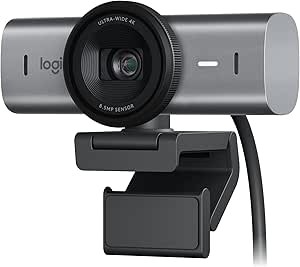
Logitech MX Brio Ultra HD 4K Webcam for Streaming and Collaboration

Samsung 32 Odyssey G5 QHD Gaming Monitor

Sonos Era 100 SL Compact Microphone-Free Speaker, Black
As an affiliate, we earn on qualifying purchases.
A Small System Comes First
The source material is a setup guide, not a report of a new product launch, independent test or measured performance study. It presents a beginner path for connecting a few devices through a phone and home network, then using supported voice, schedule or sensor controls. Its estimate of 45 to 90 minutes is a planning estimate from the guide, not a tested time that applies to every home.
The guide also names Hubitat, SwitchBot and Green as possible platform choices, but its recommendations are editorial judgments rather than independently verified comparisons. It says Hubitat is its preferred option when local, multi-protocol automation and subscription-free AI-assisted routine building are priorities; it favors SwitchBot for camera-aware chat control and bundled storage if subscription terms and device limits suit the buyer; and describes Green as a quiet, expandable local base. It does not provide testing data in the supplied material to establish comparative performance.
“Choose a low-risk first device, such as a lamp.”
— ThorstenMeyerAI.com guide
Features Depend on the Model
The source does not identify specific device models, provide independent testing, or establish how well particular AI routines work. It also does not define which sensor events or voice features are supported across the products mentioned. Compatibility and available functions must be checked model by model, including whether a hub or subscription is needed.
The guide says processing may be local or cloud-based, but the supplied material does not specify data retention periods, the exact information sent by each product, or how its named platform recommendations were assessed. Its setup-time estimate and product verdicts should be treated as guide-provided information, not universal results.
Check Before Adding Devices
For a beginner, the next step is to choose one task and one compatible device, confirm the network and hub requirements, and install it through the manufacturer’s official app. After pairing, the user can test the device’s name and controls, review privacy settings and create a simple voice command or schedule if supported. Add further devices only after confirming that the first one works reliably.
Anyone considering a thermostat, lock, alarm or other equipment that affects safety or access should check the manufacturer’s instructions and installation requirements before creating an automation. The supplied guide does not announce a later product update or test result; additional capabilities, service terms and compatibility details remain matters for buyers to verify with manufacturers.
Key Questions
What home tasks can AI devices help automate?
Depending on the device and platform, they can respond to voice commands, schedules or supported sensor events. Examples in the guide include switching on a lamp by voice and adjusting a thermostat on a schedule.
Can any voice-controlled device run AI routines?
No. The guide warns that voice control does not guarantee support for every routine or AI feature. Check the exact model’s feature list and platform compatibility.
What should I check before buying a smart device?
Check whether it works with your chosen platform, needs a hub, requires a specific Wi-Fi band, or depends on a subscription. The guide also advises confirming regional compatibility and using the manufacturer’s official app.
How should beginners start?
Start with a low-risk device such as a lamp, connect and update it through the official app, then test a simple command or schedule. The guide advises against beginning with equipment that affects safety or access.
What privacy settings should I review?
Review voice recordings, activity history, data sharing and cloud processing. Check how to pause a camera or microphone and limit household access to people who need it.
Source: ThorstenMeyerAI.com