
The best Apple HomeKit devices make everyday controls simpler, but the right choice depends on whether you need reliable basics, richer automation, or a camera that fits your existing setup. I rank the Apple HomePod mini as the best overall foundation for its role as a smart speaker and home hub, while the TP-Link Tapo P125M stands out for straightforward Matter-enabled plug control and the Aqara G410 for shoppers seeking a HomeKit Secure Video doorbell. The main tradeoffs are compatibility and setup, the features you actually need, and whether a device must work indoors, outdoors, or with existing wiring. Some options focus on low-effort essentials; others make more sense when you want monitoring, physical button control, or dedicated home upgrades. Read on for the full breakdown and the factors I use to separate these picks.

Get the latest gadgets delivered free with Prime
- Fast, free delivery on millions of items
- Prime Video, Amazon Music and more included
- Member-only deals all year
Complete the kit



Key Takeaways
- The HomePod mini is the most versatile starting point in this lineup, while smart plugs are a simpler route if you only want to automate existing appliances.
- Matter support broadens flexibility in several Linkind and Tapo choices, but buyers should still check the device’s specific Apple Home features and setup requirements.
- Smart plugs serve different jobs: the Tapo and Linkind multipacks suit basic outlet automation, while Kasa options add distinctions such as outdoor use or energy monitoring.
- The two Aqara doorbells fit different installations: the G410 is the battery-oriented choice, while the wired/PoE G400 is aimed at homes prepared for a permanent connection.
- Lighting and button controls are preference-led purchases: color bulbs offer more scene options than tunable-white bulbs, while Onvis and Airversa provide physical control without relying only on voice or an app.
| Apple HomePod mini Smart Speaker, Black |  | Best HomeKit Smart Speaker | Brand: Apple | Model: MTJT3LL/A-cr | Color: Black | VIEW LATEST PRICE | See Our Full Breakdown |
| TP-Link Tapo P125M Matter Smart Plug Mini, 3-Pack |  | Best Matter Plug for Mixed-Platform Homes | Brand: TP-Link Tapo | Model: P125M | Pack size: 3 | VIEW LATEST PRICE | See Our Full Breakdown |
| Linkind Matter Smart Plug, 4-Pack |  | Best Value Multi-Plug Pack | Brand: Linkind | Model: LC09003256 | Pack size: 4 | VIEW LATEST PRICE | See Our Full Breakdown |
| Linkind Matter Smart Plug with Night Light, 4-Pack |  | Best Smart Plug with Night Light | Brand: Linkind | Pack size: 4 | Connectivity: 2.4 GHz Wi-Fi, IPv6 | VIEW LATEST PRICE | See Our Full Breakdown |
| Aqara Smart Doorbell Camera G410 with Chime, HomeKit Secure Video, Black |  | Best HomeKit Video Doorbell for Local Features | Color: Black | Video resolution: 2K; limited to 1600×1200 when connected to Apple HomeKit | Field of view: 175° | VIEW LATEST PRICE | See Our Full Breakdown |
| Kasa Smart Plug Mini 15A, EP25P2, with Apple HomeKit |  | Best HomeKit Plug for Energy Monitoring | Model: EP25P2 | Maximum load: 15 A, 1800 W | Operating voltage: 120 V | VIEW LATEST PRICE | See Our Full Breakdown |
| Linkind Matter Smart Color-Changing LED Bulbs, A19 E26, 6-Pack |  | Best Color Bulb Pack for Multi-Platform Homes | Pack size: 6 bulbs | Bulb type and base: A19 LED, E26 | Power and light output: 9 W; 800 lumens | VIEW LATEST PRICE | See Our Full Breakdown |
| Onvis 5-Key Smart Button for Apple HomeKit |  | Best HomeKit Button for Scene Shortcuts | Model: HS2 | Compatibility: Apple HomeKit | Connectivity: Thread and Bluetooth | VIEW LATEST PRICE | See Our Full Breakdown |
| Airversa QliQ AC1 HomeKit Button Controller, White |  | Best Rechargeable HomeKit Button | Model: AC1 | Compatibility: Apple Home (HomeKit) | Connectivity: Thread | VIEW LATEST PRICE | See Our Full Breakdown |
| Aqara Doorbell Camera G400 with Chime, Wired/PoE, HomeKit Secure Video, IP65 |  | Best Wired HomeKit Doorbell for Flexible Recording | Video resolution: 2K HD; limited to 1200p with HomeKit Secure Video | Field of view: 165° | Power options: PoE or 8–24 V AC/DC | VIEW LATEST PRICE | See Our Full Breakdown |
| meross Smart LED Light Bulb, Dimmable Multicolor, E26 | 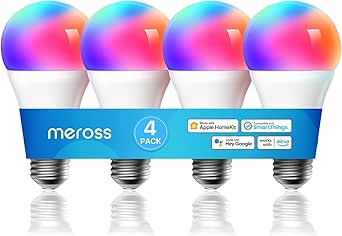 | Best HomeKit Color Bulb Without a Hub | Bulb shape and base: A19, E26 | Brightness: 900 lumens | Wattage: 9 watts | VIEW LATEST PRICE | See Our Full Breakdown |
| Linkind Matter Smart LED Bulbs, Tunable White, 4-Pack |  | Best Matter Bulb Pack for HomeKit | Pack size: 4 bulbs | Bulb type and base: A19 LED, E26 | Light output: 800 lumens per bulb | VIEW LATEST PRICE | See Our Full Breakdown |
| Kasa EP40A Outdoor Smart Plug with Apple HomeKit, 2 Outlets |  | Best Outdoor HomeKit Plug | Model: EP40A | Outlets: 2 independently controlled AC outlets | Voltage: 125 V AC | VIEW LATEST PRICE | See Our Full Breakdown |
| Kasa Smart Plug Mini 15A with Energy Monitoring and Apple HomeKit Support |  | Best HomeKit Plug for Energy Monitoring | Model: EP25P4 | Maximum load: 15A, 1800W | Operating voltage: 120 V AC | VIEW LATEST PRICE | See Our Full Breakdown |
| Meross MSG100HK Smart Garage Door Opener Remote |  | Best HomeKit Garage Door Upgrade | Model: MSG100HK | Connectivity: 2.4GHz Wi-Fi | Compatible platforms: Apple HomeKit, Siri, CarPlay, Amazon Alexa, Google Assistant, SmartThings | VIEW LATEST PRICE | See Our Full Breakdown |
| Apple HomeKit device | Connectivity | Model |
|---|---|---|
| Apple HomePod mini Smart Speak | Bluetooth, Wi-Fi | MTJT3LL/A-cr |
| TP-Link Tapo P125M Matter Smar | Matter, Wi-Fi, Bluetooth | P125M |
| Linkind Matter Smart Plug | — | LC09003256 |
| Linkind Matter Smart Plug with | 2.4 GHz Wi-Fi, IPv6 | — |
| Aqara Smart Doorbell Camera G4 | — | — |
| Kasa Smart Plug Mini 15A | 2.4 GHz Wi-Fi | EP25P2 |
| Linkind Matter Smart Color-Cha | Matter and 2.4 GHz Wi-Fi | — |
| Onvis 5-Key Smart Button for A | Thread and Bluetooth | HS2 |
| Airversa QliQ AC1 HomeKit Butt | Thread | AC1 |
| Aqara Doorbell Camera G400 wit | — | — |
| meross Smart LED Light Bulb | 2.4GHz Wi-Fi | — |
| Linkind Matter Smart LED Bulbs | 2.4GHz Wi-Fi and Bluetooth | — |
| Kasa EP40A Outdoor Smart Plug | 2.4GHz Wi-Fi, 802.11 b/g/n | EP40A |
| Kasa Smart Plug Mini 15A with | 2.4GHz Wi-Fi | EP25P4 |
| Meross MSG100HK Smart Garage D | 2.4GHz Wi-Fi | MSG100HK |
More Details on Our Top Picks
Apple HomePod mini Smart Speaker, Black
The HomePod mini is the clearest pick here for someone who wants a room-filling voice interface as well as a speaker. Its 360-degree audio and Siri integration let it handle music, questions, and HomeKit commands from a tabletop spot, while its small footprint is easier to place than a larger speaker. Unlike the TP-Link Tapo P125M, which adds smart control to a single plugged-in appliance, this Apple speaker can serve as a hands-free control point for a broader set of Apple devices and connected accessories. The tradeoff is ecosystem fit: it makes the most sense for people already using Apple devices, and it is not water resistant, so it is a poor choice for damp spaces. Choose a smart plug instead if you only need scheduled appliance control.
Pros:- Siri provides hands-free access to HomeKit commands and information
- 360-degree sound suits shared rooms where listeners sit in different spots
- Compact tabletop design is easy to place
- Works with iPhone, iPad, Mac, and Apple TV
Cons:- Not water resistant
- Its smart-home usefulness is strongest for people already using Apple devices
- Corded power limits placement to locations near an outlet
Best for: Apple households wanting a compact speaker for Siri, music, and hands-free HomeKit control in a dry room
Not ideal for: People outside the Apple ecosystem or anyone needing a speaker for a bathroom, kitchen splash zone, or outdoor area
- Brand:Apple
- Model:MTJT3LL/A-cr
- Color:Black
- Speaker type:Smart speaker
- Connectivity:Bluetooth, Wi-Fi
- Maximum output power:20 watts
- Dimensions:3.9 x 3.9 x 3.3 inches
- Power source:Corded electric
Our verdict“Choose the HomePod mini if you want an Apple-focused speaker that also provides convenient voice control for HomeKit devices.”
TP-Link Tapo P125M Matter Smart Plug Mini, 3-Pack
The Tapo P125M three-pack is a practical HomeKit entry point for buyers who want smart outlets without tying their home to Apple alone. Matter support brings Apple Home alongside Alexa, Google Home, and SmartThings, while local network control can keep commands working when internet access drops. Schedules and timers make everyday lamps or other suitable appliances easier to automate. Compared with the four-pack of standard Linkind Matter Smart Plugs, the Tapo bundle has one fewer outlet, but its stated support for local control and its compact form make it a strong fit for a smaller setup. Its limits are straightforward: it uses 2.4 GHz Wi-Fi only and is rated for up to 15 A and 1,800 W, so check an appliance’s load before connecting it. It is not a substitute for an outdoor-rated plug.
Pros:- Matter support spans Apple Home and several other major smart-home platforms
- Local network control can work when internet access is unavailable
- Compact shape helps preserve access to nearby outlets
- Schedules and timers support routine automation
Cons:- Works with 2.4 GHz Wi-Fi only
- Limited to 15 A and 1,800 W
- Three plugs may be insufficient for buyers automating many outlets
Best for: Households mixing Apple Home with Alexa, Google Home, or SmartThings that want a small set of indoor outlets with schedules
Not ideal for: Buyers with 5 GHz-only Wi-Fi or anyone who needs more than three plugs, outdoor use, or control of loads above 15 A
- Brand:TP-Link Tapo
- Model:P125M
- Pack size:3
- Connectivity:Matter, Wi-Fi, Bluetooth
- Wi-Fi band:2.4 GHz
- Maximum power:1,800 W
- Operating voltage:120 V AC
- Compatible platforms:Apple Home, Amazon Alexa, Google Home, Samsung SmartThings
Our verdict“Pick the Tapo P125M if cross-platform Matter support and local control matter more than getting a larger plug bundle.”
Linkind Matter Smart Plug, 4-Pack
For buyers adding several HomeKit-controlled outlets at once, the Linkind four-pack offers more plugs than the Tapo P125M three-pack while retaining Matter compatibility with Apple Home and other major platforms. Schedules, timers, and voice commands cover the core jobs most people need from a smart plug, and local network communication is designed to keep control available during internet outages. The stated overload and short-circuit protection adds a useful layer of protection, though it does not change the 15 A/1,800 W load ceiling. Compared with the Linkind plug with night light, this model keeps the outlet’s job simple and avoids adding a light feature, making it a better match for lamps and appliances where illumination is unnecessary. Check that your setup supports 2.4 GHz Wi-Fi and IPv6; some platforms also require a Matter hub or controller.
Pros:- Four plugs support a broader setup than the three-plug Tapo pack
- Matter works with Apple Home and several other platforms
- Local communication can support control during internet outages
- Overload and short-circuit protection are specified
Cons:- Requires 2.4 GHz Wi-Fi and IPv6
- Some platforms require a Matter hub or controller
- Maximum load is 15 A and 1,800 W
Best for: Apple Home users setting up several indoor outlets who want Matter and basic schedules without built-in lighting
Not ideal for: People whose network lacks 2.4 GHz Wi-Fi or IPv6, or who want a plug with a built-in night light
- Brand:Linkind
- Model:LC09003256
- Pack size:4
- Plug type:Type A
- Amperage:15 A
- Power capacity:1,800 W
- Wi-Fi:2.4 GHz only
- Compatibility:Apple Home, Alexa, Google Home, SmartThings, AiDot
Our verdict“Choose this Linkind pack when you need several straightforward Matter outlets and do not need an integrated night light.”
Linkind Matter Smart Plug with Night Light, 4-Pack
The Linkind Matter Smart Plug with Night Light is the more specialized choice in this group: each unit combines an outlet for scheduled device control with an adjustable 30-lumen light that can switch on at dusk and off at dawn. That pairing suits hallways and bedrooms where a low-level guide light is useful, without needing a separate night light. Like the standard Linkind four-pack, it supports Apple Home and other Matter-compatible platforms; unlike that simpler model, its added lighting is the reason to choose it. The compromise is setup dependence: third-party smart-home control requires a Matter-certified controller, though the AiDot app supports hub-free control. It also uses 2.4 GHz Wi-Fi and shares the 15 A/1,800 W limit. Skip it if you do not need the light, since the standard Linkind plug is the more focused option.
Pros:- Combines a controllable outlet and night light in one device
- Night light brightness adjusts from 1% to 100%
- Dusk-to-dawn sensing automates the light cycle
- Matter compatibility includes Apple Home and other listed platforms
Cons:- Third-party smart-home control requires a compatible Matter controller
- Supports 2.4 GHz Wi-Fi only
- Rated for a maximum of 15 A and 1,800 W
Best for: Apple Home households adding outlet automation and an adjustable dusk-to-dawn guide light to bedrooms or hallways
Not ideal for: Buyers who do not need a night light, lack a Matter controller for third-party platforms, or need 5 GHz Wi-Fi
- Brand:Linkind
- Pack size:4
- Connectivity:2.4 GHz Wi-Fi, IPv6
- Smart-home compatibility:Apple Home, Alexa, Google Home, SmartThings
- Hub requirement:Matter-certified controller for third-party platforms; AiDot app supports hub-free control
- Maximum current:15 A
- Maximum power:1,800 W
- Night light:30 lm; adjustable from 1% to 100%; dusk-to-dawn sensing
Our verdict“Choose this four-pack over the standard Linkind plugs when you want each outlet to double as an automatic, adjustable night light.”
Aqara Smart Doorbell Camera G410 with Chime, HomeKit Secure Video, Black
The Aqara G410 stands apart from the HomePod mini and smart plugs by bringing visitors, motion events, and doorbell video into a HomeKit-centered setup. It offers HomeKit Secure Video, a 175-degree field of view, mmWave radar motion detection, and a loud indoor chime, along with local face processing and microSD storage support. Its built-in Zigbee and Matter hub can also support a wider Aqara-connected setup, giving it more smart-home reach than a doorbell alone. The important HomeKit tradeoff is video detail: resolution is limited to 1600×1200 when connected to Apple HomeKit, below the listed 2K capability. A microSD card is not included, and the unit is not water resistant, so installation exposure needs careful attention. Compared with the wired/PoE Aqara G400 in this roundup, this G410’s listed feature set emphasizes its built-in hub and local storage options.
Pros:- Supports HomeKit Secure Video and several other smart-home platforms
- Built-in Zigbee and Matter hub expands its role beyond doorbell monitoring
- Local face processing and microSD storage support offer local-data options
- mmWave motion detection and a 95 dB chime are specified
Cons:- HomeKit connection limits video resolution to 1600×1200
- microSD card is not included
- Not water resistant
Best for: Apple Home users who want a video doorbell, local storage options, and a built-in hub for compatible smart-home devices
Not ideal for: Buyers who require full 2K resolution through HomeKit, need a water-resistant doorbell, or do not want to buy a microSD card separately
- Color:Black
- Video resolution:2K; limited to 1600×1200 when connected to Apple HomeKit
- Field of view:175°
- Motion detection:mmWave radar
- Chime volume:95 dB
- Wi-Fi:2.4 GHz and 5 GHz; WPA3
- Built-in hub:Zigbee and Matter
- Local storage:microSD card up to 512 GB; card not included
Our verdict“Choose the G410 if you want HomeKit doorbell video plus local storage and hub features, but not if full 2K HomeKit video or water resistance is a must.”
Kasa Smart Plug Mini 15A, EP25P2, with Apple HomeKit
The Kasa EP25P2 is a practical pick for HomeKit users who want to automate appliances and see how much electricity they use. Its energy monitoring gives it an edge over the TP-Link Tapo P125M Matter Smart Plug Mini when tracking power consumption is a priority, while its 15 A capacity suits many lamps, fans, and other household devices. Two plugs come in the package, and its compact size helps keep nearby outlets usable.
It connects directly to 2.4 GHz Wi-Fi, so there’s no separate hub to set up, and it also supports several non-Apple assistants. The tradeoff is that HomeKit remote access depends on a networked Apple home hub, and the plug won’t join a 5 GHz-only network. Choose it for usage tracking; skip it if you only need a straightforward Matter plug or your Wi-Fi setup lacks 2.4 GHz.
Pros:- Energy monitoring shows current and historical power use.
- Works with Apple HomeKit and several other voice-assistant platforms.
- Schedules, timers, and remote app control support flexible routines.
- Compact, hub-free design and a two-plug package.
Cons:- HomeKit remote control requires a networked Apple device at home.
- Requires a 2.4 GHz Wi-Fi connection.
- Energy monitoring adds little value for buyers who only need basic on/off control.
Best for: HomeKit households that want to automate everyday appliances and track their energy use without adding a hub.
Not ideal for: Buyers with a 5 GHz-only Wi-Fi network or those who want HomeKit remote access without a networked Apple home hub.
- Model:EP25P2
- Maximum load:15 A, 1800 W
- Operating voltage:120 V
- Connectivity:2.4 GHz Wi-Fi
- Energy monitoring:Yes
- Dimensions:2.62 x 1.57 x 1.5 inches
- Pack size:2 plugs
- Warranty:2-year limited warranty
Our verdict“Choose the EP25P2 if energy tracking matters as much as HomeKit control; pick a simpler plug if you only need basic automation.”
Linkind Matter Smart Color-Changing LED Bulbs, A19 E26, 6-Pack
This six-bulb set makes sense for buyers who want to add color and scene control across several rooms while keeping Apple Home in the mix. Matter support lets the bulbs work with multiple compatible smart home platforms, a broader fit than a HomeKit-only lighting setup. Each 9 W bulb produces 800 lumens, so it can serve as everyday room lighting rather than just an accent light; the 16 million colors and 104 scenes add more atmosphere options than the Linkind Matter Smart LED Bulbs, Tunable White, 4-Pack.
The compromise is setup and switch compatibility: these bulbs use 2.4 GHz Wi-Fi and generally do not work with traditional dimmer switches. Smart control also depends on leaving the wall switch on. Choose this pack for color-rich, app-controlled rooms; skip it if you want simple white lighting or need to retain conventional dimmer operation.
Pros:- Matter support works across Apple Home and other compatible smart home platforms.
- Six bulbs provide a coordinated lighting upgrade for multiple rooms.
- 16 million colors and 104 preset scenes offer broad customization.
- 800-lumen output from a 9 W LED suits general indoor lighting.
Cons:- Generally incompatible with traditional dimmer switches.
- Requires a 2.4 GHz Wi-Fi connection.
- Color features may be unnecessary for buyers who only want tunable white light.
Best for: Households outfitting several indoor rooms with color lighting that can be controlled through Apple Home and other Matter-compatible platforms.
Not ideal for: Buyers with traditional dimmer switches, 5 GHz-only Wi-Fi, or a preference for uncomplicated white-only bulbs.
- Pack size:6 bulbs
- Bulb type and base:A19 LED, E26
- Power and light output:9 W; 800 lumens
- Incandescent equivalent:60 W
- Connectivity:Matter and 2.4 GHz Wi-Fi
- Color options:16 million colors; 104 preset scenes
- Color temperature:6500 K
- Indoor use:Yes
Our verdict“Pick this set for multi-room color lighting across smart home platforms, but choose the tunable-white Linkind pack if color scenes are not a priority.”
Onvis 5-Key Smart Button for Apple HomeKit
The Onvis HS2 is for Apple Home users who want physical control over more scenes than a typical multi-button controller can conveniently handle. Its five keys each support single, double, and long presses, creating up to 15 scene actions for lights, plugs, and other HomeKit accessories. That gives it more dedicated controls than the three-button Airversa QliQ AC1, making the Onvis a better fit for a busy room where separate shortcuts are useful.
It connects over Thread or Bluetooth and stores data locally, which suits buyers who prefer not to rely on cloud tracking. The main catch is platform lock-in: it is Apple HomeKit only, and Thread connectivity requires a compatible Apple Thread home hub. Its plastic body and surface mounting are functional rather than decorative. Choose it for many physical HomeKit shortcuts; skip it if you need cross-platform controls or want fewer buttons.
Pros:- Five keys with three press types support up to 15 scene actions.
- Controls multiple HomeKit-compatible devices and scenes.
- Supports Thread or Bluetooth connectivity.
- Local data storage avoids cloud tracking.
Cons:- Compatible with Apple HomeKit only.
- Thread connectivity requires a compatible Apple Thread home hub.
- Surface-mounted plastic construction may not suit buyers seeking an integrated wall switch.
Best for: Apple Home households that want a wall-mounted controller with separate physical shortcuts for multiple scenes and accessories.
Not ideal for: People who need a controller for Alexa or Google Home, or who lack an Apple Thread home hub and want Thread connectivity.
- Model:HS2
- Compatibility:Apple HomeKit
- Connectivity:Thread and Bluetooth
- Keys:5
- Press actions:Single, double, and long press
- Scene capacity:Up to 15 scenes
- Power:3 V
- Dimensions:2.17 x 0.79 x 2.17 inches
- Mounting:Surface mount with adhesive tape and magnetic strips
Our verdict“Choose the Onvis when five dedicated keys and up to 15 HomeKit actions matter more than cross-platform support or a simpler three-button layout.”
Airversa QliQ AC1 HomeKit Button Controller, White
The Airversa QliQ AC1 offers a compact physical shortcut for Apple Home automations without the five-key layout of the Onvis HS2. Its three buttons each support single, double, and long presses, giving users up to nine automation triggers while keeping the controller simple to place by a doorway or bedside. A wall plate and built-in magnet make placement more flexible, and vibration and audible feedback can confirm a press without checking a phone.
Unlike the Onvis, the AC1 is rechargeable, with a stated battery life of up to two months per charge. That avoids routine battery replacement but still means charging is part of ownership. It works exclusively with Apple Home over Thread, and a compatible Thread-enabled Apple Home hub must be within 30 feet. Choose it for a tidy, rechargeable controller; skip it if you need more than nine actions or do not have the required hub nearby.
Pros:- Three buttons and three press types provide up to nine automation triggers.
- Rechargeable battery lasts up to two months per charge.
- Includes a wall plate and built-in magnetic attachment.
- Vibration and audible feedback confirm button presses.
Cons:- Requires a compatible Thread-enabled Apple Home hub within 30 feet.
- Works exclusively with Apple Home.
- Needs periodic charging, unlike a controller that uses replaceable batteries.
Best for: Apple Home users who want a rechargeable, mountable button controller for up to nine frequently used automations.
Not ideal for: Homes without a compatible Thread-enabled Apple Home hub within 30 feet, or users who need more than three physical buttons and nine automations.
- Model:AC1
- Compatibility:Apple Home (HomeKit)
- Connectivity:Thread
- Buttons and actions:3 buttons; single, double, and long press
- Automation capacity:Up to 9
- Battery:Rechargeable lithium-ion
- Battery life:Up to 2 months per charge
- Dimensions:2.99 x 1.26 x 0.57 inches
- Mounting:Surface mount with wall plate and built-in magnet
Our verdict“Choose the AC1 for a rechargeable three-button HomeKit controller with useful feedback; choose the Onvis if you need more scene shortcuts.”
Aqara Doorbell Camera G400 with Chime, Wired/PoE, HomeKit Secure Video, IP65
The Aqara G400 stands out for buyers who want a wired HomeKit doorbell with more installation and recording choices than a basic camera. It can run on PoE or 8–24 V AC/DC wiring, offers a 165° field of view, and supports local AI detection plus microSD or compatible NAS recording. Those options make it a stronger fit for homeowners who value local storage than a doorbell centered mainly on HomeKit Secure Video, such as the Aqara G410.
Its 2K sensor does not deliver full 2K resolution through HomeKit Secure Video, where video is limited to 1200p. HomeKit Secure Video also requires an iCloud+ plan and an Apple home hub, and the microSD card is sold separately. With IP65 weather resistance, two-way audio, and a plug-in chime included, it offers broad functionality, but installation is less convenient than a battery-powered camera. Choose it for wired power and storage flexibility; skip it if you need a simple wireless setup.
Pros:- 165° field of view, 2K sensor, and infrared night vision.
- Supports PoE or existing 8–24 V AC/DC wiring.
- Local AI detection and recording to microSD or compatible NAS.
- Works with HomeKit Secure Video and several other smart home platforms.
Cons:- HomeKit Secure Video limits resolution to 1200p and requires iCloud+ and an Apple home hub.
- MicroSD card is not included.
- Wired or PoE installation is less suitable for homes without compatible power or network cabling.
Best for: Homeowners with compatible wiring or PoE who want a wide-view HomeKit doorbell and local recording options.
Not ideal for: Renters or buyers seeking a battery-powered installation, or HomeKit users who expect full 2K resolution through HomeKit Secure Video.
- Video resolution:2K HD; limited to 1200p with HomeKit Secure Video
- Field of view:165°
- Power options:PoE or 8–24 V AC/DC
- Wi-Fi:Dual-band 2.4 GHz and 5 GHz Wi-Fi 6; WPA3
- Weather resistance:IP65
- Local storage:MicroSD up to 512 GB; card not included
- Audio:Two-way audio
- Compatibility:Apple HomeKit Secure Video, Alexa, Google Assistant, SmartThings, RTSP/ONVIF
- Included accessories:Plug-in chime and wedge kit
Our verdict“Pick the G400 for a wired HomeKit doorbell with flexible local recording; skip it if you need wireless installation or full 2K HomeKit Secure Video.”
meross Smart LED Light Bulb, Dimmable Multicolor, E26
I’d choose this Meross bulb when adding color to a HomeKit room matters more than building a Matter-based setup. It offers adjustable white light from 2700K to 6500K, RGB colors, and 900 lumens, making it more flexible for moods and everyday lighting than the tunable-white-only Linkind Matter Smart LED Bulbs. It also connects directly to 2.4GHz Wi-Fi, so there’s no separate hub to buy or configure. That simplicity has a limit: the Linkind bulbs use Matter for broader platform compatibility, while this model depends on Wi-Fi and a compatible app or voice assistant. I’d skip it if your network doesn’t support 2.4GHz or you need an outdoor bulb; it’s rated for indoor use only.
Pros:- Combines tunable white light with multiple RGB colors
- 900 lumens provides useful general-purpose brightness
- Works with Apple HomeKit and several major voice assistants
- Remote control and scheduling work without a hub
Cons:- Requires a 2.4GHz Wi-Fi network
- Indoor use only
- Uses Wi-Fi rather than Matter for smart-home connectivity
Best for: HomeKit users who want a single indoor bulb with both tunable white and RGB color, without adding a hub.
Not ideal for: Buyers standardizing on Matter or needing outdoor-rated lighting, since this bulb uses 2.4GHz Wi-Fi and is for indoor use only.
- Bulb shape and base:A19, E26
- Brightness:900 lumens
- Wattage:9 watts
- Color options:Multicolor RGB and tunable white
- Color temperature:2700K–6500K
- Connectivity:2.4GHz Wi-Fi
- Smart home compatibility:Apple HomeKit, Siri, Alexa, Google Assistant, SmartThings
Our verdict“Choose this Meross bulb for flexible HomeKit color and white lighting without a hub; choose the Linkind Matter bulbs if Matter support is your priority.”
Linkind Matter Smart LED Bulbs, Tunable White, 4-Pack
This four-bulb pack is my pick for HomeKit households that want tunable white lighting in several rooms and prefer a Matter-compatible setup. Its 2700K–6500K range covers warm evening light and cooler task lighting, while dimming down to 1% gives more control than a basic on/off smart bulb. Compared with the color-capable Meross Smart LED Light Bulb, these bulbs give up RGB effects but add Matter support and a four-bulb pack suited to consistent room lighting. The tradeoff is setup: Apple Home use requires a Matter hub or controller, and initial setup also needs Bluetooth and 2.4GHz Wi-Fi. I’d pass if you want color-changing bulbs or need compatibility with a traditional dimmer switch.
Pros:- Four bulbs make it easier to create consistent lighting across a room
- Matter compatibility supports major smart-home platforms
- Tunable white range and 1%–100% dimming allow fine lighting adjustment
- CRI above 90 and lifespan rated up to 25,000 hours
Cons:- Apple Home requires a Matter hub or controller
- Initial setup requires both Bluetooth and 2.4GHz Wi-Fi
- Not compatible with traditional dimmer switches
Best for: HomeKit households with a Matter controller that want matching tunable-white bulbs across multiple indoor fixtures.
Not ideal for: Buyers without a Matter hub or controller, or anyone seeking RGB colors or use with a traditional dimmer switch.
- Pack size:4 bulbs
- Bulb type and base:A19 LED, E26
- Light output:800 lumens per bulb
- Wattage:8.5 watts per bulb
- Color temperature:2700K–6500K
- Dimming range:1%–100%
- Connectivity:2.4GHz Wi-Fi and Bluetooth
- Smart home compatibility:Apple Home, Amazon Alexa, Google Home, AiDot
- Lifespan:Up to 25,000 hours
Our verdict“Pick this pack for coordinated Matter-based tunable-white lighting across several rooms, but choose the Meross bulb if you want RGB color without a hub.”
Kasa EP40A Outdoor Smart Plug with Apple HomeKit, 2 Outlets
The Kasa EP40A is the most purpose-built choice here for bringing HomeKit control outside. Its two outlets operate independently, so I can schedule separate outdoor devices without treating them as one load; that’s a more useful fit for paired lights or seasonal decorations than the indoor Kasa Smart Plug Mini 15A. The IP64 weather resistance helps protect against dust and water splashes, though it doesn’t make the plug suitable for submersion or every exposed installation. It also supports Siri and other major assistants, with app-based schedules and grouping. The tradeoffs are its 2.4GHz Wi-Fi requirement and HomeKit remote access, which depends on a networked Apple device at home. I’d skip it for indoor-only needs or if you need a plug with energy monitoring.
Pros:- Two outlets can be controlled independently
- IP64 rating helps resist dust and water splashes
- Supports Apple HomeKit, Siri, Alexa, and Google Assistant
- App-based scheduling, remote control, and grouping
Cons:- Requires a 2.4GHz Wi-Fi network
- HomeKit remote control requires a networked Apple device at home
- Does not provide energy monitoring
Best for: HomeKit users automating two outdoor lights or appliances from a suitably protected outdoor outlet.
Not ideal for: Indoor buyers who want energy-use tracking or anyone without 2.4GHz Wi-Fi and a networked Apple device for remote HomeKit access.
- Model:EP40A
- Outlets:2 independently controlled AC outlets
- Voltage:125 V AC
- Weather resistance:IP64
- Connectivity:2.4GHz Wi-Fi, 802.11 b/g/n
- Wi-Fi range:Up to 300 ft
- Voice assistants:Siri, Alexa, Google Assistant
- Warranty:2 years
Our verdict“Choose the EP40A for independently controlled outdoor devices, while the indoor Kasa Smart Plug Mini is the better fit for energy monitoring inside.”
Kasa Smart Plug Mini 15A with Energy Monitoring and Apple HomeKit Support
I’d pick this Kasa Smart Plug Mini when seeing an appliance’s energy use is as useful as switching it on and off. Real-time and historical monitoring can help identify which compatible lamps, fans, or other appliances use power over time—a feature the outdoor Kasa EP40A doesn’t provide. Its 15A, 1800W capacity also suits a broader range of supported household loads than a low-capacity plug, and its compact design helps leave a neighboring outlet accessible. It connects over 2.4GHz Wi-Fi without a hub and works with HomeKit and several voice assistants. The main catch is remote HomeKit control: it needs a networked Apple device at home. I’d skip it for outdoor equipment or if you don’t need energy data and want the simplest possible plug.
Pros:- Tracks real-time and historical energy use
- Supports loads up to 15A and 1800W
- Compact design helps preserve access to nearby outlets
- Works with HomeKit and multiple voice assistants without a hub
Cons:- Requires a 2.4GHz Wi-Fi network
- HomeKit remote control requires a networked Apple device at home
Best for: HomeKit users who want to automate indoor appliances and track their real-time and historical energy consumption.
Not ideal for: People automating outdoor equipment or those who need HomeKit remote access without a networked Apple device at home.
- Model:EP25P4
- Maximum load:15A, 1800W
- Operating voltage:120 V AC
- Connectivity:2.4GHz Wi-Fi
- Energy monitoring:Real-time and historical usage
- Voice assistants:Siri, Amazon Alexa, Google Assistant, SmartThings
- Hub required:No
- Warranty:2-year limited warranty
Our verdict“Choose this plug for indoor appliance control and energy tracking; choose the Kasa EP40A for weather-resistant outdoor use and two separate outlets.”
Meross MSG100HK Smart Garage Door Opener Remote
The Meross MSG100HK earns its place by adding HomeKit control and door-status awareness to a compatible existing garage opener, rather than replacing the opener itself. Its wired sensor can report whether the door is open or closed, and the app adds history, schedules, and automatic closing—useful safeguards beyond the basic outlet control offered by the Kasa Smart Plug Mini. HomeKit, Siri, and CarPlay support make it a natural fit for Apple households, while existing wall buttons and remotes continue to work. Compatibility is the key condition: some openers need an adapter, and the listed support excludes Security+ 3.0. It also relies on 2.4GHz Wi-Fi. I’d verify the opener model before buying and skip this if you need to control more than one garage door.
Pros:- Adds Apple HomeKit, Siri, and CarPlay control to a compatible opener
- Wired sensor reports door status
- Includes history, scheduling, and automatic closing
- No hub or subscription is required, and existing remotes remain usable
Cons:- Some openers require a separate adapter
- Not compatible with Security+ 3.0
- Supports one device and requires 2.4GHz Wi-Fi
Best for: Apple Home households with one compatible garage door opener that want remote status checks, voice control, and automatic closing.
Not ideal for: Owners of Security+ 3.0 openers, anyone unwilling to check adapter compatibility, or households needing control of multiple doors from one unit.
- Model:MSG100HK
- Connectivity:2.4GHz Wi-Fi
- Compatible platforms:Apple HomeKit, Siri, CarPlay, Amazon Alexa, Google Assistant, SmartThings
- Opener compatibility:200+ brands and 1,600+ models; adapter may be required
- Supported protocols:Security+ 1.0 and 2.0; not Security+ 3.0
- Maximum supported devices:1
- Maximum range:200 meters
- Dimensions:3 × 2 × 1 in
Our verdict“Choose the MSG100HK to add status-aware HomeKit control to one compatible garage door, after confirming your opener model and protocol.”
How We Picked
I ranked these devices by how clearly they solve a common Apple Home need, how practical they are to set up and use, and what their feature differences mean for a household. I also weighed compatibility signals such as Apple Home support and Matter, the fit for the intended location, and whether a product adds something beyond basic app control. A smart plug that suits a simple indoor routine should not outrank a more capable option for outdoor control or energy monitoring just because both switch power.
The order reflects usefulness across a range of HomeKit homes, not a claim that one device is best for every buyer. The HomePod mini leads as a flexible starting point; focused accessories follow where they offer a clearer value for a particular need. I treated wiring, power requirements, and the type of control a device provides as meaningful tradeoffs, and avoided ranking products on features that are not established by their listed specifications.
Factors to Consider When Choosing Best Apple HomeKit Devices
Before choosing from these picks, I would start with the job you want HomeKit to do, then check what your home and network can support. The right device is often the one that fits your installation and daily habits, rather than the one with the longest feature list.
Check Apple Home and Matter compatibility separately
Apple Home support and Matter are related but not interchangeable labels for every feature. A Matter device may connect across ecosystems, yet specific controls or automations can still depend on the product and the platform. Before buying, check the manufacturer’s current compatibility details for the exact model and the functions you expect to use in Apple Home. Also confirm whether setup calls for a hub, a particular app, or a supported network connection. A common mistake is to assume that a device appearing in Home means every feature available in its own app will appear there too. If you plan to add devices from different brands, prioritize clear support for the scenes and controls you will actually rely on.
Match the device to its power and installation needs
Power requirements can rule out a product before its features matter. A battery-oriented doorbell and a wired or PoE model suit different entryways, and a wired option only makes sense if the home can support its installation. The same check applies to garage controls, outdoor outlets, and bulbs: verify the fitting, location, and existing equipment before ordering. Avoid treating a device’s category name as proof that it will work with your particular wiring or appliance. For equipment that is difficult to access, installation effort and ongoing upkeep may matter more than adding extra smart features. When the fit is uncertain, compare the product’s setup instructions with the actual fixture or system you intend to control.
Choose the right kind of control for your routines
App and voice controls are convenient, but they are not the only ways a household interacts with a smart home. Physical buttons can provide a quick, shared action for people who do not want to open an app or speak a command. Smart plugs work well for appliances that simply need power switched on or off, while bulbs are better suited to lighting changes such as dimming, color, or white-tone adjustment. Think about who will use each control and where it should sit before buying. A button with more actions can be useful for a practiced routine, but a simple control may be easier for guests or family members to understand. Pick the control style that reduces friction in the room where it will be used.
Separate basic automation from monitoring
Many smart plugs automate an outlet, but some buyers want more than on-and-off control. Energy monitoring can help you observe connected devices, while an outdoor model addresses placement and use beyond the living space. Those extras are useful only when they answer a real need: monitoring does not automatically make a plug suitable for every appliance, and an outdoor label does not remove the need to follow installation and use guidance. Check the connected equipment’s requirements and the plug’s stated limits before relying on it. If you only want a lamp or small household device on a schedule, a simpler plug may be easier to manage. Pay for monitoring or outdoor capability when you expect to use it, not as a default upgrade.
Decide how much lighting flexibility you will use
Smart bulbs differ most in the kinds of light they can produce and the number of bulbs in a package. Tunable-white models let you adjust white tones, while multicolor bulbs add color choices for scenes and moods. If your goal is a dependable lighting schedule or a change in white tone, color may add complexity without improving the routine. For rooms where scenes matter, multicolor control can justify choosing a more flexible bulb. Check the bulb base and fixture compatibility, and remember that a smart bulb needs power to remain reachable for app control. Buying a multipack is sensible when you plan to use the same lighting approach across several fixtures; otherwise, start with the rooms where smart control will make the clearest difference.
Plan for shared use and future additions
A device that works well for one person can be awkward in a home where several people need control. Think about whether the main routine should be available by voice, through a wall-side button, or in the Home app, and make sure the chosen approach is understandable to other household members. If you expect to add more devices later, favor products and setups that fit your preferred Apple Home routines rather than building around a feature you may not use. Mixing brands can be practical, but it adds setup steps and can make troubleshooting less straightforward. Keep a simple record of device names, locations, and the automations they support. That small habit makes it easier to maintain a growing home and replace a device without rebuilding every routine from memory.
Frequently Asked Questions
Do I need a HomePod mini to use the smart plugs and bulbs in this roundup?
Not every smart plug or bulb needs a HomePod mini simply to provide its listed device-level controls, but the full Apple Home setup and remote or automated features may depend on your configuration and the accessory’s requirements. Check the current instructions for the exact model before buying. The HomePod mini is the most flexible foundation in this roundup, but it is a separate purchase rather than a universal prerequisite for every accessory. If you only want to control one device locally, begin by checking what that product supports on its own. If you want a broader home setup, plan the hub and network side along with the accessories.
Should I choose a Matter smart plug or a plug made specifically for Apple Home?
Choose based on the ecosystem flexibility and controls you need, rather than the label alone. Matter can be useful if you want a device that may fit more than one supported smart-home platform, while a HomeKit-branded plug can make its Apple Home positioning easier to identify. Neither label guarantees that every feature or setup path will be identical across apps. Compare the exact model’s Apple Home support, any required hub or app, and the controls you plan to use. For a home committed to Apple Home, straightforward compatibility may matter more than cross-platform flexibility; for a mixed setup, Matter may be a stronger fit.
Which Aqara doorbell should I choose: the G410 or the G400?
The G410 is the battery-oriented option in this lineup, while the G400 is specified as wired/PoE and has an IP65 rating. That makes the installation itself a key decision: choose the G400 only if its wired or PoE setup fits your entryway and home network plans. The G410 is a better match when a battery-based approach is more practical. Both are listed with HomeKit Secure Video, but you should check the current requirements and capabilities for the model and your Apple Home setup. Before choosing, confirm power, mounting, network access, and how the doorbell will connect to your existing chime or installation.
Is an energy-monitoring smart plug worth choosing over a basic HomeKit plug?
It is worth choosing when seeing the connected device’s energy use would change how you manage it. If your goal is simply to switch a lamp or another suitable appliance on a schedule, a basic plug may cover the routine with less to evaluate. Monitoring can add useful information, but it does not replace checking the plug’s electrical limits or the appliance’s requirements. Think about whether you will review the information regularly and what action you might take based on it. If you do not have a clear use for the data, prioritize the plug’s compatibility and placement instead.
Should I buy color bulbs or tunable-white bulbs for Apple Home scenes?
Pick tunable-white bulbs if your scenes mainly adjust brightness and the tone of white light. Choose multicolor bulbs when you expect to use colored lighting as part of a room’s routines or atmosphere. The Linkind color six-pack offers a way to outfit several fixtures with color control, while the tunable-white Linkind pack focuses on white-light adjustment; the meross bulb is a single multicolor option for a smaller starting point. Check the fixture base and decide how many bulbs you will use before opting for a multipack. A more flexible bulb is not automatically a better fit if your scenes only change white light.
Conclusion
For most people building an Apple Home setup, I recommend the Apple HomePod mini as the best overall because it provides a flexible starting point beyond a single accessory. For best value in basic outlet automation, compare the Tapo P125M and Linkind Matter plug packs against how many outlets you need; choose the Kasa energy-monitoring plug if tracking use is the specific goal. The best premium choice for a doorbell-focused upgrade is the Aqara G400 when wired or PoE installation suits the home, while the G410 is the more fitting pick for a battery-oriented setup. Beginners who want a low-effort first automation can start with a compatible smart plug before adding lighting or sensors. For specific needs, choose the Kasa EP40A for outdoor outlet control, the Onvis or Airversa button for physical actions, and Meross MSG100HK for garage access. My final recommendation is to start with the room or routine that causes the most friction, then add devices that match its power, placement, and control needs.
Evergreen bestsellers Picks

TCL T7 Series 85-Inch 4K 144Hz QLED Smart Google TV

Sony BRAVIA 5 85-Inch Mini LED 4K HDR Smart TV (K-85XR50)

Samsung 85-Inch QN70H Neo QLED 4K Smart TV (2026)
As an affiliate, we earn on qualifying purchases.