

The best desktop companion robots balance personality, responsiveness, and daily usefulness — and after comparing 15 current models, the Loona Deskmate stands out as my top overall pick for its context-aware interaction and built-in 165W GaN charger that earns its desk space. Close behind are the Eilik DQ, which nails expressive animations at a friendlier price, and the LOOI AI, which pairs genuine visual recognition with 10W wireless charging. The main tradeoff in this category is between emotional charm (touch-responsive characters like the Eilik family) and raw smarts (AI-driven conversationalists like Loona and LOOI). Cheaper options often lack long-term memory or feel like novelty toys within a week. Read on for the full breakdown of all 15 robots and which one fits your desk.

Get the latest gadgets delivered free with Prime
- Fast, free delivery on millions of items
- Prime Video, Amazon Music and more included
- Member-only deals all year
Complete the kit



Key Takeaways
- Robots that double as chargers — the Loona Deskmate (165W GaN) and LOOI (10W wireless) — justify their desk footprint far better than pure toys, which is why they claim the top spots.
- The Eilik family (DQ, original, and the touch-responsive variant) dominates the mid-range because expressive animations matter more than raw AI horsepower for daily companionship.
- Long-term memory is the biggest divider in this lineup: models like the umissfun and LOOI remember you across sessions, while budget picks like the ciciglow and Oiumhru reset to strangers every day.
- The Anki Vector 2.0 remains the strongest truly autonomous robot here — it roams and navigates on its own — but its software support depends on community maintenance, a real long-term risk.
- Sub-budget picks such as the PanniOhye and OVAQUIXI work as desk decor with light chat, but buyers expecting personality depth from the premium models will be disappointed.
| Eilik DQ (Desert Quester) Desktop Companion Robot |  | Best Themed Eilik | Character: Desert Quester (DQ) | Interaction: Touch-based | Setup: No setup required | VIEW LATEST PRICE | See Our Full Breakdown |
| umissfun Emotional AI Companion Device – Desktop Robot with Voice Understanding, Personality Design, and Long-Term Memory (Gray) |  | Best for Conversational Companionship | Screen: 8-inch HD display | Audio: Stereo speakers | Supported languages: Chinese, English, and Japanese | VIEW LATEST PRICE | See Our Full Breakdown |
| ENERGIZE LAB Eilik Desktop Companion Robot |  | Best for Simple Desk Play | Brand: ENERGIZE LAB | Model: Eilik | Product type: Desktop companion robot | VIEW LATEST PRICE | See Our Full Breakdown |
| Eilik Desktop Companion Robot with Expressive Animations and Touch-Responsive Play |  | Best Multi-Robot Starter | Product type: Desktop companion robot | Interaction: Touch-responsive reactions and animations | Other responses: Movement and play | VIEW LATEST PRICE | See Our Full Breakdown |
| Anki Vector 2.0 Autonomous AI Robot |  | Best for Autonomous Movement | Connectivity: 2.4 GHz Wi-Fi; Bluetooth pairing for setup | Camera: HD camera | Sensors: Mapping, facial recognition, and obstacle detection | VIEW LATEST PRICE | See Our Full Breakdown |
| OVAQUIXI AI Desktop Robot Companion with Emotion Recognition, 2.01-Inch Screen, Black |  | Best for Expressive Animations | Screen: 2.01 in, 240 × 296 resolution | Dimensions: 64 × 63 × 55 mm (2.52 × 2.48 × 2.17 in) | Weight: 165 g (5.82 oz) | VIEW LATEST PRICE | See Our Full Breakdown |
| EMOPET EMO Interactive Desk Robot with Charging Station | 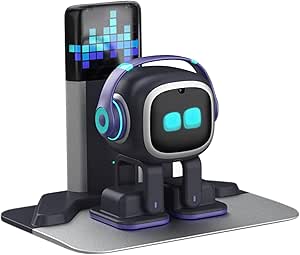 | Best for Autonomous Charging | Model: EMO GO HOME | Dimensions: 11 × 8.5 × 2.95 in | Connectivity: Network connection and EMO app | VIEW LATEST PRICE | See Our Full Breakdown |
| AI Companion Robot Plush with Cloud Memory and Real-Time Chat |  | Best Plush AI Companion | Design: Portable plush | Connectivity: 2.4 GHz Wi-Fi | AI models: ChatGPT, DeepSeek, and Gemini | VIEW LATEST PRICE | See Our Full Breakdown |
| LOOI AI Desktop Companion Robot with Voice Interaction, Visual Recognition, Memory, and 10W Wireless Charging |  | Best for Desk Utility | Color: Space Black | Voice interaction: ChatGPT and Gemini | Language support: English only | VIEW LATEST PRICE | See Our Full Breakdown |
| EMOPET EMO AI Desk Robot Companion with ChatGPT, Voice Commands & Dancing |  | Best for Interactive Play | Model: EMO | Manufacturer: Living AI | Recommended age: 15 years and up | VIEW LATEST PRICE | See Our Full Breakdown |
| YONBO AIPI Lite AI Robot Companion, Blue |  | Best for Custom AI Personalities | Brand: YONBO | Model: XY006PL01 | Color: Blue | VIEW LATEST PRICE | See Our Full Breakdown |
| ciciglow AI Desktop Robot Companion with Voice Chat, Yellow |  | Best Battery Life | Brand: ciciglow | Material: ABS | Battery: Built-in lithium battery, 1000 mAh | VIEW LATEST PRICE | See Our Full Breakdown |
| Loona Deskmate AI Desktop Companion with Context-Aware Interaction and 165W GaN Charging |  | Best Premium Productivity Hub | Brand: Loona | Material: Aluminum | Color: Obsidian Black | VIEW LATEST PRICE | See Our Full Breakdown |
| Oiumhru Interactive AI Desktop Robot with Bilingual Chat and 7-Color Lights |  | Best for Young Children | Brand: Oiumhru | Color: Yellow | Material: ABS | VIEW LATEST PRICE | See Our Full Breakdown |
| PanniOhye HH1801YM Interactive AI Robot Companion |  | Best Complete Starter Package | Brand: PanniOhye | Model: HH1801YM | Features: Memory, voice recognition, storytelling, learning helper, smart chat | VIEW LATEST PRICE | See Our Full Breakdown |
More Details on Our Top Picks
Eilik DQ (Desert Quester) Desktop Companion Robot
Eilik DQ suits buyers who want a small, playful desk companion with a defined character and a game to explore. It works out of the box, and its touch-based reactions keep the interaction simple. The included four pieces of explorer gear, exclusive startup animation, and Antmeow Boss mission give DQ a more specific theme than the standard ENERGIZE LAB Eilik. Like that model, DQ can interact with other Eilik characters, so it can become part of a multi-robot setup. The tradeoff is that this is still centered on expressive play rather than voice-led conversation or autonomous room navigation like Anki Vector 2.0. More characters and accessories are sold separately, so the expanded experience depends on buying into the Eilik lineup.
Pros:- Ready to use without setup
- Touch-based reactions and expressive animations make interaction straightforward
- Includes four explorer gear pieces and an exclusive themed mission
- Can interact with other Eilik characters
Cons:- Additional characters and accessories are sold separately
- Play centers on touch interactions and a themed mission rather than voice conversation
Best for: Eilik fans and gift buyers who want a ready-to-play desktop robot with an explorer theme and a built-in mission.
Not ideal for: Buyers looking for sustained voice conversations, autonomous navigation, or a complete multi-character setup without buying additional items.
- Character:Desert Quester (DQ)
- Interaction:Touch-based
- Setup:No setup required
- Included accessories:4 pieces of explorer gear
- Special feature:Antmeow Boss monster shooting mission
- Compatibility:Other Eilik characters, AI Station, and Panxer
Our verdict“Choose Eilik DQ for an immediately usable, themed Eilik experience; pick Anki Vector 2.0 if autonomous movement and voice interaction matter more.”
umissfun Emotional AI Companion Device – Desktop Robot with Voice Understanding, Personality Design, and Long-Term Memory (Gray)
The umissfun is the most conversation-oriented choice in this group: its voice understanding and long-term memory are meant to make exchanges feel more personal over time. Its 8-inch screen and stereo speakers also let it display photos and play voice messages, giving it a role beyond the animated touch play of ENERGIZE LAB Eilik. Compared with Anki Vector 2.0, which pairs voice features with movement and sensors, umissfun puts more emphasis on a stationary screen-based presence and personalization. That focus will appeal to people who want a companion for a desk or home setting, but may feel excessive to buyers who mainly want quick, playful reactions. Its support for Chinese, English, and Japanese broadens its audience, though the supplied product data does not establish how well its conversational features work in practice.
Pros:- Voice understanding and long-term memory are designed for personalized conversations
- 8-inch HD screen can display photos and voice messages
- Stereo speakers support audio playback
- Supports Chinese, English, and Japanese
Cons:- Larger and heavier than the small Eilik desktop robots
- Its conversational focus may not suit buyers who prefer simple, functional interactions
- Product data does not specify setup requirements or the conditions behind privacy controls
Best for: People seeking a stationary, screen-equipped companion for voice interaction, photo display, and messages in Chinese, English, or Japanese.
Not ideal for: Buyers who want a compact touch-and-play robot, autonomous roaming, or a device whose value does not depend on conversational AI.
- Screen:8-inch HD display
- Audio:Stereo speakers
- Supported languages:Chinese, English, and Japanese
- Weight:4.02 pounds
- Color:Gray
- Manufacturer:SmartApe Tech Limited
- Package dimensions:13.27 x 7.6 x 6.18 inches
Our verdict“Choose umissfun if conversation, memory, and displaying personal media matter more than the compact, touch-driven play of Eilik.”
ENERGIZE LAB Eilik Desktop Companion Robot
ENERGIZE LAB Eilik is a straightforward pick for buyers who want a desktop robot to react to touch and movement without a setup routine. Its expressive animations, reactions, and mini games make it a more playful choice than the screen-and-memory-centered umissfun Emotional AI Companion. It also supports interaction between two or more Eilik robots, giving owners a natural way to expand the play over time. That makes the standard Eilik a useful baseline in this roundup: unlike Eilik DQ, it is not described with a specific explorer theme or included gear, but it delivers the core Eilik interaction style. The tradeoff is a focus on short, physical interactions rather than autonomous navigation or extended voice conversation. The AI Station and Panxer can add experiences, but both are sold separately.
Pros:- Ready to use out of the box
- Touch and movement trigger expressive reactions
- Includes mini games
- Two or more Eilik robots can interact
Cons:- AI Station and Panxer accessories are sold separately
- Interaction is centered on animations, touch, and mini games rather than voice conversation
Best for: Desk owners and gift buyers who want an approachable touch-responsive robot with mini games and the option to pair multiple Eiliks.
Not ideal for: Buyers who want voice-based companionship, autonomous movement, or expanded features included in the initial package.
- Brand:ENERGIZE LAB
- Model:Eilik
- Product type:Desktop companion robot
- Interactions:Touch-responsive reactions, animations, and mini games
- Setup:Ready to use out of the box
- Multi-robot interaction:Two or more Eilik robots can interact
- Optional accessories:AI Station and Panxer, sold separately
Our verdict“Choose the standard Eilik for uncomplicated touch-driven desk play, while Eilik DQ is the better fit for buyers drawn to a themed mission and included gear.”
Eilik Desktop Companion Robot with Expressive Animations and Touch-Responsive Play
This Eilik listing makes the most sense for buyers who want the core touch-responsive play and expect to add a second robot for interaction. Its reactions to touch, movement, and play give it a lively presence without requiring setup. Like the ENERGIZE LAB Eilik, it supports interaction between two or more Eiliks; the product data describes the same central experience, so there is little basis for treating it as a feature-rich step up from that model. Compared with Eilik DQ, it has no specified explorer gear or Antmeow Boss mission, making it a less themed choice. The upside is a clean entry into the Eilik ecosystem. The limitation is that accessories such as AI Station and Panxer are separate purchases, and the listed interactions stay focused on physical play rather than voice conversation.
Pros:- Ready to use out of the box
- Touch, movement, and play prompt expressive reactions
- Can interact with other Eilik robots
- Core interaction style is easy to understand
Cons:- AI Station and Panxer are sold separately
- No themed mission or included gear is specified in the product data
- Does not offer the voice-focused companionship described for umissfun
Best for: Buyers planning to start with a core Eilik robot and later pair it with another Eilik for shared desk play.
Not ideal for: Anyone seeking a distinct themed package, conversational AI, or a broader feature set without separate accessories.
- Product type:Desktop companion robot
- Interaction:Touch-responsive reactions and animations
- Other responses:Movement and play
- Setup:Ready to use out of the box
- Multi-robot interaction:Two or more Eilik robots can interact
- Optional accessories:AI Station and Panxer, sold separately
Our verdict“Pick this Eilik as a simple starting point for multi-robot play; choose Eilik DQ if a themed mission and included explorer accessories are a priority.”
Anki Vector 2.0 Autonomous AI Robot
Anki Vector 2.0 is the clear choice for buyers who want a desktop companion that can move around and react to its surroundings. Its HD camera and sensors support facial recognition, mapping, and obstacle detection, giving it a more active role than the stationary touch interactions of ENERGIZE LAB Eilik or Eilik DQ. Animated expressions and voice interaction add another layer, while advertised multilingual support may suit households that use more than one language. Those abilities come with setup and access tradeoffs: Vector needs a 2.4 GHz Wi-Fi network, and ChatGPT-powered conversations require an active subscription. Buyers who want a simple, ready-out-of-box playmate may find Eilik easier to start with; Vector makes more sense when autonomous movement and sensor-driven responses justify the added requirements.
Pros:- Moves and reacts autonomously without remote control
- HD camera and sensors support facial recognition and obstacle detection
- Mapping gives the robot awareness of its surroundings
- Animated expressions and advertised multilingual voice support
Cons:- Requires a 2.4 GHz Wi-Fi network
- ChatGPT-powered conversations require an active subscription
- More setup-dependent than the out-of-box Eilik models
Best for: Tech enthusiasts who want a mobile desktop robot with environmental sensing and are prepared to configure Wi-Fi and a ChatGPT subscription for those features.
Not ideal for: Buyers without access to 2.4 GHz Wi-Fi, those avoiding subscription-dependent conversation features, or anyone seeking setup-free touch play.
- Connectivity:2.4 GHz Wi-Fi; Bluetooth pairing for setup
- Camera:HD camera
- Sensors:Mapping, facial recognition, and obstacle detection
- Voice features:ChatGPT-powered conversations; active subscription required
- Languages:Advertised support for Spanish, French, German, Chinese, and more
Our verdict“Choose Vector 2.0 for sensor-led autonomous movement and voice features; choose an Eilik for simpler, setup-free touch interaction.”
OVAQUIXI AI Desktop Robot Companion with Emotion Recognition, 2.01-Inch Screen, Black
The OVAQUIXI makes the most sense for buyers who want a small, animated desk presence that reacts to simple gestures. Its 2.01-inch screen shows more than 70 expressions, while tilt and tap responses give it a more playful feel than the plush AI Companion Robot, which focuses on Wi-Fi conversations and cloud memory. It also doubles as a 3 W speaker for music and hands-free calls, adding utility beyond the character animations. The tradeoff is that its AI and emotion-recognition descriptions are unclear, so I would not choose it for dependable conversational depth. Its magnetic base and included adhesive tape offer flexible placement, but a car mount is not included. This is a lighter, more visual pick than EMO, with fewer documented autonomous behaviors.
Pros:- More than 70 screen expressions create varied visual reactions
- Responds to tilts, shakes, and taps
- Built-in 3 W speaker supports music and hands-free calls
- Magnetic base and included adhesive tape allow flexible placement
Cons:- Product details leave some AI and emotion-recognition functions unclear
- Magnetic car mount is not included
Best for: Desk owners who want a compact robot with lots of expressions, gesture reactions, and basic speaker functions
Not ideal for: Buyers seeking clearly documented AI conversations or a ready-to-use magnetic car mount
- Screen:2.01 in, 240 × 296 resolution
- Dimensions:64 × 63 × 55 mm (2.52 × 2.48 × 2.17 in)
- Weight:165 g (5.82 oz)
- Material:ABS
- Battery:Built-in 1000 mAh lithium-ion
- Speaker:36 mm, 3 W
- Interactions:Voice chat, gyroscopic tilt response, and tap-activated animations
- Included items:Robot, charging cable, double-sided tape, and instruction manual
Our verdict“Choose OVAQUIXI for a compact, gesture-reactive character with speaker functions, and skip it if conversational capability is your main priority.”
EMOPET EMO Interactive Desk Robot with Charging Station
EMO GO HOME stands out for pairing voice commands and app games with an included station it can return to for charging. That self-docking behavior gives it an everyday convenience advantage over the other EMOPET EMO listing, which explicitly comes without a charging station. Network-connected ChatGPT conversations add a conversational dimension, while dancing, touch responses, and movement reactions keep interaction from depending only on speech. The limitation is that complex conversations need a network connection, and adjusting volume requires the app. Compared with LOOI, EMO is more focused on character-like play and roaming back to its charger than on reminders, weather, and wireless phone charging. Its listed dimensions are also substantial for a desk companion, so buyers should check their available space.
Pros:- Supports voice commands and network-connected ChatGPT conversations
- Dancing, games, touch, and movement responses provide varied interaction
- Automatically locates and returns to its included charging station
Cons:- Complex AI conversations depend on a network connection
- The app is required to adjust volume
- Listed dimensions may take up substantial desk space
Best for: People who want a desk robot that mixes voice interaction and games with automatic return-to-charger behavior
Not ideal for: Buyers who need offline AI conversations, app-free volume control, or a compact desk footprint
- Model:EMO GO HOME
- Dimensions:11 × 8.5 × 2.95 in
- Connectivity:Network connection and EMO app
- Conversation:ChatGPT-powered conversations when connected to a network
- Features:Voice commands, dancing, interactive games, and automatic charging
- Included components:Robot and charging station
- Recommended age:15 years and up
Our verdict“Pick EMO GO HOME if automatic charging and playful interaction matter more than offline conversation or a compact footprint.”
AI Companion Robot Plush with Cloud Memory and Real-Time Chat
This plush companion takes a different route from screen-based robots such as OVAQUIXI: its appeal is soft, portable design paired with real-time AI conversation. It can connect to ChatGPT, DeepSeek, or Gemini over 2.4 GHz Wi-Fi, and its cloud memory is intended to adapt to past interactions. That makes it a better fit for buyers who want ongoing multilingual chats than for those seeking expressive screen animations or autonomous movement. Touch-activated prerecorded lines and Easter eggs offer a little interaction offline, but they do not replace the connected features. Setup requires an app, and both conversation and memory depend on internet access. The absence of a built-in camera and GPS may suit privacy-conscious buyers, though the listing provides fewer concrete details about its physical controls and dimensions than EMO.
Pros:- Connects to ChatGPT, DeepSeek, and Gemini
- Cloud memory can adapt to prior conversations
- Multilingual real-time conversations broaden its use
- Touch controls trigger prerecorded lines and Easter eggs offline
Cons:- Real-time AI features require 2.4 GHz Wi-Fi and app setup
- Cloud memory and conversation features depend on internet access
- Offline interaction is limited to prerecorded content
Best for: People who want a portable plush character for multilingual AI chats and cloud-based conversational continuity
Not ideal for: Buyers who need a fully functional offline companion, screen animations, or autonomous movement around a desk
- Design:Portable plush
- Connectivity:2.4 GHz Wi-Fi
- AI models:ChatGPT, DeepSeek, and Gemini
- Memory:Cloud-based conversational memory
- Languages:Multilingual conversations
- Offline features:Touch-activated prerecorded lines and Easter eggs
- Camera and GPS:No built-in camera or GPS
- Warranty:12 months
Our verdict“Choose this plush companion for portable, connected conversation, and look to OVAQUIXI or EMO for more visible robotic reactions and play.”
LOOI AI Desktop Companion Robot with Voice Interaction, Visual Recognition, Memory, and 10W Wireless Charging
LOOI is the strongest fit here for buyers who want a companion that also handles desk utilities. Alongside voice interaction with ChatGPT and Gemini, it offers visual recognition, face tracking, memory, reminders, weather, a clock, and games. That broader tool set separates it from OVAQUIXI, whose appeal centers on animated expressions and gesture play, and from the plush AI Companion Robot, which prioritizes portable conversation. LOOI’s 10 W wireless charging can add practical value, but it requires a separate 9V/2A-or-higher adapter. English-only support narrows its audience, and the listing warns that autonomous behavior can be unpredictable. Its camera and visual features may also be unnecessary for someone seeking a simple, low-interaction desk character.
Pros:- Combines voice interaction with visual recognition and gesture responses
- Short- and long-term memory support conversational continuity
- Reminders, weather, clock, and games add desk utility
- 10 W wireless charging is built in
Cons:- Language support is English only
- Wireless charging requires a separate 9V/2A-or-higher adapter
- Autonomous behavior may be unpredictable
Best for: English-speaking desk users who want conversational interaction alongside reminders, weather, games, and wireless charging
Not ideal for: Multilingual households, buyers who do not want a face-tracking camera, or anyone without a suitable power adapter
- Color:Space Black
- Voice interaction:ChatGPT and Gemini
- Language support:English only
- Wireless charging:10 W
- Power adapter requirement:9V/2A or higher
- Camera:Face-tracking camera
- Features:Visual recognition, memory, reminders, weather, standby clock, and games
Our verdict“Choose LOOI if you want a desk assistant with visual interaction and practical features, provided English-only support and the required adapter work for you.”
EMOPET EMO AI Desk Robot Companion with ChatGPT, Voice Commands & Dancing
This EMO listing is aimed at buyers who want a characterful robot for voice-led play and app games. Its sensors respond to touch and gestures, it can dance to music, and the description gives it simulated moods and weather-related “sick” behavior. Those details make it feel more like a playful desk pet than LOOI, which offers a stronger mix of reminders, weather, and charging utility. The key buying distinction within the roundup is the included kit: this edition comes with an adapter, skateboard, and smart light, but no charging station. The other EMOPET EMO listing includes one and can return to it automatically. The product description mentions ChatGPT-powered conversation, while the listed specifications provide less detail about network requirements and charging behavior.
Pros:- ChatGPT-powered conversations are described alongside voice commands
- Multiple sensors support touch and gesture responses
- App provides games, achievements, and life event tracking
- Includes an adapter, skateboard, and smart light
Cons:- Charging station is not included
- Listed information gives limited detail about network requirements
- Charging behavior without the station is not specified
Best for: Buyers who want a sensor-rich desk pet for dancing, voice commands, and app-based games, and can manage charging without a dock
Not ideal for: Anyone who wants an included charging station or needs clearly specified network and charging details
- Model:EMO
- Manufacturer:Living AI
- Recommended age:15 years and up
- Edition:Without charging station
- Included components:Adapter, EMO robot, skateboard, smart light, and user manual
- Interaction:ChatGPT-powered conversation, voice commands, touch and gesture responses
- App features:Games, achievements, and life event tracking
Our verdict“Pick this EMO edition for playful, sensor-driven interaction if you are comfortable without the charging station included with EMO GO HOME.”
YONBO AIPI Lite AI Robot Companion, Blue
Where most desk companions on this list — like the PanniOhye HH1801YM or the ciciglow robot — ship with fixed personalities, the AIPI Lite lets you build your own AI characters with persistent memory and knowledge you upload yourself. Paste in notes or documents and it answers questions from that material, which makes it less of a toy and more of a genuinely personal assistant. The free tier is generous, covering unlimited conversations and 20 AI agents. The tradeoff is unusual: the battery, USB-C cable, and power adapter are all sold separately, so it won’t run out of the box, and voice cloning sits behind a paid plan. At 23 grams it’s also the most minimal option here — closer to a smart pebble than a robot like Loona Deskmate.
Pros:- Customizable AI characters with persistent memory
- Answers questions using your own uploaded content
- Free tier includes unlimited conversations and 20 AI agents
- Extremely compact and lightweight at 23 grams
Cons:- Battery, USB-C cable, and power adapter are not included
- Voice cloning and advanced features require a paid plan
- Does not work on public Wi-Fi login networks
Best for: Tinkerers who want to shape their companion’s personality and feed it their own knowledge base
Not ideal for: Anyone expecting a complete package — no battery or charger is included, so it needs extra purchases before it works
- Brand:YONBO
- Model:XY006PL01
- Color:Blue
- Material:Plastic
- Weight:23 g
- Dimensions:2.18 x 1.87 x 0.3 inches
- Connectivity:2.4 GHz Wi-Fi (password-protected)
- Included Components:AIPI Lite AI robot, manual
Our verdict“This pick makes the most sense for users who want a deeply personalizable AI companion and don’t mind sourcing the missing accessories.”
ciciglow AI Desktop Robot Companion with Voice Chat, Yellow
If untethered desk time matters, this model stands out with a 1000 mAh battery rated for up to 200 minutes — the longest runtime in this batch, and double the Oiumhru robot’s 120-minute ceiling. That means a full work session between charges instead of mid-afternoon downtime. Conversational answers and daily motivational prompts give it everyday utility, and the expressive LED eyes add personality that text-only companions like the YONBO AIPI Lite lack. Its strongest differentiator is support for 37 languages, making it the obvious choice for multilingual households or language learners. The drawbacks are predictable for the price tier: it’s locked to 2.4 GHz Wi-Fi, and the ABS plastic build feels more utilitarian than the aluminum Loona Deskmate.
Pros:- Up to 200 minutes of cordless use per charge
- Supports 37 languages for conversation
- Expressive LED eyes react during chat
- Voice chat with question answering and daily prompts
Cons:- Requires a 2.4 GHz Wi-Fi connection
- Runtime is capped at 200 minutes and recharging takes 120 minutes
Best for: Multilingual users and students who want long cordless sessions without constant recharging
Not ideal for: Users on 5 GHz-only networks, since it strictly requires a 2.4 GHz connection
- Brand:ciciglow
- Material:ABS
- Battery:Built-in lithium battery, 1000 mAh
- Usage Time:Up to 200 minutes
- Charging Time:120 minutes
- Languages Supported:37
- Wi-Fi:2.4 GHz required
- Recommended Age:16–18 years
Our verdict“A sensible pick for anyone who values battery endurance and language flexibility over premium build quality.”
Loona Deskmate AI Desktop Companion with Context-Aware Interaction and 165W GaN Charging
This is the most ambitious entry in the lineup. Rather than acting as a chat toy, Loona Deskmate functions as a connected productivity companion that hooks into email, calendar, and everyday workflow tools — something no other product here attempts, not even the capable LOOI or Vector 2.0. Wake-word-free interaction and a quiet gimbal make it feel present without being noisy, and privacy-sensitive perception is processed on your iPhone rather than the cloud. The aluminum body and 165W GaN charging hub with three USB-C ports, one USB-A, and 15W Qi2 wireless charging effectively replace a desktop charger. The catch is significant: it requires an iPhone 12 or later running iOS 16+, which excludes Android users entirely and adds hidden cost if you don’t already own one.
Pros:- Integrates email, calendar, and productivity tools
- Wake-word-free, context-aware interaction
- Quiet gimbal movement and premium aluminum body
- 165W GaN hub with 4 ports and 15W Qi2 wireless charging
Cons:- Requires an iPhone 12 or later with iOS 16+, not included
- Higher complexity than simple chat companions like the ciciglow
Best for: iPhone-owning professionals who want a companion that doubles as a genuine desk productivity hub and charging station
Not ideal for: Android users or anyone without a compatible iPhone — the robot simply won’t function
- Brand:Loona
- Material:Aluminum
- Color:Obsidian Black
- Charging:165W GaN
- Ports:3 USB-C, 1 USB-A
- Wireless Charging:15W Qi2
- Compatibility:iPhone 12 or later with iOS 16+
- Dimensions:4.45 × 4.17 × 4.45 inches
- Recommended Age:14 years and up
Our verdict“The pick for Apple-centric power users who want their desk robot to earn its footprint through real utility.”
Oiumhru Interactive AI Desktop Robot with Bilingual Chat and 7-Color Lights
Compared with adult-oriented models like the YONBO AIPI Lite, this robot is built around play: bilingual conversation, stories, riddles, study guidance, and 7-color lights that sync with music give it genuine kid appeal, and the flexible joints let children pose it like a figure rather than a gadget. The gentle voice and customizable roles are tuned for toddlers as young as 18 months, which no other product in this roundup matches — even the family-friendly PanniOhye starts at age 12. The tradeoffs are real: the 500 mAh battery delivers only up to 120 minutes per charge, well behind the ciciglow’s 200, and connected features stop working entirely without Wi-Fi or a 2.4G network. Parents should also note the ABS build is lightweight rather than rugged.
Pros:- Bilingual conversation with stories, riddles, and study guidance
- Music-synchronized 7-color eye lights
- Flexible joints allow poseable play
- Gentle voice with customizable roles
Cons:- Only up to 120 minutes of battery life per charge
- Requires Wi-Fi or a 2.4G network for connected features
Best for: Parents of toddlers and preschoolers who want an interactive, light-up learning companion
Not ideal for: Adults seeking a serious assistant — the content and voice are clearly pitched at very young children
- Brand:Oiumhru
- Color:Yellow
- Material:ABS
- Dimensions:3.74 × 2.17 × 5.12 in
- Battery:3.7 V, 500 mAh rechargeable lithium
- Maximum Working Time:Up to 120 minutes
- Charging:USB Type-C
- Recommended Age:18 months–3 years
Our verdict“The clear choice for households with very young kids, thanks to toddler-appropriate content the rest of the lineup can’t offer.”
PanniOhye HH1801YM Interactive AI Robot Companion
This model earns its spot by being the only one in the batch that arrives ready to use: robot, manual, and a USB-C charging cable all come in the box, unlike the YONBO AIPI Lite, which ships without battery or charger. Its feature set — smart chat, voice recognition, and memory — covers the essentials of companionship, and custom storytelling plus learning support give it staying power beyond novelty. At 9.6 ounces and under five and a half inches tall, it occupies a sensible middle ground between the pocketable AIPI Lite and the heftier Loona Deskmate. The honest weakness is transparency: the listing doesn’t specify battery life or charging time, so you’re buying without knowing runtime, and the product is newer to market with little established track record compared with veteran options like the Eilik line.
Pros:- Voice recognition with persistent memory
- Custom storytelling and learning support
- Includes USB-C charging cable in the box
- Compact footprint fits any desk
Cons:- Battery life and charging details are not specified
- Newer product with little established track record
Best for: First-time buyers who want everything included and a straightforward, no-extra-purchases unboxing experience
Not ideal for: Spec-conscious shoppers who need confirmed battery life before buying
- Brand:PanniOhye
- Model:HH1801YM
- Features:Memory, voice recognition, storytelling, learning helper, smart chat
- Dimensions:4.3 x 2.5 x 5.5 inches
- Weight:9.6 ounces
- Recommended Age:12 years and up
- Included Components:AI robot, manual, USB-C charging cable
Our verdict“A low-friction entry point into desktop companions for buyers who value a complete package over documented specs.”

How We Picked
I ranked these robots against what actually determines satisfaction in this category: personality depth, interaction quality, memory, desk practicality, and long-term value. Personality covers how expressive and distinct the robot feels — animations, emotional states, and whether it reacts to touch, voice, or your presence rather than sitting inert until addressed. Memory was weighted heavily because a companion that forgets every conversation stops feeling like a companion within weeks.
Beyond character, I credited models that earn their footprint on a crowded desk. The Loona Deskmate and LOOI rank highly partly because they integrate GaN and wireless charging, turning a toy into a functional accessory. I also factored in software sustainability — whether the manufacturer actively updates the AI — and penalized models with thin documentation or unclear app support. Budget picks ranked lower not simply for being cheap, but because most lacked memory, relied on generic chat engines, or felt like repackaged novelty gadgets.
Factors to Consider When Choosing Best Desktop Companion Robots
Before picking a desktop companion robot, it helps to understand what separates a genuinely engaging deskmate from an expensive desk ornament. These are the factors that shaped my rankings — and the traps that catch first-time buyers.Charm vs. Intelligence: Know Which One You’re Buying
The biggest mistake buyers make is expecting one robot to deliver both Disney-grade personality and serious AI conversation — almost no model under premium pricing does both well. The Eilik line is a masterclass in charm: rich animations, touch reactions, and emotional states, but limited open-ended conversation. The Loona and LOOI invert that trade, offering recognition and dialogue with less polish in expressive movement. Decide whether you want a pet-like presence or a chat partner before comparing specs, because spec sheets rarely make this distinction obvious. Buyers who skip this step often return charming-but-shallow robots or find smart-but-stiff ones underwhelming.
Memory: The Feature That Decides Longevity
Long-term memory is the single strongest predictor of whether a companion robot still gets used three months later. Robots with cloud or persistent memory — like the umissfun and the plush AI companion — accumulate context about your preferences and routines, which makes interactions feel personal. Robots without it reset daily, and that novelty ceiling arrives fast. Check whether memory is local or cloud-based, too: cloud memory can mean subscription dependence or privacy questions, while local memory survives a company shutting down servers. That matters more in this category than in almost any other gadget, because several past companion robots have been bricked when their makers folded.
Desk Footprint and Bonus Functionality
A desktop robot competes for space with your monitor, lamp, and speakers, so size and secondary functions matter more than they seem. The Loona Deskmate’s 165W GaN charging station and the LOOI’s 10W wireless pad effectively make the robot pay rent on your desk — a smart design pattern I expect more manufacturers to copy. Without such extras, you’re dedicating permanent space to a device whose only output is interaction. Also consider power: battery-only models wander off your desk or need constant docking, while USB-tethered ones stay put but look less elegant. Measure your actual available space before buying anything marketed as “desktop-sized.”
Autonomy and App Dependence
There’s a real split between autonomous robots like the Anki Vector 2.0, which move, explore, and react without being prompted, and app-dependent companions that sit still until you engage them. Autonomy feels magical at first but introduces mechanical wear, fall risk, and more complex maintenance. App-dependent models are simpler and cheaper but live or die by their software — an abandoned app turns the hardware into clutter. Before buying, check the manufacturer’s update history and community activity. A slightly less capable robot with active development beats a more advanced one whose software is frozen.
Voice Quality, Languages, and Household Fit
Interaction quality varies enormously at the audio layer, and it’s rarely listed clearly in product descriptions. Some models — like the Oiumhru with bilingual chat — target multilingual households, while others are English-only with stiff text-to-speech that undercuts any personality the animations build. If the robot will live on a family desk, also consider content filtering and volume control; AI chat engines tuned for adults can produce awkward moments around kids. Finally, test whether the microphones actually work at typical desk distance — voice understanding that fails from two feet away makes every other feature irrelevant. Poor audio is the most common complaint in this category, and it’s the hardest to fix after purchase.
Software Longevity and Company Risk
The companion robot market has a graveyard of abandoned products, and this is the risk buyers most often ignore. Any robot relying on cloud AI or a companion app is only as durable as the company behind it. Favor manufacturers with a track record of firmware updates, an active user community, or open-source escape hatches — the community-maintained Vector ecosystem is the cautionary tale and the workaround in one. Premium models with local processing cost more upfront but degrade more gracefully if support ends. Before spending premium money, ask what happens on the day the servers go dark; if the answer is “paperweight,” factor that into what you’re willing to pay.
Frequently Asked Questions
Is the Loona Deskmate worth it over a cheaper Eilik if I mainly want personality?
Not necessarily — and this is the most common wrong assumption in the category. If your priority is expressive charm, the Eilik family actually delivers more polished animations and touch-driven emotional reactions than the Loona, at a lower price. The Loona earns the top overall spot because it adds visual recognition, richer context-aware interaction, and a 165W GaN charging station that makes it genuinely useful on a work desk. If you want a desk pet you’ll fidget with between tasks, get the Eilik. If you want a robot that recognizes you, converses, and replaces a charging brick, the Loona justifies the premium.
Do any of these robots work without a smartphone app?
A few do, and app independence correlates strongly with long-term satisfaction. The Anki Vector 2.0 is the most self-sufficient — it processes voice and navigation onboard and behaves autonomously without needing your phone nearby. Most Eilik models handle touch interaction natively, using the app only for updates and settings. The umissfun and LOOI, by contrast, lean on their apps for setup and some features, though core interaction works standalone once configured. Before buying, check whether the app is required for daily use or only for onboarding — that distinction determines how gracefully the robot ages.
What happens to these robots if the company shuts down?
It depends entirely on where the intelligence lives. Cloud-dependent models like several of the ChatGPT-powered companions become limited or nonfunctional if servers go offline — a pattern the industry has seen repeatedly. The Vector line survived Anki’s collapse only because the community and subsequent owners kept the software alive, which is why I credit its ecosystem despite the company’s history. Robots with local processing and offline modes degrade to a reduced feature set rather than dying completely. If longevity matters to you, prioritize models with local memory and offline interaction, and treat cloud-AI robots as shorter-term purchases priced accordingly.
Are the budget AI robots under $50 actually good companions?
Honestly, most are desk ornaments with a chat feature. The ciciglow, Oiumhru, and PanniOhye models can hold simple conversations and light up pleasantly, but they typically lack memory, have stiff text-to-speech, and cycle through the same interactions quickly. They work well as gifts, desk decor, or low-risk experiments to see whether you’d even use a companion robot daily. What they don’t do is sustain interest for someone who already knows they want a genuine deskmate. My advice: if you’re curious, buy cheap once; if you’re convinced, skip the entry tier entirely and go straight to Eilik or above.
Which of these robots is best for a child’s desk?
For kids, prioritize durable, touch-first interaction over open-ended AI chat. The Eilik DQ is the strongest choice — it’s solidly built, responds richly to pokes and lifts, and doesn’t depend on unfiltered conversational AI. The plush AI companion with cloud memory is another good fit for younger children who want something soft and conversational. I’d steer families away from ChatGPT-driven models like the EMOPET EMO variants for unsupervised use, since their responses aren’t tailored for children. Also check whether the model has volume limits and drop resistance; robots that roam, like the Vector, are engaging but will eventually drive off a desk edge.
Conclusion
After comparing all 15, the right choice comes down to what kind of companionship you actually want. For the best overall pick, the Loona Deskmate wins by combining context-aware interaction with a genuinely useful 165W GaN charger — it’s the only model here that improves your desk while entertaining you. For best value, the Eilik DQ delivers the category’s best expressive personality without the premium price tag, and it’s also my pick for beginners who want to test whether a desk robot fits their routine. For buyers wanting maximum capability, the LOOI AI offers voice interaction, visual recognition, memory, and wireless charging in one package. If true autonomy is the draw, the Anki Vector 2.0 is still the only robot here that genuinely explores and navigates on its own. And for lighter budgets or gifts, the umissfun’s long-term memory makes it the smartest affordable option, while the Oiumhru and ciciglow work fine as playful desk decor. Whatever you choose, buy for the personality you’ll still enjoy in month three — not the demo you saw on day one.
Fall Picks
fall essentials
As an affiliate, we earn on qualifying purchases.