Choosing the best Logitech computer peripherals requires balancing specific workflow needs against budget constraints and ergonomic preferences. The Logitech MX Master 3S stands out as the best overall pick for professionals who demand precision and multi-device control, while the Logitech G305 remains the go-to choice for gamers seeking lightweight speed without sacrificing battery life. For those prioritizing wrist health, the Logitech Lift offers a distinct vertical advantage that traditional mice cannot match. The main tradeoff in this category is often between feature-rich premium models and simpler, durable options that require less maintenance. Read on to determine which of these fifteen devices aligns with your daily computing habits and physical comfort requirements.

Get the latest gadgets delivered free with Prime
- Fast, free delivery on millions of items
- Prime Video, Amazon Music and more included
- Member-only deals all year
Complete the kit



Key Takeaways
- The Logitech MX Master 3S and MX Master 4 define the premium productivity tier, offering MagSpeed scrolling and haptic feedback that justify the higher cost for heavy text and data users.
- Entry-level combos like the MK270 lack the multi-device switching capabilities found in the MK850 or MX Keys series, making them better suited for single-device workstations.
- Ergonomic designs such as the Lift and Ergo M575S significantly reduce forearm strain but require a 1–2 week adaptation period that may hinder immediate productivity.
- The G305 proves that wireless gaming mice can offer LIGHTSPEED latency comparable to wired options while maintaining exceptional battery efficiency, removing a common barrier for esports enthusiasts.
- Business-focused combos like the Signature MK650 prioritize durability and quiet typing over the advanced customization software available in consumer-grade MX Series devices.
| Logitech MK850 Performance Wireless Keyboard and Mouse Combo |  | Best Full-Size Productivity Combo | Connectivity: Bluetooth, USB Receiver | Battery Life: Keyboard: 3 years, Mouse: 2 years | Wireless Range: 10m / 30ft | VIEW LATEST PRICE | See Our Full Breakdown |
| Logitech Lift Vertical Ergonomic Wireless Mouse – Graphite |  | Best Ergonomic Mouse for Small Hands | Weight: 125 g | Dimensions: 108 x 70 x 71 mm | Tracking Resolution: 4000 DPI (adjustable) | VIEW LATEST PRICE | See Our Full Breakdown |
| Logitech MX Master 3S Bluetooth Wireless Mouse, Graphite |  | Best Premium Productivity Mouse | Connectivity: Bluetooth | Sensor: Darkfield high precision optical | Maximum sensitivity: 8,000 DPI | VIEW LATEST PRICE | See Our Full Breakdown |
| Logitech G305 LIGHTSPEED Wireless Gaming Mouse, Black |  | Best Budget Wireless Gaming Mouse | Sensor: HERO optical | Sensitivity: 200–12,000 DPI | Wireless report rate: 1 ms | VIEW LATEST PRICE | See Our Full Breakdown |
| Logitech MX Master 4 Ergonomic Wireless Mouse with Haptic Feedback, Graphite |  | Best Advanced Productivity Mouse | Connectivity: Bluetooth, radio frequency, USB-C dongle | Sensor: Optical, up to 8,000 DPI | Buttons: 7 | VIEW LATEST PRICE | See Our Full Breakdown |
| Logitech Ergo M575S Wireless Bluetooth Trackball Mouse | 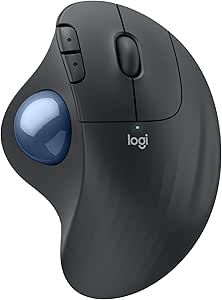 | Best for Small Workspaces | Connectivity: Bluetooth, USB (Logi Bolt Receiver) | Movement Detection: Trackball | Button Quantity: 5 (2 main, 3 customizable) | VIEW LATEST PRICE | See Our Full Breakdown |
| Logitech MK270 Full-Size Wireless Keyboard and Mouse Combo, Black |  | Best Budget Combo | Connectivity: Wireless, 2.4 GHz | Wireless Range: Up to 33 ft (10 m) | Keyboard Layout: QWERTY, 104 keys | VIEW LATEST PRICE | See Our Full Breakdown |
| Logitech M185 Compact Ambidextrous Wireless Mouse, Swift Grey |  | Best for Travel & Portability | Connectivity: 2.4 GHz wireless via USB nano receiver | Tracking: Optical | Maximum Sensitivity: 1000 DPI | VIEW LATEST PRICE | See Our Full Breakdown |
| Logitech MK850 Performance Wireless Keyboard and Mouse Combo |  | Best for Multi-Device Workflows | Connectivity: Bluetooth, radio frequency, USB | Compatible OS: Windows, macOS, Chrome OS, Linux, Android | Keyboard Layout: QWERTY | VIEW LATEST PRICE | See Our Full Breakdown |
| Logitech Signature Comfort Plus MK880 Wireless Keyboard and Mouse Combo, Graphite |  | Best for Modern Office Comfort | Connectivity: Bluetooth | Color: Graphite | Keyboard Layout: QWERTY | VIEW LATEST PRICE | See Our Full Breakdown |
| Logitech M510 Full-Size Wireless Mouse |  | Best Long-Lasting Wireless Mouse | Connectivity: 2.4 GHz wireless via USB receiver | Buttons: 7 | Tracking Technology: Laser | VIEW LATEST PRICE | See Our Full Breakdown |
| Logitech MX Keys Combo for Business Keyboard and Mouse – Graphite |  | Best Secure Business Combo | Connectivity: Bluetooth, Logi Bolt | Sensor Type: Darkfield 8000 DPI Optical | Keyboard Layout: QWERTY (104 keys) | VIEW LATEST PRICE | See Our Full Breakdown |
| Logitech MX Keys S Combo Wireless Keyboard and Mouse, Graphite |  | Best Premium Productivity Combo | Connectivity: Bluetooth Low Energy or Logi Bolt | Keyboard Weight: 810 g | Mouse Sensor: Darkfield 8K DPI | VIEW LATEST PRICE | See Our Full Breakdown |
| Logitech Signature MK650 Combo for Business Keyboard and Mouse, Graphite |  | Best Value Business Combo | Connectivity: Logi Bolt or Bluetooth Low Energy | Keyboard Battery Life: Up to 36 months | Mouse Battery Life: Up to 24 months | VIEW LATEST PRICE | See Our Full Breakdown |
| Logitech M720 Triathlon Multi-Device Wireless Mouse | 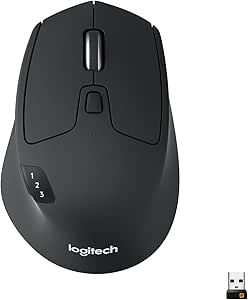 | Best Multi-Device Mouse | Connectivity: Bluetooth or USB Receiver | Multi-Device Support: Up to 3 computers | Maximum Sensitivity: 1000 DPI | VIEW LATEST PRICE | See Our Full Breakdown |
| Logitech computer peripheral | Connectivity | Battery Life |
|---|---|---|
| Logitech MK850 Performance Wir | Bluetooth, USB Receiver | Keyboard: 3 years, Mouse: 2 years |
| Logitech Lift Vertical Ergonom | Bluetooth Low Energy, Logi Bolt USB | 24 months |
| Logitech MX Master 3S Bluetoot | Bluetooth | Up to 70 days |
| Logitech G305 LIGHTSPEED Wirel | USB wireless receiver | Up to 250 hours |
| Logitech MX Master 4 Ergonomic | Bluetooth, radio frequency, USB-C dongle | Up to 70 days |
| Logitech Ergo M575S Wireless B | Bluetooth, USB (Logi Bolt Receiver) | Up to 18 months |
| Logitech MK270 Full-Size Wirel | Wireless, 2.4 GHz | Up to 36 months (keyboard), 12 months (mouse) |
| Logitech M185 Compact Ambidext | 2.4 GHz wireless via USB nano receiver | Up to 12 months |
| Logitech MK850 Performance Wir | Bluetooth, radio frequency, USB | — |
| Logitech Signature Comfort Plu | Bluetooth | — |
| Logitech M510 Full-Size Wirele | 2.4 GHz wireless via USB receiver | Up to 2 years |
| Logitech MX Keys Combo for Bus | Bluetooth, Logi Bolt | — |
| Logitech MX Keys S Combo Wirel | Bluetooth Low Energy or Logi Bolt | — |
| Logitech Signature MK650 Combo | Logi Bolt or Bluetooth Low Energy | — |
| Logitech M720 Triathlon Multi- | Bluetooth or USB Receiver | Up to 24 months |
More Details on Our Top Picks
Logitech MK850 Performance Wireless Keyboard and Mouse Combo
This combo stands out for its exceptional battery endurance, offering up to three years on the keyboard and two on the mouse, which minimizes maintenance significantly. Compared to the Logitech MX Keys Combo, the MK850 provides a more traditional typing experience with a dedicated number pad and cushioned palm rest, making it better suited for data entry tasks. The hyper-fast scroll wheel on the mouse is a productivity booster for long documents, though it lacks the precision scrolling modes found in higher-end models. While the multi-device switching is seamless, the requirement for Logitech Options software to unlock full customization can be a hurdle for users who prefer plug-and-play simplicity.
Pros:- Extensive battery life reduces frequent charging or battery replacement needs
- Cushioned palm rest and ergonomic mouse shape support long typing sessions
- Easy switching between three devices via Bluetooth or USB receiver
Cons:- Right-handed-only design excludes a portion of the user base
- Full functionality is locked behind Logitech Options software installation
Best for: Office workers and data analysts who need a full-size keyboard with a number pad and reliable long-term battery life for a stationary desk setup.
Not ideal for: Left-handed users, as the mouse is strictly right-handed, or those with limited desk space, as the full-size footprint requires significant room.
- Connectivity:Bluetooth, USB Receiver
- Battery Life:Keyboard: 3 years, Mouse: 2 years
- Wireless Range:10m / 30ft
- Compatible OS:Windows, Mac, Chrome OS, Linux
- Keyboard Layout:QWERTY
- Mouse Design:Right-handed, Ergonomic
- Software:Logitech Options
Our verdict“Choose this if you need a durable, full-size wireless setup that prioritizes battery life and comfort over compact portability.”
Logitech Lift Vertical Ergonomic Wireless Mouse – Graphite
The Logitech Lift is engineered for comfort, featuring a 57-degree vertical angle that places the wrist in a natural handshake position, directly addressing strain issues common with flat mice like the Logitech M510. This design is particularly effective for users with small to medium hands, as the compact size ensures proper finger reach to the buttons. While it shares multi-device connectivity with the MX Master series, the Lift focuses on health rather than advanced productivity features. The whisper-quiet clicks make it ideal for shared workspaces, but the reliance on a single AA battery means you must keep spares on hand, unlike rechargeable competitors.
Pros:- Vertical design significantly reduces wrist strain and promotes neutral posture
- Whisper-quiet clicks minimize noise disturbance in quiet environments
- Compact size fits naturally in smaller hands without awkward gripping
Cons:- Ill-fitting for users with large hands due to its compact dimensions
- Requires a separate AA battery rather than offering built-in rechargeability
Best for: Users with small to medium-sized hands who suffer from wrist pain or carpal tunnel and need a compact, ergonomic mouse for daily office use.
Not ideal for: People with large hands, who will find the body too short and the buttons difficult to reach comfortably, or those who prefer rechargeable batteries.
- Weight:125 g
- Dimensions:108 x 70 x 71 mm
- Tracking Resolution:4000 DPI (adjustable)
- Battery Life:24 months
- Battery Type:1x AA
- Wireless Range:10 m
- Connectivity:Bluetooth Low Energy, Logi Bolt USB
- Button Quantity:6
- Hand Orientation:Right
Our verdict“This is the go-to choice for smaller-handed users seeking relief from wrist strain without the bulk of full-sized ergonomic peripherals.”
Logitech MX Master 3S Bluetooth Wireless Mouse, Graphite
The MX Master 3S remains a benchmark for professional productivity, offering an 8,000 DPI sensor that tracks reliably on nearly any surface, including glass. Unlike the G305 LIGHTSPEED, which focuses on gaming speed, the Master 3S prioritizes precision and comfort with its sculpted ergonomic shape. The MagSpeed scroll wheel provides tactile ratchet clicks for precision and a free-spin mode for rapid scrolling, a feature absent in basic models like the M185. However, the lack of an included USB receiver and charging cable in the box is a notable omission for a premium device, forcing buyers to source their own accessories.
Pros:- Advanced MagSpeed scroll wheel offers both precision and high-speed scrolling
- High-precision sensor works on difficult surfaces like glass
- Robust multi-device support allows seamless switching between three computers
Cons:- Charging cable and USB receiver are not included in the package
- Heavier weight may feel cumbersome for users preferring lightweight mice
Best for: Creative professionals, programmers, and power users who demand high precision, multi-device control, and ergonomic support for long work sessions.
Not ideal for: Budget-conscious buyers who expect all accessories in the box, or gamers who prefer the lighter weight and higher polling rates of dedicated gaming mice.
- Connectivity:Bluetooth
- Sensor:Darkfield high precision optical
- Maximum sensitivity:8,000 DPI
- Buttons:7
- Weight:141 g (4.97 oz)
- Dimensions:51 × 84.3 × 124.9 mm
- Battery:Rechargeable Li-Po, 500 mAh
- Battery life:Up to 70 days
- Wireless range:Up to 10 m (33 ft)
Our verdict“Select this mouse if you need top-tier productivity features and ergonomic support, and don’t mind sourcing your own charging accessories.”
Logitech G305 LIGHTSPEED Wireless Gaming Mouse, Black
The G305 LIGHTSPEED delivers competitive-grade performance in a lightweight, ambidextrous form factor, making it a stark contrast to the heavier, right-handed MX Master 3S. Its HERO sensor offers up to 12,000 DPI and 1 ms response times, ensuring that cursor movement feels instantaneous during fast-paced gaming. While it lacks the multi-device switching of the MK850 combo, its focus is singular: gaming reliability. The use of a standard AA battery allows for extended playtime without charging downtime, though this adds slight weight compared to internal lithium-polymer designs found in premium gaming mice.
Pros:- Extremely lightweight design reduces fatigue during extended gaming sessions
- Highly responsive 1 ms LIGHTSPEED wireless connectivity
- Ambidextrous shape accommodates both left and right-handed users
Cons:- Lacks ergonomic shaping for long-term productivity tasks
- Dependence on a single AA battery can be less convenient than USB-C charging
Best for: Gamers who prioritize lightweight handling and responsive tracking over ergonomic features or multi-device connectivity.
Not ideal for: Office professionals who need ergonomic support for 8-hour workdays, or users who dislike replacing batteries frequently.
- Sensor:HERO optical
- Sensitivity:200–12,000 DPI
- Wireless report rate:1 ms
- Buttons:6 programmable
- Battery life:Up to 250 hours
- Battery:1 AA, included
- Weight:3.4 oz (99 g)
- Connectivity:USB wireless receiver
- Hand orientation:Ambidextrous
Our verdict“This is the ideal entry point for wireless gaming, offering pro-level speed in a simple, durable package.”
Logitech MX Master 4 Ergonomic Wireless Mouse with Haptic Feedback, Graphite
The MX Master 4 elevates the productivity mouse category by introducing customizable haptic feedback, allowing users to feel specific actions like notifications or macros directly through the mouse. This adds a tactile layer of interaction that the MX Master 3S lacks, potentially speeding up workflow recognition. While it retains the familiar ergonomic shape and MagSpeed scrolling, the new Actions Ring offers quick access to shortcuts, reducing the need for keyboard combinations. The inclusion of a USB-C dongle improves connectivity reliability over the 3S, though the continued exclusion of a charging cable remains a minor inconvenience for a top-tier device.
Pros:- Haptic feedback provides tactile confirmation for custom actions and notifications
- Actions Ring allows for rapid access to frequently used shortcuts
- Included USB-C dongle ensures stable low-latency connectivity
Cons:- Higher price point compared to the previous generation MX Master 3S
- Charging cable is still not included in the retail box
Best for: Power users and multitaskers who want the most advanced customization options and tactile feedback to streamline complex workflows.
Not ideal for: Users who prefer a simpler, less cluttered interface or those who are satisfied with the standard features of the MX Master 3S.
- Connectivity:Bluetooth, radio frequency, USB-C dongle
- Sensor:Optical, up to 8,000 DPI
- Buttons:7
- Hand orientation:Right-handed
- Battery life:Up to 70 days
- Compatible operating systems:Android, Chrome OS, Linux, Windows, iPadOS, macOS
- Material:Plastic
Our verdict“Choose this model if you want the absolute latest in ergonomic productivity tech, specifically the added dimension of haptic interaction.”
Logitech Ergo M575S Wireless Bluetooth Trackball Mouse
This model stands out for its thumb-operated trackball design, which keeps your hand stationary to reduce forearm strain. Unlike the Logitech Lift Vertical Ergonomic Mouse, which requires vertical hand positioning and desktop space for movement, the M575S fits into tight areas where mouse pads are impractical. The quiet click mechanism makes it suitable for shared offices or late-night work. However, the learning curve is steep; users accustomed to traditional pointing may find the 2000 DPI sensitivity feels slow during rapid cursor adjustments. It is strictly for right-handed users, limiting its versatility compared to ambidextrous options.
Pros:- Reduces forearm muscle strain by keeping the hand stationary
- Operates quietly, ideal for shared workspaces
- Requires no surface area for movement, perfect for small desks
- Up to 18-month battery life on a single AA battery
Cons:- Steep learning curve for users new to trackballs
- Right-handed design excludes left-handed users
- Lower DPI may feel sluggish for fast-paced tasks
Best for: Professionals with limited desk space or those suffering from repetitive strain injuries who prefer stationary hand positions.
Not ideal for: Gamers or designers who need high-speed precision and rapid cursor movement across large screens.
- Connectivity:Bluetooth, USB (Logi Bolt Receiver)
- Movement Detection:Trackball
- Button Quantity:5 (2 main, 3 customizable)
- Hand Orientation:Right
- Battery Life:Up to 18 months
- Sensitivity:2000 DPI
- Materials:Post-consumer recycled plastic
Our verdict“Choose this if you need ergonomic relief and have a cramped desk, but be prepared to retrain your cursor control habits.”
Logitech MK270 Full-Size Wireless Keyboard and Mouse Combo, Black
The MK270 offers a complete wireless setup at an entry-level price point, making it a strong alternative to the premium Logitech MX Keys Combo. While it lacks the advanced multi-device switching and mechanical feel of higher-end Logitech kits, its spill-resistant keyboard and long battery life provide reliable daily durability. The included mouse is compact and ambidextrous, which suits casual users but may feel too small for those with larger hands compared to the sculpted Logitech M510. This combo prioritizes function and simplicity over tactile refinement, serving as a solid workhorse for basic computing tasks without unnecessary frills.
Pros:- Full-size keyboard includes a number pad and multimedia keys
- Spill-resistant design adds durability against accidents
- Ambidextrous mouse accommodates both left- and right-handed users
- Long battery life reduces maintenance frequency
Cons:- Mouse is compact and may lack ergonomic support for large hands
- Basic plastic construction feels less premium than higher-end combos
- Single USB receiver lacks Bluetooth flexibility
Best for: Home offices or students needing a reliable, no-frills wireless keyboard and mouse set for basic productivity.
Not ideal for: Power users who require programmable keys, multi-device connectivity, or premium tactile feedback.
- Connectivity:Wireless, 2.4 GHz
- Wireless Range:Up to 33 ft (10 m)
- Keyboard Layout:QWERTY, 104 keys
- Keyboard Features:Full-size, number pad, spill-resistant
- Mouse Orientation:Ambidextrous
- Battery Life:Up to 36 months (keyboard), 12 months (mouse)
- Receiver:USB-A Nano Receiver
Our verdict“This is the sensible choice if you need a functional, durable wireless set without paying for advanced features you won’t use.”
Logitech M185 Compact Ambidextrous Wireless Mouse, Swift Grey
This mouse excels in portability, measuring significantly smaller than the Logitech M510 and lacking the extra buttons of the Logitech M720 Triathlon. Its compact, ambidextrous shape fits easily into laptop bags, making it a go-to for travelers who prioritize weight savings over ergonomic support. The plug-and-play USB nano receiver ensures quick setup on any compatible device, from Windows laptops to Linux machines. However, the 1000 DPI optical sensor is basic, and the small size can cause hand fatigue during long sessions. It is a utility tool, not a productivity powerhouse, best reserved for on-the-go use.
Pros:- Extremely compact and lightweight for easy transport
- Ambidextrous design works for both left and right hands
- Simple plug-and-play setup via USB nano receiver
- Broad compatibility with major operating systems
Cons:- Small size may cause discomfort for users with large hands
- Requires a dedicated USB-A port for the receiver
- Basic 1000 DPI tracking lacks precision for detailed work
Best for: Frequent travelers and laptop users who need a lightweight, simple mouse for temporary or mobile setups.
Not ideal for: Desktop users with larger hands or those requiring ergonomic support for extended work sessions.
- Connectivity:2.4 GHz wireless via USB nano receiver
- Tracking:Optical
- Maximum Sensitivity:1000 DPI
- Hand Orientation:Ambidextrous
- Battery Life:Up to 12 months
- Wireless Range:Up to 33 ft / 10 m
- Compatibility:Windows, Mac, Chrome OS, Linux
Our verdict“Buy this for its unmatched portability and simplicity, but skip it if you spend hours daily at a fixed desk.”
Logitech MK850 Performance Wireless Keyboard and Mouse Combo
The MK850 distinguishes itself with robust multi-device switching, allowing seamless movement between three connected computers, tablets, or phones. This feature sets it apart from the single-receiver Logitech MK270 and offers a more integrated experience than pairing separate devices. The keyboard includes a cushioned palm rest and adjustable tilt, promoting better posture than the flat Logitech Signature Comfort Plus MK880. The mouse features a hyper-fast scroll wheel for quick document navigation. While highly functional, the right-handed mouse design limits accessibility, and the overall bulk is greater than minimalist alternatives, making it less ideal for travel.
Pros:- Switches seamlessly between up to three devices
- Ergonomic keyboard with cushioned palm rest and adjustable tilt
- Hyper-fast scroll wheel speeds up document navigation
- Long battery life reduces frequent replacements
Cons:- Mouse is designed exclusively for right-handed users
- Larger footprint requires significant desk space
- Battery life can vary significantly based on usage intensity
Best for: Professionals who switch between multiple computers or devices and need a cohesive, ergonomic typing and pointing experience.
Not ideal for: Left-handed users or minimalists who find the cushioned palm rest and large footprint too bulky.
- Connectivity:Bluetooth, radio frequency, USB
- Compatible OS:Windows, macOS, Chrome OS, Linux, Android
- Keyboard Layout:QWERTY
- Mouse Tracking:Optical
- Hand Orientation:Right-handed
- Wireless Range:Up to 10 m (30 ft)
- Keyboard Battery Life:Up to 3 years
Our verdict“This combo is the best choice for multi-device users who value ergonomic comfort and efficient workflow switching.”
Logitech Signature Comfort Plus MK880 Wireless Keyboard and Mouse Combo, Graphite
The MK880 focuses on tactile comfort with a dual-foam palm rest and a sculpted mouse cushion, offering a softer feel than the harder plastic edges of the Logitech MK850. It connects via Bluetooth to three devices, matching the multi-device capability of higher-end kits like the Logitech MX Keys Combo. A key differentiator is the inclusion of dedicated meeting and AI keys, which streamline virtual calls and modern workflows. However, the mouse remains right-handed only, and the reliance on AAA batteries may be less convenient for users who prefer rechargeable options found in the MX series. It strikes a balance between comfort and modern connectivity features.
Pros:- Dual-foam palm rest and sculpted mouse enhance long-term comfort
- Dedicated meeting and AI keys streamline modern workflows
- Bluetooth connectivity supports switching between three devices
- Made with significant recycled plastic content
Cons:- Mouse is right-handed only, limiting accessibility
- Uses replaceable AAA batteries instead of rechargeable cells
- Full-size layout may crowd smaller desks
Best for: Office workers who spend long hours typing and want dedicated shortcuts for meetings and AI tools.
Not ideal for: Users who prefer rechargeable peripherals or left-handed individuals due to the mouse design.
- Connectivity:Bluetooth
- Color:Graphite
- Keyboard Layout:QWERTY
- Keyboard Type:Full-size with palmrest
- Mouse Type:Right-handed optical with SmartWheel
- Device Switching:Up to 3 devices
- Keyboard Battery Life:Up to 36 months
Our verdict“Ideal for modern professionals who prioritize ergonomic comfort and specific software shortcuts over premium build materials.”
Logitech M510 Full-Size Wireless Mouse
This mouse stands out for its exceptional battery life, lasting up to two years on two AA batteries. Compared to the Logitech M720 Triathlon, the M510 offers a more traditional full-size shape with soft rubber grips that provide a secure hold during long work sessions. The seven programmable buttons, including side scrolling, add utility for spreadsheet navigation. However, the laser sensor is a limitation; it fails on glass or reflective surfaces, unlike the optical sensors in premium models. It lacks the multi-device switching found in the M720, making it less ideal for users who jump between machines. This is a solid choice if you prioritize battery longevity and comfort over advanced connectivity features.
Pros:- Two-year battery life reduces maintenance frequency
- Contoured shape with rubber grips enhances comfort
- Side scrolling and zoom buttons aid productivity
Cons:- Laser tracking fails on glass or shiny surfaces
- Single-device connection limits multi-computer workflows
- Advanced features require Logitech software installation
Best for: Office workers who want a comfortable, full-size mouse with minimal maintenance and hate changing batteries.
Not ideal for: Users who work on glass desks or need to switch between three different computers frequently.
- Connectivity:2.4 GHz wireless via USB receiver
- Buttons:7
- Tracking Technology:Laser
- Maximum Sensitivity:1000 DPI
- Battery Life:Up to 2 years
- Hand Orientation:Right-handed
Our verdict“Choose the M510 if you value long battery life and ergonomic comfort over multi-device flexibility.”
Logitech MX Keys Combo for Business Keyboard and Mouse – Graphite
This combo is engineered for enterprise security, featuring Logi Bolt encryption that protects data better than standard Bluetooth. It pairs the MX Keys keyboard with the MX Master 3S mouse, offering a premium build. The mouse’s Quiet Click technology reduces noise by 90%, making it ideal for shared offices, unlike the louder switches in the Logitech Signature MK650. The 8000 DPI Darkfield sensor tracks on any surface, including glass, a significant advantage over the M510. While the MX Keys S Combo offers similar hardware, this business-focused version emphasizes IT deployment and security compliance. The tradeoff is the right-hand-only mouse and the premium cost, which may be unnecessary for home users.
Pros:- Logi Bolt encryption provides enterprise-grade security
- Quiet Click technology minimizes noise in open offices
- 8000 DPI sensor works reliably on glass surfaces
Cons:- Premium price point exceeds standard office peripherals
- Right-hand-only mouse design excludes left-handed users
- Requires specific Logi Bolt receiver for best performance
Best for: IT managers and professionals in secure environments who need encrypted wireless connections and silent operation.
Not ideal for: Budget-conscious home users or left-handed individuals, as the mouse is right-hand exclusive.
- Connectivity:Bluetooth, Logi Bolt
- Sensor Type:Darkfield 8000 DPI Optical
- Keyboard Layout:QWERTY (104 keys)
- Power Source:Rechargeable Lithium Polymer
- Mouse Feature:Quiet Click Technology
- Compatibility:Windows, macOS, ChromeOS, Linux
Our verdict“This combo is the definitive choice for businesses prioritizing security and silent productivity.”
Logitech MX Keys S Combo Wireless Keyboard and Mouse, Graphite
As the refined successor to the original MX Keys, this combo features smart backlighting that activates when your hands approach, saving battery compared to always-on illumination. It pairs the MX Keys S with the MX Master 3S, delivering the famous MagSpeed scrolling for effortless document navigation. Unlike the Logitech Signature MK650, which uses AA batteries, both devices here are rechargeable via USB-C, offering a cleaner desk setup. The ability to connect to three devices simultaneously makes it superior to single-device options like the M510. However, the reliance on the Logi Options+ app for full customization can be a hurdle for users who prefer plug-and-play simplicity. It is a high-end choice for those who want top-tier ergonomics and seamless multi-device switching.
Pros:- Smart backlighting adapts to ambient light and hand proximity
- MagSpeed scrolling offers precise and fast navigation
- Rechargeable batteries eliminate the need for disposables
Cons:- Full feature set requires Logi Options+ software
- Not compatible with older Logitech USB receivers
- Higher cost compared to basic wireless combos
Best for: Power users and professionals who need seamless switching between Mac and PC and appreciate smart backlighting.
Not ideal for: Users who dislike installing software or need a budget-friendly entry into wireless peripherals.
- Connectivity:Bluetooth Low Energy or Logi Bolt
- Keyboard Weight:810 g
- Mouse Sensor:Darkfield 8K DPI
- Battery Type:Rechargeable Li-Po
- Multi-Device Support:Up to 3 devices
- Mouse Buttons:7
Our verdict“The MX Keys S Combo is the gold standard for high-end, multi-device productivity workflows.”
Logitech Signature MK650 Combo for Business Keyboard and Mouse, Graphite
This combo offers a strong balance of comfort and connectivity at a lower price than the MX Keys S Combo. The keyboard includes an integrated palm rest, reducing wrist strain during long typing sessions, a feature the M510 mouse lacks. The mouse features SmartWheel technology for automatic switching between line-by-line and free-spin scrolling. Unlike the premium MX series, this set uses AA batteries, which can last up to 36 months for the keyboard, appealing to those who prefer disposables over charging cables. It supports Logi Bolt for secure connections, similar to the business MX combo, but without the high-end sensor or rechargeable convenience. It is a practical choice for office environments needing reliability and ergonomic comfort without the flagship price tag.
Pros:- Integrated palm rest enhances typing comfort
- SmartWheel adapts scrolling speed automatically
- Extensive battery life with standard AA batteries
Cons:- Requires AA battery replacements over time
- Lacks the high-precision sensor of the MX series
- No multi-device switching capability
Best for: Office users seeking ergonomic comfort and long battery life without paying for premium rechargeable features.
Not ideal for: Users who work on glass surfaces or prefer the convenience of USB-C charging over battery swaps.
- Connectivity:Logi Bolt or Bluetooth Low Energy
- Keyboard Battery Life:Up to 36 months
- Mouse Battery Life:Up to 24 months
- Keyboard Feature:Integrated Palm Rest
- Mouse Feature:SmartWheel
- Power Source:AA Batteries
Our verdict“The MK650 is the smart pick for businesses wanting ergonomic comfort and secure connectivity on a budget.”
Logitech M720 Triathlon Multi-Device Wireless Mouse
The M720 excels in versatility, allowing users to switch between three computers with the push of a button. This makes it far more flexible than the single-device M510 for those managing a desktop, laptop, and tablet. The hyper-fast scrolling wheel handles long documents efficiently, though it lacks the magnetic precision of the MX Master 3S. It uses a standard optical sensor with 1000 DPI, which is adequate for office work but not for high-end design. The 24-month battery life on a single AA battery is impressive and comparable to the M510. While it lacks the rubberized side grips of some competitors, its sculpted shape remains comfortable. This is the ideal mouse for multi-device setups where budget matters more than premium scroll precision.
Pros:- Switches seamlessly between three connected devices
- Hyper-fast scrolling wheel handles long documents
- Single AA battery lasts up to 24 months
Cons:- 1000 DPI sensor is limited for precision tasks
- Some advanced features lack Linux support
- Right-handed design limits ergonomic options
Best for: Users who frequently switch between a PC, Mac, and iPad and need a reliable, long-lasting mouse.
Not ideal for: Gamers or designers requiring high DPI sensitivity and advanced thumb-wheel controls.
- Connectivity:Bluetooth or USB Receiver
- Multi-Device Support:Up to 3 computers
- Maximum Sensitivity:1000 DPI
- Battery Life:Up to 24 months
- Buttons:6
- Wireless Range:5.0 meters
Our verdict“The M720 is the most practical multi-device mouse for users who value battery life and switching speed.”

How We Picked
I evaluated these peripherals based on three core criteria: ergonomic fit, connectivity reliability, and workflow efficiency. For mice, I prioritized shape versatility and sensor accuracy, distinguishing between devices designed for static desk work versus dynamic movement. Keyboards were judged on key travel consistency, backlighting utility, and the effectiveness of their multi-device switching protocols. I also weighed the long-term value of each product, considering battery life, build durability, and the availability of replacement parts or software support.
The ranking logic favors devices that solve specific problems rather than those that simply offer the most features. A premium mouse with haptic feedback ranks higher than a basic mouse with more buttons if the haptics provide tangible utility for common tasks. Conversely, a budget-friendly combo earns a high spot if it delivers exceptional reliability and comfort without unnecessary complexity. This approach ensures that readers can identify the right tool for their specific use case, whether that involves competitive gaming, long hours of data entry, or casual home computing.
Factors to Consider When Choosing Best Logitech Computer Peripherals
Selecting the right peripheral goes beyond brand loyalty; it requires matching hardware specifications to your physical habits and technical environment. Here are the critical factors to weigh before making a purchase.
Ergonomics And Hand Shape Compatibility
Standard mice assume a neutral hand position, but this posture often leads to wrist strain over extended periods. Vertical mice like the Logitech Lift and trackballs like the Ergo M575S alter muscle engagement, shifting load from the forearm to larger muscle groups. However, these alternative shapes are not universally superior; users with smaller hands may find vertical mice cumbersome, while trackballs require precise thumb or finger control that can cause fatigue if not adjusted correctly. I recommend prioritizing shape over features if you experience existing discomfort, as no amount of software customization can fix poor physical alignment. Test the device in your hand before committing if possible, as grip styles (palm, claw, fingertip) drastically affect comfort levels across different Logitech models.
Connectivity Protocols And Device Switching
Logitech offers three primary connection methods: Bluetooth, the Unifying Receiver, and the newer Logi Bolt receiver. The Unifying Receiver allows you to connect up to six devices with a single USB dongle, ideal for clean desk setups with multiple peripherals. Logi Bolt is more secure and reliable in congested wireless environments but requires compatible devices and does not support older Unifying hardware. Bluetooth offers the most flexibility for switching between computers, tablets, and phones without dongles, though it can occasionally suffer from latency or pairing interruptions. If you frequently switch between three or more devices, prioritize models with dedicated physical switch buttons, such as the M720 Triathlon or MX Series, rather than relying solely on Bluetooth software toggles which can be slower to register.
Software Dependency And Customization Depth
Many high-end Logitech devices rely heavily on Logi Options+ software to unlock their full potential, including key remapping, cursor speed adjustment, and application-specific profiles. While this software is robust, it adds a layer of dependency; if you use a work computer where installing third-party drivers is restricted, advanced features on devices like the MX Keys S may remain inaccessible. Basic plug-and-play functionality will still work, but you lose the competitive advantage that justifies the premium price tag. For corporate environments, consider simpler models like the MK270 or M510 that function perfectly without software installation. Conversely, if you control your own machine, the deep customization available in the MX ecosystem can significantly accelerate workflows through smart actions and macro assignments.
Battery Life And Charging Infrastructure
Power management varies wildly across the Logitech lineup, influencing both convenience and long-term ownership costs. Older models and budget options often rely on replaceable AA or AAA batteries, which offer weeks or months of use but require ongoing purchases. Premium devices like the MX Master 3S and G305 use rechargeable lithium-ion cells, providing rapid charging via USB-C or micro-USB. While rechargeable models eliminate battery waste, they introduce the risk of downtime if you forget to charge them. I find that devices supporting ‘fast charge’—where one minute of charging provides several hours of use—are far more practical for daily drivers. Evaluate your charging habits: if you tend to leave devices plugged in constantly, a wired option or a rechargeable mouse with a long battery life is preferable to a low-capacity wireless model that requires frequent attention.
Gaming Performance Versus Productivity Features
Gaming peripherals and productivity peripherals are converging, but distinct engineering choices remain. The G305 prioritizes sensor speed and click latency, using the HERO sensor to maximize battery efficiency without compromising tracking accuracy. In contrast, productivity mice like the MX Master series emphasize scroll wheel precision (MagSpeed) and multi-device connectivity, often at the cost of slightly higher click latency or heavier build weights. Do not assume a gaming mouse is better for office work; the aggressive button layouts and lightweight shells can feel unrefined for document editing. Similarly, a productivity mouse may feel sluggish in fast-paced gaming scenarios. Match the primary use case to the engineering priority: choose LIGHTSPEED technology for competitive play, and MagSpeed or ergonomic shapes for professional workflows.
Frequently Asked Questions
What is the main difference between the Unifying Receiver and Logi Bolt?
The Unifying Receiver is an older USB-A standard that allows you to connect up to six compatible devices to a single dongle, making it excellent for consolidating desk clutter. However, it uses the 2.4GHz band which can be susceptible to interference in crowded office environments. Logi Bolt is the newer, more secure protocol that offers improved stability and security, particularly in congested wireless spaces, but it is not backward compatible with Unifying devices. If you already own multiple Unifying peripherals, stick with that ecosystem; if you are buying new equipment and prioritize connection security in a busy network environment, Logi Bolt is the superior choice.
Do I need Logi Options+ software for basic functionality?
No, you do not need software for basic functionality. All Logitech mice and keyboards function as standard input devices when plugged in or paired via Bluetooth or a receiver, allowing you to move the cursor, click, and type immediately. The software is required only for advanced features such as remapping buttons, adjusting scroll direction per application, customizing backlighting modes, or creating complex macros. If you are using a device on a restricted work computer where you cannot install software, you will lose these premium features but retain full basic usability, which is often sufficient for general office tasks.
Is a vertical mouse actually better for preventing carpal tunnel?
A vertical mouse can reduce pressure on the median nerve by keeping the wrist in a more natural handshake position, which may alleviate symptoms associated with repetitive strain injuries. However, it is not a cure-all; improper sizing or a poor grip style can still cause discomfort in the elbow or shoulder. The Logitech Lift is designed for small to medium hands, while larger hands may find standard ergonomic mice more comfortable. It is important to note that switching to a vertical mouse requires an adaptation period, and users should combine this with regular breaks and stretching to truly mitigate health risks.
Can I use a Logitech gaming mouse for office work?
Yes, you can use a gaming mouse like the G305 for office work, and many users prefer its lightweight design and high-precision sensor for tasks like photo editing or CAD. However, gaming mice often lack the specialized features found in productivity-focused models, such as the thumb wheel for horizontal scrolling or silent click mechanisms. Additionally, gaming mice typically have more visible RGB lighting, which can be distracting in professional settings. If your office work involves heavy document scrolling or multi-device switching, a dedicated productivity mouse will likely offer a more refined and efficient experience than a repurposed gaming device.
Which Logitech combo is best for a small desk setup?
For small desks, the Logitech MK270 or the MX Keys S Combo are strong contenders due to their compact footprints and wireless freedom. The MK270 is extremely affordable and slim, leaving plenty of room for other items, though it lacks multi-device switching. The MX Keys S Combo is more expensive but offers a low-profile keyboard and the ability to switch between three devices, which is ideal if you use a laptop and a desktop on the same desk. If space is your absolute priority and you do not need numpads or advanced features, the MK270 provides the best value, whereas the MX Keys S Combo offers the best functionality per square inch.
Conclusion
Choosing from the best Logitech computer peripherals ultimately depends on your primary workflow and physical needs. For most professionals seeking a balance of comfort, precision, and versatility, the Logitech MX Master 3S is the best overall pick, offering unmatched scroll control and seamless multi-device switching. If you are on a tight budget but need reliable wireless performance, the Logitech MK270 combo is the best value option, providing essential functionality without unnecessary frills. Gamers should gravitate toward the Logitech G305 for its lightweight design and responsive sensor, while those prioritizing wrist health will find the Logitech Lift to be the best ergonomic choice. For beginners or general home users, the Logitech M185 serves as a simple, durable entry point into wireless computing. Evaluate your daily tasks, hand size, and software restrictions to select the device that will serve you best for years to come.
Fall Picks

DJI Osmo Action 4 Essential Combo Waterproof 4K Action Camera
As an affiliate, we earn on qualifying purchases.