
Choosing the best portable monitors requires balancing screen clarity, connectivity, and power draw against your specific workflow needs. The ViewSonic VX1655-4K-OLED stands out as the premium choice for creative professionals who demand perfect blacks and color accuracy, while the ASUS ZenScreen MB16AHV offers a robust balance of battery life and durability for frequent travelers. For gamers or those needing smoother motion, the VisionOwl 18.5-Inch provides a rare 100Hz refresh rate in a portable form factor. Most buyers face a tradeoff between screen size and weight; larger 18-inch panels offer more workspace but add bulk, whereas 15.6-inch models prioritize portability. This guide breaks down these tradeoffs to help you select the right display for your setup.

Get the latest gadgets delivered free with Prime
- Fast, free delivery on millions of items
- Prime Video, Amazon Music and more included
- Member-only deals all year
Complete the kit



Key Takeaways
- OLED panels like the ViewSonic VX1655 deliver superior contrast but consume more power and cost significantly more than IPS alternatives.
- USB-C single-cable connectivity is the standard for modern laptops, but legacy HDMI inputs remain necessary for older devices and consoles.
- 15.6-inch screens offer the best compromise between desk real estate and bag space, while 18.5-inch models provide near-desktop productivity at the cost of portability.
- High refresh rates (100Hz+) are still rare in portable monitors and are primarily found in niche models like the VisionOwl, making them a standout feature for mobile gamers.
- Built-in speakers on portable monitors are generally low-quality, so users should prioritize headphone jacks or external audio solutions for media consumption.




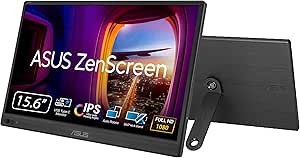


| portable monitor | Screen Size | Resolution | Weight | Panel Type |
|---|---|---|---|---|
| ASUS ZenScreen MB16AHV 15.6-In | 15.6 inches | 1920 x 1080 (FHD) | 2.0 pounds | IPS LCD |
| Acer PM191Q Ebmiuux 18.5-inch | 18.5 inches | 1920 x 1080 (FHD) | 2.49 lbs | IPS |
| VisionOwl 18.5-Inch Portable F | 18.5 inches | 1920 x 1080 (FHD) | 2.6 pounds | IPS |
| VisionOwl 15.6-Inch 1080p Port | 15.6 inches | 1920 x 1080 (FHD) | 1.4 lbs (screen only) | IPS LCD |
| AOC 16T20 15.6" Portable Monit | 15.6 inches | 1920 x 1080 (FHD) | 1.5 pounds | IPS |
| ViewSonic VX1655-4K-OLED 16 In | 15.6 inches | 4K UHD (3840 x 2160) | 1.5 lbs | — |
| KYY 15.6-Inch 1080p Portable M | 15.6 inches | 1920 x 1080 | 1.7 pounds | IPS LCD |
| cocopar 15.6-Inch Portable Mon | 15.6 inches | 1920 x 1080 (FHD) | 1.5 lb (without cover) | — |
| MNN 15.6-Inch 1080p Portable I | 15.6 inches | 1920 x 1080 (Full HD) | 1.5 pounds | — |
| ASUS ZenScreen MB169CK 15.6-In | 15.6 inches | 1920 x 1080 (FHD) | — | IPS |
| ASUS ZenScreen 15.6" Portable | 15.6 inches | 1920 x 1080 (Full HD) | 3.2 pounds | IPS |
| ASUS ZenScreen MB16ACV 15.6-in | 15.6 inches | 1920 x 1080 | — | — |
| Lenovo L15 15.6-Inch Portable | 15.6 inches | 1920 x 1080 (FHD) | — | IPS |
| ASUS ZenScreen MB16AC 15.6" FH | 15.6 inches | 1920 x 1080 (FHD) | 1.7 lbs | IPS LCD |
| MSI Pro MP165 E6 Portable Moni | 15.6 inches | 1920 x 1080 (FHD) | 0.78 kg | IPS |
More Details on Our Top Picks
ASUS ZenScreen MB16AHV 15.6-Inch FHD Portable Monitor
This model stands out for its focus on sustained viewing comfort, making it a strong choice for professionals who spend hours in front of a secondary screen. The matte anti-glare IPS panel reduces reflections significantly better than glossy alternatives like the AOC 16T20, which can suffer from glare in bright environments. While the 250-nit brightness is modest compared to the Acer PM191Q, it is sufficient for indoor office settings and helps minimize eye strain when paired with the built-in flicker-free and low blue light technologies. The USB-C and mini HDMI connectivity offers flexibility, though the lack of a higher refresh rate means it is strictly for productivity, not gaming. The integrated fold-out kickstand and tripod socket provide versatile positioning options that many competitors lack.Pros:- Matte finish effectively reduces glare and reflections
- Integrated flicker-free and low blue light tech reduces eye strain
- Versatile placement options with kickstand and tripod socket
- Triple connectivity via USB-C and Mini HDMI
Cons:- Brightness levels are lower than competitors
- 60Hz refresh rate limits motion smoothness
- Response time is average for fast-paced tasks
Best for: Office workers and students who need a reliable, eye-friendly second screen for spreadsheets, coding, or reading documents in controlled lighting.
Not ideal for: Gamers or video editors who require high refresh rates or high brightness for HDR content.
- Screen Size:15.6 inches
- Resolution:1920 x 1080 (FHD)
- Panel Type:IPS LCD
- Refresh Rate:60 Hz
- Brightness:250 nits
- Connectivity:USB-C, Mini HDMI
- Weight:2.0 pounds
Our verdict“Choose this if your priority is reducing eye fatigue during long work sessions rather than high-performance visuals.”
Acer PM191Q Ebmiuux 18.5-inch FHD IPS Portable Monitor
This monitor offers the most screen real estate in this group at 18.5 inches, providing significantly more workspace than the 15.6-inch ASUS ZenScreen. The 100Hz refresh rate is a major advantage, delivering smoother scrolling and motion compared to the standard 60Hz found on most rivals. I find the single-cable USB-C connectivity particularly convenient, as it powers the unit and transmits data without needing extra adapters, unlike setups that require separate power sources. However, the 7ms response time is slower than the VisionOwl 18.5-inch, which may result in slight ghosting during fast gaming. The ultra-slim 0.54-inch profile keeps it portable despite the larger size, making it an excellent compromise for those who need more space without carrying a heavy brick.Pros:- Largest screen size in this lineup at 18.5 inches
- High 100Hz refresh rate for smoother visuals
- Slim and lightweight for its size class
- Simplifies setup with single USB-C cable operation
Cons:- Slower 7ms response time affects fast motion clarity
- Limited port selection compared to dual-HDMI models
- Larger footprint may not fit smaller bags
Best for: Users who prioritize screen size and smoother motion for productivity or casual gaming over absolute portability.
Not ideal for: Travelers with limited bag space who prefer the smallest possible footprint.
- Screen Size:18.5 inches
- Resolution:1920 x 1080 (FHD)
- Panel Type:IPS
- Refresh Rate:100Hz
- Response Time:7ms
- Weight:2.49 lbs
- Ports:1x HDMI 1.4, 2x USB-C
Our verdict“This is the best pick for those who want maximum workspace and smooth motion without stepping up to premium 4K prices.”
VisionOwl 18.5-Inch Portable FHD Monitor with 100Hz Refresh Rate
While similar in size to the Acer PM191Q, this VisionOwl model differentiates itself with superior mounting options, including 75 x 75 mm VESA holes and a robust integrated stand. This makes it ideal for users who want to mount the screen on a tripod or arm for ergonomic adjustments, a feature the Acer lacks. The 100Hz refresh rate matches the Acer’s smoothness, but the 3ms response time is notably faster, reducing motion blur in games and videos. The built-in speakers add convenience for travel, though they lack depth compared to external audio. The matte screen finish helps combat glare, though the 1200:1 contrast ratio is slightly lower than the Acer’s, resulting in less deep blacks.Pros:- VESA mounting support allows for tripod or arm use
- Fast 3ms response time suits gaming better
- Built-in speakers provide basic audio without accessories
- Metal back panel adds durability
Cons:- Requires compatible USB-C ports for single-cable use
- Contrast ratio is lower than top-tier competitors
- Weight is slightly higher than 15.6-inch alternatives
Best for: Hybrid workers and gamers who need a large screen that can be mounted on stands or tripods for flexible setups.
Not ideal for: Users who need the absolute highest contrast ratios for dark-room movie watching.
- Screen Size:18.5 inches
- Resolution:1920 x 1080 (FHD)
- Panel Type:IPS
- Refresh Rate:100 Hz
- Response Time:3 ms
- Mounting:75 x 75 mm VESA
- Weight:2.6 pounds
Our verdict“Select this if you need a large, fast screen that can be mounted in various positions for ergonomic flexibility.”
VisionOwl 15.6-Inch 1080p Portable Monitor
This monitor is the lightest and thinnest option here, weighing just 1.4 pounds without the cover. Compared to the heavier Acer PM191Q, it disappears into a backpack, making it perfect for frequent travelers. The aluminum alloy construction feels premium and rigid, unlike the plastic-heavy designs of some competitors. While it shares the 60Hz refresh rate with the ASUS ZenScreen, its 300-nit brightness is higher, offering better visibility in varied lighting. The protective cover doubles as a stand, a clever design that reduces the number of accessories you need to carry. However, the 85% sRGB color gamut is narrower than the VisionOwl 18.5-inch, meaning colors may look slightly less vibrant for creative work.Pros:- Extremely lightweight at 1.4 lbs without cover
- Slim aluminum profile fits easily in bags
- Cover functions as a sturdy stand
- Good brightness for a 15.6-inch panel
Cons:- Narrower color gamut limits creative accuracy
- Cover adds nearly a pound to travel weight
- 60Hz refresh rate feels dated next to 100Hz rivals
Best for: Frequent travelers and commuters who prioritize weight and thickness above all other factors.
Not ideal for: Designers or photographers who need accurate, wide-gamut color reproduction.
- Screen Size:15.6 inches
- Resolution:1920 x 1080 (FHD)
- Panel Type:IPS LCD
- Refresh Rate:60 Hz
- Weight:1.4 lbs (screen only)
- Color Gamut:85% sRGB
- Ports:2x USB-C, 1x HDMI
Our verdict“Buy this if you are on the move constantly and need a second screen that adds minimal bulk to your luggage.”
AOC 16T20 15.6″ Portable Monitor, FHD 1080p IPS, USB-C & Mini HDMI, Ultra Slim with Smart Cover
The AOC 16T20 serves as a straightforward entry point into portable monitors, offering a 15.6-inch IPS panel with decent color accuracy. It is lighter than the VisionOwl 15.6-inch at 1.5 pounds, though the 20ms response time is significantly slower, making it unsuitable for any fast-paced gaming. The glossy screen finish is a notable drawback compared to the matte finishes on the ASUS ZenScreen and VisionOwl 18.5-inch, as it reflects more light and can be distracting in bright rooms. However, the smart cover provides decent protection and a basic stand function. It is a solid choice for basic office tasks, but those needing eye comfort or motion clarity should look at the ASUS or Acer models respectively.Pros:- Lightweight design at 1.5 pounds
- Smart cover provides protection and stand functionality
- Wide 170-degree viewing angles
Cons:- Glossy screen causes significant glare
- Slow 20ms response time causes motion blur
- Limited brightness for outdoor use
Best for: Casual users who need a simple, affordable second screen for occasional travel or office use.
Not ideal for: Gamers or users working in brightly lit environments due to the glossy screen and slow response time.
- Screen Size:15.6 inches
- Resolution:1920 x 1080 (FHD)
- Panel Type:IPS
- Refresh Rate:60 Hz
- Response Time:20 ms
- Screen Finish:Glossy
- Weight:1.5 pounds
Our verdict“This is a basic, no-frills option for those who want a cheap portable screen for simple tasks.”
ViewSonic VX1655-4K-OLED 16 Inch 4K UHD OLED Portable Monitor
This monitor stands out for its 4K OLED panel, offering contrast ratios that LCD alternatives simply cannot match. While most portable screens in this roundup, like the KYY 15.6-Inch, offer standard 1080p IPS panels, this ViewSonic model delivers true blacks and vibrant colors essential for content creation or high-end media consumption. The 60W power delivery is a significant upgrade, allowing it to charge a connected laptop while displaying content, a feature often limited to lower wattage on budget models. However, the fixed 60Hz refresh rate is a notable tradeoff for gamers who might prefer the higher refresh rates found in some gaming-focused alternatives. It is also thinner and lighter than many competitors, but the premium price point places it firmly in a luxury tier. The portrait mode support via the smart cover adds versatility for coding or document review, making it a robust tool for mobile professionals who demand visual precision.
Pros:- Exceptional 4K OLED contrast and color accuracy
- Ultra-slim profile at 0.6 inches and 1.5 lbs
- 60W two-way power delivery charges connected laptops
- Versatile smart cover enables portrait and landscape modes
Cons:- Fixed 60Hz refresh rate limits gaming performance
- OLED panels carry a risk of burn-in with static UI elements
- Requires a device with USB-C DisplayPort Alt Mode for full functionality
Best for: Video editors, graphic designers, and photographers who need accurate color reproduction and deep blacks for on-the-go grading or review.
Not ideal for: Competitive gamers who require high refresh rates (120Hz+) and users on a strict budget who only need basic screen extension.
- Screen Size:15.6 inches
- Resolution:4K UHD (3840 x 2160)
- Display Type:OLED
- Brightness:400 nits
- Connectivity:USB-C (x2), Mini HDMI
- Weight:1.5 lbs
- Warranty:3-Year Limited
Our verdict“Choose this if visual fidelity and color accuracy are your top priorities and you are willing to pay a premium for OLED technology.”
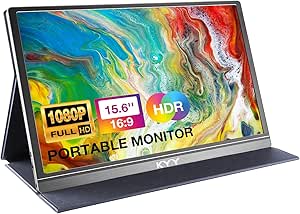
KYY 15.6-Inch 1080p Portable Monitor with Smart Cover
The KYY 15.6-Inch strikes a compelling balance between cost and feature set, making it a strong contender for general productivity. Unlike the ViewSonic VX1655, which commands a premium for OLED, this model uses a standard IPS panel that still delivers solid 1080p clarity and wide viewing angles. Its magnetic PU leather cover is a practical touch, protecting the screen during transit while serving as an adjustable stand, though it offers fewer angle options than dedicated stands on larger monitors. The inclusion of built-in stereo speakers is convenient for casual use, eliminating the need for external audio devices in hotel rooms or coffee shops. However, the 300 nits brightness may struggle in direct sunlight compared to higher-end models. It supports both USB-C and mini HDMI, ensuring compatibility with a wide range of devices, though users must verify their laptop’s USB-C capabilities for single-cable operation.
Pros:- Affordable price point for a 1080p IPS display
- Built-in stereo speakers reduce accessory clutter
- Magnetic cover doubles as a protective case and stand
- Supports both USB-C and mini HDMI inputs
Cons:- 300 nits brightness is insufficient for bright outdoor use
- Cover stand offers limited viewing angle adjustment
- No VESA mount support for flexible desk setups
Best for: Students and remote workers who need a reliable, affordable second screen for general office tasks and media consumption.
Not ideal for: Color-critical professionals who need high-end color gamut coverage or users who frequently work in bright outdoor environments.
- Screen Size:15.6 inches
- Resolution:1920 x 1080
- Panel Type:IPS LCD
- Brightness:300 cd/m²
- Connectivity:2 USB-C, mini HDMI
- Weight:1.7 pounds
- Speakers:Built-in stereo
Our verdict“This is the sensible choice for most users who want a dependable portable screen without paying for premium panel technology.”
cocopar 15.6-Inch Portable Monitor, 1080p FHD, 60Hz, IPS, USB-C and HDMI
The cocopar 15.6-Inch distinguishes itself with VESA mount compatibility, a feature largely absent in the KYY and MNN models. This allows users to attach the monitor to a monitor arm or tripod, transforming it into a flexible second display for tight workspace setups. The matte IPS screen reduces glare effectively, which is critical for productivity in varied lighting conditions. While it shares the 1080p resolution and 60Hz refresh rate with many competitors, its FreeSync support offers a slight edge for light gaming or smoother video playback. The build is lightweight at 1.5 lbs without the cover, making it easy to slip into a bag. However, the 280 nits brightness is on the lower end, meaning it may appear dim in well-lit offices. It requires a compatible device for single-cable power and video, so users with older laptops may need to use a separate power source.
Pros:- VESA mountable for use with arms or tripods
- FreeSync support helps reduce screen tearing
- Lightweight design at 1.5 lbs without cover
- Matte finish minimizes glare effectively
Cons:- 280 nits brightness is lower than many competitors
- Requires compatible USB-C port for single-cable operation
- Cover stand adds significant bulk and weight
Best for: Users with limited desk space who want to mount their portable monitor on a VESA arm or tripod for ergonomic positioning.
Not ideal for: Gamers seeking high refresh rates or those who need a bright display for outdoor work due to its 280 nits brightness.
- Screen Size:15.6 inches
- Resolution:1920 x 1080 (FHD)
- Display Technology:IPS LCD
- Brightness:280 cd/m²
- Mounting:VESA Compatible
- Weight:1.5 lb (without cover)
- Warranty:2-year manufacturer warranty
Our verdict“Select this model if you plan to mount your portable monitor rather than just resting it on a desk.”
MNN 15.6-Inch 1080p Portable IPS Monitor
The MNN 15.6-Inch is positioned as a versatile option for entertainment, explicitly listing compatibility with PS5, Xbox, and Switch. While it shares the same 1080p IPS panel specs as the cocopar, its marketing and bundled accessories cater more toward media consumption and gaming. The inclusion of FreeSync helps maintain smooth gameplay, although the 60Hz cap limits its appeal for competitive titles. The PU leather smart cover provides basic protection and stand functionality, similar to the KYY, but the overall build feels slightly more geared toward casual users. A key limitation is the single HDMI port, which restricts simultaneous connections from multiple consoles or devices compared to monitors with dual HDMI or more USB-C options. It serves as a solid, no-frills extension for consoles when you don’t want to hog the main TV, offering a private gaming screen in hotel rooms or dorms.
Pros:- Explicit compatibility with major game consoles
- FreeSync support for smoother motion
- Lightweight at 1.5 pounds for travel
- Smart cover doubles as a stand
Cons:- Only one HDMI port limits multi-device connectivity
- 60Hz refresh rate is standard, not gaming-optimized
- USB-C single-cable mode requires specific laptop compatibility
Best for: Console gamers and media enthusiasts who want a dedicated private screen for playing games or watching movies on the go.
Not ideal for: Professionals needing multiple simultaneous inputs or users who require high refresh rates for competitive gaming.
- Screen Size:15.6 inches
- Resolution:1920 x 1080 (Full HD)
- Display Type:LCD IPS
- Refresh Rate:60 Hz
- Ports:1 HDMI, USB-C
- Weight:1.5 pounds
- Compatible Devices:PS5, PS4, Xbox, Switch
Our verdict“This is the right pick if your primary use case is connecting to game consoles rather than productivity tasks.”
ASUS ZenScreen MB169CK 15.6-Inch 1080p Portable Monitor
The ASUS ZenScreen MB169CK focuses heavily on user comfort and flexibility, featuring a 360-degree kickstand that offers far superior positioning options than the simple fold-over covers found on the KYY or MNN. This allows for precise tilt adjustments, reducing neck strain during long work sessions. The flicker-free and low blue light certifications are significant for users who spend hours staring at the screen, providing a more comfortable viewing experience than unbranded alternatives. At 11.8 mm thickness, it is exceptionally slim, though the weight is listed inconsistently, it remains highly portable. The matte anti-glare screen is well-tuned for office environments. While it lacks the VESA mounting of the cocopar, the integrated stand design makes it ready to use right out of the box without needing external accessories. It represents a polished, reliable choice for corporate travelers who value build quality and eye care features.
Pros:- 360-degree kickstand offers extensive tilt adjustment
- Flicker-free and low blue light technology
- Slim 11.8 mm profile fits easily in laptop bags
- Matte anti-glare coating reduces reflections
Cons:- Conflicting weight data in specifications may confuse buyers
- No VESA mount support for arm integration
- USB-C single-cable mode requires DisplayPort Alt Mode
Best for: Corporate travelers and office workers who prioritize ergonomic adjustability and eye comfort during extended use.
Not ideal for: Users who need to mount the monitor on a VESA arm or those looking for the absolute cheapest entry-level option.
- Screen Size:15.6 inches
- Resolution:1920 x 1080 (FHD)
- Panel Type:IPS
- Thickness:11.8 mm
- Stand:360-degree kickstand
- Eye Care:Flicker-free, Low Blue Light
- Warranty:3 years
Our verdict“Choose this for its superior stand flexibility and eye-care features if you work long hours on a portable display.”
ASUS ZenScreen 15.6″ Portable USB Monitor (MB16ACE)
This model stands out for its ultra-slim profile and integrated foldable smart case, which eliminates the need to carry a separate stand. Compared to the MSI Pro MP165 E6, the MB16ACE offers a more traditional laptop-like experience with its case, though it lacks the MSI’s built-in speakers. The hybrid USB-C signal simplifies setup significantly, making it ideal for presentations where cable management is a headache. However, the 250 cd/m² brightness is a notable tradeoff; while adequate for offices, it struggles in bright environments more than higher-brightness competitors. It is a solid choice for those prioritizing form factor over multimedia features.
Pros:- Integrated foldable case doubles as a stand
- Single-cable USB-C power and video transmission
- ASUS Eye Care technology reduces eye strain
- Slim 0.31-inch profile fits easily in bags
Cons:- Lower brightness limits outdoor usability
- No built-in speakers for multimedia
- Requires compatible USB-C port for full functionality
Best for: Business travelers who need a reliable, slim second screen for presentations and office work without extra accessories.
Not ideal for: Outdoor workers or content creators who require high brightness and color accuracy for detailed visual tasks.
- Screen Size:15.6 inches
- Resolution:1920 x 1080 (Full HD)
- Panel Type:IPS
- Brightness:250 cd/m²
- Connectivity:USB Type-C, USB Type-A
- Weight:3.2 pounds
- Warranty:3 Years
Our verdict“A sleek, case-integrated monitor that prioritizes portability and ease of setup for the modern professional.”
ASUS ZenScreen MB16ACV 15.6-inch 1080p USB‑C Portable Monitor
The MB16ACV distinguishes itself with a versatile kickstand that supports both portrait and landscape modes, offering more flexibility than the fixed-case design of the MB16ACE. Its anti-glare finish is a significant advantage for users working near windows, reducing reflections better than glossy alternatives like the Lenovo L15. While it shares the same 60Hz refresh rate as most competitors, the inclusion of FreeSync provides a slight edge for casual gaming or smoother video playback. The main limitation is its dependency on USB-C Power Delivery; devices without PD support cannot drive the monitor, narrowing its compatibility compared to models with dedicated power inputs.
Pros:- Kickstand supports portrait and landscape modes
- Anti-glare screen reduces reflections
- Single-cable USB-C connectivity
- Includes FreeSync for smoother motion
Cons:- Requires USB-C with Power Delivery
- No built-in speakers
- Standard 60Hz refresh rate
Best for: Developers and writers who frequently switch between portrait and landscape modes for code or documents.
Not ideal for: Users with older laptops lacking USB-C Power Delivery support, as the monitor will not function.
- Screen Size:15.6 inches
- Resolution:1920 x 1080
- Display Type:LED IPS
- Refresh Rate:60 Hz
- Connectivity:USB-C
- Warranty:3 Years
Our verdict“A flexible option for users who need portrait mode support and an anti-glare screen for varied lighting conditions.”
Lenovo L15 15.6-Inch Portable FHD Monitor with IPS Panel and Adjustable Stand
The Lenovo L15 is defined by its height-adjustable stand, a feature rarely found in this category that allows for precise eye-level alignment. This sets it apart from the ASUS MB16ACV, which relies on a fixed-angle kickstand. The glossy screen finish delivers vibrant colors but introduces glare issues in bright rooms, a tradeoff compared to the anti-glare panels of its ASUS counterparts. With two USB-C ports, it offers decent connectivity, yet the 250-nit brightness remains average for portable displays. It is a strong contender for static desk setups where ergonomic comfort outweighs portability concerns.
Pros:- Height-adjustable stand for better ergonomics
- IPS panel with wide viewing angles
- Two USB-C ports for flexible connection
- Flicker-free technology for eye comfort
Cons:- Glossy finish causes glare in bright light
- Heavier than case-based competitors
- Average brightness limits outdoor use
Best for: Desk workers who prioritize ergonomic height adjustment over maximum portability.
Not ideal for: Travelers who need the lightest possible setup, as the integrated stand adds bulk and weight.
- Screen Size:15.6 inches
- Resolution:1920 x 1080 (FHD)
- Panel Type:IPS
- Brightness:250 nits
- Stand:Height-adjustable
- Ports:2 USB-C
- Warranty:1 year
Our verdict“An ergonomic-focused monitor for desk users who need precise height adjustment rather than ultra-portability.”
ASUS ZenScreen MB16AC 15.6″ FHD IPS Portable Monitor
This model remains relevant because of its hybrid USB-A compatibility, allowing users with older laptops to connect via a standard USB port and a DisplayLink driver. This contrasts sharply with the MSI Pro MP165 E6 and MB16ACV, which strictly require modern USB-C connections. At just 1.7 pounds, it is one of the lightest options available, making it exceptionally easy to slip into a bag. The smart cover offers basic stand functionality, though it lacks the robust adjustability of the Lenovo L15. The 220 cd/m² brightness is its weakest point, making it unsuitable for anything other than controlled indoor environments.
Pros:- Supports USB-A connections via adapter
- Extremely lightweight at 1.7 lbs
- Includes smart cover for portrait/landscape
- Eye Care technology reduces strain
Cons:- Requires DisplayLink driver for USB-A
- Low 220 cd/m² brightness
- Glossy screen reflects ambient light
Best for: Users with older laptops or devices lacking USB-C ports who still want a portable screen.
Not ideal for: Gamers or designers who need high brightness and low latency, as the USB-A path introduces lag.
- Screen Size:15.6 inches
- Resolution:1920 x 1080 (FHD)
- Panel Type:IPS LCD
- Weight:1.7 lbs
- Brightness:220 cd/m²
- Connectivity:USB-C, USB-A
- Warranty:3 Years
Our verdict“A lightweight solution for users with legacy hardware who need basic portability over high performance.”
MSI Pro MP165 E6 Portable Monitor, 15.6″ FHD IPS, USB‑C, HDMI, Built‑in Speakers, Tripod Mount, Metal Gray
The MSI Pro MP165 E6 stands out with its built-in speakers and tripod mount, features absent in most competitors like the ASUS MB16ACE. This makes it uniquely suited for presentations or media consumption without external audio gear. Its 0.78 kg weight and 1.38 cm thickness make it arguably the most portable in this group, surpassing even the ASUS options. However, the 49% NTSC color gamut is limited, meaning colors may look less vivid than on higher-end panels. While the 856 cd/m² brightness is decent, it is not exceptional, so it still struggles in direct sunlight. It is the best choice for those needing audio and mounting flexibility.
Pros:- Built-in speakers for audio without peripherals
- 1/4-inch tripod mount for flexible placement
- Extremely lightweight and thin
- USB-C and Mini HDMI connectivity
Cons:- Limited 49% NTSC color gamut
- Brightness insufficient for outdoor use
- No battery or wireless options
Best for: Presenters and casual gamers who want built-in audio and the ability to mount the screen on a tripod.
Not ideal for: Professional photographers or video editors who require wide color gamuts for accurate grading.
- Screen Size:15.6 inches
- Resolution:1920 x 1080 (FHD)
- Panel Type:IPS
- Brightness:856.5 cd/m²
- Weight:0.78 kg
- Connectivity:USB-C, Mini HDMI
- Speakers:Built-in
Our verdict“The most versatile portable monitor for multimedia use, thanks to its speakers and mounting options.”

How We Picked
I evaluated these fifteen models by analyzing their panel technology, connectivity options, and physical design constraints. The primary filter was panel quality, distinguishing between standard IPS panels, high-contrast OLED, and high-refresh-rate LCDs. I also examined power delivery requirements, noting which models could run solely off a laptop’s USB-C port versus those requiring external power, a critical factor for travelers working in cafes or planes without outlets. Build quality and stand versatility were also assessed, as flimsy kickstands or poor hinge mechanisms often lead to instability on uneven surfaces.
Factors to Consider When Choosing Best Portable Monitors
Selecting a portable monitor goes beyond just picking a screen size. The following factors will help you avoid common pitfalls and match a device to your actual usage patterns.
Panel Technology: IPS vs. OLED
The choice between IPS and OLED dictates both image quality and battery impact. IPS panels are the standard for most portable monitors, offering good color accuracy and wide viewing angles at a lower price point. They are generally brighter and more efficient for everyday tasks. OLED panels, like the one in the ViewSonic VX1655, provide infinite contrast and true blacks, making them ideal for photo editing or movie watching. However, OLEDs can suffer from burn-in over time with static UI elements and often require more power, which may drain your laptop battery faster. If you primarily edit text or spreadsheets, IPS is the practical choice; if you grade video or photos, OLED is worth the premium.
Connectivity: USB-C vs. HDMI
Single-cable USB-C is the most convenient connection method, transmitting both video and power from your laptop to the monitor. This reduces clutter and eliminates the need for separate power bricks. However, not all USB-C ports support video output (DisplayPort Alt Mode), so verifying your laptop’s capabilities is mandatory before buying. HDMI inputs are more universally compatible with older laptops, game consoles, and desktops, but they require a separate power source for the monitor. For maximum flexibility, look for a model that includes both USB-C and Mini HDMI ports, ensuring you can connect to virtually any device you own.
Screen Size and Aspect Ratio
Most portable monitors feature 15.6-inch or 16-inch screens with a 16:9 aspect ratio, mirroring standard laptop displays for seamless dual-screen workflows. Larger 18.5-inch models offer significantly more workspace, allowing you to view full-sized documents or complex spreadsheets without scaling issues. The tradeoff is weight and bulk; an 18-inch monitor may not fit in standard laptop sleeves or backpacks designed for 15-inch devices. If your primary use case is light multitasking, stick to 15.6 inches. If you need a desktop replacement for serious productivity, the extra inches of an 18-inch panel are worth the added carry weight.
Refresh Rate and Motion Clarity
Standard portable monitors operate at 60Hz, which is sufficient for office work and media consumption. However, if you play games on the go or require smoother cursor movement for design work, look for models with higher refresh rates, such as the 100Hz VisionOwl. Higher refresh rates reduce motion blur and input lag, providing a more responsive experience. This feature is still uncommon in the portable market, so it often comes with a price premium or a compromise in panel color accuracy. For most users, 60Hz is adequate, but competitive gamers will find 60Hz limiting.
Power Consumption and Battery Impact
A portable monitor is an additional power draw on your laptop. Brightness levels and panel type heavily influence this consumption. OLED panels can be more efficient when displaying dark content but draw more power with bright, white backgrounds typical of productivity apps. Some monitors offer low-power modes or automatic brightness adjustments, which can extend your laptop’s battery life during mobile work sessions. If you frequently work without access to power outlets, prioritize models with efficient LED backlights and consider using your laptop’s power-saving features to compensate for the extra screen load.
Frequently Asked Questions
Do I need a separate power source for a portable monitor?
It depends on the monitor model and your laptop’s USB-C port capabilities. Many modern portable monitors can draw sufficient power directly from a laptop’s USB-C port, eliminating the need for an external power adapter. However, if you are using HDMI or connecting to a laptop with limited USB power delivery, you will likely need to plug the monitor into a wall outlet. Some models also include a USB-C port for pass-through charging, allowing you to power both the monitor and your laptop from a single source, which is a convenient feature for keeping your desk tidy.
Can I use a portable monitor with an iPhone or Android phone?
Yes, but compatibility varies by device model. Most modern flagship smartphones support DeX mode or similar desktop interfaces over USB-C, allowing them to output video to a portable monitor. You will typically need a USB-C to USB-C cable and a phone that supports DisplayPort Alt Mode. Older or budget phones may lack this hardware support. Check your phone’s specifications for ‘video out’ or ‘desktop mode’ capabilities before assuming it will work with your chosen monitor.
Is a 4K portable monitor worth the extra cost?
For most users, 1080p (FHD) is the sweet spot for a 15.6-inch screen, offering sharp text without excessive scaling issues. 4K resolution provides incredible detail and is beneficial for creative professionals who need to view high-resolution assets or work with small UI elements. However, 4K monitors require more bandwidth and power, and they often cost significantly more. Unless you have a specific need for extreme pixel density, the jump to 4K may not provide a proportional benefit for general productivity or media consumption.
How do I prevent burn-in on OLED portable monitors?
OLED screens are susceptible to image retention or burn-in if static elements are displayed for extended periods. To mitigate this, avoid leaving the same taskbar, logo, or window open for hours at a time. Most modern OLED monitors include pixel shifting and auto-dimming features that help prevent retention. It is also wise to vary the content you display and use dark mode where possible, as darker pixels consume less power and are less prone to degradation. For heavy spreadsheet users, an IPS panel remains a safer, burn-in-proof alternative.
Can I mount these monitors to a tripod?
Not all portable monitors include VESA mount compatibility. Some models, like the MSI Pro MP165, feature built-in tripod mounts or VESA holes that allow you to attach the screen to a stand for flexible positioning. Others rely solely on integrated kickstands or smart covers. If you plan to use your monitor in a fixed setup or attach it to a laptop arm, verify the presence of 75x75mm or 100x100mm VESA patterns before purchasing. Adapters are rarely available for portable monitors due to their thin chassis, so native support is necessary.
Conclusion
The best portable monitor for you depends on your specific tradeoff tolerance. For overall excellence, the ViewSonic VX1655-4K-OLED is the premium choice for those who prioritize visual fidelity and color accuracy. If you need a reliable, durable workhorse for travel, the ASUS ZenScreen MB16AHV offers a balanced mix of battery efficiency and build quality. For budget-conscious buyers seeking value, the KYY 15.6-Inch provides solid 1080p performance without unnecessary frills. Gamers and users needing smoother motion should look to the VisionOwl 18.5-Inch for its rare 100Hz refresh rate. Beginners or those with older hardware will appreciate the universal compatibility of the AOC 16T20, which supports both USB-C and HDMI inputs. Choose based on whether you value portability, screen real estate, or image quality above all else.