

The best SanDisk storage devices depend on whether you need pocket-size file transfers, a fast portable SSD, or large-capacity backup storage. My best overall pick is the SanDisk 1TB Extreme Portable SSD for its balance of speed, capacity, and portability; the 2TB Portable SSD stands out for buyers who need more room, while the Ultra Dual Drive Go suits quick transfers between USB-C and USB-A devices. The main tradeoffs are capacity versus portability, SSD speed versus hard-drive capacity, and rugged features versus a simpler design. I compare all 15 options by their intended use, connection types, capacity, and practical limitations. Read on for the full breakdown and guidance on choosing the right device for your files.

Get the latest gadgets delivered free with Prime
- Fast, free delivery on millions of items
- Prime Video, Amazon Music and more included
- Member-only deals all year
Complete the kit



Key Takeaways
- Portable SSDs make the strongest all-around choices: The 1TB Extreme Portable SSD combines useful capacity with a compact format, while the 2TB and Extreme PRO models make more sense when capacity or higher-end performance matters more.
- USB flash drives solve a different problem from external drives: The Dual Drive Go adds both USB-C and USB-A connectors for transfers between newer phones or laptops and older devices, but it is not a substitute for a large backup drive.
- Hard drives favor capacity over speed and size: The 5TB ArmorATD and 18TB G-DRIVE suit larger archives, while their bulk and hard-drive performance make them less convenient for frequent, fast file movement.
- Rugged protection has a use-case premium: ArmorATD and PRO-G40 models are aimed at mobile or demanding work setups; buyers storing files at a desk may get more value from a simpler drive.
- Choose based on the connection and workflow, not capacity alone: The PRO-BLADE SSD Mag is designed around a modular system, so its appeal depends on compatible gear and a workflow that benefits from swapping media.
| SanDisk 128GB Ultra Dual Drive Go, USB-C & USB-A, Up to 400MB/s Read Speeds | 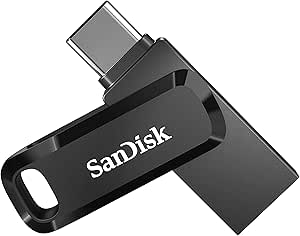 | Best for Phone-to-Computer Transfers | Capacity: 128 GB | Connectors: USB Type-C and USB Type-A | Interface: USB 3.1 | VIEW LATEST PRICE | See Our Full Breakdown |
| SanDisk Ultra Flair 512GB USB 3.0 Flash Drive |  | Best for High-Capacity USB-A Storage | Capacity: 512 GB | Interface: USB 3.0, backward compatible with USB 2.0 | Connector: USB Type-A | VIEW LATEST PRICE | See Our Full Breakdown |
| SanDisk Ultra Dual Drive USB Type-C 128GB | 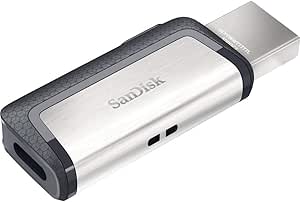 | Best Retractable Dual-Connector Pick | Capacity: 128 GB | Interface: USB 3.1 Gen 1 | Connectors: USB Type-C and USB Type-A | VIEW LATEST PRICE | See Our Full Breakdown |
| SanDisk 1TB Extreme Portable SSD |  | Best Rugged High-Speed Storage | Capacity: 1 TB | Storage technology: NVMe | Maximum read speed: Up to 1050 MB/s | VIEW LATEST PRICE | See Our Full Breakdown |
| SanDisk Ultra 128GB USB 3.0 Flash Drive (SDCZ48-128G-U46) |  | Best Simple Retractable USB-A Drive | Capacity: 128 GB | Model number: SDCZ48-128G-U46 | Interface: USB 3.0, backward compatible with USB 2.0 | VIEW LATEST PRICE | See Our Full Breakdown |
| SanDisk 64GB Cruzer Blade USB-A Flash Drive |  | Best for Simple File Sharing | Capacity: 64 GB | Interface: USB 2.0 | Read speed: 30 MB/s | VIEW LATEST PRICE | See Our Full Breakdown |
| SanDisk 1TB Portable Drive – Black |  | Best Everyday Portable SSD | Capacity: 1 TB | Read speed: Up to 600 MB/s | Connectivity: USB-C | VIEW LATEST PRICE | See Our Full Breakdown |
| SanDisk Professional 5TB G-Drive ArmorATD Rugged Durable Portable External Hard Drive (USB-C, USB 3.2 Gen 1) | 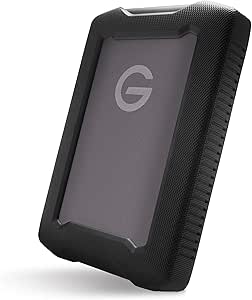 | Best High-Capacity Rugged Hard Drive | Capacity: 5 TB | Interface: USB 3.2 Gen 1 | Connectivity: USB-C; Thunderbolt listed | VIEW LATEST PRICE | See Our Full Breakdown |
| SanDisk Professional 2TB G-Drive ArmorATD Portable External Hard Drive |  | Best Rugged Mid-Capacity Backup | Capacity: 2 TB | Interface: USB-C (USB 3.2 Gen 1) | Read speed: Up to 130 MB/s | VIEW LATEST PRICE | See Our Full Breakdown |
| SanDisk Professional 2TB PRO-BLADE SSD Mag |  | Best Modular High-Speed Storage | Capacity: 2 TB | Interface: NVMe | Maximum transfer speed: Up to 3,000 MB/s with PRO-BLADE STATION | VIEW LATEST PRICE | See Our Full Breakdown |
| SanDisk Professional 4TB PRO-G40 SSD |  | Best for Rugged, High-Speed Workflows | Capacity: 4TB | Interface: Thunderbolt 3 (40Gbps), USB-C (10Gbps) | Read speed: Up to 3000MB/s | VIEW LATEST PRICE | See Our Full Breakdown |
| SanDisk Extreme Portable SSD – 1TB |  | Best for Everyday Mobile Use | Capacity: 1TB | Read speed: Up to 1000MB/s | Write speed: Up to 950MB/s | VIEW LATEST PRICE | See Our Full Breakdown |
| SanDisk 2TB Portable SSD |  | Best for Simple, High-Capacity Portability | Capacity: 2TB | Read speed: Up to 1000MB/s | Interface: USB-C | VIEW LATEST PRICE | See Our Full Breakdown |
| SanDisk Extreme PRO Portable SSD 2TB |  | Best for Maximum Portable SSD Speed | Capacity: 2TB | Read speed: Up to 4000MB/s | Write speed: 3100MB/s average sustained | VIEW LATEST PRICE | See Our Full Breakdown |
| SanDisk Professional G-DRIVE 18TB External Desktop Hard Drive |  | Best for Large Desktop Backups | Capacity: 18TB | Interface: USB-C (USB 3.2 Gen 2) | Rotational speed: 7200RPM | VIEW LATEST PRICE | See Our Full Breakdown |
| SanDisk storage device | Capacity | Interface | Read speed |
|---|---|---|---|
| SanDisk 128GB Ultra Dual Drive | 128 GB | USB 3.1 | — |
| SanDisk Ultra Flair 512GB USB | 512 GB | USB 3.0, backward compatible with USB 2.0 | — |
| SanDisk Ultra Dual Drive USB T | 128 GB | USB 3.1 Gen 1 | — |
| SanDisk 1TB Extreme Portable S | 1 TB | — | — |
| SanDisk Ultra 128GB USB 3.0 Fl | 128 GB | USB 3.0, backward compatible with USB 2.0 | — |
| SanDisk 64GB Cruzer Blade USB- | 64 GB | USB 2.0 | 30 MB/s |
| SanDisk 1TB Portable Drive | 1 TB | — | Up to 600 MB/s |
| SanDisk Professional 5TB G-Dri | 5 TB | USB 3.2 Gen 1 | Up to 130 MB/s |
| SanDisk Professional 2TB G-Dri | 2 TB | USB-C (USB 3.2 Gen 1) | Up to 130 MB/s |
| SanDisk Professional 2TB PRO-B | 2 TB | NVMe | — |
| SanDisk Professional 4TB PRO-G | 4TB | Thunderbolt 3 (40Gbps), USB-C (10Gbps) | Up to 3000MB/s |
| SanDisk Extreme Portable SSD | 1TB | — | Up to 1000MB/s |
| SanDisk 2TB Portable SSD | 2TB | USB-C | Up to 1000MB/s |
| SanDisk Extreme PRO Portable S | 2TB | USB; specific generation not provided | Up to 4000MB/s |
| SanDisk Professional G-DRIVE 1 | 18TB | USB-C (USB 3.2 Gen 2) | Up to 270MB/s |
More Details on Our Top Picks
SanDisk 128GB Ultra Dual Drive Go, USB-C & USB-A, Up to 400MB/s Read Speeds
Two connector types and up to 400MB/s reads make the Ultra Dual Drive Go the most flexible small-capacity choice here for moving files between a USB-C phone and a USB-A computer. Its swivel body covers the unused connector, while the keyring hole makes it easier to keep on hand. Compared with the older SanDisk Ultra Dual Drive USB Type-C 128GB, this model lists substantially faster read speeds, which can help when retrieving large files. Its 128GB capacity is a better fit for routine transfers than for keeping an entire media library on one drive.
The tradeoff is its 150MB/s write speed, well below the advertised read rate, so large uploads may take longer. Phone transfers also depend on OTG support, and automatic backup requires the Memory Zone app. Choose it over a single-connector drive when switching between devices matters more than write speed.
Pros:- USB-C and USB-A connectors work across many newer mobile devices and computers.
- Up to 400MB/s read speed supports faster file access than the older SanDisk Ultra Dual Drive USB Type-C 128GB.
- Swivel design covers the connectors when not in use.
- Keyring hole and optional Memory Zone app support portable storage and Android backup.
Cons:- Specified write speed of 150MB/s is much lower than its maximum read speed.
- Mobile file access requires a compatible device with OTG support.
- Automatic backup features require downloading the Memory Zone app.
Best for: People who regularly move photos and files between USB-C phones or tablets and USB-A computers.
Not ideal for: Buyers who often write large files, need more than 128GB, or have a phone without USB OTG support.
- Capacity:128 GB
- Connectors:USB Type-C and USB Type-A
- Interface:USB 3.1
- Maximum read speed:Up to 400 MB/s
- Write speed:150 MB/s
- Design:Swivel connector cover with keyring hole
- Dimensions:0.34 × 0.48 × 1.75 in
- Compatible devices:Mobile devices and tablets; OTG support required for mobile use
Our verdict“Pick the Ultra Dual Drive Go if you need one compact 128GB drive for moving files between USB-C mobile devices and USB-A computers.”
SanDisk Ultra Flair 512GB USB 3.0 Flash Drive
With 512GB capacity, the Ultra Flair is the flash-drive pick for buyers who want a large stash of files in a compact USB-A form. It offers far more room than either 128GB dual-connector drive in this group, and its metal casing gives it a more solid exterior than the plastic-style retractable SanDisk Ultra 128GB USB 3.0 Flash Drive. Password protection with 128-bit AES encryption adds a privacy option for files carried between locations.
That capacity comes with a significant speed caveat: the listed read rate reaches 150MB/s, but the provided write-speed figure is only up to 4MB/s on the USB 2.0 baseline. That makes frequent large transfers a poor match, even if the drive has plenty of room. It also has only a USB-A connector, unlike the Ultra Dual Drive Go, and using password protection on Mac requires a software download. Choose it for capacity and basic file privacy, not fast uploads or phone compatibility.
Pros:- 512GB capacity exceeds that of the 128GB flash drives in this group.
- Metal casing provides a sturdy exterior in a compact format.
- Listed read speed reaches up to 150MB/s over USB 3.0.
- 128-bit AES password protection offers an added privacy feature.
Cons:- The provided write-speed figure is only up to 4MB/s on the USB 2.0 baseline.
- USB-A only, unlike the USB-C and USB-A Ultra Dual Drive Go.
- Password-protection software must be downloaded for Mac use.
Best for: USB-A computer users who need a compact drive with 512GB of space for documents, media, and files they carry between locations.
Not ideal for: People who frequently write large files, need direct USB-C phone connections, or want password protection without installing software on Mac.
- Capacity:512 GB
- Interface:USB 3.0, backward compatible with USB 2.0
- Connector:USB Type-A
- Maximum read speed:Up to 150 MB/s
- Listed write speed:Up to 4 MB/s on USB 2.0 baseline
- Material:Metal
- Security:128-bit AES encryption with password protection
- Dimensions:1.7 × 0.5 × 0.3 in
Our verdict“Choose the Ultra Flair when 512GB of compact USB-A storage matters more than fast writing or USB-C connectivity.”
SanDisk Ultra Dual Drive USB Type-C 128GB
The SanDisk Ultra Dual Drive USB Type-C suits buyers who want USB-C and USB-A access in a retractable design, without moving up to a portable SSD. It connects compatible Android devices to older USB-A computers, and the retractable body helps shield the connectors in a bag. The Memory Zone app can help manage and back up Android files. Compared with the newer Ultra Dual Drive Go, its stated read speed is lower—up to 150MB/s rather than 400MB/s—so the Go is the stronger choice when quicker reads matter.
This model’s case for selection is straightforward compatibility, not speed: the listed write rate is just up to 10MB/s, which can make loading large photo or video folders slow. At 128GB, it also offers less room than the 512GB Ultra Flair, and mobile use requires both a USB-C port and OTG support. Pick it when retractable connectors and cross-device access take priority over rapid writing.
Pros:- USB-C and USB-A connectors support transfers between compatible mobile devices and computers.
- Retractable design helps protect the connectors when carried.
- Memory Zone app supports Android file management and backup.
- USB 3.1 Gen 1 interface supports read speeds up to 150MB/s.
Cons:- Listed write speed of up to 10MB/s is modest for large transfers.
- Read speed is lower than the 400MB/s listed for the Ultra Dual Drive Go.
- Android mobile use requires USB-C OTG support.
Best for: Android users with USB-C OTG support who need a retractable drive to move files between a phone or tablet and USB-A computers.
Not ideal for: People who often write large files, need more than 128GB, or want the higher listed read speed of the Ultra Dual Drive Go.
- Capacity:128 GB
- Interface:USB 3.1 Gen 1
- Connectors:USB Type-C and USB Type-A
- Maximum read speed:Up to 150 MB/s
- Maximum write speed:Up to 10 MB/s
- Design:Retractable
- Color:Gray/Silver
- Compatibility:Windows, Mac OS X, and Android with USB-C OTG support
Our verdict“Choose this model for retractable USB-C and USB-A convenience, but pick the Ultra Dual Drive Go if faster reads are a priority.”
SanDisk 1TB Extreme Portable SSD
The 1TB Extreme Portable SSD is the performance and protection choice in this batch. Its NVMe-based speeds of up to 1050MB/s read and 1000MB/s write are in a different class from the flash drives here, making it better suited to moving large project files or keeping an active work library. The IP65 water and dust resistance, 3-meter drop protection, and carabiner loop also make it more practical for travel than the compact Ultra Flair or either dual-connector drive.
That performance is useful only when the host device can support it, and actual speeds may vary. It is also larger in purpose and cost category than a simple USB flash drive, though no price comparison is needed to see that it solves a different storage problem. The model is identified as older, so buyers seeking a newer generation may prefer another SSD in the roundup. Pick this one for capacity, speed, and rugged features rather than pocket-sized everyday transfers.
Pros:- Up to 1050MB/s read and 1000MB/s write speeds suit large, frequent file transfers.
- 1TB capacity offers much more working space than the flash drives in this batch.
- IP65 water and dust resistance plus 3-meter drop protection support travel use.
- 256-bit AES hardware encryption and password protection add data security.
Cons:- Performance depends on the host device and may fall below the stated maximums.
- The product is identified as an older model.
- A portable SSD is more storage than many buyers need for basic document transfers.
Best for: Photographers, video creators, and mobile professionals who carry large files and need fast, rugged 1TB storage.
Not ideal for: People who only need occasional document transfers, want a tiny flash drive, or have a host device that cannot make use of its performance.
- Capacity:1 TB
- Storage technology:NVMe
- Maximum read speed:Up to 1050 MB/s
- Maximum write speed:Up to 1000 MB/s
- Drop protection:Up to 3 meters
- Ingress protection:IP65 water and dust resistance
- Encryption:256-bit AES hardware encryption with password protection
- Attachment feature:Carabiner loop
Our verdict“Choose this Extreme Portable SSD for fast 1TB storage with rugged protection, and skip it if a basic flash drive meets your needs.”
SanDisk Ultra 128GB USB 3.0 Flash Drive (SDCZ48-128G-U46)
The SanDisk Ultra 128GB USB 3.0 Flash Drive is the straightforward pick for buyers who want a retractable USB-A drive for everyday file storage. Its up-to-100MB/s read speed is below the Ultra Flair’s 150MB/s and the Ultra Dual Drive Go’s 400MB/s, but that may be enough for documents, photos, and occasional transfers. Its USB 3.0 interface is backward compatible with USB 2.0, so it can work with older ports, though connected-device speed will vary.
Unlike the dual-connector models, it cannot plug directly into USB-C phones or tablets. It also lacks the Ultra Flair’s listed encryption feature and the Extreme Portable SSD’s rugged ratings, making it a basic utility drive rather than a protected field-storage option. Rescue PRO Deluxe file recovery software is included as a one-year subscription, but the product data does not specify a write speed. Choose it for uncomplicated USB-A use, not for security, ruggedness, or high-volume fast transfers.
Pros:- Retractable design protects the connector during everyday carrying.
- USB 3.0 interface is backward compatible with USB 2.0 ports.
- Up to 100MB/s read speed suits routine file access.
- Includes a one-year Rescue PRO Deluxe file recovery software subscription.
Cons:- USB-A connector does not provide direct USB-C mobile-device compatibility.
- Write speed is not specified in the supplied product data.
- No rugged or waterproof protection is listed, unlike the Extreme Portable SSD.
Best for: Students and office users who need a compact 128GB USB-A drive for routine documents, photos, and occasional file transfers.
Not ideal for: USB-C phone owners, buyers who need specified fast write speeds, or people seeking encryption or rugged water and dust protection.
- Capacity:128 GB
- Model number:SDCZ48-128G-U46
- Interface:USB 3.0, backward compatible with USB 2.0
- Connector:USB Type-A
- Maximum read speed:Up to 100 MB/s
- Design:Retractable
- Weight:0.01 kg
- Included software:Rescue PRO Deluxe, one-year subscription
- Warranty:1 year
Our verdict“Choose the SanDisk Ultra for simple, retractable 128GB USB-A storage, but look to a dual-connector drive for phone transfers.”
SanDisk 64GB Cruzer Blade USB-A Flash Drive
The Cruzer Blade suits basic transfers and keeping a small set of documents or photos close at hand. Its tiny body is easier to slip into a pocket than the larger portable drives here, and the included SecureAccess software with 128-bit AES encryption gives private files an added layer of protection. The tradeoff is its USB 2.0 interface: with listed read and write speeds of 30 MB/s and 10 MB/s, it is a poor match for frequent large video transfers. Compared with the USB-C SanDisk 1TB Portable Drive, this flash drive prioritizes low-fuss portability over speed, capacity, and modern connectivity. I’d choose it for occasional file handoffs, not as a main backup device.
Pros:- Very compact and lightweight for carrying or passing between computers
- SecureAccess software includes 128-bit AES encryption for private files
- USB-A connection works with compatible computers without an adapter
- Backed by a 5-year limited warranty
Cons:- USB 2.0 is much slower than the USB 3.x and USB-C storage options in this roundup
- Listed 10 MB/s write speed makes large file transfers time-consuming
Best for: Students or office users who need a tiny USB-A drive for documents, small photo collections, and occasional file sharing.
Not ideal for: People moving large video files regularly or needing USB-C connectivity, fast transfers, or substantial backup capacity.
- Capacity:64 GB
- Interface:USB 2.0
- Read speed:30 MB/s
- Write speed:10 MB/s
- Color:Black
- Dimensions:0.39 × 0.79 × 0.39 in
- Weight:4.54 g
- Warranty:5-year limited warranty
- Model number:SDCZ50-064G-B35
Our verdict“Choose the Cruzer Blade for small, occasional USB-A transfers; pick the SanDisk 1TB Portable Drive if speed and capacity matter more.”
SanDisk 1TB Portable Drive – Black
This 1TB portable SSD is a practical middle ground for people who want a larger working drive without the bulk or moving parts of a hard disk. Its stated read speed of up to 600 MB/s makes file access and transfers far quicker than the 130 MB/s G-Drive ArmorATD hard drives, while the pocket-sized design and 2-meter drop protection suit everyday carry. USB-C also makes it a more natural fit for current laptops, tablets, and compatible phones than the USB-A Cruzer Blade. The tradeoffs are that the listing does not specify write speed, and real performance depends on the host device and conditions. It is not the fastest choice here: the PRO-BLADE SSD Mag can reach much higher speeds with its compatible station, but requires a modular setup.
Pros:- Up to 600 MB/s read speed outpaces the ArmorATD hard drives
- Pocket-sized solid-state design with drop protection up to 2 meters
- USB-C connection supports compatible laptops, desktops, smartphones, and tablets
- 1TB capacity balances everyday portability with room for larger files
Cons:- Write speed is not specified and may be lower than the stated read speed
- Performance can vary with the connected device and operating conditions
Best for: Laptop and tablet users who want a compact 1TB drive for everyday file transfers, project storage, and travel.
Not ideal for: Video professionals who need the highest sustained transfer speeds, a stated write-speed figure, or a ruggedized enclosure with a specific weather-resistance rating.
- Capacity:1 TB
- Read speed:Up to 600 MB/s
- Connectivity:USB-C
- Drive type:Solid-state portable drive
- Drop protection:Up to 2 m
- Compatible devices:Desktop, laptop, smartphone, tablet
- Color:Black
Our verdict“Choose this drive for convenient USB-C storage and faster everyday transfers; opt for the PRO-BLADE SSD Mag setup when maximum speed is the priority.”
SanDisk Professional 5TB G-Drive ArmorATD Rugged Durable Portable External Hard Drive (USB-C, USB 3.2 Gen 1)
For carrying a large working archive, the 5TB G-Drive ArmorATD offers far more space than the 1TB SanDisk Portable Drive or the 2TB ArmorATD, without relying on a desktop-sized enclosure. Its IP54 rain and dust resistance, aluminum shell, and protective bumper make it better suited to field backups than a standard portable drive. The listed 130 MB/s read speed is adequate for backup and retrieval, but it falls well short of the 600 MB/s portable SSD and the PRO-BLADE SSD Mag’s much higher compatible-system speed. That is the capacity-and-durability tradeoff: this is a hard drive, not a fast scratch disk. It is formatted for macOS out of the box; Windows users must reformat it, which adds setup work and may affect existing data.
Pros:- 5TB capacity provides room for extensive photo, video, and backup libraries
- IP54-rated resistance to rain and dust, plus an aluminum enclosure and bumper
- USB-C connectivity supports transfer speeds up to 5 Gbps at the interface level
- Formatted for macOS out of the box
Cons:- Windows users need to reformat the drive before use
- 130 MB/s read speed is slower than the portable SSD options in this roundup
- Hard-drive construction is heavier than a comparable compact SSD
Best for: Photographers, field crews, and Mac users who need several terabytes of portable backup storage in a rain- and dust-resistant enclosure.
Not ideal for: Windows users seeking a ready-to-use drive, frequent high-speed editing from storage, or a lightweight SSD for everyday pocket carry.
- Capacity:5 TB
- Interface:USB 3.2 Gen 1
- Connectivity:USB-C; Thunderbolt listed
- Read speed:Up to 130 MB/s
- Form factor:2.5 in portable
- Compatibility:macOS out of the box; Windows after reformatting
- Weight:12.32 oz
- Dimensions:7.1 × 4.8 × 2 in
Our verdict“Pick the 5TB ArmorATD when rugged capacity matters more than SSD speed, and choose the 2TB ArmorATD if you can trade space for a smaller storage commitment.”
SanDisk Professional 2TB G-Drive ArmorATD Portable External Hard Drive
The 2TB G-Drive ArmorATD keeps the same field-ready character as its 5TB sibling but suits buyers with a smaller archive or less need to carry multiple terabytes. Its IP54 rain and dust resistance, anodized aluminum enclosure, and protective bumper offer more environmental protection than the compact SanDisk 1TB Portable Drive, while the USB-C connection and up-to-130 MB/s read speed handle routine backups. The compromise is that it remains a hard drive: the SanDisk 1TB SSD is faster at up to 600 MB/s, and the PRO-BLADE SSD Mag is built for far higher throughput with compatible hardware. The ArmorATD makes more sense when rugged housing and backup capacity take priority over active editing speed. Mac users get native compatibility; Windows users must reformat before use.
Pros:- IP54 rain and dust resistance with a protective bumper and anodized aluminum enclosure
- 2TB capacity suits field backups and substantial media collections
- USB-C connectivity with read speeds up to 130 MB/s
- Native macOS compatibility
Cons:- Windows users must reformat the drive before use
- Read speeds are limited compared with the 1TB SanDisk Portable Drive SSD
- USB-C connection may require an adapter for devices that only have USB-A
Best for: Mac-based photographers and mobile professionals who want a rugged 2TB backup drive for work outside a controlled office.
Not ideal for: Windows users who need plug-and-play setup, editors working directly from storage, or buyers who want an SSD’s faster transfers and lighter build.
- Capacity:2 TB
- Interface:USB-C (USB 3.2 Gen 1)
- Read speed:Up to 130 MB/s
- Form factor:2.5 in
- Color:Silver
- Compatibility:macOS native; Windows requires reformatting
- Model number:SDPH81G-002T-GBA1D
Our verdict“Choose the 2TB ArmorATD for rugged Mac-friendly backups; select its 5TB sibling for a larger archive or an SSD if transfer speed matters more.”
SanDisk Professional 2TB PRO-BLADE SSD Mag
The 2TB PRO-BLADE SSD Mag is the specialist choice for workflows built around SanDisk’s modular PRO-BLADE system. With a compatible PRO-BLADE STATION, it can reach transfer speeds up to 3,000 MB/s, far beyond the 130 MB/s G-Drive ArmorATD drives and the 600 MB/s SanDisk 1TB Portable Drive. Its compact NVMe module is also rated to withstand drops up to 3 meters and crushing forces up to 4,000 lb, giving a working drive extra physical resilience. The catch is that this is not a complete plug-and-play external drive: the enclosure is sold separately, and the listed peak speed requires the station. Buyers who just need portable backups may find the ArmorATD or 1TB SSD simpler. This Mag suits people investing in a scalable modular workflow.
Pros:- Up to 3,000 MB/s transfer speed when paired with a PRO-BLADE STATION
- Compact NVMe module rated for drops up to 3 meters
- Rated to withstand crushing forces up to 4,000 lb
- Modular system can scale to 16TB in a PRO-BLADE STATION
Cons:- Requires a separately sold PRO-BLADE enclosure or station for full use
- Maximum listed speed depends on compatible PRO-BLADE STATION hardware
- Actual performance can vary by host device and operating conditions
Best for: Video professionals and production teams already using, or planning to build, a PRO-BLADE system who need fast, swappable 2TB media storage.
Not ideal for: Casual backup users who want a complete external drive in one purchase or anyone without compatible PRO-BLADE hardware.
- Capacity:2 TB
- Interface:NVMe
- Maximum transfer speed:Up to 3,000 MB/s with PRO-BLADE STATION
- Drop resistance:Up to 3 m
- Crush resistance:Up to 4,000 lb
- Maximum stack capacity:16 TB in PRO-BLADE STATION
- Model:SDPM1NS-002T-GBAND
Our verdict“Choose the PRO-BLADE SSD Mag for a compatible modular production setup; for a ready-to-connect backup drive, the SanDisk 1TB Portable Drive is simpler.”
SanDisk Professional 4TB PRO-G40 SSD
The 4TB PRO-G40 is the strongest fit here for professionals moving large project files in demanding locations. Its Thunderbolt 3 connection supports read speeds up to 3000MB/s, far beyond the 1000MB/s ceiling listed for the SanDisk Extreme Portable SSD 1TB. It also switches to USB-C, giving you another connection option when Thunderbolt is unavailable. The IP68 protection and drop and crush resistance address field risks that a standard portable SSD may not be built to handle.
The tradeoff is specialization: the drive is formatted for Mac with APFS, so Windows users may need to reformat it, and its professional-grade feature set may be more than everyday backups require. I’d choose it over the Extreme PRO Portable SSD 2TB when 4TB capacity and rugged protection matter more than that model’s higher listed peak speed.
Pros:- Thunderbolt 3 supports read speeds up to 3000MB/s
- IP68 dust and water resistance with drop and crush protection
- USB-C mode adds flexibility when Thunderbolt is unavailable
- Aluminum core helps manage heat during sustained transfers
Cons:- Mac-ready APFS format may require reformatting for Windows
- Professional rugged features may be unnecessary for basic file storage
- Maximum performance depends on a compatible Thunderbolt 3 connection
Best for: Video crews and field professionals who need 4TB of fast, rugged storage and can connect over Thunderbolt 3 or USB-C.
Not ideal for: Windows users who want immediate out-of-box compatibility, or casual backup buyers who do not need Thunderbolt speeds or heavy-duty protection.
- Capacity:4TB
- Interface:Thunderbolt 3 (40Gbps), USB-C (10Gbps)
- Read speed:Up to 3000MB/s
- Write speed:Up to 2500MB/s
- Durability:IP68; 4000lb crush resistance; 3m drop resistance
- Format:Mac-ready APFS
- Model:SDPS31H-004T-GBCND
Our verdict“Choose the PRO-G40 for high-capacity field work where rugged protection and Thunderbolt speed matter more than simple setup or everyday value.”
SanDisk Extreme Portable SSD – 1TB
The SanDisk Extreme Portable SSD 1TB suits buyers who want one compact drive for a laptop, tablet, or phone without stepping up to specialist workstation hardware. Its USB-C connection and listed speeds of 1000MB/s read and 950MB/s write make it a substantial speed upgrade over a hard drive for transferring and organizing everyday files. Direct file management from iPhone and iPad through the Files app is a useful distinction from the more work-focused SanDisk Professional 4TB PRO-G40.
It also works with Time Machine, so Mac owners can use it for backups as well as portable files. The main limitation is 1TB capacity: people storing large video libraries may prefer the 2TB SanDisk Portable SSD. It does not offer the PRO-G40’s listed IP68 and crush protection, either, so I’d treat it as a travel-friendly everyday drive rather than the tougher choice for harsh field conditions.
Pros:- USB-C connectivity supports laptops, desktops, smartphones, and tablets
- Read speeds up to 1000MB/s and write speeds up to 950MB/s
- Can manage files directly from iPhone and iPad using the Files app
- Compatible with Time Machine for Mac backups
Cons:- 1TB capacity may be limiting for large media collections
- Does not match the PRO-G40’s stated IP68 and crush protection
- Maximum transfer speeds depend on the connected device and port
Best for: Phone and laptop users who want a compact USB-C drive for mobile file management, everyday transfers, or Mac Time Machine backups.
Not ideal for: Creators with large ongoing media libraries who need 2TB or more, or field workers who need the PRO-G40’s specified IP68 and crush resistance.
- Capacity:1TB
- Read speed:Up to 1000MB/s
- Write speed:Up to 950MB/s
- Connectivity:USB-C
- Compatible devices:Laptop, desktop, smartphone, tablet, Mac
- Mac backup support:Time Machine compatible
- Model number:SDSSDE62-2T00-GAO
Our verdict“Pick this 1TB model for flexible everyday USB-C use across phones and computers, but move to a higher-capacity drive for larger libraries.”
SanDisk 2TB Portable SSD
If 2TB capacity in a pocket-sized drive matters more than headline performance, this portable SSD is a straightforward choice. Its USB-C connection supports plug-and-play use across Mac, PC, phones, and tablets, while read speeds up to 1000MB/s make it a much quicker option for file access than a traditional hard drive. At 1.12 ounces, it is notably easy to carry compared with the desktop-bound SanDisk Professional G-DRIVE 18TB.
The protection is also practical for daily transport: the drive is rated for drops up to 2 meters and has no moving parts. Still, its listed speed is a read-speed figure; write performance is not specified here, unlike the SanDisk Extreme Portable SSD 1TB, which lists both read and write speeds. Choose this model for capacity and portability, not for a fully documented speed profile or the PRO-G40’s professional field protection.
Pros:- 2TB capacity in a lightweight 1.12-ounce body
- Read speeds up to 1000MB/s offer a clear step up from hard drives
- Drop protection rated up to 2 meters
- USB-C plug-and-play compatibility with Mac, PC, smartphones, and tablets
Cons:- Write speed is not specified in the provided product data
- Usable capacity will be below the stated 2TB after formatting
- Protection rating is less extensive than the PRO-G40’s listed IP68 and crush resistance
Best for: Students, photographers, and mobile workers who want 2TB of pocketable USB-C storage for mixed-device file access.
Not ideal for: Buyers who need specified high write speeds, desktop-scale backup capacity, or IP68-level environmental protection.
- Capacity:2TB
- Read speed:Up to 1000MB/s
- Interface:USB-C
- Weight:1.12 ounces
- Dimensions:1.77 × 3.35 × 0.39 inches
- Durability:Drop protection up to 2 meters
- Compatibility:Mac, PC, smartphone, tablet
Our verdict“Choose this drive when you want more portable capacity than the 1TB Extreme model without moving to a desktop-sized storage device.”
SanDisk Extreme PRO Portable SSD 2TB
The Extreme PRO Portable SSD 2TB is the speed-led pick for demanding portable workflows. Its listed read speed reaches 4000MB/s, with average sustained writes of 3100MB/s, making it better suited to heavy transfers and video editing than the 1000MB/s SanDisk 2TB Portable SSD. 256-bit AES encryption adds a security feature not listed for the other portable SSDs in this group, while IP65 protection and drop resistance provide useful safeguards when the drive travels.
Those capabilities are conditional: reaching maximum speed calls for a compatible high-speed connection, and ordinary USB-C setups may not deliver the full figure. The PRO-G40 is the more clearly rugged choice, with a higher IP rating and stated crush resistance, while this model offers the higher listed peak read speed and encryption. I’d select it for demanding work, not just routine backups.
Pros:- Read speeds up to 4000MB/s for demanding file transfers
- Average sustained write speed of 3100MB/s
- 256-bit AES encryption for protected data storage
- IP65 rating and drop protection up to 3 meters
Cons:- Maximum speed depends on a compatible high-speed interface
- IP65 protection is less extensive than the PRO-G40’s stated IP68 rating
- Performance features may be excessive for routine backups
Best for: Editors and other high-throughput users who need 2TB of portable storage, sustained writes, and hardware encryption with compatible equipment.
Not ideal for: Casual backup users who will not benefit from high transfer speeds, or buyers without a compatible high-speed interface.
- Capacity:2TB
- Read speed:Up to 4000MB/s
- Write speed:3100MB/s average sustained
- Interface:USB; specific generation not provided
- Durability:IP65; drop protection up to 3 meters
- Security:256-bit AES encryption
Our verdict“Choose the Extreme PRO 2TB for fast editing and transfers when your computer supports its high-speed interface and you want hardware encryption.”
SanDisk Professional G-DRIVE 18TB External Desktop Hard Drive
The G-DRIVE 18TB is the capacity-first option in this group: it offers far more room for archives and backups than the portable SSDs, including the 4TB PRO-G40. Its 7200RPM Ultrastar hard drive and USB-C connection deliver listed read and write speeds of up to 270MB/s, which can suit scheduled backups and large media collections without paying in portability or SSD-level speed. The anodized aluminum enclosure is stackable, a practical fit for a desk-based storage setup.
This is not a travel drive. Its 3.5-inch desktop form factor requires a fixed workspace, and its transfer speeds are well below those of the SanDisk Extreme PRO Portable SSD 2TB. Mac-ready formatting makes setup simple for Mac owners; Windows users can reformat it. I’d choose it for bulk storage and backups, not for editing directly from a fast portable drive.
Pros:- 18TB capacity for large archives and backup collections
- 7200RPM Ultrastar HDD with listed transfer speeds up to 270MB/s
- Stackable anodized aluminum enclosure suits desk-based storage setups
- Mac-ready out of the box and can be reformatted for Windows
Cons:- 3.5-inch desktop form factor is not portable
- Much slower than the portable SSD options for demanding editing workflows
- Actual performance can vary with the host device and usage conditions
Best for: Photographers, video teams, and home-office users building a stationary archive or backup library with high capacity needs.
Not ideal for: Traveling creators or users who need fast portable editing storage; its desktop form and hard-drive speeds are a poor fit.
- Capacity:18TB
- Interface:USB-C (USB 3.2 Gen 2)
- Rotational speed:7200RPM
- Read speed:Up to 270MB/s
- Write speed:Up to 270MB/s
- Enclosure material:Anodized aluminum
- Form factor:3.5-inch desktop hard drive
- Compatibility:Mac and Windows
Our verdict“Choose the G-DRIVE 18TB for stationary bulk storage and backups, not for portable work or SSD-class transfer speeds.”

How We Picked
I compared these 15 SanDisk devices by the jobs they are built to do: everyday file transfer, phone-and-computer sharing, portable work storage, rugged field use, and large-capacity backup. For each option, I weighed capacity, connection compatibility, portability, expected speed class, and physical protection against the needs of its likely buyer. I also looked at how much setup or compatible equipment a product may require, since a specialized device is less useful when it does not fit the rest of a buyer’s workflow.
The ranking gives preference to devices with broad usefulness and clear tradeoffs, rather than treating the largest capacity or most advanced feature set as automatically best. That puts a versatile portable SSD ahead of niche modular storage for most people, while flash drives remain sensible picks for low-complexity transfers. Rugged and desktop hard drives rank higher for buyers who need their particular protections or capacity, but lower for everyday carry because they trade away compactness or speed.
Factors to Consider When Choosing Best SanDisk Storage Devices
Before choosing a SanDisk device, match it to the way files move through your day. A drive that is excellent for a video archive may be inconvenient for moving a few documents between computers, and a fast SSD cannot replace a sensible backup plan. These factors help narrow the options beyond headline capacity.
Match the drive type to the job
Start by deciding whether you need a flash drive, portable SSD, portable hard drive, or desktop drive. Flash drives are easy to carry and suit small transfers, but they are not the best foundation for maintaining a large archive. Portable SSDs are a better fit for frequently accessed work files because they combine a compact form with faster storage technology than a typical hard drive. Portable hard drives can provide more capacity for less physical space than an equivalent SSD, while desktop drives are intended to stay connected at a workstation. A common mistake is buying by capacity alone and ending up with a drive that is too slow, bulky, or awkward for regular use.
Check every device connection before buying
List the ports on the computers, tablets, phones, cameras, and consoles that will use the drive. USB-C and USB-A describe connector styles, while the actual transfer rate also depends on the port, cable, and host device. A dual-connector flash drive can simplify sharing between newer and older equipment, but it does not make files move at the same speed on every device. Some phones may also need compatible software, enough free power, or a supported file system to access external storage. Avoid assuming a connector will work just because it fits; check device support and the drive’s formatting requirements first.
Choose capacity with working room, not just today’s files
Estimate the space used by your current files, then allow room for new projects, exports, and temporary copies. Video, photo, and creative-work folders can grow quickly, while documents and occasional transfers may need far less storage. A nearly full drive can make file management harder and leave little space for new work, so buying the smallest capacity that fits today may lead to an early replacement. On the other hand, paying for a much larger drive is wasteful if you will not use the extra room. For important files, capacity planning should include a second copy on a separate device or service rather than treating one large drive as a complete backup strategy.
Pay for ruggedness only when your routine calls for it
Rugged enclosures can make sense for equipment carried between locations, used outdoors, or exposed to bumps and dust. They add practical reassurance, but they do not make a drive indestructible or protect against every hazard, including loss, theft, or accidental deletion. A stationary desk drive has little to gain from field-focused protection if it stays in a safe workspace. Consider where the device will sit, how often it travels, and whether it will be plugged in while moving. If the drive holds irreplaceable files, keep a separate backup even when the enclosure is built for tougher handling.
Weigh speed against capacity and cost of ownership
SSD speed matters most when you regularly open, edit, or copy large files; it matters less for a drive used mainly to store old material. Hard drives can suit large archives, but transfers may take longer and the device may be less convenient to carry. Advertised maximum speeds are not a promise that every transfer will reach that rate: the connected port, cable, file size, and computer all affect real-world performance. Think about how often you will wait for files, not only the fastest figure on the box. If fast access is central to your work, choose an SSD; if the drive is mostly a backup destination, capacity may matter more.
Account for compatibility, formatting, and backup habits
A drive may need formatting before it works smoothly across all your devices, and one file system may not suit every computer, phone, camera, or game console. Check the supported formats and any device-specific limits before moving a library onto a new drive. Reformatting can erase stored files, so copy data elsewhere before making changes. For long-term storage, plan how you will verify that files remain readable and how often you will refresh the backup. The safest approach for valuable data is to keep more than one copy, with at least one stored separately from the primary device.
Frequently Asked Questions
Should I choose the 1TB Extreme Portable SSD or a SanDisk hard drive for backups?
Choose the Extreme Portable SSD if you expect to carry the drive, access files often, or move large folders regularly. A hard drive is more appropriate when your priority is storing a large archive that will not be opened or transferred frequently. The smaller, more mobile SSD format comes with a capacity tradeoff compared with high-capacity hard-drive options. Also think about how you will protect the backup: one external drive alone is not enough for files you cannot replace. For a working set and a separate archive, using different drive types can be more practical than asking one device to do both jobs.
Can the Ultra Dual Drive Go replace cloud storage for moving files between a phone and a computer?
The Ultra Dual Drive Go can make direct transfers convenient when both USB-C and USB-A connections are useful, but it is not a full cloud-storage replacement. A physical drive requires access to the device and can be lost, damaged, or left behind. Cloud storage may be easier for syncing across locations and sharing, while a flash drive can work without an internet connection. Check whether your phone supports external USB storage and whether its file system and power needs are compatible. For important files, keep another copy rather than relying on a single small drive.
Is a rugged SanDisk drive worth choosing for home or office storage?
For a drive that stays on a desk, rugged construction may not improve your day-to-day experience enough to justify choosing it over a simpler option. It becomes more useful when the device travels frequently or is used in less controlled environments. Rugged protection addresses some physical risks, but it cannot prevent data loss from theft, deletion, failure, or every kind of impact. Consider whether your routine exposes the drive to hazards before making protection a deciding factor. Regardless of enclosure, keep a separate copy of important files.
Will a USB-C SanDisk drive work with my older computer?
It depends on the ports and connectors available on the computer and on the cable or adapter included with the drive. A USB-C plug will not directly fit a USB-A port, though a suitable adapter may make the connection possible. The computer’s USB standard can also limit transfer speeds, even when the drive supports a faster connection. Check the product’s connector details and your computer’s supported USB specifications before buying. If you regularly move files between both port types, a dual-connector option may reduce adapter hassles.
When does the PRO-BLADE SSD Mag make more sense than a standard portable SSD?
The PRO-BLADE SSD Mag is most relevant when your workflow already uses compatible PRO-BLADE hardware and benefits from swapping storage modules. That modular setup may help organize active projects or move media between supported equipment without treating each drive as a standalone purchase. If you simply want a portable drive to connect to a computer, a conventional portable SSD is likely easier to choose and use. Confirm compatibility across the devices and accessories in your setup before committing to a modular system. The specialized format is a workflow choice, not a general upgrade for every SSD buyer.
Conclusion
For most people, my best overall recommendation is the SanDisk 1TB Extreme Portable SSD, which balances portable size, useful capacity, and SSD-style access. The best value depends on the task: a basic Ultra flash drive is a straightforward choice for occasional transfers, while the 2TB Portable SSD is a sensible step up when your active files need more room. For a best premium pick, look at the PRO-G40 SSD or Extreme PRO Portable SSD 2TB when your workflow calls for a higher-end portable SSD; the PRO-BLADE makes sense specifically for compatible modular setups. Beginners who want an uncomplicated way to move files between USB-C and USB-A devices should start with the Ultra Dual Drive Go. For specific needs, choose the 5TB ArmorATD for a rugged, high-capacity portable hard drive or the 18TB G-DRIVE for a large desk-based archive. Pick the device that fits your ports, file habits, and backup plan—not simply the largest capacity on the list.
Halloween Picks
halloween
As an affiliate, we earn on qualifying purchases.