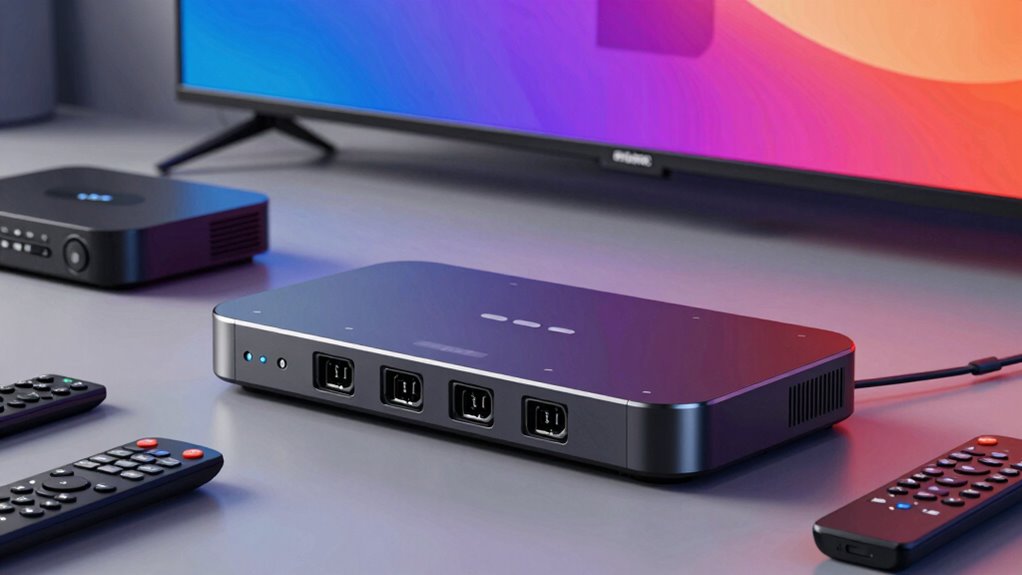

IR blaster hubs are essential for anyone looking to automate and control multiple home devices with a single system. The best options balance compatibility, ease of use, and reliability, but they often involve tradeoffs like cost or complexity. The Sewell SW-32988 Direct BlastIR Wireless Pro IR Repeater stands out as the best overall, offering robust wireless control. For simpler setups, the SwitchBot Hub Mini provides excellent Wi-Fi integration at a lower price, while the eRemote HA Smart Wi-Fi IR Hub excels for those seeking smart home compatibility. Keep reading for a detailed breakdown of these options and more to find the best fit for your needs.

Get the latest gadgets delivered free with Prime
- Fast, free delivery on millions of items
- Prime Video, Amazon Music and more included
- Member-only deals all year
Complete the kit



Key Takeaways
- Wireless IR hubs generally offer better range and flexibility compared to wired emitters.
- Compatibility with smart assistants like Alexa and Google Home is a key factor for modern smart homes.
- Price varies significantly, with premium hubs offering advanced automation features and lower-cost options focusing on basic IR control.
- Build quality and ease of setup are often overlooked but critical for long-term reliability.
- Most hubs support multiple devices and IR codes, but some excel in expanding control over complex home entertainment systems.
| Sewell SW-32988 Direct BlastIR Wireless Pro IR Repeater, Remote Control Extender Kit, Black |  | Best for Long-Range Wireless IR Control | Wireless Distance: 200m (650 ft.) | IR Receiver Distance: 7m (30 ft.) | Incompatibility: Yamaha HTR 6140, Arris DCX 3520E-M, OSD ATM-7 Speaker Selector | VIEW ON AMAZON | See Our Full Breakdown |
| SwitchBot Hub Mini Smart Remote – IR Blaster, Wi-Fi Control for TV, Air Conditioner, Alexa, Google Home, IFTTT |  | Best for Easy Smart Home Integration | Connectivity: 2.4GHz Wi-Fi | Power: USB-powered | Compatibility: Alexa, Google Home, IFTTT | VIEW ON AMAZON | See Our Full Breakdown |
| eRemote HA Smart Wi-Fi IR Universal Remote Hub with Alexa & Google Home Compatibility |  | Best for Extensive Device Compatibility | Compatibility: 2000+ brands, 22 categories | Connectivity: Wi-Fi 2.4 GHz | Infrared Range: up to 12 meters | VIEW ON AMAZON | See Our Full Breakdown |
| SwitchBot Hub Mini Smart IR Remote – WiFi IR Blaster for TV, Air Conditioner, Compatible with Alexa, Google Home |  | Best for Compact, Multi-Platform Control | Connectivity: 2.4GHz Wi-Fi | Power: USB-powered | Compatibility: Alexa, Google, Siri, IFTTT | VIEW ON AMAZON | See Our Full Breakdown |
| IR Blaster/Emitter for Repeater Extender Systems |  | Best for Near-Device Control with Wide Frequency Range | Frequency Range: 20KHz to 60KHz | Wavelength: 940nm | Transmission Range: up to 3 ft | VIEW ON AMAZON | See Our Full Breakdown |
| MOES WiFi Smart IR Remote Controller, Universal Infrared Remote Blaster for Home Devices, Compatible with Alexa and Google Assistant |  | Best Overall Flexibility with DIY Customization | Maximum Supported Devices: 1 | Compatible Devices: TV, Air Conditioner, DVD, CD, SAT | Connectivity Technology: Infrared | VIEW ON AMAZON | See Our Full Breakdown |
| Universal WiFi IR Blaster Hub with Temperature & Humidity Monitor – Smart Home Automation for AC, TV & Audio – Compatible with Smart Life, Tuya, Alexa, Google |  | Best for Environmental Monitoring & Automation Integration | Sensor Type: Temperature and Humidity | Connectivity: WiFi 2.4GHz | Device Compatibility: IR-controlled devices, 50,000+ device database | VIEW ON AMAZON | See Our Full Breakdown |
| WiFi IR Blaster, Universal Remote Control Hub for Home Automation, Compatible with Alexa & Google Assistant |  | Best 360° Signal Coverage for Multi-Room Control | WiFi Protocol: 2.4G WiFi only | Infrared Frequency: 38KHz | Connectivity: USB 2.0 cable included | VIEW ON AMAZON | See Our Full Breakdown |
| TNP Dual IR Emitter Cable, 10 ft 3.5mm Extender for AV Receivers and TVs |  | Best for Hidden Device Control Behind Cabinets | Length: 10 ft | Connector: 3.5mm mono jack | Compatibility: Most IR repeater kits and 38–56 kHz infrared systems | VIEW ON AMAZON | See Our Full Breakdown |
| Smart Home Hub WiFi IR Blaster Remote Control for All-in-One IR Devices |  | Best for Massive Device Compatibility and Voice Control | Compatibility: Over 50,000 IR devices | App: Smart Life for iOS and Android | Voice Assistants: Alexa, Google Assistant, Siri | VIEW ON AMAZON | See Our Full Breakdown |
| TNP Dual IR Emitter Cable, 10 ft 3.5mm Extender for AV Receivers and TVs |  | Best for Neat, Hidden Device Control | Length: 10 ft | Connector: 3.5mm mono jack | Compatibility: Most IR repeater kits and 38–56 kHz systems | VIEW ON AMAZON | See Our Full Breakdown |
| IR Emitter Extender Cable, 10 Feet, 3-Eye 3.5mm Jack, Compatible with IR Repeater Systems and Xbox One |  | Best for Multi-Device Control at a Distance | Length: 10 feet | Connector: 3.5mm jack | Number of emitters: 3 | VIEW ON AMAZON | See Our Full Breakdown |
| IR Infrared Emitter Extension Cable 1.5m, 45° Emission Angle, 3.5mm Jack, 5pcs | 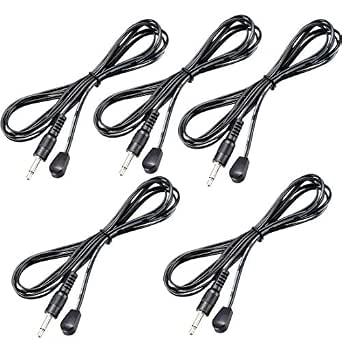 | Best for Compact, Multi-Angle IR Coverage | Product: IR Emitter Cable | Jack: 3.5mm | Total Length: 1.5 meters | VIEW ON AMAZON | See Our Full Breakdown |
| 4 Head IR Emitter/Blaster Cable for IR Repeaters and Extenders |  | Best for Precise Multi-Device IR Signal Reproduction | Number of Heads: 4 | Cable Length: 6 feet | Connector: 3.5mm stereo plug | VIEW ON AMAZON | See Our Full Breakdown |
| Ancable 2-Pack 2.5mm Mono Plug to 3.5mm Mono Jack IR Adapter for Logitech Harmony Hub |  | Best for Simple IR Device Compatibility | Type: Mono Adapter | Number of Pieces: 2 | Connector 1: 2.5mm mono plug | VIEW ON AMAZON | See Our Full Breakdown |
More Details on Our Top Picks
Sewell SW-32988 Direct BlastIR Wireless Pro IR Repeater, Remote Control Extender Kit, Black
The Sewell SW-32988 stands out for its impressive wireless reach, extending IR signals up to 200 meters, making it ideal for large spaces or complex setups. Compared to the IR emitters, like the B0CN1MLBZ8, it offers a true wireless solution that eliminates the need for direct line-of-sight. However, its directional IR receivers can require precise alignment, and obstacles may impact performance. While the kit includes all necessary mounting accessories, its incompatibility with some RF-based devices limits flexibility in mixed environments. This pick is best suited for users needing remote control over vast distances without physical wiring. Still, users with RF-only devices or those in cluttered spaces should consider alternatives.Pros:- Extends IR control up to 200 meters wirelessly
- Includes complete accessories for easy installation
- Compatible with most IR remote-controlled devices
Cons:- Incompatible with RF-based devices like Yamaha HTR 6140
- Requires precise alignment of directional IR receivers
- Performance can degrade with obstacles
Best for: Home theater enthusiasts or commercial setups requiring remote IR control across large areas
Not ideal for: Small rooms or setups with many obstacles, where obstacles could impair wireless IR signals
- Wireless Distance:200m (650 ft.)
- IR Receiver Distance:7m (30 ft.)
- Incompatibility:Yamaha HTR 6140, Arris DCX 3520E-M, OSD ATM-7 Speaker Selector
Our verdict“This is a strong choice for those needing long-distance IR control but who can manage directional and obstacle considerations.”
SwitchBot Hub Mini Smart Remote – IR Blaster, Wi-Fi Control for TV, Air Conditioner, Alexa, Google Home, IFTTT
The SwitchBot Hub Mini excels in making IR-controlled devices part of a smart home ecosystem through Wi-Fi, with simple app setup and compatibility with Alexa and Google Home. Unlike the eRemote, which offers broader device recognition, the SwitchBot’s strength lies in its portability and ease of use, especially for users already invested in the SwitchBot ecosystem. Its reliance on 2.4GHz Wi-Fi and susceptibility to interference from metal objects can limit reliability, especially in complex environments. This device makes the most sense for homeowners seeking quick, wireless integration of existing IR devices into a smart system without extensive wiring or setup. Those with complex Wi-Fi networks or requiring stable 5GHz support may find it limiting.Pros:- Simple setup and user-friendly app interface
- Supports smart learning for existing remotes
- Compatible with Alexa, Google, and IFTTT for voice control
- Portable with USB power supply
Cons:- Limited to 2.4GHz Wi-Fi networks, no 5GHz support
- Line of sight still preferred for best IR control
- Potential connectivity issues with metal objects
Best for: Smart home beginners or users with existing IR devices wanting quick voice control integration
Not ideal for: Advanced users needing 5GHz Wi-Fi support or extensive automation beyond basic IR control
- Connectivity:2.4GHz Wi-Fi
- Power:USB-powered
- Compatibility:Alexa, Google Home, IFTTT
- Supported Devices:Infrared appliances such as TV and air conditioners
Our verdict“Ideal for newcomers seeking hassle-free smart IR control, but less suitable for complex or high-performance setups.”
eRemote HA Smart Wi-Fi IR Universal Remote Hub with Alexa & Google Home Compatibility
The eRemote HA shines by supporting over 2000 brands and 22 categories, making it highly versatile for those with diverse IR appliances. Its seamless integration with major voice assistants like Alexa and Google Home offers a comprehensive smart control experience, surpassing the basic learning capabilities of the SwitchBot Hub Mini. However, it requires a stable 2.4 GHz Wi-Fi connection and a power adapter, which might be an extra step for some users. This hub makes the most sense for users with extensive IR device collections seeking broad compatibility and automation. For those with fewer devices or less tech-savvy users, setup complexity and reliance on cloud updates could be drawbacks.Pros:- Supports over 2000 brands and 22 categories
- Integrates with Alexa, Google, and Home Assistant
- Supports programmable IR codes and updates
- Easy setup with wide IR range
Cons:- Requires a 2.4 GHz Wi-Fi network (no 5 GHz support)
- Power adapter not included
- Limited to IR devices only, no other wireless protocols
Best for: Homeowners with large IR appliance inventories needing broad device support and smart integration
Not ideal for: Users with only a few IR devices or those without a stable 2.4 GHz Wi-Fi network
- Compatibility:2000+ brands, 22 categories
- Connectivity:Wi-Fi 2.4 GHz
- Infrared Range:up to 12 meters
- Power:5V/1A power adapter
- Updateability:Cloud-based updates, programmable IR
Our verdict“Perfect for large-scale IR device users seeking extensive compatibility and smart home integration, with some setup considerations.”
SwitchBot Hub Mini Smart IR Remote – WiFi IR Blaster for TV, Air Conditioner, Compatible with Alexa, Google Home
This version of the SwitchBot Hub Mini emphasizes portability and multi-platform support, including Siri, Alexa, and Google Home. Its straightforward setup and support for multiple devices through a single app make it ideal for users who want a simple, all-in-one IR control solution. Compared to the more feature-rich eRemote, it may lack some advanced programming options but compensates with ease of use and compatibility. Its dependence on 2.4GHz Wi-Fi and occasional line-of-sight issues can be limiting, especially with large or obstructed spaces. This device suits those seeking a compact, versatile IR hub for everyday smart home control.Pros:- Easy to set up with intuitive app and smart learning
- Supports multiple voice assistants including Siri, Alexa, Google
- Portable and USB-powered for flexible placement
- Controls multiple devices in one app
Cons:- No support for 5GHz Wi-Fi networks
- Line of sight still preferred for best IR control
- Potential connectivity issues with metallic obstructions
Best for: Users needing a small, flexible IR hub compatible with multiple voice assistants and platforms
Not ideal for: High-demand automation users or those requiring stable 5GHz Wi-Fi support
- Connectivity:2.4GHz Wi-Fi
- Power:USB-powered
- Compatibility:Alexa, Google, Siri, IFTTT
- Supported Devices:Infrared appliances like TV and AC
Our verdict“A convenient, versatile IR hub for users who value portability and broad voice compatibility in a compact form.”
IR Blaster/Emitter for Repeater Extender Systems
The IR Blaster/Emitter offers a flexible solution for controlling multiple devices through its broad frequency coverage from 20KHz to 60KHz, making it compatible with a wide range of IR signals. Its 180-degree emission angle and 6-foot cable provide versatile placement options, especially for home theater setups where direct contact isn’t feasible. Compared to wireless hubs, this emitter relies on manual placement, which can be less convenient but allows precise targeting. Its limited transmission range of 3 feet means it’s best for close-proximity control, and compatibility depends on matching the IR frequency of your devices. This emitter is ideal for users with fixed setups wanting broad frequency coverage but who don’t mind manual placement.Pros:- Covers a wide IR frequency range for broad device compatibility
- Flexible placement with a 6-foot cable and 180-degree angle
- Non-visible IR emission for discreet operation
Cons:- Limited to a 3-foot transmission range, requiring close placement
- Manual setup needed for optimal placement
- Compatibility depends on matching IR frequencies
Best for: Home theater enthusiasts or DIY installers needing broad IR frequency control at close range
Not ideal for: Large or wireless setups requiring remote control over distances beyond 3 feet
- Frequency Range:20KHz to 60KHz
- Wavelength:940nm
- Transmission Range:up to 3 ft
- Cable Length:6 ft
- Angle:180 Degrees
- Tip is Signal & Ring is Gnd:Yes
Our verdict“Best suited for close-range IR control where broad frequency coverage and discreet operation are priorities.”
MOES WiFi Smart IR Remote Controller, Universal Infrared Remote Blaster for Home Devices, Compatible with Alexa and Google Assistant
The MOES WiFi Smart IR Remote Controller stands out for its ability to control multiple infrared devices through a single app, with seamless voice control via Alexa and Google Assistant. Unlike the WiFi IR Blaster, which offers broad compatibility but lacks DIY learning, MOES’s DIY feature allows personalized programming for unique devices. Its limitation to one device at a time and reliance on a 2.4G WiFi connection mean it’s less suited for multi-room setups or complex automation, but its simplicity makes it ideal for single-device control in small spaces. This pick makes the most sense for users seeking customizable, remote access to a specific device without a large hub or extensive setup.
Pros:- Supports control of multiple infrared devices with one remote
- Compatible with Alexa and Google Assistant for voice commands
- Allows remote operation from anywhere via mobile app
- Includes DIY learning feature for custom device programming
Cons:- Limited to supporting only one device at a time
- Infrared signals cannot pass through walls, restricting control to single rooms
- Requires 2.4G WiFi connection for operation
Best for: Homeowners wanting flexible control over a few infrared devices with custom programming options
Not ideal for: Large households or those needing control of multiple devices simultaneously across different rooms
- Maximum Supported Devices:1
- Compatible Devices:TV, Air Conditioner, DVD, CD, SAT
- Connectivity Technology:Infrared
- Button Quantity:12
- Controller Type:Amazon Alexa, Google Assistant
- Maximum Range:15 meters
Our verdict“Best suited for users who want customizable, remote IR control for a single device in a specific room.”
Universal WiFi IR Blaster Hub with Temperature & Humidity Monitor – Smart Home Automation for AC, TV & Audio – Compatible with Smart Life, Tuya, Alexa, Google
This WiFi IR Blaster Hub combines remote control with environmental sensors, making it a strong choice for those wanting to automate based on temperature and humidity. Its broad device database surpasses the WiFi IR Blaster in versatility, and its automation capabilities based on environmental data add a layer of convenience not found in simpler IR hubs. However, it only supports IR devices, so users needing RF or Z-Wave control should look elsewhere. Its easy setup and DIY learning make it accessible, but the reliance on a 2.4GHz WiFi network limits performance in some environments. It makes sense for users who want environmental awareness integrated into their IR control system.
Pros:- Combines IR remote control with environmental sensors
- Supports automation based on temperature and humidity
- Easy setup with DIY learning and broad device database
- Compatible with Alexa and Google Assistant
Cons:- Limited to IR devices only
- No RF, Bluetooth, or Z-Wave support
- Requires stable 2.4GHz WiFi connection
Best for: Smart home enthusiasts seeking to combine device control with environmental monitoring and scene automation
Not ideal for: Homes needing RF or Z-Wave device control or those with unstable 2.4GHz WiFi networks
- Sensor Type:Temperature and Humidity
- Connectivity:WiFi 2.4GHz
- Device Compatibility:IR-controlled devices, 50,000+ device database
- Voice Assistant Compatibility:Amazon Alexa, Google Assistant
- Setup:Plug-and-play, easy DIY learning
Our verdict“Ideal for users who want integrated environmental data to trigger IR device automation within a smart home setup.”
WiFi IR Blaster, Universal Remote Control Hub for Home Automation, Compatible with Alexa & Google Assistant
The WiFi IR Blaster offers 360° infrared coverage, making it an excellent choice for controlling multiple devices across a room without multiple units. Compared to the MOES IR Remote Controller, which is limited to one device, this hub provides broader coverage and supports numerous devices, but its reliance on IR signals means it can’t control devices behind walls or in separate rooms. Its support for voice commands via Alexa and Google Assistant enhances convenience, but it only works with 2.4G WiFi and requires one unit per room. This model suits users who want an easy-to-install, all-around IR control solution with extensive coverage.
Pros:- Supports voice control with Alexa and Google Assistant
- 360° infrared coverage for comprehensive control
- Universal compatibility with many IR devices
- Remote control via mobile app
Cons:- Limited to 2.4G WiFi, no 5G support
- Requires a separate unit per room for full coverage
- Limited to IR devices only
Best for: Homeowners needing a single IR hub to control multiple devices in a large room or open space
Not ideal for: People requiring control over devices behind cabinets or walls, or those with 5G WiFi networks
- WiFi Protocol:2.4G WiFi only
- Infrared Frequency:38KHz
- Connectivity:USB 2.0 cable included
- Supported Devices:TV, AC, fan, projector, DVD, STB
- Voice Assistant Compatibility:Alexa, Google Assistant, others
- Control Range:360° all-round
Our verdict“Best for users who want broad, room-wide IR control with voice assistance and minimal setup complexity.”
TNP Dual IR Emitter Cable, 10 ft 3.5mm Extender for AV Receivers and TVs
The TNP Dual IR Emitter Cable excels at allowing control of devices behind cabinets or in hard-to-reach spots, thanks to its 10-foot flexible cable and strong adhesion. Compared with hubs like the Frankever WiFi IR Blaster, which require network setup and are more suited for remote control, this cable offers a straightforward, physical extension of your existing IR system. Its main limitation is that it only works with infrared signals—no RF or Bluetooth support—so it relies on a compatible IR repeater setup. This makes it ideal for home theater enthusiasts who want a clutter-free look while maintaining control over hidden equipment.
Pros:- Allows control of hidden devices behind furniture
- Flexible 10-foot cable for easy routing
- Strong adhesion keeps emitters in place
- Compatible with most IR repeater systems
Cons:- Works only with IR signals, not RF or Bluetooth
- Requires a compatible IR system for full functionality
Best for: Home theater or entertainment system owners needing to control concealed devices
Not ideal for: Users looking for network-based or app-controlled solutions, or control of RF devices
- Length:10 ft
- Connector:3.5mm mono jack
- Compatibility:Most IR repeater kits and 38–56 kHz infrared systems
Our verdict“Ideal for home theater setups where controlling concealed equipment seamlessly is a priority.”
Smart Home Hub WiFi IR Blaster Remote Control for All-in-One IR Devices
The Frankever WiFi IR Blaster supports over 50,000 IR devices, making it one of the most versatile hubs in this list. Its broad compatibility surpasses the MOES IR Remote Controller in device support, and its integration with Alexa, Google, and Siri provides extensive voice control options. Its 360° control range ensures coverage for multiple devices in a room, but its reliance on 2.4G WiFi and IR signals means it may need multiple units for larger spaces or complex setups. The setup process is straightforward, though some users with less technical experience might find initial configuration challenging. This product makes the most sense for households with a wide range of IR-controlled devices wanting a unified, voice-enabled control system.
Pros:- Supports over 50,000 IR devices
- Compatible with Alexa, Google, and Siri
- 360° infrared coverage for comprehensive control
- Remote management via smartphone app
Cons:- Requires a stable 2.4GHz WiFi network
- Limited to IR devices, no RF or Z-Wave support
- Setup may involve some technical steps
Best for: Large households or tech-savvy users managing many IR devices needing voice control and broad compatibility
Not ideal for: Those with many RF or Z-Wave devices or in homes with unstable WiFi networks
- Compatibility:Over 50,000 IR devices
- App:Smart Life for iOS and Android
- Voice Assistants:Alexa, Google Assistant, Siri
- Wi-Fi:2.4GHz required
Our verdict“Best for users seeking extensive device support and voice control in a large or tech-rich home environment.”
TNP Dual IR Emitter Cable, 10 ft 3.5mm Extender for AV Receivers and TVs
This 10-foot IR extender excels at controlling devices tucked away behind cabinets or inside media closets, thanks to its reliable, flexible cable and strong adhesion. Compared to the IR Emitter Extender Cable with multiple emitters, it offers a straightforward, single-emitter solution ideal for focused control. Its length and flexible routing make it perfect for discreet setups, but it’s limited to IR signals only and requires a compatible IR system. For those needing simple, reliable IR control without multiple device management, this pick shines.
Pros:- Reliable IR control for hidden devices
- Flexible 10 ft cable for neat setups
- Strong adhesion with precise aiming
Cons:- Works only with infrared remote signals, not RF or Bluetooth
- Requires compatible IR system for operation
Best for: Home theater enthusiasts who need to control hidden AV components with minimal clutter
Not ideal for: Users wanting to control multiple devices simultaneously or using RF signals, as this is IR-only and single-emitter
- Length:10 ft
- Connector:3.5mm mono jack
- Compatibility:Most IR repeater kits and 38–56 kHz systems
Our verdict“A solid choice for those who need a dependable IR extension for a single device behind the scenes.”
IR Emitter Extender Cable, 10 Feet, 3-Eye 3.5mm Jack, Compatible with IR Repeater Systems and Xbox One
This 10-foot triple-emitter cable offers the ability to control up to three devices at once, making it ideal for setups requiring multiple IR targets, such as gaming consoles and AV equipment. Unlike the single-emitter options like the TNP cable, its multiple emitters provide versatility for complex systems. However, its reliance on the 38kHz frequency and the need for proper mounting can limit performance if not installed correctly. It’s best suited for users with multiple IR-controlled devices who want flexible placement but are comfortable with some setup precision.
Pros:- Extends IR control range up to 10 feet
- Triple emitter design for controlling multiple devices
- Easy installation with adhesive backing
Cons:- Limited to 38kHz frequency devices
- Proper mounting is essential for best performance
Best for: Gamer or home theater user managing several IR devices in a single setup
Not ideal for: Those with non-standard IR frequencies or limited space for mounting, as compatibility and placement are key
- Length:10 feet
- Connector:3.5mm jack
- Number of emitters:3
- Frequency compatibility:38kHz
Our verdict“Ideal for multi-device IR control where flexible, extended reach is needed, provided the installer can mount carefully.”
IR Infrared Emitter Extension Cable 1.5m, 45° Emission Angle, 3.5mm Jack, 5pcs
This set of five 1.5-meter cables with a 45° emission angle offers flexible placement for multiple IR devices, making it suitable for complex AV setups or remote wireless transceivers. Compared with larger, bulkier emitters, these small cables are discreet and consume less power, but their glued emitter heads limit repositioning once installed. They’re perfect for users needing to cover multiple angles or tight spaces, but require careful placement for effective IR transmission.
Pros:- Compatible with all 38-56kHz IR remote controls
- Low power consumption and long launch distance
- Small size allows easy installation in tight spaces
Cons:- Emitter head must not be covered for proper function
- Glued emitter head limits repositioning
Best for: AV enthusiasts who need to cover multiple IR angles in tight or multi-device environments
Not ideal for: Users who prefer adjustable emitter heads or need to reposition frequently, as glued heads are fixed in place
- Product:IR Emitter Cable
- Jack:3.5mm
- Total Length:1.5 meters
- Emission Angle:+/- 45°
- Quantity:5 pieces
Our verdict“Great for multi-angle IR coverage in confined spaces, but requires careful placement due to fixed emitter heads.”
4 Head IR Emitter/Blaster Cable for IR Repeaters and Extenders
This 4-head emitter cable with six-foot individual legs is designed for accurate placement and reliable IR signal reproduction across multiple devices. Its flexibility and mounting adhesive make it suitable for setups requiring precise control, such as home automation systems using Harmony Hub or IR repeaters. Unlike single-emitter setups, this option excels at handling multiple IR signals simultaneously. However, it needs an adapter for Harmony Hub compatibility and is limited to IR signals, which could restrict use with RF or Bluetooth devices.
Pros:- Easy to install with mounting adhesive
- Flexible six-foot legs for precise placement
- Compatible with popular IR repeaters and Harmony Hub
Cons:- Requires additional adapter for Harmony Hub
- Limited to IR signals only
Best for: Home automation users with multiple IR devices needing accurate, multi-point control
Not ideal for: Those seeking RF or Bluetooth control, or without the necessary adapters for Harmony Hub integration
- Number of Heads:4
- Cable Length:6 feet
- Connector:3.5mm stereo plug
- Compatibility:Harmony Hub, IR Repeaters
Our verdict“Perfect for multi-device IR automation setups where precise emitter placement is critical, assuming compatibility with existing hubs and repeaters.”
Ancable 2-Pack 2.5mm Mono Plug to 3.5mm Mono Jack IR Adapter for Logitech Harmony Hub
This 2-pack of mono adapters makes connecting IR emitters or receivers with different port sizes straightforward, particularly for Logitech Harmony Hub users. Unlike specialized emitter cables, these adapters are ideal for quick fixes or adding IR control where space or port compatibility is an issue. They are simple, plug-and-play solutions but limited to mono connections, which may not suit all IR devices, especially those requiring stereo or multi-ring connections.
Pros:- Includes two adapters for convenience and backup
- Compatible with various IR devices and Harmony Hub
- Simple plug-and-play installation
Cons:- Requires checking plug ring count for compatibility
- Limited to mono audio connections
Best for: Home automation users needing quick adapter solutions for IR control with Harmony Hub
Not ideal for: Users with stereo IR devices or multi-ring IR connectors, as these are mono-only adapters
- Type:Mono Adapter
- Number of Pieces:2
- Connector 1:2.5mm mono plug
- Connector 2:3.5mm mono jack
Our verdict“A practical, hassle-free choice for adapting IR connections to Harmony Hub, best for mono IR devices.”
How We Picked
The selection of these IR blaster hubs was based on a combination of performance, compatibility, usability, and value. We evaluated how well each product integrates with popular smart home ecosystems, their ease of setup, and overall reliability. Consideration was also given to build quality, range, and expandability, ensuring options suited both casual users and tech enthusiasts. The ranking reflects a balance between price and features, with an emphasis on versatility and future-proofing. Products that excelled in multiple categories earned higher positions, while those with notable drawbacks were placed lower or excluded.Factors to Consider When Choosing Ir Blaster Hubs
Choosing the right IR blaster hub involves understanding your specific needs and the broader smart home setup. Beyond basic compatibility, factors like range, ease of installation, and integration with other smart devices are critical. It’s also important to consider whether you prefer wired or wireless solutions, and how future expandability might influence your choice. Being aware of common pitfalls, such as limited device support or poor build quality, can save you money and frustration. Use these factors to guide your decision for a setup that works seamlessly today and adapts tomorrow.Compatibility with Smart Home Ecosystems
Ensure the IR blaster hub works with your preferred voice assistants or smart platforms like Alexa, Google Home, or Apple HomeKit. Compatibility broadens your control options and simplifies automation. Some hubs support multiple ecosystems, offering greater flexibility, but this can come at a higher cost. Avoid hubs that only support proprietary apps if you want integration with other smart devices. Compatibility often determines how easily the system can be expanded or integrated into existing setups.
Range and Signal Reliability
Range is a vital consideration—wires may limit placement flexibility, while wireless hubs tend to offer broader control zones. A reliable signal ensures commands are executed instantly and consistently. Check product specifications for maximum IR range and consider your room sizes. Poor signal quality can result in missed commands or delayed responses, which frustrates daily use. Investing in a hub with a proven reputation for stable communication can prevent headaches in complex setups.
Ease of Installation and Use
Simple setup processes and user-friendly interfaces make a significant difference, especially for non-technical users. Look for hubs with clear instructions, straightforward app controls, and minimal wiring. Some advanced models include pre-loaded IR codes for popular devices, saving setup time. Conversely, overly complex systems might require extensive configuration or technical knowledge, which can deter casual users. Prioritize intuitive design if you want reliable operation without ongoing frustration.
Expandability and Device Support
Consider how many devices your hub can support simultaneously and whether it covers your entire device ecosystem. Some hubs support only a limited set of devices or IR codes, while others can be updated or expanded via firmware or additional modules. Think about your future needs—if you plan to add more smart devices later, choose a hub with scalable options. Limited expandability might mean needing to replace your hub prematurely, increasing long-term costs.
Price and Value
Price points in this category vary widely, often reflecting the range of features offered. Budget options generally handle basic IR control but may lack smart home integration or reliable range. Premium hubs provide advanced automation, better build quality, and multi-platform support but come at a higher cost. Balance your immediate needs with future plans—sometimes paying more upfront yields better long-term value. Beware of very cheap options that lack reliability or compatibility, which can lead to higher costs over time.
Frequently Asked Questions
Can I control multiple devices with a single IR blaster hub?
Yes, most IR blaster hubs support multiple IR codes, allowing control over several devices like TVs, air conditioners, and sound systems through a single interface. The key is to confirm that the hub supports the IR codes for all your specific devices, which is often available via software updates or community-shared code libraries. Some hubs also allow customization or adding new IR commands, making them versatile for complex setups. However, the number of supported devices can vary, so check specifications if you have many appliances.Do IR blaster hubs work with smart speakers like Alexa or Google Home?
Many IR blaster hubs are designed to integrate with popular voice assistants, enabling voice control of your IR devices. Compatibility depends on the hub supporting the respective smart platform and having the appropriate app or skill installed. This integration simplifies automation, allowing routines or voice commands to control multiple devices simultaneously. Be aware that some hubs require additional setup or app configuration to enable these features, so choose one explicitly compatible with your preferred voice assistant.What is the typical range I should expect from a wireless IR hub?
Wireless IR hubs generally have a range between 10 to 30 meters (about 33 to 98 feet), depending on the model and environment. Obstacles like walls or furniture can reduce this range significantly, so it’s important to consider your room layout. For larger spaces or multi-room setups, choose a hub with a proven extended range or multiple IR emitters. Ensuring strong signal strength helps commands execute reliably without repeated attempts or delays.Are wired IR emitters better than wireless hubs?
Wired IR emitters can provide more stable signals and are less susceptible to interference, making them reliable for fixed setups. However, wired solutions lack the flexibility of wireless hubs, which can be moved easily without additional wiring. Wireless hubs also tend to support more complex automation and remote control through apps or voice commands. The best choice depends on your environment—wired emitters suit permanent, high-precision installations, while wireless options are better for flexible, multi-room setups.How often should I update the firmware of my IR blaster hub?
Regular firmware updates are important to improve stability, add features, and patch security vulnerabilities. Many manufacturers release updates periodically, and enabling automatic updates can ensure your device remains current without manual intervention. Delaying updates might result in compatibility issues with new devices or missed bug fixes that could affect performance. Check the manufacturer’s support resources for instructions and recommended update schedules to keep your system running smoothly.Conclusion
For most users, the Sewell SW-32988 Direct BlastIR Wireless Pro IR Repeater offers a reliable, feature-rich experience, making it the best overall choice. Budget-conscious buyers should consider the SwitchBot Hub Mini, which provides smart home integration at a lower cost. Tech enthusiasts or those with complex setups will benefit from the eRemote HA Smart Wi-Fi IR Hub for its expandability and device support. Beginners will find straightforward, easy-to-use options, while advanced users should prioritize hubs with broad compatibility and future-proof features. Matching your specific needs with the right hub ensures seamless control over your home devices for years to come.
Halloween Picks

Pumpkin Halloween Fog Machine with 12-Color LED Lights, Bluetooth Speaker, and Remote

27FT Giant Inflatable Pumpkin Lighted Outdoor Halloween Decor

10.5 ft Lighted Pumpkin and Ghost Halloween Inflatable Archway
As an affiliate, we earn on qualifying purchases.