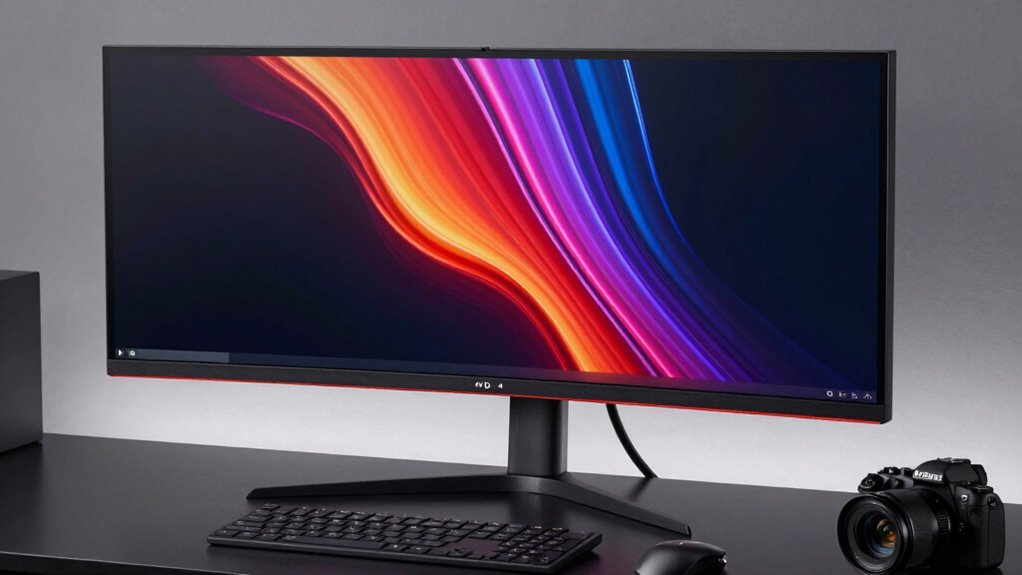

Choosing a monitor with Thunderbolt 4 in 2026 means balancing performance, connectivity, and price. The BenQ MA320UG stands out for Mac users needing high refresh rates and color accuracy, while the ASUS ProArt PA32QCV offers exceptional 6K resolution for demanding creative workflows. For those seeking a versatile, budget-friendly option, the ViewSonic VP2488-4K provides excellent color and single-cable convenience. Each of these picks has tradeoffs, whether it’s price, intended use, or specific feature sets, making it essential to understand what matters most for your setup.

Get the latest gadgets delivered free with Prime
- Fast, free delivery on millions of items
- Prime Video, Amazon Music and more included
- Member-only deals all year
Complete the kit



Key Takeaways
- The BenQ MA320UG excels for Mac users needing smooth motion and color accuracy but is less ideal for Windows environments.
- The ASUS ProArt PA32QCV provides 6K resolution and professional calibration, suitable for high-end creative workflows, with a higher price point.
- The ViewSonic VP2488-4K offers a compact, budget-friendly 4K experience with excellent color coverage and single-cable Thunderbolt 4 convenience.
- Ergonomics and connectivity are key differentiators—consider what adjustments or ports you need daily.
- Higher resolution and color accuracy often come with increased costs and complexity, so prioritize your primary use case.
| BenQ MA320UG 32″ 4K 120Hz Nano Gloss Monitor for Mac |  | Best for Mac users needing smooth motion and color accuracy | Screen Size: 32 inches | Resolution: 4K | Refresh Rate: 120Hz | VIEW ON AMAZON | See Our Full Breakdown |
| ASUS ProArt PA32QCV 32″ 6K DCI-P3 Thunderbolt 4 Monitor |  | Best for professional creative workflows demanding high resolution and color precision | Screen Size: 31.5 inches | Resolution: 6016 x 3384 (6K) | Color Gamut: 98% DCI-P3, 100% sRGB | VIEW ON AMAZON | See Our Full Breakdown |
| BenQ PD2732U 27″ 4K Creative Pro Monitor with Thunderbolt 4 |  | Best for creative professionals needing color accuracy and ergonomic flexibility | Display Size: 27 inches | Resolution: 4K UHD | Color Coverage: 99% Adobe RGB, Display P3 | VIEW ON AMAZON | See Our Full Breakdown |
| Dell UltraSharp U2724DE 27″ WQHD LED Monitor |  | Best for versatile productivity and multimedia use | Size: 27 inches | Resolution: WQHD | Refresh Rate: 120Hz | VIEW ON AMAZON | See Our Full Breakdown |
| ViewSonic VP2488-4K 24 Inch 4K UHD IPS Monitor with Thunderbolt 4 |  | Best for compact, color-accurate work in limited space | Screen Size: 24 inches | Resolution: 3840 x 2160 (4K UHD) | Color Coverage: 100% sRGB, 98% DCI-P3 | VIEW ON AMAZON | See Our Full Breakdown |
| monitors with thunderbolt 4 | Resolution | Ports | Screen Size |
|---|---|---|---|
| BenQ MA320UG 32" 4K 120Hz Nano | 4K | 2x Thunderbolt 4, HDMI, USB-C | 32 inches |
| ASUS ProArt PA32QCV 32" 6K DCI | 6016 x 3384 (6K) | Dual Thunderbolt 4, HDMI 2.1, DisplayPort 1.4 | 31.5 inches |
| BenQ PD2732U 27" 4K Creative P | 4K UHD | Thunderbolt 4, USB-C, HDMI, DisplayPort | — |
| Dell UltraSharp U2724DE 27" WQ | WQHD | — | — |
| ViewSonic VP2488-4K 24 Inch 4K | 3840 x 2160 (4K UHD) | Thunderbolt 4, USB-C, HDMI, DisplayPort | 24 inches |
More Details on Our Top Picks
BenQ MA320UG 32″ 4K 120Hz Nano Gloss Monitor for Mac
This monitor stands out for its combination of 4K resolution at 120Hz and Mac-optimized color with P3 gamut. It’s ideal for creative professionals working on Mac platforms, offering dual Thunderbolt 4 ports with 96W power delivery and daisy chaining, which simplifies workspace setups. The fully adjustable ergonomic stand supports extensive customization, but the Nano Gloss panel can reflect in bright rooms, and its design is more tailored to Mac users, potentially limiting Windows compatibility. Compared to other options, it sacrifices versatility for Mac-specific features, making it less suitable for Windows-centric workflows.
Pros:- 4K 120Hz for smooth responsiveness
- Dual Thunderbolt 4 with 96W charging
- Smart KVM for switching between computers
- Fully adjustable ergonomic stand
Cons:- Designed primarily for Mac, limited Windows features
- Nano Gloss panel prone to reflections in bright environments
Best for: Mac users who prioritize motion clarity and color accuracy
Not ideal for: Windows users seeking broader compatibility or higher resolutions
- Screen Size:32 inches
- Resolution:4K
- Refresh Rate:120Hz
- Panel Type:Nano Gloss
- Ports:2x Thunderbolt 4, HDMI, USB-C
- Power Delivery:96W/15W
Our verdict“A top choice for Mac-centric setups needing high refresh rate and color fidelity, with some reflection tradeoffs.”
ASUS ProArt PA32QCV 32″ 6K DCI-P3 Thunderbolt 4 Monitor
Best for professional creative workflows demanding high resolution and color precision
View on AmazonThis model is a powerhouse for creative professionals, offering a stunning 6K resolution with wide DCI-P3 and sRGB coverage. Its factory calibration and Calman verification ensure outstanding color accuracy, making it ideal for photo editing, video grading, and detailed design work. Dual Thunderbolt 4 ports provide up to 96W power delivery and daisy chaining, while the built-in Auto KVM simplifies multi-device workflows. The ergonomic stand and extended warranty make it a premium investment, but the high price and complex calibration features might be unnecessary for casual users or those with less demanding color needs.
Pros:- 6K resolution with wide color coverage
- Factory calibrated for accuracy
- Dual Thunderbolt 4 with 96W power
- Ergonomic, adjustable stand
Cons:- Premium price point
- Requires calibration knowledge for optimal use
Best for: High-end creative professionals needing ultimate resolution and color fidelity
Not ideal for: Budget-conscious buyers or casual users
- Screen Size:31.5 inches
- Resolution:6016 x 3384 (6K)
- Color Gamut:98% DCI-P3, 100% sRGB
- Panel Type:IPS with LuxPixel AGLR coating
- Ports:Dual Thunderbolt 4, HDMI 2.1, DisplayPort 1.4
- Warranty:5 years
Our verdict“Best suited for professionals who need absolute pixel and color precision, with a higher investment requirement.”
BenQ PD2732U 27″ 4K Creative Pro Monitor with Thunderbolt 4
This 27-inch model balances high color fidelity, with 99% Adobe RGB and Display P3 coverage, and a flexible Thunderbolt 4 setup supporting 90W charging and daisy chaining. Its factory calibration and Pantone validation ensure consistent, reliable color reproduction, which is vital for creative work. The ergonomic stand adds comfort, but the smaller 27-inch size may be less appealing for users who prefer larger screens for detailed editing. Its premium price might also deter casual users, but it’s a solid choice for those who need precision and flexibility.
Pros:- High color accuracy with 99% Adobe RGB
- Daisy chain support with 90W charging
- Ergonomic stand with multiple adjustments
- Pantone validated for color standards
Cons:- Higher price for advanced calibration features
- Smaller screen size for some workflows
Best for: Creative professionals who value color accuracy and ergonomic design
Not ideal for: Casual users or those on a tight budget
- Display Size:27 inches
- Resolution:4K UHD
- Color Coverage:99% Adobe RGB, Display P3
- Calibration:Factory-calibrated, Pantone Validated
- Ports:Thunderbolt 4, USB-C, HDMI, DisplayPort
- Power Delivery:90W
Our verdict“Ideal for creators demanding detailed color work in a compact form factor, at a premium price.”
Dell UltraSharp U2724DE 27″ WQHD LED Monitor
The Dell UltraSharp U2724DE offers a practical balance of resolution and features, with WQHD (2560×1440) pixels and a 120Hz refresh rate. It’s not the highest resolution in this lineup but provides a sharp, flicker-free experience that’s well-suited for general productivity, media, and lighter creative tasks. The adjustable stand and borderless design add ergonomic comfort and visual immersion, but it lacks the extensive color calibration and professional-grade features of higher-end models. It’s a solid choice for users who want reliable performance without breaking the bank.
Pros:- WQHD resolution for sharp images
- 120Hz refresh rate minimizes flicker
- Fully adjustable stand
- Borderless design for immersive viewing
Cons:- Lower resolution than 4K or 6K options
- Lacks advanced color calibration features
Best for: Productivity-focused users needing a versatile, affordable monitor
Not ideal for: Professional color work or high-resolution creative projects
- Size:27 inches
- Resolution:WQHD
- Refresh Rate:120Hz
- Features:Ambient Light Sensor, Adjustable stand, Borderless screen
Our verdict“A reliable, ergonomic monitor suitable for everyday productivity and multimedia use at a reasonable price.”
ViewSonic VP2488-4K 24 Inch 4K UHD IPS Monitor with Thunderbolt 4
This 24-inch monitor emphasizes color accuracy and single-cable convenience, with 4K UHD resolution, covering 100% sRGB and 98% DCI-P3. Its Thunderbolt 4 port supports 40 Gbps data transfer and 100W power delivery, making it highly suitable for MacBook users or space-constrained setups. The ergonomic stand with full adjustments adds comfort, but the smaller 24-inch size may feel cramped for detailed creative tasks, and some may find the feature set costly relative to size. It’s a compelling choice for users prioritizing compactness and color fidelity over screen real estate.
Pros:- Thunderbolt 4 with 100W charging
- Excellent color coverage and Pantone validation
- Compact size ideal for tight spaces
- Full ergonomic adjustments
Cons:- Small screen size may limit detailed creative work
- Premium price for size and features
Best for: Color-critical work in small or space-limited environments
Not ideal for: Users needing large screens or extensive calibration tools
- Screen Size:24 inches
- Resolution:3840 x 2160 (4K UHD)
- Color Coverage:100% sRGB, 98% DCI-P3
- Ports:Thunderbolt 4, USB-C, HDMI, DisplayPort
- Wattage:100W
Our verdict“Perfect for space-constrained creative setups requiring color accuracy, with some tradeoffs in screen size and cost.”
How We Picked
Our selection process focused on monitors that feature Thunderbolt 4 as a primary or significant connectivity option, emphasizing visual performance, build quality, and value. We prioritized models with high-resolution displays, accurate color reproduction for creative work, and flexible connectivity options, including daisy chaining and power delivery. Cost was considered in relation to features, ensuring recommendations suit a range of budgets. We also factored in ergonomic features and user reviews to gauge real-world usability and reliability.
Factors to Consider When Choosing Monitors With Thunderbolt 4
Selecting a monitor with Thunderbolt 4 involves understanding your primary tasks—be it creative production, general productivity, or specialized Mac workflows. Key considerations include resolution, color accuracy, connectivity options, and ergonomic features. Knowing your budget and workspace constraints can help narrow options, ensuring you get a monitor that delivers performance without excess complexity or cost.
Understanding Thunderbolt 4’s Role in Monitors
Thunderbolt 4 provides fast data transfer, daisy chaining multiple devices, and high-power delivery in a single cable. For monitors, this translates into seamless connectivity with laptops and desktops, especially for Mac users or professionals who rely on multiple peripherals. Evaluating whether you need daisy chaining, high wattage, or multiple ports will influence your choice greatly.
Resolution and Color Accuracy
The primary difference among these monitors lies in resolution and color fidelity. If your work demands pixel-perfect images, the 6K ASUS ProArt stands out, but it comes at a premium. For general creative tasks, 4K options like the BenQ or BenQ PD2732U offer excellent color coverage, while the ViewSonic provides a balanced approach with 4K in a compact size. Consider your workspace and whether higher resolution will significantly impact your workflow.
Ergonomics and Connectivity
Adjustability is vital for comfort during long work sessions. All models here offer tilt, swivel, and height adjustments, but the extent varies. Connectivity options extend beyond Thunderbolt 4; many include HDMI, DisplayPort, and USB hubs. Think about your peripheral setup and whether features like KVM switching or specific port counts are necessary for your daily use.
Frequently Asked Questions
What is Thunderbolt 4, and why is it important in monitors?
Thunderbolt 4 is a versatile, high-speed data protocol that supports fast transfer speeds up to 40 Gbps, daisy chaining multiple devices, and delivering up to 100W of power. In monitors, this means fewer cables for connecting and charging your laptop, alongside seamless data transfer for peripherals and displays. It simplifies workspace setups, especially for Mac users or those with extensive device arrays.
Are 4K monitors with Thunderbolt 4 suitable for professional creative work?
Yes, many 4K monitors with Thunderbolt 4, like the BenQ PD2732U or ViewSonic VP2488-4K, deliver accurate color reproduction and calibration, making them suitable for photo editing, design, and video production. However, for the most demanding tasks, models offering higher resolutions like 6K or professional calibration features provide better precision—though at higher costs.
Is a higher refresh rate necessary for creative work?
While a higher refresh rate, such as 120Hz, improves motion smoothness for gaming and video editing, it’s less critical for static creative tasks. Monitors like the BenQ MA320UG offer 120Hz primarily to enhance responsiveness and reduce motion blur, which can benefit video editing or real-time rendering, but many creative professionals prioritize color accuracy over refresh rate.
How does size impact the choice of a Thunderbolt 4 monitor?
Screen size influences your workspace and workflow. Larger monitors like the BenQ MA320UG or ASUS ProArt provide more screen real estate for multitasking and detailed editing, but they also require more desk space and may be more costly. Smaller options like the ViewSonic VP2488-4K are ideal for compact desks or portable setups, though they might limit detailed work or multi-window workflows.
What should I consider when choosing between a 4K and a 6K monitor?
Higher resolutions, such as 6K, offer more detailed images and can simplify workflows that require pixel-perfect accuracy. However, they demand more powerful hardware and come at a higher price. For most creative tasks, 4K provides a good balance of clarity and affordability, while 6K models excel in professional environments needing the utmost precision and detail.
Conclusion
If you primarily work on a Mac or need a monitor with high refresh rates and color accuracy, the BenQ MA320UG offers excellent value, especially for creative professionals who also value ergonomic flexibility. The ASUS ProArt PA32QCV is the best choice for high-end, pixel-perfect workflows, though its premium price reflects that. For those looking for a versatile, space-efficient, and budget-conscious option, the ViewSonic VP2488-4K delivers solid performance in a compact form. Consider your specific needs—whether professional-grade accuracy, high resolution, or workspace constraints—to find the ideal Thunderbolt 4 monitor in 2026.
As an affiliate, we earn on qualifying purchases.Halloween Picks
halloween