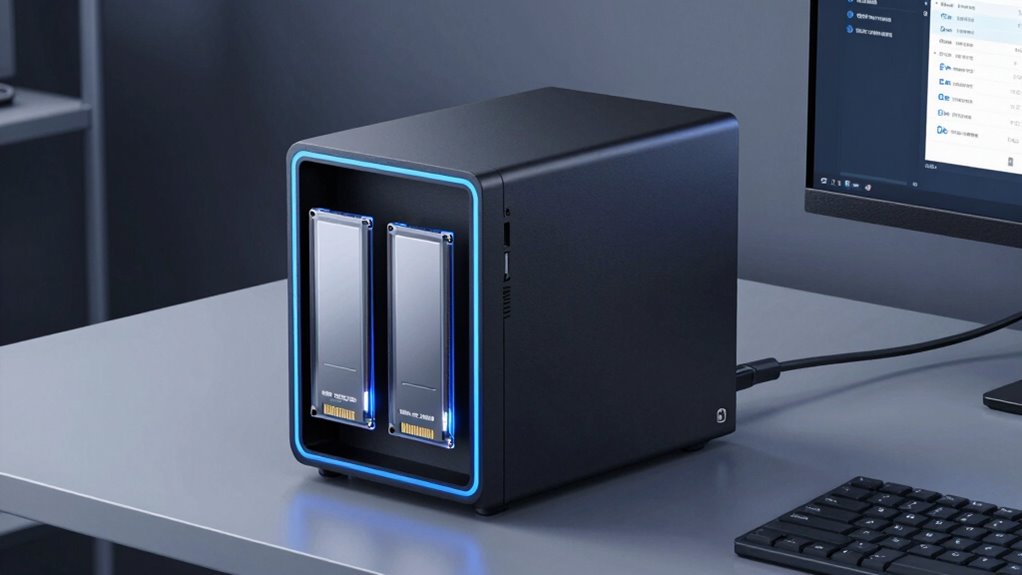

Choosing a NAS with SSD cache in 2026 involves balancing performance, capacity, and expandability. The Asustor Lockerstor 2 Gen2+ AS6702T v2 stands out for its dual 5GbE ports and quad M.2 slots, making it ideal for media creators and small businesses. The Synology DS925+ offers a robust 4-bay setup with expandable RAM and reliable drives, perfect for small to medium workloads. Meanwhile, the Asustor Lockerstor 6 Gen2 provides flexible hybrid storage options with 6 bays and PCIe expansion, suited for those needing high performance and future-proofing. Each comes with tradeoffs: the small 2-bay options are more budget-friendly but less scalable, while the larger NAS units offer more power at a higher cost and complexity.

Get the latest gadgets delivered free — and shop member deals
- Fast, free delivery on millions of items
- Access to Prime Big Deal Days deals on October 6–7
- Prime Video, Amazon Music and more included
Complete the kit



Key Takeaways
- The Asustor Lockerstor 2 Gen2+ offers powerful media transcoding and high-speed networking with four M.2 slots, making it ideal for media-heavy users.
- The Synology DS925+ provides a balanced mix of storage capacity, expandability, and reliable drives for business use.
- The Asustor Lockerstor 6 Gen2 excels in hybrid storage flexibility and future-proofing via PCIe slots and multiple M.2 NVMe slots.
- Smaller 2-bay NAS options are easier on budget and space but limit scalability and performance for intensive workloads.
- Choosing the right NAS depends heavily on your planned workload, whether media streaming, virtualization, or large-scale storage.
| Asustor Lockerstor 2 Gen2+ AS6702T v2 2-Bay NAS (Diskless) |  | Best for Media Creators and Small Businesses | Model: AS6702T v2 | CPU: Intel Celeron N5105 Quad-Core | RAM: 4GB DDR4 (expandable to 16GB) | VIEW ON AMAZON | See Our Full Breakdown |
| Western Digital 8TB WD Red Plus NAS Internal Hard Drive (WD80EFPX) |  | Best for Reliable NAS Storage | Capacity: 8TB | Interface: SATA 6 Gb/s | Cache: 256 MB | VIEW ON AMAZON | See Our Full Breakdown |
| Asustor Lockerstor 6 Gen2 AS6706T 6-Bay NAS (Diskless) | 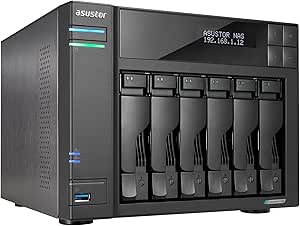 | Best for High Capacity and Future Expansion | Bays: 6 SATA | M.2 Slots: 4x NVMe | CPU: Intel Celeron N5105 | VIEW ON AMAZON | See Our Full Breakdown |
| Synology DS925+ 4-Bay NAS (2x 2.5GbE, Ryzen V1500B, 4GB RAM) 32TB Bundle |  | Best for Business Storage & Virtualization | Processor: AMD Ryzen V1500B quad-core | RAM: 4 GB DDR4 ECC (expandable to 32GB) | Drive Bays: 4 hot-swappable | VIEW ON AMAZON | See Our Full Breakdown |
| Asustor Lockerstor 2 Gen2 AS6702T 2-Bay NAS (Diskless) |  | Best for Entry-Level & Compact Use | Drive Bays: 2 (diskless) | Processor: Intel Celeron N5105 | Memory: 4GB DDR4 (expandable to 16GB) | VIEW ON AMAZON | See Our Full Breakdown |
| nas with ssd cache | Network | RAM | Drive Bays | M.2 Slots |
|---|---|---|---|---|
| Asustor Lockerstor 2 Gen2+ AS6 | Dual 5GbE ports | 4GB DDR4 (expandable to 16GB) | 2 (diskless) | 4x M.2 NVMe |
| Western Digital 8TB WD Red Plu | — | — | — | — |
| Asustor Lockerstor 6 Gen2 AS67 | Dual 2.5GbE | 8GB DDR4 (expandable to 16GB) | — | 4x NVMe |
| Synology DS925+ 4-Bay NAS | 2x 2.5 GbE | 4 GB DDR4 ECC (expandable to 32GB) | 4 hot-swappable | — |
| Asustor Lockerstor 2 Gen2 AS67 | 2x 2.5GbE | — | 2 (diskless) | 4x NVMe |
More Details on Our Top Picks
Asustor Lockerstor 2 Gen2+ AS6702T v2 2-Bay NAS (Diskless)
The Asustor Lockerstor 2 Gen2+ stands out for its dual 5GbE ports and four M.2 NVMe slots, delivering high-speed network access and flexible caching options. Its Intel Celeron N5105 processor and expandable RAM up to 16GB make it capable of handling media transcoding and light virtualization. Compared with larger NAS units, it may lack capacity and scalability but offers a streamlined, efficient setup for users prioritizing media streaming and quick file access. The diskless design keeps initial costs lower, but buyers should budget for drives separately. Its hardware transcoding supports Plex well, making it a solid choice for media-heavy users with smaller storage needs.
Pros:- Dual 5GbE ports for faster network transfers
- Four M.2 NVMe slots for caching or all-flash storage
- Hardware 4K transcoding support
- Expandable RAM up to 16GB
Cons:- Ships diskless, drives sold separately
- Base 4GB RAM may limit virtualization performance
Best for: Small businesses, media creators, and home users needing fast media streaming and moderate virtualization
Not ideal for: Users requiring large storage capacity or enterprise-level scalability
- Model:AS6702T v2
- CPU:Intel Celeron N5105 Quad-Core
- RAM:4GB DDR4 (expandable to 16GB)
- Drive Bays:2 (diskless)
- M.2 Slots:4x M.2 NVMe
- Network:Dual 5GbE ports
Our verdict“A compact, high-performance NAS ideal for media and small business use, with future-proofing via multiple M.2 slots.”
Western Digital 8TB WD Red Plus NAS Internal Hard Drive (WD80EFPX)
The WD Red Plus 8TB is designed specifically for NAS environments, emphasizing durability and compatibility. Its CMR technology and NASware firmware make it a trusted choice for 24/7 operation, especially in multi-bay setups. Compared to traditional desktop drives, it offers better reliability under continuous workloads but operates at a slower 5,640 RPM, which may impact performance during heavy data transfers. Its 256MB cache helps with caching tasks, but the drive’s capacity is limited to 8TB, which might not satisfy users with larger storage needs. This drive pairs well with any NAS with SSD caching, offering a balance of endurance and affordability.
Pros:- Purpose-built for NAS with 24/7 reliability
- Supports up to 8-bay NAS systems
- CMR technology for consistent performance
- 3-year limited warranty
Cons:- Slower rotational speed than 7,200 RPM drives
- Effective capacity may be slightly less due to formatting
Best for: Small to medium business NAS systems needing reliable, continuous operation
Not ideal for: High-performance workloads requiring faster rotation speeds or larger capacities
- Capacity:8TB
- Interface:SATA 6 Gb/s
- Cache:256 MB
- Technology:CMR
- Workload Rate:Up to 180 TB/year
Our verdict“A dependable, purpose-built NAS hard drive suitable for steady workloads in multi-bay NAS setups.”
Asustor Lockerstor 6 Gen2 AS6706T 6-Bay NAS (Diskless)
The Asustor Lockerstor 6 Gen2 offers a substantial 6-bay configuration with four M.2 NVMe slots, combining large storage capacity with caching options. Its Intel Celeron N5105 processor and 8GB RAM (expandable to 16GB) ensure it handles virtualization, media streaming, and intensive tasks smoothly. The dual 2.5GbE ports provide fast network connectivity, while the PCIe slot opens opportunities for future upgrades, like 10GbE or additional SSD expansion. This makes it a versatile, future-ready solution, although the initial cost and setup complexity are higher than smaller models. It is especially suited to users needing hybrid or all-flash storage with room to grow.
Pros:- Flexible hybrid storage with 6 SATA bays and 4 M.2 NVMe slots
- Expandable RAM up to 16GB
- PCIe slot for future upgrades like 10GbE
- Hardware 4K transcoding support
Cons:- Ships diskless, drives must be purchased separately
- Higher price point and more complex setup
Best for: Power users requiring hybrid storage, high performance, and future expandability
Not ideal for: Budget-conscious buyers or those with limited space who don’t need large capacity
- Bays:6 SATA
- M.2 Slots:4x NVMe
- CPU:Intel Celeron N5105
- RAM:8GB DDR4 (expandable to 16GB)
- Network:Dual 2.5GbE
Our verdict“A robust, future-proof NAS that balances large storage, caching flexibility, and upgrade options for demanding users.”
Synology DS925+ 4-Bay NAS (2x 2.5GbE, Ryzen V1500B, 4GB RAM) 32TB Bundle
The Synology DS925+ balances capacity, expandability, and reliability with a compact 4-bay design. Its AMD Ryzen V1500B processor and ECC RAM support smooth multitasking, virtualization, and intensive workloads. The included four 8TB IronWolf drives provide immediate storage, and the dual 2.5GbE ports deliver fast network access. The two M.2 NVMe slots support caching, improving performance under heavy loads. Compared to larger models, its smaller size is easier to manage, but the base 4GB RAM may require upgrades for virtualization or more demanding scenarios. Its software ecosystem, DSM 7.3, offers extensive app support and drive compatibility, making it ideal for business-critical tasks.
Pros:- Powerful Ryzen V1500B CPU with ECC RAM support
- Includes four 8TB IronWolf drives for immediate use
- Dual 2.5GbE ports for fast networking
- Two M.2 NVMe slots for caching
Cons:- Base RAM of only 4GB, upgrade recommended
- Limited to 4 bays without expansion units
Best for: Small to medium-sized businesses needing reliable storage, virtualization, and caching
Not ideal for: Large-scale storage or users without budget for RAM upgrades
- Processor:AMD Ryzen V1500B quad-core
- RAM:4 GB DDR4 ECC (expandable to 32GB)
- Drive Bays:4 hot-swappable
- Network:2x 2.5 GbE
- Included Drives:4x 8TB Seagate IronWolf
Our verdict“A compact, capable NAS suited for business environments with a focus on virtualization and caching.”
Asustor Lockerstor 2 Gen2 AS6702T 2-Bay NAS (Diskless)
The Asustor Lockerstor 2 Gen2 provides a straightforward, space-saving solution for users with moderate storage needs. Its Intel Celeron N5105 processor and 4GB RAM (expandable to 16GB) handle everyday tasks like file sharing, backup, and media streaming. The dual 2.5GbE ports facilitate quick network transfers, and four M.2 NVMe slots allow caching or all-flash pools. Its tool-free drive installation simplifies setup, but its limited bays restrict scalability for larger data needs. This model is best suited for users who prioritize simplicity and speed over maximum capacity or enterprise features.
Pros:- Dual 2.5GbE ports for fast network connectivity
- Four M.2 NVMe slots for caching
- Hardware 4K transcoding support
- Tool-free drive installation
Cons:- Ships diskless, drives sold separately
- Limited to 2 drive bays, less scalable
Best for: Home users or small offices focused on media streaming and backup
Not ideal for: Users with large data storage or virtualization demands
- Drive Bays:2 (diskless)
- Processor:Intel Celeron N5105
- Memory:4GB DDR4 (expandable to 16GB)
- Network:2x 2.5GbE
- M.2 Slots:4x NVMe
Our verdict“A compact, easy-to-use NAS ideal for media streaming and light workloads with minimal fuss.”
How We Picked
Our selection process focused on NAS devices that include SSD caching capabilities, emphasizing performance, expandability, and versatility. We prioritized models with multiple M.2 NVMe slots for caching or all-flash pools, strong processor options, and network interfaces suitable for demanding environments. Cost, ease of use, and future-proofing features, such as PCIe slots and RAM expandability, also influenced our rankings. Devices that support common media or business workloads, like Plex transcoding or virtualization, were given special consideration. We compared these factors across different sizes and price points to find options suitable for a range of users, from casual streamers to enterprise-level setups.
Factors to Consider When Choosing Nas With Ssd Cache
When selecting a NAS with SSD cache, consider how much performance boost you need, the size of your storage, and future expansion plans. SSD caching can significantly accelerate read/write speeds, especially in multi-user environments or media servers. The number of M.2 slots determines caching flexibility, while processor power and RAM influence how well your NAS handles virtualization and multitasking. Network interfaces are also critical for ensuring fast data transfer, with 2.5GbE or higher recommended for high throughput. Your choice should align with your workload, whether that’s media streaming, business storage, or virtualization.
Performance and Caching Capabilities
Look for models with multiple M.2 NVMe slots for caching or all-flash pools, which can dramatically improve data access speeds. A powerful CPU and ample RAM support smooth media transcoding, virtualization, and multitasking. For heavy workloads, prioritize models with 2.5GbE or higher network interfaces to prevent bottlenecks. Smaller NAS units with fewer bays and limited RAM are better suited for lighter tasks, while larger, more expandable models serve enterprise needs better.
Scalability and Expandability
Consider your future storage needs. Smaller 2-bay NAS devices are compact but limited in scalability. Larger models with multiple bays and PCIe slots offer room to grow, whether through additional drives or network upgrades. RAM upgrades and PCIe slots for 10GbE cards or SSD expansion can extend the lifespan and performance of your NAS. Budget constraints and space limitations should guide your choice between simplicity and future-proofing.
Drive Compatibility and Reliability
Using drives designed for NAS environments, like WD Red Plus or Seagate IronWolf, ensures durability and consistent performance. Check compatibility with your NAS model, especially if you plan to mix SSDs and HDDs. Reliability is vital for data integrity, so investing in drives with warranties and proven endurance is advisable. Remember, larger capacities may require matching drives for optimal performance and stability.
Frequently Asked Questions
What is SSD caching in a NAS?
SSD caching in a NAS involves using SSDs to accelerate data access speeds by storing frequently accessed data closer to the processor. This enhances overall performance, especially during multitasking or media streaming, and reduces latency compared to traditional HDD-only storage. It’s an effective way to boost speed without replacing existing storage configurations.
How many M.2 slots should I look for in a NAS with SSD cache?
The number of M.2 slots determines caching flexibility. For most small to medium workloads, two to four slots suffice, allowing for multiple cache pools or hybrid configurations. Larger, more expandable NAS units may offer additional slots, supporting all-flash pools or dedicated cache drives, which can significantly improve performance for intensive tasks.
Is a 2-bay NAS with SSD cache enough for media streaming?
Yes, a 2-bay NAS with SSD cache can handle media streaming effectively, especially if it includes hardware transcoders and fast network interfaces. The cache speeds up media access, reducing buffering, but overall capacity may limit large libraries. For extensive media collections or multiple simultaneous streams, larger NAS units with more bays may be preferable.
Should I upgrade RAM in my NAS with SSD cache?
Upgrading RAM improves multitasking, virtualization, and caching performance. While 4GB may suffice for basic tasks, expanding to 8GB or more is recommended for heavier workloads or multiple simultaneous users. Expanded RAM ensures smoother operation, especially when running additional services or virtual machines.
What are the main tradeoffs when choosing a NAS with SSD cache?
The primary tradeoffs include cost versus performance; larger, more capable models with multiple M.2 slots and higher-end processors tend to be more expensive. Smaller NAS units are easier to set up and more budget-friendly but may lack scalability and power for demanding tasks. Additionally, adding SSDs increases initial expense but offers significant speed benefits, making it essential to balance your current needs with future plans.
Conclusion
For users focused on media streaming and light virtualization, the Asustor Lockerstor 2 Gen2+ offers a compelling mix of speed, media support, and expandability. Small businesses or home office users needing reliable storage with caching should consider the Synology DS925+. Power users or those planning large-scale or future-proof setups will find the Asustor Lockerstor 6 Gen2 to be a versatile, highly expandable choice. Budget-conscious buyers might opt for the smaller Asustor Lockerstor 2 or a dedicated NAS hard drive like WD Red Plus, but remember that scalability and performance often come with higher upfront costs. Selecting the right NAS depends on your workload, budget, and growth expectations—align these factors carefully for the best long-term investment.
Evergreen bestsellers Picks
bestsellers
As an affiliate, we earn on qualifying purchases.