
Choosing the right Black Friday smart home gadgets requires balancing ecosystem compatibility with hardware longevity. The Amazon Echo Hub 8-Inch Smart Home Control Panel stands out as the best overall pick for users seeking a central command center, while the Aqara Smart Thermostat W200 offers superior precision for climate control enthusiasts. The primary tradeoff in this category lies between dedicated hardware performance and multi-protocol flexibility. This guide breaks down the top 15 devices to help you avoid ecosystem fragmentation and find tools that actually simplify your daily routine. Continue reading for a detailed comparison of features, integration capabilities, and long-term utility.

Get the latest gadgets delivered free with Prime
- Fast, free delivery on millions of items
- Prime Video, Amazon Music and more included
- Member-only deals all year
Complete the kit



Key Takeaways
- Centralized control panels like the Echo Hub offer better stability than app-based management for complex routines.
- Matter-compatible plugs provide future-proofing that proprietary Wi-Fi-only plugs lack.
- Smart displays with spatial audio significantly outperform standard speakers for ambient room filling.
- High-amperage smart plugs are necessary for heavy appliances like space heaters, not just lamps.
- Adaptive temperature learning in thermostats saves more energy than simple scheduling apps.
| GHome Smart Wi-Fi Plug with App and Voice Control, 2-Pack |  | Best for Beginners | Model: WP3 | Quantity: 2 plugs | Connectivity: 2.4 GHz Wi-Fi; Bluetooth or Wi-Fi connection | VIEW LATEST PRICE | See Our Full Breakdown |
| EIGHTREE 15A Smart Plug, 4-Pack | 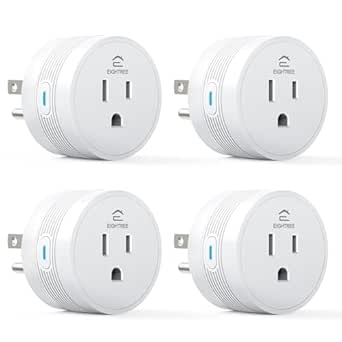 | Best Value Multi-Room Pack | Pack size: 4 plugs | Connectivity: 2.4 GHz Wi-Fi | Maximum power: 1800 W in description; 1100 W listed in product data | VIEW LATEST PRICE | See Our Full Breakdown |
| Echo Dot Max (newest model) – Alexa speaker with room-filling sound and nearly 2x bass, Graphite |  | Best Premium Smart Home Hub | Dimensions: 4.27 × 4.27 × 3.9 in | Weight: 17.82 oz | Audio bandwidth: 53 Hz–16 kHz | VIEW LATEST PRICE | See Our Full Breakdown |
| Kasa EP40 Outdoor Smart Plug with Two Independently Controlled Outlets |  | Best Outdoor Smart Plug | Model: EP40 | Outlets: 2 independently controlled AC outlets | Maximum load: 15 A / 1875 W per outlet | VIEW LATEST PRICE | See Our Full Breakdown |
| Govee Smart Plug, 4-Pack |  | Best for Flexible Connectivity | Quantity: 4 plugs | Connectivity: Bluetooth and 2.4 GHz Wi-Fi | Voice assistants: Amazon Alexa, Google Assistant | VIEW LATEST PRICE | See Our Full Breakdown |
| Amazon Echo Show 11 Smart Display with Full HD Touchscreen and Spatial Audio, Graphite |  | Best Smart Display Hub | Display: 10.95-inch Full HD touchscreen, 1920 × 1200 | Dimensions: 10 × 5 × 7.2 inches | Weight: 45.92 oz (1302 g) | VIEW LATEST PRICE | See Our Full Breakdown |
| Amazon Echo Hub 8-Inch Smart Home Control Panel |  | Best Dedicated Control Panel | Display: 8-inch touchscreen, 1280 × 800 | Audio: Two top-ported full-range speakers with stereo playback | Sensors: Passive infrared proximity sensor and ambient light sensor | VIEW LATEST PRICE | See Our Full Breakdown |
| Kasa Smart Wi-Fi Mini Plug EP10P2, 15A, 2-Pack |  | Best Value for Basic Automation | Model: EP10P2 | Pack size: 2 plugs | Maximum current: 15 A | VIEW LATEST PRICE | See Our Full Breakdown |
| Amazon Echo Time Customizable Smart Clock with Smart Alarms and Ambient Sounds, Graphite |  | Best Bedside Smart Clock | Product type: Smart clock | Color: Graphite | Clock faces: Hundreds of variations | VIEW LATEST PRICE | See Our Full Breakdown |
| Amazon Echo Show 5 Smart Display (Newest Model), Charcoal |  | Best Compact Smart Display | Display: 5.5-inch touchscreen | Dimensions: 5.8 × 3.6 × 3.2 inches | Weight: 16.1 oz (456 g) | VIEW LATEST PRICE | See Our Full Breakdown |
| EIGHTREE Smart Wi-Fi Plugs, 4-Pack |  | Best Value for Mixed Smart Home Setups | Model: ET01B-4 | Pack quantity: 4 | Title-listed amperage: 15 A | VIEW LATEST PRICE | See Our Full Breakdown |
| Amazon Smart Plug with Alexa Voice Control |  | Best for Alexa Beginners | Dimensions: 3.2 × 1.5 × 2.2 in | Weight: 3.1 oz | Input: 120 VAC, 60 Hz | VIEW LATEST PRICE | See Our Full Breakdown |
| Amazon Echo Spot Smart Alarm Clock with Alexa, Black |  | Best Smart Bedside Hub | Display: 2.83-inch touchscreen, 240 × 320 px | Dimensions: 4.5 × 4.1 × 4.4 in | Weight: 14.3 oz | VIEW LATEST PRICE | See Our Full Breakdown |
| Aqara Smart Thermostat W200 with Apple Adaptive Temperature |  | Best Premium Whole-Home Upgrade | Model: W200 | Display: 4-inch full-color touchscreen | Connectivity: Matter 1.4, Wi-Fi, Zigbee, and Thread | VIEW LATEST PRICE | See Our Full Breakdown |
| Linkind Matter Smart Plug, 4-Pack | 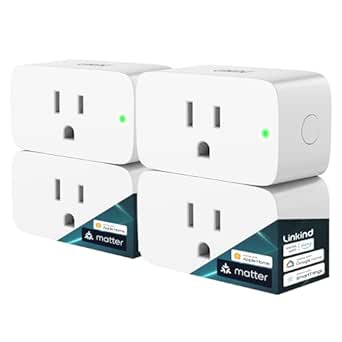 | Best for Matter and Local Control | Model: LC09003256 | Pack size: 4 | Plug type: Type A | VIEW LATEST PRICE | See Our Full Breakdown |
| Black Friday smart home gadget | Dimensions | Connectivity |
|---|---|---|
| GHome Smart Wi-Fi Plug with Ap | 2.1 × 2.1 × 1.1 in | 2.4 GHz Wi-Fi; Bluetooth or Wi-Fi connection |
| EIGHTREE 15A Smart Plug | 1.9 × 1.9 × 1.2 in | 2.4 GHz Wi-Fi |
| Echo Dot Max | 4.27 × 4.27 × 3.9 in | — |
| Kasa EP40 Outdoor Smart Plug w | 4.9 × 2.38 × 2.29 in | 2.4 GHz Wi-Fi |
| Govee Smart Plug | — | Bluetooth and 2.4 GHz Wi-Fi |
| Amazon Echo Show 11 Smart Disp | 10 × 5 × 7.2 inches | — |
| Amazon Echo Hub 8-Inch Smart H | — | Bluetooth, Zigbee, Thread, Matter, and Amazon Sidewalk |
| Kasa Smart Wi-Fi Mini Plug EP1 | — | 2.4 GHz Wi-Fi; no hub required |
| Amazon Echo Time Customizable | — | — |
| Amazon Echo Show 5 Smart Displ | 5.8 × 3.6 × 3.2 inches | — |
| EIGHTREE Smart Wi-Fi Plugs | 4.06 × 4.06 × 2.28 in | 2.4 GHz Wi-Fi |
| Amazon Smart Plug with Alexa V | 3.2 × 1.5 × 2.2 in | — |
| Amazon Echo Spot Smart Alarm C | 4.5 × 4.1 × 4.4 in | — |
| Aqara Smart Thermostat W200 wi | — | Matter 1.4, Wi-Fi, Zigbee, and Thread |
| Linkind Matter Smart Plug | — | — |
More Details on Our Top Picks
GHome Smart Wi-Fi Plug with App and Voice Control, 2-Pack
For someone starting with a couple of lamps or fans, the GHome two-pack keeps smart control simple: schedules and timers run through its app, while Alexa and Google Assistant add voice commands without a separate hub. Compared with the EIGHTREE 15A four-pack, this is a smaller commitment, but it also gives you fewer outlets and less flexibility for automating several rooms at once. Setup has an extra step: each plug must first be connected through the GHome app before linking a voice assistant. It also relies on 2.4 GHz Wi-Fi, so buyers with a network configured only for 5 GHz should skip it. This pick suits basic routines, not buyers seeking broad smart-home protocol support or the higher stated load rating of the EIGHTREE option.
Pros:- Two plugs offer a straightforward way to start automating everyday devices.
- Schedules and timers support hands-off control of lamps and fans.
- Works with Alexa and Google Assistant and requires no hub.
- Supports the GHome, Smart Life, and Tuya apps.
Cons:- Requires a 2.4 GHz Wi-Fi network.
- Must be set up in the GHome app before connecting to Alexa or Google Home.
- Two plugs provide less coverage than the four-plug EIGHTREE and Govee packs.
Best for: New smart-home users who want to automate two lamps or fans with app and voice control, without adding a hub.
Not ideal for: Buyers automating several rooms, using only 5 GHz Wi-Fi, or wanting setup directly through a voice assistant.
- Model:WP3
- Quantity:2 plugs
- Connectivity:2.4 GHz Wi-Fi; Bluetooth or Wi-Fi connection
- Compatible assistants:Alexa, Google Assistant
- Compatible apps:GHome, Smart Life, Tuya
- Operating voltage:120 V
- Maximum wattage:1200 W
- Dimensions:2.1 × 2.1 × 1.1 in
- Certifications:ETL, FCC
Our verdict“Choose this two-pack for a modest first step into scheduled, voice-controlled lighting, but pick a four-pack if you have more devices to automate.”
EIGHTREE 15A Smart Plug, 4-Pack
The EIGHTREE four-pack is the practical choice when Black Friday shopping means setting up several lamps or small appliances at once. App control, voice compatibility, schedules, timers, and group control cover the everyday routines that matter, while its compact shape can fit crowded outlet areas more easily than bulky plugs. Compared with the Govee Smart Plug four-pack, EIGHTREE adds SmartThings compatibility and lists a 15 A rating; however, its power figures conflict. The specifications give 1100 W, while the description claims up to 1800 W, so I would not treat the higher figure as settled without checking the product documentation for the intended appliance. Like the Govee and GHome models, it requires 2.4 GHz Wi-Fi, and it does not add a hub or broader radio protocols.
Pros:- Four plugs make it easier to automate multiple rooms in one setup.
- Group control, schedules, and countdown timers support coordinated routines.
- Compatible with Alexa, Google Home, and SmartThings.
- Compact dimensions can help in crowded outlet areas.
Cons:- The listed 1100 W specification conflicts with the description’s claim of 1800 W maximum.
- Requires 2.4 GHz Wi-Fi.
- Offers no hub or Matter, Zigbee, or Thread support.
Best for: Households that want four compact plugs for lights and other compatible devices, especially SmartThings users who need group scheduling.
Not ideal for: Buyers planning to control high-load appliances or anyone who needs a clearly consistent maximum-wattage specification.
- Pack size:4 plugs
- Connectivity:2.4 GHz Wi-Fi
- Maximum power:1800 W in description; 1100 W listed in product data
- Operating voltage:120 V
- Control:Smart Life app, Alexa, Google Home, SmartThings
- Hub required:No
- Dimensions:1.9 × 1.9 × 1.2 in
- Certifications:FCC, ETL
Our verdict“Choose EIGHTREE for compact, multi-room control and SmartThings compatibility, but verify its load rating before connecting appliances with substantial power needs.”
Echo Dot Max (newest model) – Alexa speaker with room-filling sound and nearly 2x bass, Graphite
The Echo Dot Max is the most capable smart-home centerpiece in this group: its built-in hub supports Zigbee, Matter, and Thread, so compatible devices can connect without relying on a separate hub for each ecosystem. Presence and ambient sensors also let routines respond to a room’s conditions, while the larger driver setup and room adaptation make it more than a voice-control puck. Compared with the GHome and Govee smart plugs, it can coordinate a wider range of device types, but it is a much bigger investment in space and system commitment than adding a plug. Its eero Wi-Fi extension is useful only with a compatible eero router, and the listed extension is limited to up to 10 devices on 5 GHz. Skip it if you only need basic outlet scheduling.
Pros:- Built-in Zigbee, Matter, and Thread support can reduce the need for separate device hubs.
- Presence, temperature, and light sensors can support more responsive routines.
- Room-adapting audio and a dedicated woofer provide fuller sound than basic smart plugs or small control devices.
- Compatible eero systems can use its built-in Wi-Fi extension.
Cons:- Its larger footprint takes more space than a compact smart speaker or plug.
- The Wi-Fi extension requires a compatible eero router.
- The eero extension supports up to 10 devices on the 5 GHz band.
Best for: Alexa households building a broader smart home who want a speaker, multi-protocol hub, room sensors, and compatible eero extension in one device.
Not ideal for: Shoppers who only need to automate lamps or fans, have no compatible eero router, or need a compact speaker for a tight space.
- Dimensions:4.27 × 4.27 × 3.9 in
- Weight:17.82 oz
- Audio bandwidth:53 Hz–16 kHz
- Drivers:1 × 0.8 in tweeter; 1 × 2.5 in woofer
- Wi-Fi:Wi-Fi 6E
- Smart home hub:Zigbee, Matter, Thread Border Router
- Bluetooth:BLE 5.3, A2DP, AVRCP
- Sensors:Ambient temperature, ambient light, presence detection
- eero built-in:Up to 1,000 sq ft coverage; up to 100 Mbps; up to 10 devices on 5 GHz
Our verdict“Pick the Echo Dot Max if you want one premium Alexa device to anchor audio and a multi-protocol smart home; skip it for simple plug automation.”
Kasa EP40 Outdoor Smart Plug with Two Independently Controlled Outlets
For seasonal lights, patio lamps, or other outdoor setups, the Kasa EP40 earns its place by pairing two independently controlled outlets with IP64 weather resistance and protective covers. That separation lets you schedule two devices differently instead of switching the whole outdoor setup on and off together. The indoor EIGHTREE and Govee packs offer more total plugs for household use, but neither is described as weather-resistant; they are not substitutes for an outdoor-rated unit. The tradeoff is narrow specialization: the EP40 has only two outlets, needs 2.4 GHz Wi-Fi, and supports Alexa and Google Assistant rather than the broader device-protocol hub features of the Echo Dot Max. Its per-outlet load rating and sunrise/sunset scheduling make it a purpose-built choice for outdoor routines.
Pros:- Two outlets can be controlled independently for different devices and routines.
- IP64 weather resistance and protective covers suit outdoor installations.
- Schedules, countdown timers, and sunrise/sunset offsets support automatic operation.
- Each outlet is rated for up to 15 A / 1875 W.
Cons:- Requires a 2.4 GHz Wi-Fi connection.
- Only two outlets are included, fewer than the indoor four-packs.
- Does not provide the multi-protocol smart-home hub features found in the Echo Dot Max.
Best for: Homeowners automating two outdoor devices, such as seasonal lights and a patio fixture, with separate schedules and voice control.
Not ideal for: Buyers seeking indoor multi-room coverage, Matter or Thread hub features, or an outdoor plug that works on 5 GHz Wi-Fi.
- Model:EP40
- Outlets:2 independently controlled AC outlets
- Maximum load:15 A / 1875 W per outlet
- Weather resistance:IP64
- Connectivity:2.4 GHz Wi-Fi
- Voice assistants:Amazon Alexa, Google Assistant
- Dimensions:4.9 × 2.38 × 2.29 in
- Certification:ETL
- Warranty:2 years
Our verdict“Choose the EP40 for weather-resistant, separately scheduled outdoor devices; use an indoor pack instead if you need more outlets around the house.”
Govee Smart Plug, 4-Pack
The Govee four-pack stands apart from the other indoor plug bundles by offering both Bluetooth and 2.4 GHz Wi-Fi. That gives buyers another way to connect and manage compatible devices, while the app handles schedules and grouped control without a hub. Compared with the EIGHTREE 15A four-pack, Govee has a clearly stated 1200 W maximum and a simpler Alexa-and-Google Assistant focus; EIGHTREE lists SmartThings compatibility and a higher 15 A claim, but its power figures conflict. Govee’s stated limit is the clearer reference, though it also means these plugs are not suited to every higher-load appliance. They cannot use 5 GHz Wi-Fi, and Bluetooth does not change that Wi-Fi limitation. This is a sensible bundle for everyday lights and small compatible devices, not a broad smart-home hub.
Pros:- Bluetooth and 2.4 GHz Wi-Fi provide two connectivity options.
- Four plugs support automation across multiple rooms.
- App scheduling and group control make coordinated routines easier.
- Works with Alexa and Google Assistant without a separate hub.
Cons:- Does not support 5 GHz Wi-Fi.
- Maximum power is rated at 1200 W.
- Does not list SmartThings compatibility, unlike the EIGHTREE four-pack.
Best for: Alexa or Google Assistant households that want four compact plugs for lights and compatible appliances, with Bluetooth as an additional connection option.
Not ideal for: Buyers using only 5 GHz Wi-Fi, seeking SmartThings support, or needing plugs rated above 1200 W.
- Quantity:4 plugs
- Connectivity:Bluetooth and 2.4 GHz Wi-Fi
- Voice assistants:Amazon Alexa, Google Assistant
- Maximum power:1200 W
- Voltage:120 V
- Amperage:11 A
- Plug type:Type B
- Hub required:No
- Certifications:ETL, FCC
Our verdict“Choose Govee for a four-plug bundle with Bluetooth and straightforward Alexa or Google control, but check the 1200 W limit against your intended devices.”
Amazon Echo Show 11 Smart Display with Full HD Touchscreen and Spatial Audio, Graphite
For a Black Friday smart home upgrade that can also handle video calls, recipes, and entertainment, the Echo Show 11 is the most capable screen in this group. Its 10.95-inch Full HD display gives dashboards and camera feeds more room than the Echo Show 5, while Zigbee, Matter, and Thread support lets it connect directly to a broad mix of devices. The presence and temperature sensors add useful context for routines, rather than limiting the screen to manual controls.
The tradeoff is footprint: at nearly 46 ounces, it suits a counter or shelf better than a crowded bedside table. Its built-in hub also makes it more than some households need if they only want basic appliance scheduling. Camera and microphone disable buttons offer physical privacy controls, but buyers who want a dedicated, fixed control panel may prefer the Echo Hub.
Pros:- Large Full HD touchscreen makes camera feeds, recipes, and calendars easier to view than on the Echo Show 5.
- Zigbee, Matter, and Thread support can connect compatible devices without a separate hub.
- 13 MP camera with auto framing and 3.3x zoom supports more flexible video calls.
- Physical camera and microphone disable controls provide direct privacy management.
Cons:- Its size and 45.92-ounce weight make it less suited to small shelves or bedside tables.
- Bluetooth speakers that require PIN codes are not supported.
- Hands-free voice control of connected mobile devices is not supported for Mac OS X.
Best for: Households building a mixed-brand smart home that want a large display for device controls, video calls, and everyday viewing.
Not ideal for: Buyers with limited counter space or anyone who only needs a small bedside screen or simple smart plug control.
- Display:10.95-inch Full HD touchscreen, 1920 × 1200
- Dimensions:10 × 5 × 7.2 inches
- Weight:45.92 oz (1302 g)
- Camera:13 MP with auto framing and 3.3× zoom
- Audio:One 2.8-inch woofer, two full-range drivers, spatial audio
- Wi-Fi:Wi-Fi 6E (IEEE 802.11ax)
- Smart home connectivity:Zigbee, Matter, and Thread Border Router
- Sensors:Ambient temperature, ambient light, presence detection, and camera
Our verdict“Choose the Echo Show 11 if you want one substantial screen to anchor a connected home, but pick the Echo Hub for a fixed control panel or the Echo Show 5 for a smaller footprint.”
Amazon Echo Hub 8-Inch Smart Home Control Panel
The Echo Hub earns its place for buyers who want smart-home controls to live on the wall, not compete with a general-purpose display for counter space. Its customizable dashboard keeps device controls, cameras, routines, and security functions within reach; support for Zigbee, Thread, Matter, and Sidewalk also makes it a more connected control point than the Kasa Smart Wi-Fi Mini Plug, which handles only the appliances plugged into it. Included wall-mount hardware makes a fixed installation practical out of the box.
This is a control panel first, not the best choice for entertainment or portable use. Its 8-inch, 1280 × 800 screen is smaller and lower-resolution than the Echo Show 11, and a tabletop stand or PoE accessories cost extra. Setup also requires an internet connection. I’d choose it for a central household dashboard, but not for someone who wants a flexible screen to move between rooms.
Pros:- Customizable dashboard lets users rearrange and resize device controls.
- Built-in support for Zigbee, Thread, Matter, Bluetooth, and Sidewalk.
- On-screen controls cover compatible devices, cameras, routines, security, and media.
- Wall mount, power adapter, and installation hardware are included.
Cons:- Designed for fixed installation rather than portable use.
- Tabletop stand, cable pass-throughs, and PoE adapter are sold separately.
- Internet access is required for setup.
Best for: Smart-home owners who want a permanent, shared wall dashboard for compatible devices, cameras, routines, and security controls.
Not ideal for: Renters or frequent movers who need a portable display, or buyers seeking a large screen for video calls and entertainment.
- Display:8-inch touchscreen, 1280 × 800
- Audio:Two top-ported full-range speakers with stereo playback
- Sensors:Passive infrared proximity sensor and ambient light sensor
- Wi-Fi:Dual-band 802.11a/b/g/n/ac
- Connectivity:Bluetooth, Zigbee, Thread, Matter, and Amazon Sidewalk
- Power:12.5 W power adapter included; supports compatible USB-C PD accessories
- Power over Ethernet:Supported with compatible USB-C converter and IEEE 802.3at or 802.3bt
- Installation:Wall mount included; tabletop stand sold separately
Our verdict“Pick the Echo Hub for a permanent smart-home command point, while the Echo Show 11 is a better fit if you want a larger, more versatile screen.”
Kasa Smart Wi-Fi Mini Plug EP10P2, 15A, 2-Pack
For a straightforward Black Friday entry into smart-home automation, the Kasa EP10P2 two-pack turns ordinary lamps and other compatible appliances into scheduled or remotely controlled devices without adding a hub. Its compact shape is a practical advantage over bulkier plugs: it can leave the neighboring outlet free. App controls, voice support for Alexa and Google Assistant, timers, and Away Mode cover the routines most first-time buyers are likely to use.
Its reach is narrower than the Echo Show 11 or Echo Hub: these plugs use 2.4 GHz Wi-Fi and do not act as a hub for other smart-home standards. The 15 A, 1800 W maximum also means buyers must check the appliance load rather than assume every device is suitable. I’d choose this pair for lamps and everyday plug-in gear, not for a whole-home connectivity backbone.
Pros:- Two plugs provide a simple way to automate more than one appliance.
- Compact design can leave the adjacent outlet available.
- Schedules, timers, Away Mode, and remote app control support useful everyday routines.
- Works with Alexa and Google Assistant and is UL certified.
Cons:- Requires a 2.4 GHz Wi-Fi connection.
- Maximum load is 15 A or 1800 W, so some appliances may not be suitable.
- Does not provide the broader device-control dashboard or hub functions of the Echo Hub.
Best for: First-time smart-home buyers who want app and voice control for lamps or compatible appliances without buying a hub.
Not ideal for: People with only 5 GHz Wi-Fi available, or shoppers who need a multi-protocol hub or control for loads above 15 A.
- Model:EP10P2
- Pack size:2 plugs
- Maximum current:15 A
- Maximum wattage:1800 W
- Operating voltage:120 V AC
- Connectivity:2.4 GHz Wi-Fi; no hub required
- Voice assistants:Amazon Alexa and Google Assistant
- Features:Remote control, scheduling, timers, and Away Mode
Our verdict“Choose the Kasa EP10P2 for uncomplicated control of two compatible appliances; pick a smart display or hub if you need to manage a wider device ecosystem.”
Amazon Echo Time Customizable Smart Clock with Smart Alarms and Ambient Sounds, Graphite
The Echo Time is the most focused pick here: it puts alarm routines, ambient sounds, and a customizable clock face at the center, rather than trying to be a general smart display. Its many face variations let buyers tune the bedside screen to their preferences, while compatible lighting can gradually brighten the room as part of a morning routine. Compared with the Echo Show 5, this is more specifically built around sleep and wake-up habits, not video calls or viewing camera feeds.
The catch is that some of its more distinctive alarm functions depend on Alexa+; lighter-sleep detection is not a standalone feature, and some Alexa+ features require a Prime membership. It also offers less information at a glance than the Echo Show 11. I’d choose it for a bedside routine, but skip it if the main goal is a larger screen or broad smart-home control panel.
Pros:- Hundreds of clock-face variations make the display adaptable to different bedside preferences.
- Ambient sounds and bedtime routines support a sleep-focused setup.
- Compatible smart lighting can be included in morning routines.
- Microphone enable/disable button provides a direct privacy control.
Cons:- Some Alexa+ features require a Prime membership.
- Lighter-sleep detection for smart alarms depends on Alexa+.
- Its clock-first focus provides less screen utility than the Echo Show 5 or Echo Show 11.
Best for: People who want a bedside clock with customizable faces, ambient sounds, and routines linked to compatible smart lighting.
Not ideal for: Buyers who want a large screen for video calls and camera feeds, or who do not want Alexa+ features tied to membership requirements.
- Product type:Smart clock
- Color:Graphite
- Clock faces:Hundreds of variations
- Audio:Crisp vocals, balanced sound, and ambient sounds
- Smart home compatibility:Compatible devices including lights, locks, and blinds
- Alarm features:Alexa+ smart alarms with lighter-sleep detection
- Privacy:Microphone enable/disable button
Our verdict“Choose the Echo Time for a customizable bedside alarm and lighting routine, but choose the Echo Show 5 if you also want a compact screen for calls and camera viewing.”
Amazon Echo Show 5 Smart Display (Newest Model), Charcoal
The Echo Show 5 is the compact choice for buyers who want a screen for quick checks without giving up much bedside or kitchen space. Its 5.5-inch display can show compatible camera feeds, news, photos, and smart-home controls, while video calling adds a use the Echo Time clock does not emphasize. A built-in camera shutter and a button to disable the camera and microphone give privacy-conscious households a physical way to restrict access.
That small footprint comes with a real limit: the screen and 1.75-inch speaker are less suited to shared viewing or room-filling entertainment than the Echo Show 11. It also lacks the listed Zigbee, Matter, and Thread hub capabilities of the larger display, so it is better as a compact endpoint than the center of a connected home. Choose it for a bedside or small counter, not as a substitute for a dedicated hub.
Pros:- Small 5.5-inch display fits more easily on a bedside table than the Echo Show 11.
- Supports video calls and viewing compatible camera feeds.
- Built-in camera shutter and camera/microphone off button provide privacy controls.
- Uses recycled fabric and aluminum, with recyclable packaging.
Cons:- Small display is less suitable for shared viewing, recipes, and detailed dashboards than the Echo Show 11.
- The 1.75-inch full-range speaker is a more limited audio option than the larger smart displays.
- Does not list the Echo Show 11’s Zigbee, Matter, and Thread hub support.
Best for: People with limited bedside or counter space who want Alexa, video calls, and a compact view of compatible cameras and smart-home controls.
Not ideal for: Households seeking a large shared display, a built-in multi-protocol smart-home hub, or stronger audio for room-wide listening.
- Display:5.5-inch touchscreen
- Dimensions:5.8 × 3.6 × 3.2 inches
- Weight:16.1 oz (456 g)
- Camera:2 MP with built-in shutter
- Speaker:1.75-inch full-range speaker
- Wi-Fi:Dual-band 802.11a/b/g/n/ac
- Bluetooth:A2DP and AVRCP support
- Sustainability:Recycled polyester fabric, recycled aluminum, and recyclable packaging
Our verdict“Choose the Echo Show 5 when footprint and basic screen functions matter most, but step up to the Echo Show 11 for a larger display and built-in smart-home hub.”
EIGHTREE Smart Wi-Fi Plugs, 4-Pack
Four plugs and broad assistant support make this EIGHTREE set a practical way to add scheduled control to several lamps or small appliances at once. Setup runs through the Smart Life app, after which the plugs work with Alexa, Google Assistant, and SmartThings; that extra app step is the tradeoff for flexibility. Compared with the Amazon Smart Plug, EIGHTREE is a better fit for households that use more than Alexa and need a four-pack, while Amazon’s plug has a simpler, Alexa-only path. These plugs require 2.4 GHz Wi-Fi and a phone-based setup, so they are less appealing if you want a direct Alexa connection or a plug that works across network bands. For a Black Friday smart-home starter kit, the useful distinction is compatibility and quantity, not a built-in hub.
Pros:- Four plugs let buyers automate several devices in one purchase.
- Works with Alexa, Google Assistant, and SmartThings through Smart Life.
- Timers, countdowns, cycles, and schedules support flexible routines.
- Compact design can fit behind furniture or in tight spaces.
Cons:- Smart Life app setup is required; direct Alexa connection is not supported.
- Only supports 2.4 GHz Wi-Fi.
- No hub is included or required, but setup still adds a separate app to manage.
Best for: Households adding scheduled control to several devices and using Alexa, Google Assistant, or SmartThings.
Not ideal for: Buyers who want direct Alexa setup without Smart Life or whose home network only provides 5 GHz Wi-Fi.
- Model:ET01B-4
- Pack quantity:4
- Title-listed amperage:15 A
- Connectivity:2.4 GHz Wi-Fi
- Smart home compatibility:Alexa, Google Assistant, and SmartThings via Smart Life
- Hub required:No
- Dimensions:4.06 × 4.06 × 2.28 in
- Certifications:ETL, FCC
- Warranty:2 years
Our verdict“Choose this four-pack if you want several compact plugs with support for more than one major voice assistant and do not mind Smart Life setup.”
Amazon Smart Plug with Alexa Voice Control
Simple Alexa integration is the main reason to choose this single plug: it adds voice control, schedules, timers, and routines without requiring a smart-home hub. Its physical on/off switch also gives you a manual fallback, and the compact shape is designed to leave the neighboring outlet available. Compared with the four-plug EIGHTREE Smart Wi-Fi Plugs, this Amazon model is easier to keep within an Alexa-only setup but offers less flexibility for mixed-platform homes and automating several devices. Its limits are plain: it works only with Alexa, connects on 2.4 GHz Wi-Fi, and is for indoor use. For Black Friday buyers building around Echo devices, that narrow compatibility can be an advantage; for anyone considering Google Assistant, SmartThings, or Apple Home, it is a reason to skip it.
Pros:- Works with Alexa routines, voice control, timers, and schedules.
- No smart-home hub is required.
- Compact design leaves the second outlet free.
- Physical switch offers manual on/off control.
Cons:- Does not support other voice assistants or smart hubs.
- Requires a 2.4 GHz Wi-Fi network.
- Indoor use only, with one socket in the package.
Best for: Alexa-first households that want to automate one indoor lamp or appliance with minimal smart-home setup.
Not ideal for: Buyers using Google Assistant, SmartThings, or a smart hub, and anyone seeking a multi-plug starter set.
- Dimensions:3.2 × 1.5 × 2.2 in
- Weight:3.1 oz
- Input:120 VAC, 60 Hz
- Maximum output:15 A
- Wi-Fi:2.4 GHz, 802.11 b/g/n
- Use:Indoor only
- Compatibility:Alexa only; no smart hub support
- Warranty:1-year limited warranty
Our verdict“Pick this plug for a straightforward Alexa-only setup, but choose the EIGHTREE four-pack if you need broader assistant support or multiple plugs.”
Amazon Echo Spot Smart Alarm Clock with Alexa, Black
The Echo Spot combines an alarm clock, a compact screen, a speaker, and Alexa control in a bedside-sized device. Its 2.83-inch touchscreen can show clock, weather, and song information, while voice or touch commands can operate compatible smart-home devices. That makes it more useful beside a bed than a smart plug alone, though it is not a substitute for a larger control display like the Amazon Echo Show 11. The Spot has a camera-free design and microphone-off control, a meaningful choice for a bedroom device. Its eero coverage feature is conditional: it needs a compatible eero router and linked setup, so it should not drive the purchase for other network owners. Choose it for a compact Alexa bedside station, not for a large-screen control center.
Pros:- Combines an alarm clock, Alexa control, touchscreen, and built-in speaker.
- Camera-free design with microphone-off and in-app privacy controls.
- Dual-band Wi-Fi supports 2.4 and 5 GHz networks.
- Can extend coverage on a compatible eero network.
Cons:- The 2.83-inch display is small for browsing or broad home control.
- eero coverage extension requires a compatible router and linked setup.
- Does not support ad-hoc or peer-to-peer Wi-Fi networks.
Best for: Alexa households that want a compact bedside clock with basic touchscreen controls for compatible smart-home devices.
Not ideal for: Buyers who need a large smart-home dashboard, a camera, or Wi-Fi extension without a compatible eero router.
- Display:2.83-inch touchscreen, 240 × 320 px
- Dimensions:4.5 × 4.1 × 4.4 in
- Weight:14.3 oz
- Camera:None
- Speaker:1.73-inch full-range built-in speaker
- Wi-Fi:Dual-band 802.11a/b/g/n/ac, 2.4 and 5 GHz
- Bluetooth:A2DP audio streaming and AVRCP voice control
- eero Built-in:Up to 1,000 sq. ft. additional coverage with a compatible eero router
- Recycled materials:36%
Our verdict“Choose the Echo Spot for a compact Alexa bedside controller; choose the Echo Show 11 if a larger screen is the priority.”
Aqara Smart Thermostat W200 with Apple Adaptive Temperature
The W200 is the most ambitious upgrade here: it pairs a 4-inch touchscreen thermostat with Matter compatibility, presence sensing, and built-in Zigbee and Thread networking. Its mmWave radar can detect presence beyond the basic movement checks associated with standard motion sensors, while Matter support connects it with Apple Home, Google Home, Alexa, SmartThings, and Home Assistant. Compared with the Linkind Matter Smart Plug, this is a much larger commitment: it can coordinate HVAC and smart-home devices, but installation depends on system wiring and compatibility. The thermostat supports about 85% of HVAC systems, not every setup; homes without a C-wire may need a separate Aqara adapter. Some Apple temperature features also depend on specific Apple hardware and software, so buyers should verify their system before choosing it.
Pros:- Matter 1.4 support spans Apple Home, Google Home, Alexa, SmartThings, and Home Assistant.
- Built-in Zigbee hub and Thread border router can consolidate device protocols.
- mmWave presence detection supports more nuanced occupancy-based control.
- Large touchscreen doubles as a smart-home control panel.
Cons:- A separate Aqara C-Wire Adapter is needed for systems without a C-wire.
- Listed HVAC compatibility is approximately 85%, so some systems will not fit.
- Apple Adaptive Temperature and Clean Energy Guidance require specific Apple hardware and software versions.
Best for: Smart-home owners planning a thermostat upgrade who want Matter, presence sensing, and multiple protocols in one wall-mounted device.
Not ideal for: Renters, buyers with uncommon HVAC wiring, or households that cannot confirm system compatibility and required C-wire arrangements.
- Model:W200
- Display:4-inch full-color touchscreen
- Connectivity:Matter 1.4, Wi-Fi, Zigbee, and Thread
- Wi-Fi bands:2.4 and 5 GHz
- Compatibility:Apple Home, Google Home, Alexa, SmartThings, and Home Assistant
- HVAC support:Furnaces, air conditioners, heat pumps, boilers, and PTAC units; approximately 85% compatibility
- Presence sensor:mmWave radar
- Built-in controllers:Zigbee hub and Thread border router
Our verdict“Choose the W200 for a compatible HVAC system and a planned multi-platform upgrade, not as a quick, low-effort smart-home add-on.”
Linkind Matter Smart Plug, 4-Pack
For buyers choosing plugs around Matter compatibility, Linkind’s four-pack stands apart from the EIGHTREE set: it lists Apple Home alongside Alexa, Google Home, and SmartThings, and it supports local network control when internet access is down. That can keep routines and control available during an outage, provided the chosen platform and local network are set up correctly. Unlike the EIGHTREE plugs, the Linkind model requires IPv6, and some platforms need a Matter-certified hub or controller. It also works only on 2.4 GHz Wi-Fi. The four-plug quantity suits multi-room automation, while overload and short-circuit protection add useful safeguards. This is a stronger match for buyers with an established Matter setup than for anyone seeking the easiest app-only first plug.
Pros:- Matter compatibility supports several major smart-home platforms.
- Local network control can remain available during internet outages.
- Four plugs support automation across multiple rooms or devices.
- Short-circuit and overload protection are listed.
Cons:- Requires 2.4 GHz Wi-Fi and IPv6.
- Some platforms require a Matter-certified hub or controller.
- Platform setup can be more involved than the Alexa-only Amazon Smart Plug.
Best for: Matter users who want four plugs across Apple Home, Alexa, Google Home, or SmartThings and value local control when internet access fails.
Not ideal for: Beginners without an IPv6-capable network or Matter controller, and households that need 5 GHz Wi-Fi support.
- Model:LC09003256
- Pack size:4
- Plug type:Type A
- Amperage:15 A
- Power capacity:1800 W
- Wi-Fi:2.4 GHz only
- Network requirement:IPv6
- Compatibility:Apple Home, Alexa, Google Home, SmartThings, and AiDot app
- Certifications:FCC, ETL
Our verdict“Choose Linkind if you already have a compatible Matter setup and want local control across several plugs; otherwise, the EIGHTREE set has a simpler compatibility path for some homes.”
How We Picked
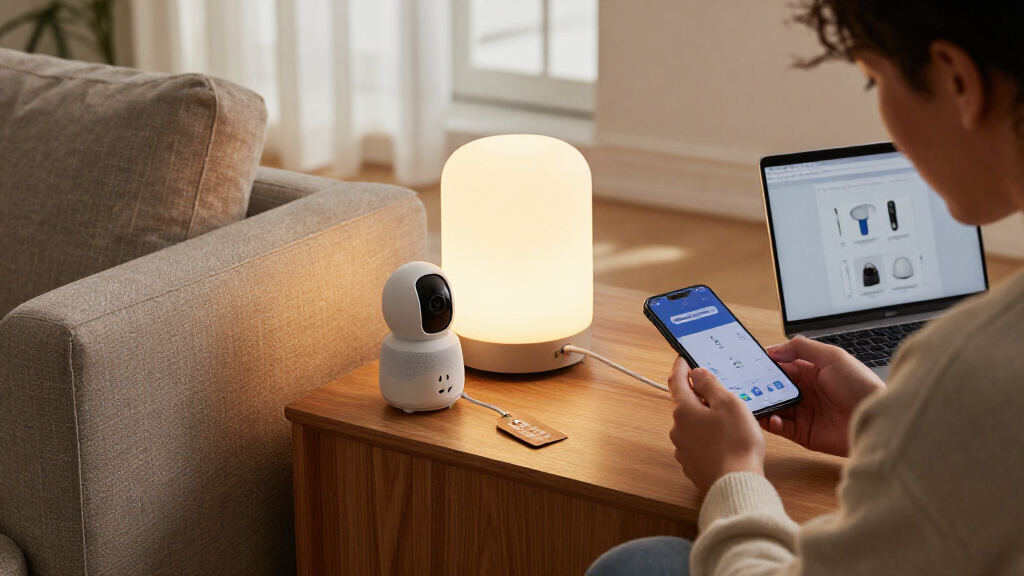
I evaluated these devices based on ecosystem integration, build quality, and protocol versatility. For smart home gadgets, seamless connection with existing devices matters more than raw processing power. I prioritized products that support multiple communication standards, such as Matter, Zigbee, or Thread, to ensure they remain useful as your home network expands. Build quality was assessed by looking at material durability and physical interface responsiveness, particularly for touchscreens and buttons.
Ranking logic favored devices that reduce friction. A smart plug is only as good as its reliability, so I looked for consistent connectivity records and ease of setup. Products that require complex hub configurations were penalized unless they offered distinct advantages in range or latency. I also considered the utility of the form factor, ensuring that clocks, displays, and plugs served clear, distinct purposes rather than overlapping features without added value.
Factors to Consider When Choosing Black Friday Smart Home Gadgets
Selecting smart home tech during sales events can be overwhelming. These factors help you cut through the noise.Ecosystem Lock-In Vs. Open Standards
Most smart devices are designed to work best within their native ecosystem. Amazon devices integrate deeply with Alexa routines, while Aqara products often favor HomeKit or Matter. I recommend checking which voice assistants and apps you already use before buying. A device that requires a new app and a new voice assistant adds unnecessary complexity to your daily interactions. Matter support is becoming the bridge between these worlds, but it is not yet perfect. If you are starting fresh, prioritize devices with open standards to maintain flexibility. If you are already invested in Alexa or Google Home, sticking to native hardware often provides a smoother initial setup experience.
Connectivity Protocols And Range
Understanding the difference between Wi-Fi, Zigbee, and Matter is important for performance. Wi-Fi plugs are easy to set up but can congest your network if you have dozens of devices. Zigbee and Thread devices create their own low-power mesh networks, which often results in faster response times and less strain on your router. Thread border routers, found in newer Echo devices, can extend the range of these mesh networks significantly. For larger homes, a mix of protocols often works best. Do not assume that a ‘smart’ label guarantees robust connectivity; check the specific protocol supported to ensure it fits your home’s layout and existing infrastructure.
Power Requirements And Safety Ratings
Not all smart plugs are created equal regarding power handling. Standard plugs usually max out at 10-15 Amps, which is fine for lamps and fans. However, connecting high-draw appliances like space heaters or air conditioners to under-rated plugs can cause overheating or fire hazards. I always look for UL certification and clear amperage ratings on the device packaging. The EIGHTREE 15A Smart Plug, for example, is designed for heavier loads than typical mini-plugs. Always verify the wattage rating of your appliance against the plug’s maximum capacity. Using a smart plug for a device it was not designed to handle is a common and dangerous mistake.
Screen Utility And Interface Design
Smart displays and panels vary widely in how useful their interfaces are. A screen is only beneficial if it provides glanceable information that saves you time. The Echo Show 11 offers spatial audio and a large canvas for video calls, making it a viable kitchen hub. In contrast, the Echo Hub is designed specifically for automation control, lacking media playback features to keep the interface clean. Touch responsiveness and screen brightness affect usability in different lighting conditions. Consider where the device will live. A display in a bedroom might need a dimmable screen, while a control panel in the entryway needs high contrast for quick status checks.
Long-Term Software Support
Hardware fails less often than software becomes obsolete. I pay close attention to the manufacturer’s track record for firmware updates. A device that stops receiving security patches becomes a vulnerability. Established brands like Amazon and Kasa generally offer longer support windows than niche startups. Before buying, check community forums for recent update activity. Cloud dependency is another factor; some devices stop working entirely if the manufacturer shuts down their servers, while others offer local control options. For critical functions like security or climate control, local processing capabilities add a layer of reliability that cloud-only devices cannot match.
Frequently Asked Questions
Do I need a hub for these smart home gadgets?
It depends on the protocol. Wi-Fi devices connect directly to your router and do not need a separate hub. However, Zigbee and Thread devices require a hub or border router to communicate with your network. The Amazon Echo Hub and newer Echo speakers act as Thread border routers, allowing you to control compatible devices without a separate dongle. If you plan to use many low-power sensors or bulbs, a hub helps manage the network load and improves reliability. For a starter setup of a few plugs and lights, your existing Wi-Fi router is likely sufficient.
Is Matter compatibility worth it for new buyers?
Yes, if you plan to expand your system over time. Matter is a universal standard that allows devices from different brands to work together on the same local network. While it does not eliminate the need for a central controller, it reduces the hassle of pairing devices across different ecosystems. The Linkind Matter Smart Plug works with Alexa, Google, and Apple Home without needing to buy a specific brand version. This flexibility protects your investment if you decide to switch voice assistants in the future, making it a wise choice for long-term planning.
Can smart plugs handle high-wattage appliances?
You must check the amperage rating carefully. Most mini smart plugs are rated for 10 Amps, which is suitable for lamps, fans, and small electronics. Appliances like space heaters, air conditioners, and microwaves often draw more power and require a 15-Amp rated plug or a dedicated smart outlet. The EIGHTREE 15A Smart Plug is built for these heavier loads. Connecting a high-draw appliance to a standard smart plug can cause the internal relay to fail or overheat. Always match the plug’s rating to the appliance’s maximum power consumption to maintain safety.
What is the main difference between the Echo Show 11 and the Echo Hub?
The Echo Show 11 is a media-centric device with a large touchscreen, high-quality speakers, and video calling capabilities. It is designed for entertainment and interaction. The Echo Hub, conversely, is a dedicated control panel with a smaller screen optimized for dashboard views and automation triggers. It lacks the powerful audio and video features of the Show series. If you want a kitchen companion for recipes and music, choose the Show 11. If you want a wall-mounted command center for lights and locks, the Hub is the more focused tool.
Are smart thermostats difficult to install?
Installation difficulty varies by wiring. Most modern smart thermostats, like the Aqara Smart Thermostat W200, require a C-wire for constant power. If your old thermostat lacks a C-wire, you may need an adapter or a professional electrician. The process involves turning off power, removing the faceplate, and matching wires to the correct terminals. It is a moderate DIY task. If you are uncomfortable working with electrical components, hiring a professional is recommended. Once installed, these devices offer significant energy savings through adaptive temperature learning that manual dials cannot provide.
Conclusion
For most users, the Amazon Echo Hub 8-Inch Smart Home Control Panel is the best overall choice, providing a stable, centralized interface for managing daily routines. If you are looking for the best value, the GHome Smart Wi-Fi Plug 2-Pack offers reliable, no-frills automation at an accessible entry point. Beginners should start with the Amazon Echo Dot Max to establish a voice control foundation before adding sensors or lights. For those seeking premium climate control, the Aqara Smart Thermostat W200 delivers precise, adaptive heating and cooling that pays for itself in energy efficiency. Finally, if you are expanding a large home network, the Linkind Matter Smart Plug ensures your new devices remain compatible across different platforms.
Black Friday Picks

Bose TV Speaker Compact Soundbar with Bluetooth and HDMI-ARC, Black
As an affiliate, we earn on qualifying purchases.