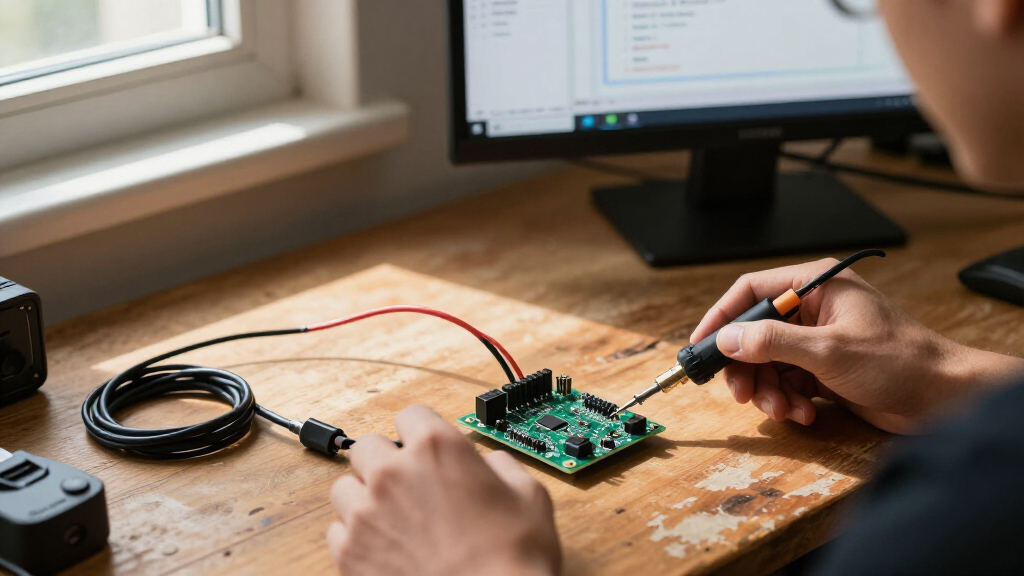

The best ESP32 development boards balance an easy programming setup, useful GPIO access, and the right chip for your project. I rank the AITRIP ESP32-2432S028R touchscreen board as the best overall for its built-in display and touch input, while the ELEGOO ESP32 three-pack stands out for straightforward multi-board prototyping and the ESP32-S3 N16R8 boards suit projects that need more memory. The main tradeoff is between simple, low-friction boards and specialized options that add screens, breakouts, or newer chip variants but may require more setup. Starter kits add parts and lessons, while bare boards leave component choices to you. Read on for the full comparison and guidance on choosing the right board for your build.

Get the latest gadgets delivered free with Prime
- Fast, free delivery on millions of items
- Prime Video, Amazon Music and more included
- Member-only deals all year
Complete the kit



Key Takeaways
- The touchscreen option is the most self-contained pick: AITRIP’s ESP32-2432S028R combines the controller with a 2.8-inch touch display, reducing the parts needed for interface prototypes.
- Multi-packs favor repeatable prototyping: The ELEGOO ESP-WROOM-32 three-pack is a straightforward choice when you want several similar boards; the six-pack hiBCTR option suits larger batches but is less focused on low-quantity use.
- Chip variants change project fit: ESP32-C3 Supermini boards prioritize a smaller footprint, while ESP32-S3 N16R8 boards offer 16 MB flash and 8 MB PSRAM for memory-heavy work.
- Breakout boards solve wiring problems, not computing limits: The 38-pin breakout bundles and AITRIP GPIO breakouts can make pin access easier, but they do not replace checking voltage, pin functions, and board compatibility.
- Tutorial kits trade board choice for learning support: LAFVIN and ELEGOO starter kits add guided project material and components, while buyers seeking only a particular board may prefer a simpler development-board bundle.
| AITRIP ESP32 Development Boards, 3-Pack, 30-Pin USB-C with CP2102 |  | Best Value Multi-Board Pack | Module: ESP32-WROOM-32 | Package quantity: 3 boards | Pin count: 30 | VIEW LATEST PRICE | See Our Full Breakdown |
| AITRIP ESP32 ESP-WROOM-32 Development Board with USB-C | 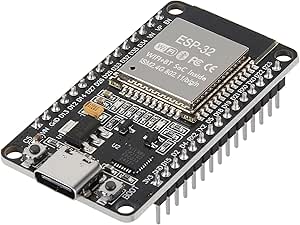 | Best for Interface-Rich Prototypes | Module: ESP-WROOM-32 | Processor: Dual-core 32-bit, up to 240 MHz | Flash: 32 Mbit (4 MB) | VIEW LATEST PRICE | See Our Full Breakdown |
| 3-Pack ESP32 USB-C Development Boards with 38-Pin Breakout Boards |  | Best for GPIO Expansion | Package contents: 3 ESP32 USB-C development boards and 3 breakout boards | Pin count: 38 | Processor: Dual-core Tensilica LX6, up to 240 MHz | VIEW LATEST PRICE | See Our Full Breakdown |
| AITRIP ESP32-2432S028R Development Board with 2.8-Inch Touchscreen |  | Best for Touchscreen Projects | Display: 2.8-inch LCD TFT touchscreen | Display resolution: 240 × 320 | Processor: Espressif ESP32-D0WDQ6, dual-core, up to 240 MHz | VIEW LATEST PRICE | See Our Full Breakdown |
| AITRIP ESP32 GPIO Breakout Boards, 3-Pack, Compatible with 30-Pin ESP32 Development Boards |  | Best 30-Pin Wiring Accessory | Package quantity: 3 breakout boards | Compatibility: 30-pin ESP32 development boards | Function: Expands each GPIO pin into two connections | VIEW LATEST PRICE | See Our Full Breakdown |
| AITRIP ESP32 30-Pin Development Board with Wi-Fi and Bluetooth |  | Best for a Straightforward Single-Board Build | Model: ESP-WROOM-32 ESP-32S | Board pins: 30 | Wireless: 2.4 GHz Wi-Fi and Bluetooth | VIEW LATEST PRICE | See Our Full Breakdown |
| hiBCTR 6-Pack ESP32-DevKitC-32 Development Boards, USB-C, 38-Pin |  | Best for Multi-Board Prototyping | Model: ESP32-DevKitC-32 | Chip: ESP-32D | Pack size: 6 boards | VIEW LATEST PRICE | See Our Full Breakdown |
| Teyleten Robot ESP32-C3 Supermini Development Board, Wi-Fi and Bluetooth, 3-Pack | 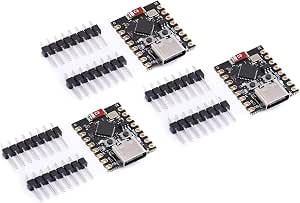 | Best Compact ESP32-C3 Pack | Model: ESP32-C3 | Quantity: 3 boards | Connectivity: Bluetooth, USB, Wi-Fi | VIEW LATEST PRICE | See Our Full Breakdown |
| ELEGOO ESP32 Development Boards, 3-Pack, ESP-WROOM-32, USB-C, Wi-Fi and Bluetooth 4.2 |  | Best Specified Three-Board Pack | Model: EL-SM-012 | Module: ESP-WROOM-32 | Quantity: 3 boards | VIEW LATEST PRICE | See Our Full Breakdown |
| LAFVIN ESP32 Basic Starter Kit with Tutorial |  | Best for Learning ESP32 Projects | Model: ESP32 Basic Starter Kit (LA043) | Connectivity: Bluetooth, Wi-Fi | Compatible software: Arduino IDE | VIEW LATEST PRICE | See Our Full Breakdown |
| ELEGOO ESP-32 Super Starter Kit with Tutorial |  | Best ESP32 Learning Kit | Processor: Dual-core Espressif ESP-32 | RAM: 520 KB SRAM | Connectivity: Wi-Fi and Bluetooth 4.2 | VIEW LATEST PRICE | See Our Full Breakdown |
| AITRIP 2-Pack ESP32 Development Boards with 2.8-Inch Touchscreen |  | Best for Screen-Based Projects | Quantity: 2 boards | Model: ESP32-2432S028R | Display: 2.8-inch TFT touchscreen | VIEW LATEST PRICE | See Our Full Breakdown |
| Hosyond 3-Pack ESP32-S3 N16R8 Development Boards |  | Best for Memory-Heavy ESP32-S3 Projects | Model: N16R8 | Quantity: 3 boards | Processor: Dual-core Xtensa 32-bit LX7, up to 240 MHz | VIEW LATEST PRICE | See Our Full Breakdown |
| ESP32 ESP-WROOM-32 Development Board, Wi-Fi and Bluetooth, 3-Pack |  | Best Classic ESP32 Multipack | Processor: Dual-core Tensilica LX6, up to 240 MHz | Memory: 512 KB SRAM listed; product details also contain conflicting memory information | Wireless: 2.4 GHz Wi-Fi 802.11b/g/n and Bluetooth Classic/LE | VIEW LATEST PRICE | See Our Full Breakdown |
| ESP32-S3 Development Board Kit with Power Supply Expansion Board, 240 MHz Dual-Core, 16 MB Flash, 8 MB PSRAM, 44-Pin GPIO Breakout, 3-Pack |  | Best for Expanded GPIO and Power Distribution | Processor: Dual-core, up to 240 MHz | Flash memory: 16 MB | PSRAM: 8 MB | VIEW LATEST PRICE | See Our Full Breakdown |
| ESP32 development board | Processor |
|---|---|
| AITRIP ESP32 Development Board | Dual-core |
| AITRIP ESP32 ESP-WROOM-32 Deve | Dual-core 32-bit, up to 240 MHz |
| 3-Pack ESP32 USB-C Development | Dual-core Tensilica LX6, up to 240 MHz |
| AITRIP ESP32-2432S028R Develop | Espressif ESP32-D0WDQ6, dual-core, up to 240 MHz |
| AITRIP ESP32 GPIO Breakout Boa | — |
| AITRIP ESP32 30-Pin Developmen | Dual-core, 240 MHz |
| hiBCTR 6-Pack ESP32-DevKitC-32 | — |
| Teyleten Robot ESP32-C3 Superm | — |
| ELEGOO ESP32 Development Board | Dual-core, up to 240 MHz |
| LAFVIN ESP32 Basic Starter Kit | — |
| ELEGOO ESP-32 Super Starter Ki | Dual-core Espressif ESP-32 |
| AITRIP 2-Pack ESP32 Developmen | Dual-core ESP32-D0WDQ6, up to 240 MHz |
| Hosyond 3-Pack ESP32-S3 N16R8 | Dual-core Xtensa 32-bit LX7, up to 240 MHz |
| ESP32 ESP-WROOM-32 Development | Dual-core Tensilica LX6, up to 240 MHz |
| ESP32-S3 Development Board Kit | Dual-core, up to 240 MHz |
More Details on Our Top Picks
AITRIP ESP32 Development Boards, 3-Pack, 30-Pin USB-C with CP2102
For projects that need a few ESP32 nodes rather than one feature-rich board, this three-board pack offers a practical starting point. Each 30-pin ESP32-WROOM-32 board has USB-C and a CP2102 USB-to-TTL module, so programming does not require a separate adapter. Wi-Fi and Bluetooth support a broad range of connected prototypes, and compatibility with MicroPython and FreeRTOS gives builders options beyond a single firmware path. Compared with the single-board AITRIP ESP-WROOM-32 USB-C, this set is better suited to parallel experiments or multiple devices, but its listed specs give less detail about I/O count and interfaces. It is a straightforward, repeatable board choice, not a ready-made project kit: sensors, wiring, and other components are still up to you.
Pros:- Three matching ESP32-WROOM-32 boards support parallel projects or spare units.
- USB-C and built-in CP2102 simplify the connection to a computer for programming.
- Wi-Fi and Bluetooth support common connected-device projects.
- MicroPython and FreeRTOS support provide firmware choices.
Cons:- No project components or learning materials are listed in the package.
- The 30-pin layout may offer less connection flexibility than the 38-pin breakout-board set.
- Product details do not specify the full I/O and interface list.
Best for: Makers building several Wi-Fi or Bluetooth prototypes who want matching 30-pin boards and USB-C programming.
Not ideal for: Beginners looking for sensors, wiring, or guided projects in the package, or builders who need a documented 38-pin layout.
- Module:ESP32-WROOM-32
- Package quantity:3 boards
- Pin count:30
- USB interface:USB-C
- USB-to-TTL chip:CP2102
- Processor:Dual-core
- Wireless:2.4 GHz Wi-Fi and Bluetooth
- Supported firmware:MicroPython, FreeRTOS, NodeLua
Our verdict“Choose this pack if you want three matching USB-C ESP32 boards for separate prototypes and already have the supporting components.”
AITRIP ESP32 ESP-WROOM-32 Development Board with USB-C
This single-board pick is a better fit when the project needs clearly listed connections, not a supply of spares. Its 22 I/O ports and UART, SPI, I2C, PWM, ADC, and DAC support give a builder room to connect sensors, actuators, and peripherals; reset and programming buttons also make firmware work more direct. Compared with the AITRIP three-pack 30-pin board, it provides more detail about interfaces but includes only one board. The product listing reports flash as both 32 Mbit and 4 MB, which are equivalent descriptions, though that dual wording may confuse spec comparisons. This is still a bare development board, so a finished project will need external components. Choose it for a defined peripheral-heavy prototype; skip it if quantity or an included learning kit matters more.
Pros:- Lists 22 I/O ports and a wide set of common peripheral interfaces.
- USB-C connection includes a CP2102 USB-to-serial chip.
- Reset and programming buttons support straightforward firmware workflows.
- Compatible with Arduino and offers Wi-Fi and Bluetooth.
Cons:- Only one development board is included.
- External components are needed to build a complete project.
- The flash specification is presented in two formats, which may cause avoidable confusion.
Best for: Makers planning one sensor- or actuator-heavy prototype who want a stated 22 I/O ports and common peripheral interfaces.
Not ideal for: Builders who need several boards in one package, project accessories, or a beginner kit with guided instructions.
- Module:ESP-WROOM-32
- Processor:Dual-core 32-bit, up to 240 MHz
- Flash:32 Mbit (4 MB)
- Pins:30
- I/O ports:22
- USB interface:USB-C with CP2102 USB-to-serial
- Wireless:2.4 GHz Wi-Fi and Bluetooth
- Interfaces:UART, SPI, SDIO, I2C, PWM, I2S, IR, ADC, DAC
- Power input:USB 5 V or pin input 5.0–12 V
Our verdict“Pick this single board when documented interfaces and onboard programming controls matter more than a multi-board pack.”
3-Pack ESP32 USB-C Development Boards with 38-Pin Breakout Boards
The defining advantage here is the combination of three 38-pin ESP32 boards and three matching breakout boards. Each breakout splits a GPIO connection into two, which can make wiring repeated connections less awkward than working directly from the board headers. The 38-pin layout also offers more pins than the 30-pin AITRIP options in this roundup, while Wi-Fi, Bluetooth, and AP/STA modes cover common connected prototypes. The tradeoff is fit: the included breakouts are made for narrow 38-pin ESP32 boards and are not compatible with ESP32 DevKit V1, so they are not a general-purpose accessory for a mixed board collection. Product details also name Lua support rather than giving a broad firmware list. Pick this set when its specific board-and-breakout pairing matches your wiring plan.
Pros:- Includes three ESP32 boards and three matching breakout boards.
- 38-pin layout provides more pins than the 30-pin boards in this roundup.
- Breakouts split each GPIO connection into two points for easier wiring.
- Reset and boot buttons support firmware installation.
Cons:- Breakout boards are limited to the specified narrow 38-pin format.
- Not compatible with ESP32 DevKit V1.
- Product details list Lua programming support without the wider firmware options described for some alternatives.
Best for: Makers building several narrow 38-pin ESP32 projects who want matching GPIO breakout boards to simplify repeated connections.
Not ideal for: Owners of ESP32 DevKit V1 or mixed development boards who need breakout accessories with broader physical compatibility.
- Package contents:3 ESP32 USB-C development boards and 3 breakout boards
- Pin count:38
- Processor:Dual-core Tensilica LX6, up to 240 MHz
- RAM:512 KB
- Wireless:Wi-Fi 802.11b/g/n and Bluetooth Classic and LE
- Supported modes:AP, STA, AP+STA
- Breakout function:Expands one GPIO pin to two connections
- Breakout compatibility:Narrow 38-pin ESP32 boards; not ESP32 DevKit V1
Our verdict“Choose this bundle when you want multiple 38-pin boards and know the included GPIO breakouts match your board layout.”
AITRIP ESP32-2432S028R Development Board with 2.8-Inch Touchscreen
Unlike the bare boards in this roundup, this model puts a 2.8-inch touchscreen on the development board, making it a more direct starting point for dashboards, controls, and visual IoT prototypes. The 240 × 320 display can reduce the need to source and wire a separate screen, while Wi-Fi, Bluetooth, and common interfaces leave room to connect other peripherals. It is a more specialized choice than the AITRIP USB-C ESP-WROOM-32 board: that board is better suited to general-purpose wiring, while this one makes most sense when the project itself needs a display. Camera compatibility with OV2640 and OV7670 adds another path for experiments, but the listing has inconsistent board model numbers. Its single-board package and display-focused layout also make it less suited to buyers seeking multiple interchangeable boards.
Pros:- Built-in 2.8-inch touchscreen avoids sourcing a separate display for interface prototypes.
- 240 × 320 resolution supports compact visual controls and status screens.
- Wi-Fi, Bluetooth, and common interfaces support connected projects.
- Compatible camera options add scope for camera-based experiments.
Cons:- The listing contains inconsistent board model numbers.
- The display-focused design is less suited to projects that do not need a screen.
- Only one board is listed, unlike the multi-board packs in this roundup.
Best for: Makers prototyping a touchscreen control panel, visual IoT interface, or display-led ESP32 project.
Not ideal for: Builders who want a low-complexity general-purpose board, a multi-board pack, or clearly consistent model identification before purchase.
- Display:2.8-inch LCD TFT touchscreen
- Display resolution:240 × 320
- Processor:Espressif ESP32-D0WDQ6, dual-core, up to 240 MHz
- Installed RAM:520 KB
- Storage:4 MB
- Connectivity:Wi-Fi and Bluetooth
- Interfaces:UART, SPI, I2C, PWM, ADC, DAC
- Compatible cameras:OV2640, OV7670
- Package count:1 board
Our verdict“Choose this board when a built-in touchscreen is central to the project and verify the model details before ordering.”
AITRIP ESP32 GPIO Breakout Boards, 3-Pack, Compatible with 30-Pin ESP32 Development Boards
This is an accessory, not an ESP32 development board, so it earns a place for buyers who already own a compatible 30-pin model. Each FR-4 breakout board splits GPIO pins into two connections, giving a project more convenient wiring points without relying solely on a breadboard. The three-board pack pairs naturally with the AITRIP three-pack 30-pin ESP32 boards, but unlike that bundle, it provides no processor, USB interface, or wireless capability on its own. The 1.6 mm, double-layer PCB is described as a stable alternative to a breadboard, though that convenience comes with a strict compatibility limit: these boards are specified for 30-pin ESP32 development boards. Check your board layout before buying, and skip this set if you still need the ESP32 itself.
Pros:- Splits each GPIO pin into two connections for more convenient wiring.
- Double-layer FR-4 construction provides a board-based alternative to breadboard wiring.
- Three breakout boards support multiple builds or spares.
- Designed for DIY and smart-home projects using 30-pin ESP32 boards.
Cons:- Does not include an ESP32 development board.
- Compatibility is limited to 30-pin ESP32 development boards.
- Adds wiring access rather than processing, wireless, or programming capability.
Best for: Owners of compatible 30-pin ESP32 boards who want extra GPIO connection points for DIY or smart-home wiring.
Not ideal for: First-time ESP32 buyers, or makers with 38-pin boards who need a breakout matched to their board layout.
- Package quantity:3 breakout boards
- Compatibility:30-pin ESP32 development boards
- Function:Expands each GPIO pin into two connections
- Material:FR-4 PCB
- PCB layers:2
- PCB thickness:1.6 mm
- Dimensions:6.3 × 6.6 × 1 cm
Our verdict“Buy this three-pack only if you already have compatible 30-pin ESP32 boards and need simpler access to their GPIO pins.”
AITRIP ESP32 30-Pin Development Board with Wi-Fi and Bluetooth
The AITRIP 30-pin board is a simple fit when a project needs one classic ESP32 module with Wi-Fi and Bluetooth, rather than a bundle of boards or a sensor kit. Its AP, STA, and AP+STA modes give you flexibility to run a device as a network client, access point, or both. Arduino IDE compatibility also makes it approachable for common ESP32 sketches. Compared with the hiBCTR six-pack, this is a one-board purchase with fewer pins and no USB-C connector listed; the hiBCTR makes more sense for repeated builds or broader pin access. One caution: the supplied RAM and storage figures appear inconsistent with typical ESP32 specifications, so I would verify them before relying on them. Choose this for a basic build, not for documentation-dependent memory planning.
Pros:- Supports both 2.4 GHz Wi-Fi and Bluetooth
- Offers AP, STA, and combined AP+STA Wi-Fi modes
- Compatible with the Arduino IDE
Cons:- Listed RAM and storage figures may not match typical ESP32 specifications
- Single-board quantity is less useful for repeated prototypes than the hiBCTR six-pack
- 30-pin layout offers fewer connections than the 38-pin hiBCTR boards
Best for: Makers building one Arduino IDE project that needs standard ESP32 Wi-Fi and Bluetooth features.
Not ideal for: Developers who need a multi-board supply, USB-C, or dependable published memory figures for a tightly specified design.
- Model:ESP-WROOM-32 ESP-32S
- Board pins:30
- Wireless:2.4 GHz Wi-Fi and Bluetooth
- Wi-Fi modes:AP, STA, AP+STA
- Processor:Dual-core, 240 MHz
- Memory:512 MB RAM (as listed; verify specification)
- Storage:512 KB (as listed; verify specification)
- Connectivity:UART, USB
Our verdict“Pick this single-board option for a basic Arduino-compatible ESP32 build, but verify its memory and storage details before designing around them.”
hiBCTR 6-Pack ESP32-DevKitC-32 Development Boards, USB-C, 38-Pin
The hiBCTR set stands out for buyers who want six matching ESP32 boards for parallel prototypes, classroom projects, or a small run of devices. Its 38-pin layout exposes more connections than the 30-pin AITRIP board, while USB-C provides a current, common connector for programming and power. Wi-Fi, Bluetooth, and UART, SPI, I2C, PWM, DAC, and ADC support make the boards adaptable to sensor and control projects. Compared with the ELEGOO three-pack, hiBCTR supplies twice as many boards, but the product details offer less clarity about memory and specific chip capabilities. Setup may also take more work: driver installation and Arduino IDE configuration are called out, so this is less plug-and-play than a tutorial-based starter kit. It is a practical quantity-first choice when pin access matters more than guided instruction.
Pros:- Six boards support parallel builds and spares
- 38-pin layout exposes more connections than 30-pin alternatives
- USB-C connector
- UART, SPI, I2C, PWM, DAC, and ADC interfaces support varied projects
Cons:- Driver installation and Arduino IDE configuration may be needed
- Product details do not specify RAM or storage
- Six boards may be unnecessary for a single-project buyer
Best for: Educators, makerspaces, and developers who need several 38-pin ESP32 boards for simultaneous prototypes.
Not ideal for: First-time learners who want guided projects, or buyers who only need one board and prefer minimal setup.
- Model:ESP32-DevKitC-32
- Chip:ESP-32D
- Pack size:6 boards
- Pin count:38
- Connector:USB Type-C
- Wireless:2.4 GHz Wi-Fi and Bluetooth
- Interfaces:UART, SPI, I2C, PWM, DAC, ADC
- Operating system:Linux (listed)
Our verdict“Choose the hiBCTR pack when you need multiple 38-pin boards for prototyping, and skip it if you want a guided first project or only one board.”
Teyleten Robot ESP32-C3 Supermini Development Board, Wi-Fi and Bluetooth, 3-Pack
This three-pack is the lineup’s compact ESP32-C3 option, suited to small connected devices where a full-size development board would take up more space than the project allows. It combines Wi-Fi, Bluetooth, USB connectivity, and support for external power from 3.3–6V, giving builders flexibility when a board will run away from a computer. Unlike the full-size hiBCTR 38-pin boards, the Supermini is framed around a compact C3 design rather than a broad, clearly specified interface set; buyers should check pinout and software support for their intended peripherals. A manual button sequence is required to enter download mode, which makes repeated flashing less convenient than a straightforward programming workflow. USB and external power must not be connected at the same time, so the power arrangement needs care.
Pros:- Three boards support multiple compact builds
- Wi-Fi and Bluetooth connectivity
- Accepts 3.3–6V external power
- USB connectivity supports programming
Cons:- Entering download mode requires a manual button sequence
- USB and external power cannot be used simultaneously
- The provided details do not specify pin count or memory
Best for: Makers building several compact Wi-Fi and Bluetooth devices that can use the ESP32-C3 platform and its external-power range.
Not ideal for: Beginners who want easy repeated uploads, or projects that require USB and external power simultaneously.
- Model:ESP32-C3
- Quantity:3 boards
- Connectivity:Bluetooth, USB, Wi-Fi
- Operating system:FreeRTOS
- Processor brand:Espressif
- External power input:3.3–6V
- USB ports:1
- Compatible devices:PCs, laptops, smartphones
Our verdict“Choose this pack for compact ESP32-C3 projects with a compatible power setup, but favor a full-size board if you need a clearly documented pin-rich layout.”
ELEGOO ESP32 Development Boards, 3-Pack, ESP-WROOM-32, USB-C, Wi-Fi and Bluetooth 4.2
The ELEGOO pack is the clearest choice here for buyers who want three standard ESP32 boards with stated memory and storage. The listed dual-core processor, 520 KB RAM, and 4 MB storage give project planning more grounding than the hiBCTR pack’s less detailed specifications. Each board also brings USB-C, Bluetooth 4.2, and GPIO, UART, SPI, and I2C, a useful mix for sensor-based IoT builds. Low-power modes can help when a device spends much of its time idle, while OTA updates are possible with compatible software setup. Compared with the AITRIP single-board option, this pack offers more units and clearer memory details, but it does not include a USB-C cable. OTA is not automatic: it takes firmware and software configuration, so this is better for builders comfortable setting up their own workflow than for someone seeking a guided kit.
Pros:- Three ESP-WROOM-32 boards in one pack
- Lists 520 KB RAM and 4 MB storage
- USB-C plus GPIO, UART, SPI, and I2C interfaces
- Supports Bluetooth 4.2 and configurable low-power modes
Cons:- USB-C cable is not included
- OTA firmware updates require compatible software configuration
- Less guided for beginners than the LAFVIN starter kit
Best for: Intermediate makers who want three ESP-WROOM-32 boards with documented memory, standard interfaces, and room to configure OTA updates.
Not ideal for: Newcomers who need included cables and step-by-step project instruction, or anyone expecting OTA updates to work without configuration.
- Model:EL-SM-012
- Module:ESP-WROOM-32
- Quantity:3 boards
- Processor:Dual-core, up to 240 MHz
- RAM:520 KB
- Storage:4 MB
- Connectivity:2.4 GHz Wi-Fi, Bluetooth 4.2, USB-C
- USB-to-serial chip:CP2102
Our verdict“Choose ELEGOO for a well-specified three-board ESP32 pack, provided you already have a USB-C cable and can configure your own development workflow.”
LAFVIN ESP32 Basic Starter Kit with Tutorial
The LAFVIN kit is the most beginner-oriented pick in this group because it pairs an ESP32 board with project components and lessons, rather than asking you to source every sensor and wire separately. Its OLED, DHT11, PIR motion sensor, LEDs, relay, breadboard, and other parts create a practical route from a basic Arduino IDE sketch to small display, sensing, or automation builds. That makes it a better learning purchase than the ELEGOO three-pack, which supplies more boards but no comparable project assortment in its listed contents. The tradeoff is that this is a learning bundle, not a multi-board supply: the included development board count is one, and assembly still takes hands-on effort. The tutorial must be downloaded, and the Micro USB cable means it is less aligned with the USB-C boards in this roundup.
Pros:- Tutorial includes code and project lessons
- Includes OLED, DHT11, PIR sensor, LEDs, relay, and breadboard
- Supports Wi-Fi and Bluetooth
- Compatible with the Arduino IDE
Cons:- Tutorial must be downloaded
- Assembly and programming require hands-on learning
- Includes one development board rather than the multiple boards in the ELEGOO pack
Best for: New Arduino IDE learners who want one ESP32 board, common components, and lessons for building sensor and display projects.
Not ideal for: Developers who need several boards, a USB-C setup, or a ready-made device rather than a hands-on learning kit.
- Model:ESP32 Basic Starter Kit (LA043)
- Connectivity:Bluetooth, Wi-Fi
- Compatible software:Arduino IDE
- Processor brand:Espressif
- Included display:0.96-inch OLED
- Included sensors:DHT11 temperature and humidity sensor; HC-SR501 PIR motion sensor
- Other included components:830-point breadboard, obstacle avoidance module, photoresistor, potentiometer, relay, switches, wires, LEDs, resistors, buzzer
- Cable:Micro USB cable
Our verdict“Pick the LAFVIN kit to learn ESP32 programming through component-based projects, but choose a multi-board pack if your priority is producing several builds.”
ELEGOO ESP-32 Super Starter Kit with Tutorial
I’d choose this kit when the goal is to learn how an ESP32 connects to real components, not just flash a board. Its 35+ modules and components give beginners room to try sensors, displays, motors, and input devices, while 30+ guided projects pair code with circuit diagrams. Wi-Fi and Bluetooth 4.2 also let projects grow from basic electronics into connected devices. Compared with the Hosyond three-pack, this ELEGOO kit offers more learning material and project hardware, but it does not provide the newer ESP32-S3 memory and USB-C details listed for Hosyond. The tradeoff is that learning remains self-guided, and the component list is not fully specified, so buyers cannot confirm every part before ordering.
Pros:- Includes more than 35 modules and components for varied experiments
- 30+ tutorials provide project code and circuit diagrams
- Wi-Fi and Bluetooth support connected project work
- Arduino IDE compatibility suits common beginner workflows
Cons:- Requires self-guided programming and electronics learning
- The full included component list is not specified
- Offers less detail on memory and USB features than the Hosyond ESP32-S3 boards
Best for: New Arduino learners who want guided projects and a varied set of components for experimenting with ESP32 electronics and IoT.
Not ideal for: Buyers who already have sensors and project parts, or who need a clearly itemized component inventory before choosing a kit.
- Processor:Dual-core Espressif ESP-32
- RAM:520 KB SRAM
- Connectivity:Wi-Fi and Bluetooth 4.2
- Wireless standard:802.11b/g/n
- Included components:Over 35 modules and components
- Tutorial projects:30+
- Software compatibility:Arduino IDE
- USB ports:1
Our verdict“Choose the ELEGOO kit if guided projects and a broad component assortment matter more than newer ESP32-S3 specifications.”
AITRIP 2-Pack ESP32 Development Boards with 2.8-Inch Touchscreen
The AITRIP pair is a good fit when a project needs a built-in interface rather than a separate screen and wiring. Each board has a 2.8-inch, 240 × 320 touchscreen, giving dashboards and controls a direct, compact display. A dual-core ESP32 and interfaces including UART, SPI, I2C, PWM, ADC, and DAC leave room to connect other hardware. Compared with the single AITRIP ESP32-2432S028R board in this roundup, this listing supplies two boards, which can support a spare or parallel prototypes. That advantage comes with a documentation caveat: the listing has inconsistent model and specification details, so I would verify the exact board variant and accessory expectations before building around it. It is less straightforward than a plain ESP32 board if you do not need a display.
Pros:- Two boards support a spare or parallel prototypes
- Built-in 2.8-inch touchscreen avoids sourcing and wiring a separate display
- Wi-Fi and Bluetooth support connected applications
- UART, SPI, I2C, PWM, ADC, and DAC broaden peripheral options
Cons:- Product details contain inconsistent model and specification information
- Touchscreen features add complexity for projects that only need a basic board
- Display resolution is modest for projects requiring detailed graphics
Best for: Makers building touchscreen controls, status panels, or small IoT interfaces who can make use of a two-board set.
Not ideal for: Buyers seeking a simple, low-complexity ESP32 breakout or anyone who needs fully consistent model specifications before choosing hardware.
- Quantity:2 boards
- Model:ESP32-2432S028R
- Display:2.8-inch TFT touchscreen
- Display resolution:240 × 320
- Processor:Dual-core ESP32-D0WDQ6, up to 240 MHz
- Installed RAM:520 KB
- Connectivity:Wi-Fi and Bluetooth
- Supported interfaces:UART, SPI, I2C, PWM, ADC, DAC
Our verdict“Pick this AITRIP set for two touchscreen ESP32 prototypes, but verify the board variant before depending on its listed specifications.”
Hosyond 3-Pack ESP32-S3 N16R8 Development Boards
For projects that need more working memory than a basic ESP32 board typically offers, Hosyond’s ESP32-S3 N16R8 configuration is the standout here: each board lists 16 MB flash and 8 MB PSRAM. That headroom can help with larger firmware and data-heavy applications, while Bluetooth 5.0 LE and dual USB-C ports support modern wireless links and separate programming or debugging workflows. The three-board pack also makes it practical to build several prototypes. Compared with the ESP-WROOM-32 three-pack, this is the more capable platform on paper, but it has no stated warranty and provides little information about dimensions or included accessories. I’d favor it over the AITRIP touchscreen pair for memory-intensive embedded work, not for projects where an onboard display is the priority.
Pros:- Three boards support multiple prototypes or spares
- 16 MB flash and 8 MB PSRAM provide substantial listed memory
- Bluetooth 5.0 LE and 2.4 GHz Wi-Fi support connected projects
- Dual USB-C ports allow USB and USB-to-serial programming options
Cons:- No product warranty is specified
- Board dimensions and included accessories are not detailed
- No touchscreen, unlike the AITRIP display boards
Best for: Embedded developers and advanced hobbyists prototyping several ESP32-S3 projects that benefit from 16 MB flash and 8 MB PSRAM.
Not ideal for: Beginners who need guided lessons, buyers who want an onboard display, or users who require a stated warranty and detailed accessory information.
- Model:N16R8
- Quantity:3 boards
- Processor:Dual-core Xtensa 32-bit LX7, up to 240 MHz
- Flash storage:16 MB
- PSRAM:8 MB
- Wireless connectivity:2.4 GHz Wi-Fi and Bluetooth 5.0 LE
- USB ports:2 USB-C ports
- Compatible platforms:Arduino IoT
Our verdict“Choose Hosyond for a three-board ESP32-S3 set with substantial listed memory, provided you can work without detailed warranty and accessory information.”
ESP32 ESP-WROOM-32 Development Board, Wi-Fi and Bluetooth, 3-Pack
This three-pack makes sense for buyers who want a familiar ESP-WROOM-32 platform for several standard Wi-Fi and Bluetooth projects. It supports Arduino IDE, common peripherals such as ADC, DAC, UART, SPI, and I2C, plus AP, STA, and combined AP+STA network modes. That combination suits practical sensor nodes and connected prototypes without the extra features of a touchscreen board. Compared with the Hosyond ESP32-S3 pack, this option is built around the older ESP32-WROOM-32 generation and lists less memory, but it may be a better match when a conventional ESP32 workflow is the priority. The main drawback is uncertainty in the product data: pin count is listed as both 30 and 36, and memory specifications conflict. I would confirm the board layout before designing a wiring plan around it.
Pros:- Three boards support multiple builds or replacement boards
- Arduino IDE compatibility fits common ESP32 project workflows
- Includes Wi-Fi, Bluetooth Classic and LE, and several network modes
- ADC, DAC, UART, SPI, and I2C support a range of peripherals
Cons:- Listing conflicts on whether the board has 30 or 36 pins
- Product information contains conflicting memory specifications
- Lacks the 16 MB flash and 8 MB PSRAM listed for the Hosyond ESP32-S3 pack
Best for: Arduino users who want several conventional ESP-WROOM-32 boards for standard Wi-Fi, Bluetooth, and peripheral projects.
Not ideal for: Buyers who need a confirmed pin layout or unambiguous memory specifications, or who want ESP32-S3 features and larger listed memory.
- Processor:Dual-core Tensilica LX6, up to 240 MHz
- Memory:512 KB SRAM listed; product details also contain conflicting memory information
- Wireless:2.4 GHz Wi-Fi 802.11b/g/n and Bluetooth Classic/LE
- Network modes:AP, STA, AP+STA
- Compatibility:Arduino IDE
- Peripherals:Capacitive touch, ADC, DAC, UART, SPI, I2C
- Package quantity:3 boards
- Dimensions:2.05 × 1.18 × 0.59 in
Our verdict“Choose this pack for conventional Arduino-based ESP-WROOM-32 projects only if the pinout and memory details are confirmed first.”
ESP32-S3 Development Board Kit with Power Supply Expansion Board, 240 MHz Dual-Core, 16 MB Flash, 8 MB PSRAM, 44-Pin GPIO Breakout, 3-Pack
I’d pick this kit when connecting several peripherals is the main challenge. Its 44-pin GPIO breakout and 1-to-2 expansion connections make it easier to arrange attached modules, while the expansion board accepts 6.5–9 V DC and provides 3.3 V and 5 V outputs. The ESP32-S3 boards also list 16 MB flash, 8 MB PSRAM, dual USB-C ports, and Arduino IDE compatibility. Compared with the Hosyond ESP32-S3 three-pack, this kit adds a dedicated power and GPIO expansion setup; Hosyond gives clearer detail on its wireless connectivity, while this product description does not specify Wi-Fi or Bluetooth. The expansion input requires an external supply, so the extra wiring convenience is not a self-contained power solution.
Pros:- 44-pin GPIO breakout and 1-to-2 expansion connections support multiple peripherals
- 16 MB flash and 8 MB PSRAM provide listed capacity for larger projects
- Dual USB-C ports support programming and debugging
- Expansion board provides 3.3 V and 5 V outputs
Cons:- Expansion board power input requires an external 6.5–9 V DC supply
- Wireless connectivity is not specified in the supplied product details
- The listing describes a three-piece kit, so the exact board and expansion-board count is not clear
Best for: Makers building ESP32-S3 projects with multiple peripherals who want GPIO breakout and separate 3.3 V and 5 V power outputs.
Not ideal for: Portable-project builders who need a complete power source in the box, or buyers who require explicitly stated wireless specifications.
- Processor:Dual-core, up to 240 MHz
- Flash memory:16 MB
- PSRAM:8 MB
- SRAM:520 KB
- GPIO:44 pins, with 1-to-2 expansion
- USB ports:2 USB Type-C
- Expansion board input:6.5–9 V DC
- Power outputs:3.3 V and 5 V
- Compatibility:Arduino IDE
Our verdict“Choose this kit when GPIO and power distribution are priorities, and plan to supply the expansion board with an external DC source.”

How We Picked
I compared these 15 options by the work a board helps a buyer do: get a project running, connect peripherals, prototype repeatedly, or build a more specialized interface. The ranking favors a useful balance of setup accessibility, connectivity, GPIO access, and project versatility. I also separated conventional ESP-WROOM-32 boards from ESP32-C3 and ESP32-S3 models, since those chip families are not interchangeable choices when software support, memory, size, or peripheral needs matter.
Bundled quantity, USB connector type, breakout hardware, displays, and tutorials informed each product’s role, but a larger bundle did not automatically rank higher. I gave more weight to features that meaningfully change the build than to extras that only make a package look fuller. Because board revisions and included accessories can vary, buyers should verify the exact pinout, USB-to-serial chip, and package contents before ordering; the ranking reflects stated product configurations rather than a claim of hands-on testing.
Factors to Consider When Choosing Best ESP32 Development Boards
Before choosing a board, I would work backward from the project: identify the chip family and peripherals you need, then decide how much wiring and learning support you want in the package. These broader checks can prevent a common mismatch: buying a board that appears similar by name but has a different pinout, memory configuration, or connector arrangement.
Match the ESP32 Variant to the Workload
“ESP32” covers multiple chip families, so compare the exact variant rather than relying on the product title alone. A conventional ESP-WROOM-32 board is a familiar general-purpose starting point, while ESP32-C3 and ESP32-S3 boards have different capabilities and software considerations. The C3 Supermini’s compact format can suit space-limited builds, but a small board may offer less convenient access to pins. The S3 N16R8 configuration calls out substantial flash and PSRAM, which can help when a project needs more memory headroom. Do not assume every library or tutorial for one variant applies unchanged to another. Check the chip, memory, and required peripherals against your project before choosing a bundle.
Check Pinout and Voltage Before Wiring
A higher pin count can make a board easier to expand, but it does not mean every pin supports every function. GPIO pins may have boot-strapping roles, input-only behavior, or other restrictions, and peripheral connections still need compatible logic levels. Breakout boards can improve access and reduce cramped wiring, yet they cannot make an unsuitable pin suitable. Before connecting sensors or motors, compare the board’s pinout with the device datasheet and check how the board handles power. A frequent mistake is to treat pin labels as proof of interchangeable layouts across brands. Keep a clear pin map for the exact board revision you buy.
Choose USB and Programming Convenience Deliberately
USB-C describes the connector shape, not every detail of programming or power delivery. A development board may use a separate USB-to-serial chip, and the driver or cable situation can affect first setup. Confirm the listed USB-to-serial component and whether the intended computer and development environment support it. Also distinguish a charge-capable cable from a data cable; a cable without data lines can make a working board appear unresponsive. For classroom or shared use, consistent connectors and board revisions can save setup time across several devices. If your project will be installed permanently, plan how you will access the USB port for updates and troubleshooting.
Decide Whether a Screen or Kit Helps More Than It Costs in Complexity
A built-in touchscreen can make a board a fast route to a local control panel, but it also ties your design to a particular screen size, touch interface, and library setup. If the project has no display requirement, a standard board leaves more freedom to select separate components. Starter kits make sense when tutorials and assorted parts help you learn through projects; they can be excess baggage if you already have a parts drawer and a defined build. Read what the kit actually includes rather than assuming every sensor or accessory is present. For a first project, guided material can matter more than a higher pin count. For a product prototype, compatibility and a repeatable bill of materials usually matter more.
Buy the Right Quantity for Testing and Replacement
Multi-packs are useful when you expect to build several units, compare firmware changes, or keep a spare for debugging. They can also create waste when a project only needs one board or when a prototype may change direction. A three-pack is often a practical middle ground for learning and iterative work, while a six-pack fits coordinated builds better. Before buying multiples, check whether the boards share the same chip, pin layout, and USB interface; visually similar boards may differ. Keeping matching boards helps reproduce bugs and share wiring notes. For a one-off build, choose the feature fit first and treat bundle size as secondary.
Treat Memory and Expansion Hardware as Project Requirements
More flash and PSRAM can give firmware and data-heavy applications additional room, but those figures do not automatically improve every project. A simple sensor node may gain little from memory it does not use, while displays, larger buffers, or more demanding software can make it useful. Expansion boards can simplify connections and power distribution, but they add physical bulk and another part whose layout must match the development board. Verify the exact memory configuration and expansion-board compatibility rather than relying on broad claims such as “high performance.” Think through enclosure size and power needs before selecting a stack of boards. Paying for capability you cannot use is less helpful than choosing a board that fits the actual build.
Frequently Asked Questions
Should I choose an ESP32-C3 or ESP32-S3 board for a new project?
Start with the peripherals and software libraries your project requires, then confirm support for the exact chip variant. The C3 Supermini in this roundup is the compact option, while the S3 N16R8 boards specify 16 MB flash and 8 MB PSRAM for projects that benefit from more memory. Those differences do not make one family universally better. Check the board pinout, memory needs, and examples available for your chosen development environment. If you are following a tutorial, matching its chip family can reduce adaptation work.
Is a touchscreen ESP32 board a good first board?
It can be a good first choice if your goal is a touch-based interface and you want the display integrated with the controller. The AITRIP touchscreen models reduce the need to select and wire a separate display, but they introduce screen-specific libraries and setup steps. For learning basic GPIO, sensors, and Wi-Fi, a standard ESP-WROOM-32 board may keep the first projects simpler. Choose the touchscreen version when the interface is part of the project, not just because a screen is included. Check documentation for the specific screen and board revision before planning your code.
Do I need a GPIO breakout board with a 38-pin ESP32?
Not always. A breakout can make pins easier to reach and wiring less cramped, especially on a breadboard or during repeated prototyping. It does not add new GPIO capabilities or remove pin restrictions, so the board’s own pinout remains the authority. If the board already exposes the pins in a layout that works for your setup, extra breakout hardware may add bulk without much benefit. Confirm that the breakout is designed for the exact board dimensions and pin arrangement. For compact enclosures, measure the assembled stack before committing to the layout.
What should I check before buying a multi-pack of ESP32 boards?
Check that every board in the bundle uses the chip variant and pin layout your firmware and wiring expect. Confirm the connector type, USB-to-serial interface, and included accessories, since package listings can describe similar boards with different details. A multi-pack helps when you need spares or plan to build several matching devices, but it can be a poor fit if you are still deciding on a chip family. Buy one first when compatibility is uncertain, then standardize after confirming the setup works. Matching revisions can make debugging and replacement easier.
Should I buy a starter kit or just a development board?
A starter kit is a better fit when tutorials, basic components, and guided exercises are part of what you need to learn. A bare board or multi-pack makes more sense if you already know which sensors and accessories your project requires. Compare the tutorial scope and listed contents with your learning goals; a kit title alone does not confirm that it includes a particular component. Kits can reduce the effort of sourcing parts, but they may include items you will not use. If you are following a course, check that its board and components match the kit before choosing.
Conclusion
For most buyers, I would start with the AITRIP ESP32-2432S028R touchscreen board as the best overall pick when an integrated display adds value to the project. For best value in a multi-board setup, the ELEGOO ESP-WROOM-32 three-pack is a practical general-purpose choice; for best premium capability, look to the ESP32-S3 N16R8 boards when their extra memory and expansion hardware match the workload. Beginners who want guided projects should choose the LAFVIN or ELEGOO starter kit, based on the listed tutorials and included parts. For compact builds, pick the Teyleten Robot ESP32-C3 Supermini; for display-led prototypes, choose one of the AITRIP touchscreen bundles. Check chip variant, pinout, and package contents before buying, then choose the board whose extras solve a real project need.