Choosing the best handheld 3D scanners requires balancing accuracy, speed, and ease of use against your specific project needs. The Revopoint INSPIRE 2 Wireless stands out as the best overall pick for its seamless wireless workflow and high-resolution capture, making it ideal for professionals who value mobility. For those prioritizing budget without sacrificing core performance, the Creality CR-Scan Ferret Pro offers exceptional value with solid single-shot scanning capabilities. However, users must weigh the tradeoffs between structured light systems, which excel at detail but struggle in bright light, and LiDAR or laser-based units that handle larger objects but often lack fine texture fidelity. This guide breaks down these distinctions to help you select the right tool for your workflow.

Get the latest gadgets delivered free with Prime
- Fast, free delivery on millions of items
- Prime Video, Amazon Music and more included
- Member-only deals all year
Complete the kit



Key Takeaways
- Wireless connectivity is becoming a standard expectation, with models like the Revopoint INSPIRE 2 and EINSTAR 2 removing tether constraints that previously limited scanning angles.
- Hybrid scanning technologies (combining NIR and blue laser) are emerging as the most versatile solution for handling both small, detailed objects and larger, dark-surface items.
- Software ecosystem quality now rivals hardware specs as a deciding factor; Creality’s Scan Bridge and Revopoint’s Revo Scan 4 demonstrate that intuitive processing reduces post-scan cleanup time.
- Entry-level scanners have reached a point of diminishing returns for professional use, with the gap between budget and mid-tier models narrowing in accuracy but widening in durability and software features.
- LiDAR-based handheld scanners remain niche, offering superior range for architectural applications but failing to compete with structured light scanners for high-fidelity object digitization.
| Revopoint INSPIRE 2 Wireless 3D Scanner |  | Best Lightweight for Mobile Scanning | Weight: 190 g | Accuracy: Up to 0.05 mm | Connection: USB Type-C, Wi-Fi 6 | VIEW LATEST PRICE | See Our Full Breakdown |
| Creality Pika Portable 3D Scanner with Blue Laser and NIR Scanning | 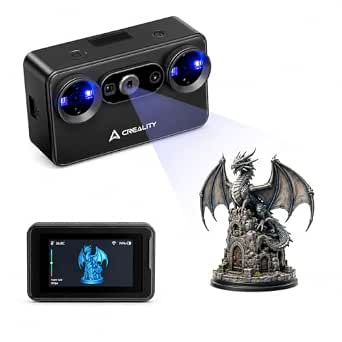 | Best Versatile Mid-Range Scanner | Accuracy: Up to 0.03 mm | Scanning Speed: Up to 110 fps | Scanning Modes: 7-line blue laser, NIR structured light | VIEW LATEST PRICE | See Our Full Breakdown |
| EINSTAR 2 Wireless 3D Scanner with Blue Laser and VCSEL Infrared Scanning |  | Best for Outdoor and High-Light Conditions | Blue Laser Speed: Up to 90 fps | IR Mode Speed: Up to 20 fps | Battery Life: Up to 3 hours | VIEW LATEST PRICE | See Our Full Breakdown |
| Creality Raptor Pro 3D Scanner with Scan Bridge | 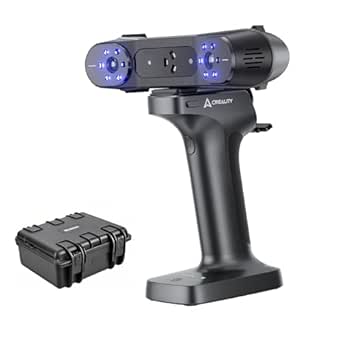 | Best Professional Precision | Accuracy: 0.02 mm (lab conditions) | Scanning Rate: 660,000 points/second | Scanning Speed: Up to 60 FPS | VIEW LATEST PRICE | See Our Full Breakdown |
| Creality CR-Scan Otter Handheld 3D Scanner |  | Best for Large-Scale Color Scanning | Resolution: 3600 dpi | Object Size: 10mm to 2000mm cube | Scanning Distance: 110–1200 mm | VIEW LATEST PRICE | See Our Full Breakdown |
| 3DMakerpro Raven Handheld LiDAR Scanner, Standard Kit |  | Best for Large-Scale Environments | Type: Handheld LiDAR Scanner | Scanning Radius: 50 m | Accuracy: 2 cm | VIEW LATEST PRICE | See Our Full Breakdown |
| Creality CR-Scan Raptor Handheld 3D Scanner |  | Best Professional Precision | Accuracy: 0.02 mm | Resolution: 0.1 mm | Scan Speed: Up to 60 fps (Blue Laser) | VIEW LATEST PRICE | See Our Full Breakdown |
| Creality CR-Scan Ferret Pro Handheld 3D Scanner |  | Best for Outdoor & Versatility | Accuracy: Up to 0.1 mm | Resolution: 0.16 mm | Scan Speed: Up to 30 FPS | VIEW LATEST PRICE | See Our Full Breakdown |
| Revopoint POP 4 3D Scanner |  | Best for Multi-Mode Flexibility | Accuracy: Up to 0.03 mm | Scan Modes: 5 (HD, Hybrid, VCSEL, Laser) | Max Frame Rate: 105 fps | VIEW LATEST PRICE | See Our Full Breakdown |
| 3DMakerpro Fox Handheld Medium-Format 3D Scanner |  | Best Entry-Level for 3D Printing | Accuracy: 0.07 mm | Resolution: 0.10 mm | Scan Speed: 10 FPS | VIEW LATEST PRICE | See Our Full Breakdown |
| Creality CR-Scan Ferret Handheld 3D Scanner |  | Best Entry-Level Wireless Scanner | Accuracy: Up to 0.1 mm | Resolution: 0.16 mm | Connection: Wi-Fi 6 | VIEW LATEST PRICE | See Our Full Breakdown |
| 3DMakerpro Seal Lite Handheld 3D Scanner |  | Best Budget Precision Scanner | Accuracy: 0.02 mm | Minimum Point Spacing: 0.07 mm | Scanning Rate: 100,000 points per second | VIEW LATEST PRICE | See Our Full Breakdown |
| Creality CR-Scan Ferret Pro Wireless 3D Scanner |  | Best All-Rounder for Hobbyists | Accuracy: Up to 0.1 mm | Object Size Range: 50–2,000 mm | Color Depth: 24 bits per pixel | VIEW LATEST PRICE | See Our Full Breakdown |
| Revopoint INSPIRE 2 Wireless 3D Scanner |  | Best for Outdoor and Reflective Scanning | Accuracy: Up to 0.05 mm | Resolution: 0.1 mm | Weight: 190 g | VIEW LATEST PRICE | See Our Full Breakdown |
| Revopoint RANGE 3 Pro Handheld 3D Scanner |  | Best for Large-Scale Objects | Volumetric Accuracy: 0.03 mm + 0.2 mm × L (m) | Max Scan Rate: 105 FPS (with NVIDIA GPU) | Max Scanning Volume: 4 × 4 × 4 m | VIEW LATEST PRICE | See Our Full Breakdown |
| handheld 3D scanner | Weight | Accuracy |
|---|---|---|
| Revopoint INSPIRE 2 Wireless 3 | 190 g | Up to 0.05 mm |
| Creality Pika Portable 3D Scan | 260 g | Up to 0.03 mm |
| EINSTAR 2 Wireless 3D Scanner | — | — |
| Creality Raptor Pro 3D Scanner | 12.17 lbs (package) | 0.02 mm (lab conditions) |
| Creality CR-Scan Otter Handhel | 3.6 lb | — |
| 3DMakerpro Raven Handheld LiDA | 1.1 kg | 2 cm |
| Creality CR-Scan Raptor Handhe | — | 0.02 mm |
| Creality CR-Scan Ferret Pro Ha | 2.86 lbs | Up to 0.1 mm |
| Revopoint POP 4 3D Scanner | 286 g | Up to 0.03 mm |
| 3DMakerpro Fox Handheld Medium | 2.39 lbs | 0.07 mm |
| Creality CR-Scan Ferret Handhe | 10.2 ounces | Up to 0.1 mm |
| 3DMakerpro Seal Lite Handheld | 225 g | 0.02 mm |
| Creality CR-Scan Ferret Pro Wi | 105 g | Up to 0.1 mm |
| Revopoint INSPIRE 2 Wireless 3 | 190 g | Up to 0.05 mm |
| Revopoint RANGE 3 Pro Handheld | 220 g | — |
More Details on Our Top Picks
Revopoint INSPIRE 2 Wireless 3D Scanner
This scanner stands out for its ultra-light 190g chassis, making it far more portable than bulkier alternatives like the Creality Raptor Pro. The dual-mode system (infrared structured light and multi-line laser) allows it to handle reflective surfaces without spray, a significant advantage for hobbyists capturing shiny objects. Wi-Fi 6 connectivity enables true wireless workflow on iOS and Android, removing cable clutter. However, the software ecosystem is a limitation; Revo Design is sold separately and restricted to Windows, which forces Mac users to rely on third-party tools or limited mobile apps. While the hardware is impressive, the PC requirements (16GB RAM) mean older laptops will struggle with processing large point clouds.
Pros:- Extremely lightweight at 190g for extended handheld use
- Captures reflective and dark surfaces without anti-glare spray
- True wireless operation via Wi-Fi 6 on multiple platforms
- Includes comprehensive accessories like turntables and markers
Cons:- Proprietary CAD software costs extra and is Windows-only
- High system requirements for PC processing (16GB RAM)
- Optical zoom limits may require careful distance management
Best for: Mobile creators and travelers who prioritize weight and need wireless scanning on tablets or phones.
Not ideal for: Windows-exclusive users who want an all-in-one software package without extra purchases.
- Weight:190 g
- Accuracy:Up to 0.05 mm
- Connection:USB Type-C, Wi-Fi 6
- Scanning Modes:Infrared structured light, multi-line laser
- Outdoor Lighting:Up to 20,000 lux
- Compatible Systems:macOS, Windows, Android, iOS, iPadOS
Our verdict“Ideal for mobile-first users who value portability over bundled software completeness.”
Creality Pika Portable 3D Scanner with Blue Laser and NIR Scanning
The Creality Pika bridges the gap between entry-level and professional tools by combining 7-line blue laser precision with NIR structured light for full-body scans. Unlike the Revopoint INSPIRE 2, which focuses on lightweight mobility, the Pika offers a 3-inch touchscreen and swappable batteries, allowing for longer field sessions without tethering. The AI-assisted retouching is a standout feature, automatically filling holes in scans, which saves significant post-processing time compared to the manual cleanup required by the EINSTAR 2. However, iPad support is still being optimized, so tablet users should stick to phones for now. The device is heavier than the INSPIRE 2, but the added battery capacity justifies the bulk for serious users.
Pros:- Hybrid blue laser and NIR modes handle diverse object types
- AI tools automate hole-filling and texture restoration
- Swappable 3350 mAh batteries extend scanning sessions
- Built-in touchscreen allows standalone monitoring
Cons:- Wireless functionality strictly requires Wi-Fi 6 devices
- iPad software optimization is incomplete
- Heavier than ultra-portable competitors like the INSPIRE 2
Best for: Hobbyists and professionals needing a balance of detail and full-body capability with on-device controls.
Not ideal for: iPad users looking for a seamless tablet experience today.
- Accuracy:Up to 0.03 mm
- Scanning Speed:Up to 110 fps
- Scanning Modes:7-line blue laser, NIR structured light
- Battery:Two swappable 3350 mAh units
- Display:3-inch HD touchscreen
- Weight:260 g
Our verdict“A robust choice for users who need AI-assisted post-processing and long battery life in one device.”
EINSTAR 2 Wireless 3D Scanner with Blue Laser and VCSEL Infrared Scanning
This model distinguishes itself with 17-line blue laser technology, delivering higher density point clouds than the Creality Pika for small, intricate parts. Its VCSEL infrared mode is engineered for extreme brightness, tolerating up to 110,000 lux, which makes it superior to the Revopoint INSPIRE 2 for outdoor architectural or automotive scanning. The 3-hour battery life ensures you can complete large projects without interruption, though this comes with a heavier footprint than lighter mobile scanners. A notable drawback is that Wi-Fi interference can disrupt wireless scanning, often forcing users back to a cable. It lacks the advanced AI post-processing tools found in the Pika, requiring more manual effort in third-party software to clean up scans.
Pros:- 17-line blue laser provides high-detail resolution for small parts
- Operates effectively in up to 110,000 lux bright light
- Up to 3 hours of continuous battery life
- Handles black and reflective surfaces without spray
Cons:- Wireless scanning can suffer from Wi-Fi interference
- Lacks built-in AI tools for automatic scan repair
- Heavier form factor compared to ultra-portable rivals
Best for: Field surveyors and outdoor scanners who operate in bright sunlight or variable lighting.
Not ideal for: Users who need a completely wireless, interference-free workflow in congested Wi-Fi environments.
- Blue Laser Speed:Up to 90 fps
- IR Mode Speed:Up to 20 fps
- Battery Life:Up to 3 hours
- Max Illumination:110,000 lux (Blue Laser)
- Connection:Wi-Fi
- Supported Markers:3 mm, 6 mm, 12 mm
Our verdict“Best suited for professionals scanning outdoors who need high laser density and long battery endurance.”
Creality Raptor Pro 3D Scanner with Scan Bridge
The Raptor Pro targets users demanding laboratory-grade accuracy, boasting 0.02 mm precision under controlled conditions, which exceeds the 0.03 mm offered by the Creality Pika. The inclusion of the Scan Bridge enables wireless streaming of massive data rates (660,000 points per second) to a PC, a feature absent in simpler Wi-Fi models. This makes it ideal for reverse engineering and tight-tolerance manufacturing. However, the 12.17 lb package weight and large form factor make it impractical for casual handheld use compared to the Revopoint INSPIRE 2. The marker-based alignment is highly reliable but adds a preparation step that marker-free scanners avoid. It is a powerhouse for static, high-fidelity tasks rather than quick, on-the-go captures.
Pros:- Industry-leading 0.02 mm accuracy in lab conditions
- High-speed capture at 660,000 points per second
- Scan Bridge enables stable high-bandwidth wireless transfer
- Full-color texture mapping with marker-based alignment
Cons:- Heavy and bulky compared to portable handheld scanners
- Marker-based alignment adds setup time
- Accuracy claims are specific to controlled lab environments
Best for: Engineers and industrial designers requiring sub-0.05mm accuracy for reverse engineering.
Not ideal for: Casual users or those with limited workspace who find the bulky setup cumbersome.
- Accuracy:0.02 mm (lab conditions)
- Scanning Rate:660,000 points/second
- Scanning Speed:Up to 60 FPS
- Object Size:5–2000 mm
- Alignment:Marker-based
- Weight:12.17 lbs (package)
Our verdict“The go-to choice for industrial precision work where speed and accuracy outweigh portability.”
Creality CR-Scan Otter Handheld 3D Scanner
The CR-Scan Otter excels at capturing large objects, handling ranges up to 2000 × 2000 × 2000 mm with robust stabilization that reduces tracking loss. Its 3600 dpi color resolution produces vibrant textures, surpassing the color fidelity of the EINSTAR 2. Unlike the Creality Raptor Pro, which is tethered to high-performance PCs, the Otter offers flexible connectivity, though Android wireless scanning requires the specific Otter Scan Bridge accessory. This dependency adds cost and complexity for mobile users. While it handles black and metallic surfaces well, the 3.6 lb weight makes it fatiguing to hold for extended periods compared to the Revopoint INSPIRE 2. It is a specialist tool for large-scale color capture rather than a generalist device.
Pros:- Excellent stabilization reduces tracking loss on large objects
- High 3600 dpi color depth for realistic textures
- Handles large volume scans up to 2m x 2m x 2m
- Effective on black and metallic surfaces without spray
Cons:- Android wireless scanning requires a separate Scan Bridge
- Heavier at 3.6 lbs, causing hand fatigue
- Requires capable PC hardware (8GB+ RAM) for processing
Best for: Archivists and automotive restorers needing high-resolution color scans of large objects.
Not ideal for: Mobile users who want seamless Android compatibility without buying extra accessories.
- Resolution:3600 dpi
- Object Size:10mm to 2000mm cube
- Scanning Distance:110–1200 mm
- Color Depth:24 bits per pixel
- Weight:3.6 lb
- Android Support:Requires Scan Bridge accessory
Our verdict“Perfect for large-format color scanning tasks where stability and texture quality are paramount.”
3DMakerpro Raven Handheld LiDAR Scanner, Standard Kit
This scanner stands apart because it uses LiDAR instead of structured light, allowing it to capture indoor and outdoor environments with a 50-meter radius. Unlike the Creality CR-Scan Ferret Pro, which excels at small object detail but struggles with vast spaces, the Raven is built for spatial mapping. The 12 MP camera integrates color data directly into the point cloud, simplifying the workflow in RayStudio. However, this technology trades geometric precision for speed and range; with 2 cm accuracy, it cannot compete with laser scanners for fine manufacturing tolerances. It is the right tool for architects or facility managers, not for creating high-fidelity game assets.
Pros:- Captures large environments with a 50 m range
- Swappable batteries enable all-day field mapping
- Integrated 12 MP camera provides colorized point clouds
- RayStudio software handles processing and export efficiently
Cons:- 2 cm accuracy is too coarse for detailed object scanning
- Optional 360 camera support is sold separately
Best for: Architects and facility managers who need to digitize rooms, buildings, or large outdoor areas.
Not ideal for: Hobbyists or engineers needing sub-millimeter precision for small mechanical parts.
- Type:Handheld LiDAR Scanner
- Scanning Radius:50 m
- Accuracy:2 cm
- Camera:12 MP
- Battery Life:Up to 2 hours
- Weight:1.1 kg
- Software:RayStudio
Our verdict“Choose this if your priority is mapping large spaces rather than capturing fine object details.”
Creality CR-Scan Raptor Handheld 3D Scanner
The Raptor is engineered for users who demand industrial-grade accuracy. With 0.02 mm precision, it significantly outperforms the 3DMakerpro Fox in capturing fine details on small components. The dual-mode system (blue laser and NIR) allows it to handle everything from tiny 5 mm parts to 2-meter objects. This versatility makes it a strong competitor to the Revopoint POP 4, though the Raptor’s software ecosystem is generally more user-friendly. The tradeoff is hardware demand; running the recommended software requires a powerful NVIDIA GPU, which may exclude older laptops or integrated graphics setups.
Pros:- 0.02 mm accuracy rivals stationary scanners
- Blue laser and NIR modes cover a vast size range
- 24-bit color texture with dedicated LED lighting
- Marker-free scanning works on feature-rich objects
Cons:- High hardware requirements for smooth performance
- Android support requires specific high-end devices
Best for: Engineers and product designers requiring high-precision scans for reverse engineering or quality control.
Not ideal for: Casual users or students with older laptops lacking dedicated NVIDIA graphics cards.
- Accuracy:0.02 mm
- Resolution:0.1 mm
- Scan Speed:Up to 60 fps (Blue Laser)
- Object Size Range:5 mm to 2000 mm
- Color Depth:24-bit
- Connection:Wi-Fi
- OS Compatibility:Windows, macOS
Our verdict“This model is the best choice for professionals who need maximum geometric fidelity and have the hardware to support it.”
Creality CR-Scan Ferret Pro Handheld 3D Scanner
This scanner bridges the gap between indoor studio work and field applications. Its ability to scan in up to 30,000 lux makes it more robust outdoors than the Creality CR-Scan Raptor, which is primarily optimized for controlled lighting. The Ferret Pro handles dark and metallic surfaces without spray, a significant advantage over the Revopoint POP 4 when working with reflective materials in daylight. While its 0.1 mm accuracy is respectable, it lacks the extreme fine-detail resolution of higher-end laser scanners. It is a versatile all-rounder, but those needing sub-0.05 mm precision for intricate jewelry or engine parts should look elsewhere.
Pros:- Scans outdoors up to 30,000 lux
- Captures dark/metallic surfaces without spray
- Lightweight and portable for field use
- Broad compatibility with iOS, Android, Mac, and PC
Cons:- Accuracy (0.1 mm) is lower than professional laser scanners
- Outdoor performance drops significantly in direct sunlight
Best for: Hobbyists and creators who need to scan varied materials outdoors or in mixed lighting conditions.
Not ideal for: Users requiring sub-0.05 mm accuracy for ultra-fine mechanical details.
- Accuracy:Up to 0.1 mm
- Resolution:0.16 mm
- Scan Speed:Up to 30 FPS
- Outdoor Light:Up to 30,000 lux
- Weight:2.86 lbs
- Connectivity:Wi-Fi 6
- Color:24-bit Full Color
Our verdict“Ideal for creators who need a durable, spray-free scanner that works both in the studio and outside.”
Revopoint POP 4 3D Scanner
The POP 4 is defined by its five distinct scanning modes, allowing it to switch between structured light, VCSEL, and blue laser. This flexibility lets it handle deep holes and reflective surfaces better than the Creality CR-Scan Ferret Pro. The 105 fps frame rate (with GPU acceleration) is impressive for a handheld device, enabling fast captures of moving subjects. However, this power comes at a cost: the base package is bare-bones. Essential accessories like the outdoor filter and battery grip are sold separately, and the software ecosystem is fragmented across paid add-ons. It is a powerful tool for technical users, but less convenient for beginners.
Pros:- Five scanning modes for varied surfaces
- High frame rate supports dynamic scanning
- Blue laser modes handle dark/reflective objects
- Compact and lightweight design
Cons:- Essential accessories sold separately
- Requires high-end hardware (16 GB RAM, RTX 3060)
- AI features limited to Windows
Best for: Technical users who need to scan diverse geometries, including deep holes and reflective parts.
Not ideal for: Beginners who want a complete kit without buying additional accessories or software.
- Accuracy:Up to 0.03 mm
- Scan Modes:5 (HD, Hybrid, VCSEL, Laser)
- Max Frame Rate:105 fps
- Weight:286 g
- Connectivity:USB, Wi-Fi 6
- Min RAM:16 GB
- Min GPU:NVIDIA RTX 3060
Our verdict“Choose this for its unparalleled scanning versatility, provided you are prepared to upgrade your hardware and buy add-ons.”
3DMakerpro Fox Handheld Medium-Format 3D Scanner
The Fox targets the hobbyist market with a focus on ease of use and markerless AI tracking. While it lacks the extreme precision of the Creality CR-Scan Raptor, its 0.07 mm accuracy is sufficient for most 3D printing and modeling tasks. The JMStudio software integrates scanning and editing, reducing the need for third-party tools compared to the Revopoint POP 4‘s fragmented ecosystem. The main drawback is its slower scan speed (10 FPS) and occasional tracking loss on featureless surfaces, which requires the user to rescan areas. It is a capable starter device, but not a professional tool.
Pros:- Markerless AI tracking simplifies workflow
- JMStudio offers integrated editing and optimization
- 0.07 mm accuracy is good for hobbyist projects
- Lightweight and easy to handle
Cons:- Slower 10 FPS scan speed
- Tracking can be lost on featureless surfaces
- Software ecosystem is less mature than competitors
Best for: Hobbyists and beginners focused on 3D printing and simple digital modeling.
Not ideal for: Professionals needing high-speed scanning or sub-0.05 mm industrial accuracy.
- Accuracy:0.07 mm
- Resolution:0.10 mm
- Scan Speed:10 FPS
- Tracking:Markerless AI
- Weight:2.39 lbs
- Software:JMStudio
- Format:Medium-Format
Our verdict“A solid entry point for hobbyists who want a straightforward scanning-to-printing workflow.”
Creality CR-Scan Ferret Handheld 3D Scanner
This model stands out as a low-cost wireless entry point for users who want to leave the desk behind. Unlike the Revopoint INSPIRE 2, which demands high-end PC specifications, the Ferret runs efficiently on mobile devices via Wi-Fi 6, making it accessible for users without gaming laptops. It captures full-color RGB textures at up to 30 FPS, a significant advantage over monochrome-only budget scanners. However, the tradeoff is a lower maximum accuracy of 0.1 mm, which limits its use for precise engineering parts. It is ideal for hobbyists who prioritize ease of use and color fidelity over sub-millimeter precision.
Pros:- Wireless operation via Wi-Fi 6 allows for untethered scanning on mobile and desktop.
- Built-in RGB camera captures full-color textures directly during the scan.
- Lightweight 10.2-ounce design reduces hand fatigue during extended sessions.
- Dual-mode scanning offers flexibility between wide-range and high-accuracy settings.
Cons:- Maximum accuracy of 0.1 mm is insufficient for precision reverse engineering.
- iOS support is restricted to iPhone 11 and newer, limiting older mobile compatibility.
- Requires specific hardware specs (Wi-Fi 6, 8 GB RAM) on mobile devices for smooth operation.
Best for: Hobbyists and content creators who need mobile-friendly, full-color scanning without investing in a powerful workstation.
Not ideal for: Engineers requiring sub-0.1 mm accuracy or users needing to scan small, intricate mechanical components with high detail.
- Accuracy:Up to 0.1 mm
- Resolution:0.16 mm
- Connection:Wi-Fi 6
- Color Capture:Full-color RGB camera
- Weight:10.2 ounces
- Capture Rate:Up to 30 FPS
- Compatibility:Windows, macOS, Android, iOS (iPhone 11+)
Our verdict“This is the best choice for beginners who want a simple, wireless, full-color scanner for general-purpose objects.”
3DMakerpro Seal Lite Handheld 3D Scanner
The Seal Lite punches above its weight class with a stated accuracy of 0.02 mm, rivaling much more expensive devices. Compared to the Creality CR-Scan Ferret, it offers significantly higher geometric precision, making it suitable for detailed hobbyist projects and prototyping. The optical stabilization helps maintain a steady scan even with minor hand movements, while nine light adjustment levels allow it to handle varying room lighting. The main drawback is the plastic construction, which feels less durable than aluminum-bodied competitors, and the lack of built-in mobile connectivity without an extra accessory.
Pros:- Exceptional 0.02 mm accuracy for a device in this price tier.
- Optical stabilization reduces jitter, improving scan quality for handheld users.
- Lightweight 225 g design is comfortable for extended scanning sessions.
- Nine light adjustment levels provide flexibility in non-controlled lighting environments.
Cons:- Plastic housing lacks the premium feel and durability of metal alternatives.
- Smart Grip for smartphone scanning is an additional accessory, not included.
- No native full-color capture; outputs geometric data rather than textured meshes.
Best for: Budget-conscious makers and students who need high geometric accuracy for small-to-medium objects.
Not ideal for: Users who need full-color texture mapping or those who want a fully wireless experience out of the box.
- Accuracy:0.02 mm
- Minimum Point Spacing:0.07 mm
- Scanning Rate:100,000 points per second
- Weight:225 g
- Material:Plastic
- Export Formats:OBJ, STL, PLY, ASC
- OS Support:Windows 10/11, macOS 12/13
Our verdict“Choose this scanner if you prioritize geometric precision over color and want the best accuracy-to-price ratio.”
Creality CR-Scan Ferret Pro Wireless 3D Scanner
The Ferret Pro refines the original Ferret’s formula by adding anti-shake tracking and a more robust accessory kit, including a power bank and tripod. It strikes a balance between the Seal Lite’s precision and the RANGE 3 Pro’s scale, handling objects from 50 mm to 2,000 mm with 24-bit color depth. While it maintains the 0.1 mm accuracy limit, the improved wireless stability makes it a more reliable tool for casual scanning. It is less capable than the Revopoint INSPIRE 2 on reflective surfaces, but its comprehensive bundle makes it ready-to-use immediately, whereas competitors often require separate purchases for mobile kits.
Pros:- Comprehensive bundle includes tripod, power bank, and carrying case for immediate use.
- Anti-shake tracking improves scan continuity during handheld movement.
- Supports both wireless and tethered operation across multiple platforms.
- Captures 24-bit full-color textures suitable for 3D printing and visualization.
Cons:- Struggles with highly reflective, transparent, or very dark surfaces.
- Not suitable for very small details like jewelry or precision mechanical parts.
- Accuracy caps at 0.1 mm, limiting industrial-grade applications.
Best for: Enthusiasts who want a complete wireless scanning kit with color support for medium-sized objects.
Not ideal for: Professionals scanning jewelry, dark objects, or reflective surfaces, as these require higher-end laser or spray assistance.
- Accuracy:Up to 0.1 mm
- Object Size Range:50–2,000 mm
- Color Depth:24 bits per pixel
- Weight:105 g
- Connection:Wi-Fi 6
- Included Accessories:Wi-Fi box, tripod, power bank, phone holder, carrying case
- Export Formats:OBJ, STL, PLY
Our verdict“This is the most complete starter kit for hobbyists who want color, wireless freedom, and essential accessories in one box.”
Revopoint INSPIRE 2 Wireless 3D Scanner
This scanner distinguishes itself with multi-line laser and infrared modes, allowing it to capture reflective and dark surfaces without the need for scanning spray. Unlike the Creality Ferret Pro, which relies on structured light and struggles with such materials, the INSPIRE 2’s hybrid technology offers greater material versatility. It also supports outdoor scanning in lighting up to 20,000 lux, making it ideal for fieldwork. However, the high system requirements (16 GB RAM, RTX 3060) mean it is not suitable for users with older or integrated-graphics laptops, and the advanced CAD integration is an extra cost.
Pros:- Hybrid laser and infrared modes handle reflective and dark surfaces without spray.
- Capable of outdoor scanning in bright sunlight up to 20,000 lux.
- Aerospace-grade aluminum front panel provides durability and heat dissipation.
- Real-time streaming to mobile devices via Wi-Fi 6 enhances portability.
Cons:- Requires powerful hardware (RTX 3060, 16 GB RAM) for optimal performance.
- Scan-to-CAD software (Revo Design) is sold separately.
- AI object segmentation features are restricted to Windows platforms.
Best for: Field workers and professionals who need to scan outdoor objects or challenging materials like metal and glass.
Not ideal for: Users with entry-level PCs or those who do not need to scan reflective/dark surfaces, given the high hardware demands.
- Accuracy:Up to 0.05 mm
- Resolution:0.1 mm
- Weight:190 g
- Scanning Modes:Infrared structured light and multi-line laser
- Max Outdoor Light:20,000 lux
- Min Windows GPU:NVIDIA GeForce RTX 3060 (8 GB)
- Connection:USB Type-C, Wi-Fi 6
Our verdict“This is the go-to scanner for professionals dealing with difficult materials and outdoor environments who have the hardware to support it.”
Revopoint RANGE 3 Pro Handheld 3D Scanner
The RANGE 3 Pro is engineered for large-volume scanning, capable of capturing areas up to 4x4x4 meters with a single-frame area of nearly 700 mm. This sets it apart from the INSPIRE 2 and Ferret Pro, which are optimized for smaller, closer-range objects. Its VCSEL structured light mode allows for outdoor scanning in extreme lighting (up to 100,000 lux) and offers high-speed capture for furniture and vehicles. The tradeoff is its heavy reliance on GPU acceleration for maximum performance, and its complexity may overwhelm users who only need to scan small handheld items.
Pros:- Massive 4x4x4 m scanning volume suits large-scale industrial and architectural projects.
- VCSEL mode enables scanning in harsh outdoor lighting up to 100,000 lux.
- High-speed capture (105 FPS with GPU) reduces time for large object scans.
- Markerless laser scanning simplifies the workflow for objects with distinct features.
Cons:- Color tracking on PC requires a dedicated GPU, limiting accessibility.
- High minimum system requirements (16 GB RAM, RTX 3060) for best results.
- Overkill for small-object scanning, where setup and processing times may not justify the scale.
Best for: Surveyors, automotive professionals, and industrial users who need to scan large objects like cars, furniture, or rooms.
Not ideal for: Users focused on small, intricate details like coins or jewelry, where high-speed large-area scanning is inefficient.
- Volumetric Accuracy:0.03 mm + 0.2 mm × L (m)
- Max Scan Rate:105 FPS (with NVIDIA GPU)
- Max Scanning Volume:4 × 4 × 4 m
- Weight:220 g
- Ambient Light Support:Up to 100,000 lux (VCSEL mode)
- Min Windows GPU:NVIDIA GeForce RTX 3060 (8 GB)
- Export Formats:PLY, OBJ, STL, ASC, 3MF, GLTF, FBX
Our verdict“This is the premier choice for large-scale projects, offering unmatched speed and range for industrial and automotive applications.”
How We Picked
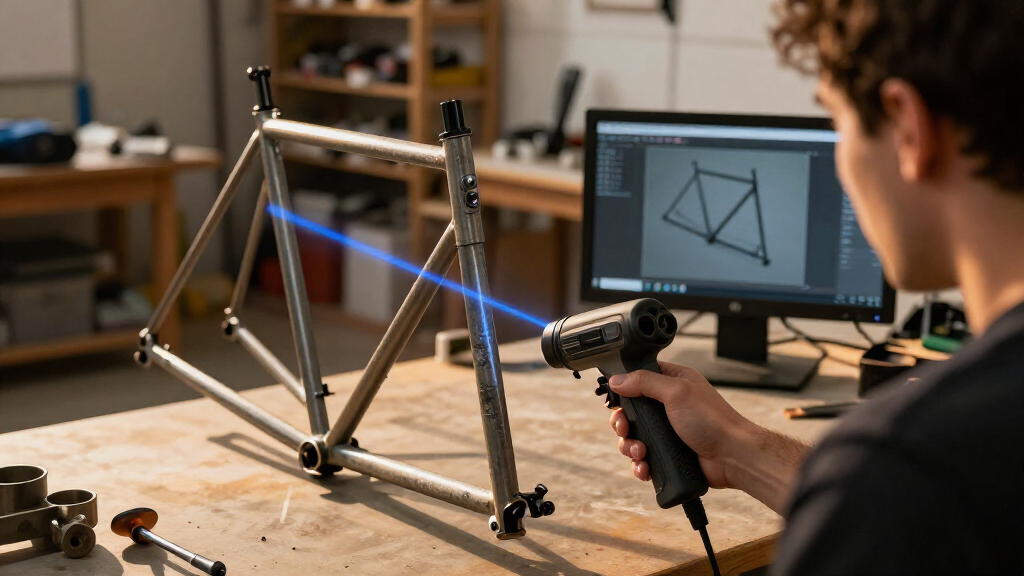
I evaluated these handheld 3D scanners based on their ability to deliver reliable, high-quality data in real-world conditions. Key criteria included scanning accuracy and resolution, where I looked for models capable of capturing fine details like text or intricate textures without excessive noise. Ease of use was another major factor, assessing how quickly a user can go from unboxing to a clean mesh, including the clarity of software guidance and the need for external markers. Versatility played a critical role, distinguishing scanners that handle only small objects from those capable of capturing larger items or dealing with challenging surfaces like dark or shiny materials.
I also prioritized build quality and ergonomics, recognizing that handheld scanning often involves holding a device steady for extended periods. Devices that caused fatigue or felt fragile were downgraded. Finally, I considered the software ecosystem, evaluating whether the included software provided useful post-processing tools or required expensive third-party subscriptions. The ranking reflects a balance of performance, usability, and long-term value, ensuring that each recommendation serves a distinct buyer profile rather than just listing specifications.
Factors to Consider When Choosing Best Handheld 3D Scanners
Selecting a handheld 3D scanner is not just about picking the most expensive model; it is about matching technology to your specific use case. The market is crowded with options that look similar on paper but perform vastly differently in practice. This guide highlights the critical factors that separate a good purchase from a disappointing one.Understanding Scanning Technologies: Structured Light vs. Laser vs. LiDAR
Most consumer-grade handheld scanners rely on structured light (often infrared or blue light) to project patterns onto an object and calculate depth based on distortion. This technology excels at capturing high-resolution surface details and textures, making it perfect for small to medium-sized objects like figurines, car parts, or artifacts. However, structured light struggles with very dark, shiny, or transparent surfaces, often requiring a scanning spray to create a matte finish. In contrast, blue laser scanners offer higher precision and better performance on challenging surfaces but can be more sensitive to ambient light conditions. LiDAR-based scanners, such as the 3DMakerpro Raven, are designed for larger-scale applications like room mapping or architectural surveys, offering long range but significantly lower detail resolution compared to structured light models. Choosing the wrong technology for your subject matter is the most common mistake buyers make.
Resolution and Accuracy: What Do the Numbers Really Mean?
Manufacturers often list impressive accuracy figures, such as 0.02mm accuracy, but these are best-case scenarios achieved in controlled lab environments. In practical use, accuracy degrades due to hand tremors, lighting changes, and object complexity. Resolution is often more useful for judging final model quality, as it determines the smallest detail the scanner can resolve. A high-resolution scanner captures smoother surfaces and finer textures, reducing the need for aggressive mesh smoothing in post-processing. When comparing specs, look for the single-shot accuracy versus global accuracy; the former tells you how well a single frame aligns, while the latter indicates how well the entire scan aligns over time. For most hobbyists and professionals, a global accuracy of under 0.1mm is sufficient for most object scanning tasks, provided the software alignment is robust.
The Importance of Software and Workflow Integration
Hardware captures the data, but software turns it into a usable 3D model. A scanner with excellent specs but poor software will frustrate you with long processing times and confusing interfaces. Creality’s Scan Bridge and Revopoint’s Revo Scan are strong examples of integrated ecosystems that guide users through the scanning process with real-time feedback on coverage and alignment. Consider whether the software offers automatic mesh generation, texture mapping, and export formats compatible with your existing CAD or 3D printing workflow. Some scanners lock you into proprietary software, while others offer open export options. Additionally, check for mobile app compatibility if you plan to scan without a laptop; wireless models that rely solely on mobile apps may have limited post-processing capabilities compared to desktop-based workflows.
Ergonomics and Wireless Freedom
Handheld scanning is physically demanding. You must hold the device steady while walking around the object, which can lead to fatigue and shaky scans. Wireless scanners like the Revopoint INSPIRE 2 or EINSTAR 2 offer significant freedom of movement, allowing you to scan from awkward angles without worrying about cable drag. However, wireless models rely on internal batteries, which can add weight and limit scanning sessions to 1-2 hours. Wired scanners are often lighter and offer unlimited runtime but restrict your movement radius. Pay attention to the grip design and weight distribution; a poorly balanced device will cause your hand to tire quickly, introducing noise into the scan. For large-scale projects or long sessions, consider whether a wired connection or a high-capacity battery is more practical for your workflow.
Scanning Range and Object Size Limitations
Every scanner has a optimal scanning distance, typically between 10cm and 60cm for handheld structured light models. Scanning too close or too far results in poor data quality or tracking loss. If you need to scan large objects like furniture or cars, you may need a scanner with a wider field of view or a LiDAR unit, though you will sacrifice detail. Conversely, scanning very small objects like jewelry requires a scanner with high magnification and close-range focus, which many general-purpose handheld scanners cannot provide. Some models, like the Creality Raptor Pro, offer interchangeable lenses or modes to adjust the working distance, providing greater versatility. Always check the manufacturer’s recommended object size range before purchasing to ensure it matches your typical projects.
Frequently Asked Questions
Do I need to apply scanning spray before using these handheld scanners?
It depends on the surface material and the scanner technology. Structured light scanners struggle with dark, black, or shiny surfaces because they absorb or reflect the projected light, leading to incomplete scans. For these materials, a matte scanning spray is often necessary to create a neutral, diffuse surface. However, many newer models like the Creality Raptor Pro or EINSTAR 2 use hybrid laser and infrared technologies that can handle dark surfaces better, reducing the need for spray. Transparent objects generally require spray regardless of the scanner type. Always test a small area first to see if your scanner can handle the specific material without assistance.
Can I use a handheld 3D scanner for reverse engineering CAD parts?
Yes, but it requires a high-accuracy scanner and robust post-processing software. Handheld scanners provide point clouds or mesh data, which are not directly compatible with parametric CAD software like SolidWorks or Fusion 360. You will need to convert the mesh into a NURBS surface or use CAD software with mesh-to-CAD capabilities. For this purpose, choose a scanner with sub-0.1mm accuracy and low noise, such as the Revopoint INSPIRE 2 or Creality Raptor Pro. Be prepared for a steep learning curve in post-processing, as cleaning up the mesh and aligning it to CAD constraints is often more time-consuming than the actual scanning process.
What is the difference between single-shot and handheld scanning modes?
Single-shot scanning captures an entire object in one go from a fixed position, similar to a photograph. It is fast and ideal for small, static objects where you don’t need to move around the subject. Handheld scanning (or continuous scanning) involves moving the scanner around the object while it captures data in real-time, stitching frames together to build a 3D model. This mode is necessary for larger objects or when you need to capture all sides of an item. Some scanners, like the Creality Ferret Pro, excel at both, allowing you to choose the mode based on the object’s size and complexity. Single-shot is easier for beginners, while handheld offers greater flexibility for complex geometries.
Why do my scans have holes or missing areas?
Missing data is usually caused by occlusion, where parts of the object are hidden from the scanner’s view, or by tracking loss, where the software fails to align new frames with previous ones. To reduce holes, scan from multiple angles and ensure good overlap between passes. For shiny or dark areas, use scanning spray or adjust lighting to minimize reflections. Some scanners include a ‘fill holes’ feature in their software, but this is an approximation and may not capture original geometry. If tracking is consistently failing, try adding visual texture to the object or using a scanner with better feature detection algorithms, such as those with VCSEL infrared or blue laser illumination.
Is a wireless scanner better than a wired one for professional work?
Wireless scanners offer superior mobility and ease of setup, allowing you to scan large or awkwardly placed objects without cable management issues. This is particularly beneficial for on-site work or scanning large artifacts. However, wired scanners often provide more stable data transfer and unlimited runtime, which can be critical for long, continuous scans of complex objects. Wireless models depend on Wi-Fi or Bluetooth stability, which can suffer in environments with interference. For professional workflows requiring maximum reliability and long-duration scanning, a wired connection is often preferred. For fieldwork, quick captures, and hobbyist use, the convenience of wireless freedom typically outweighs the minor stability risks.
Conclusion
Choosing the right handheld 3D scanner depends largely on your specific project requirements and budget constraints. For most users seeking a balance of performance and convenience, the Revopoint INSPIRE 2 Wireless remains the best overall choice due to its high-resolution capture and seamless wireless integration. If you are on a tighter budget but still need reliable results, the Creality CR-Scan Ferret Pro offers the best value, providing solid accuracy and good software support at a lower entry point. Professionals requiring maximum precision for complex engineering tasks should consider the Creality Raptor Pro as the best premium option, thanks to its hybrid laser technology and high-accuracy capabilities. Beginners will find the Creality CR-Scan Ferret to be the best for beginners due to its simple interface and forgiving learning curve. Finally, for those needing to scan larger spaces or architectural elements, the 3DMakerpro Raven LiDAR serves as the best for large-scale applications, despite its lower detail resolution compared to structured light models.