

Choosing the best MacBook laptops in 2027 requires balancing raw processing power with battery life and portability. The Apple MacBook Pro 14-inch with M5 Pro stands out as the Best Overall pick, offering a perfect equilibrium of performance for creative professionals and everyday users. For those prioritizing portability without sacrificing speed, the MacBook Air 15-inch with M5 remains the Best Value choice, delivering silent operation and excellent battery life. The primary tradeoff lies between the sustained performance of the Pro line’s active cooling systems and the fanless, lightweight design of the Air series. Continue reading to explore detailed comparisons and find the model that aligns with your specific workflow.

Get the latest gadgets delivered free with Prime
- Fast, free delivery on millions of items
- Prime Video, Amazon Music and more included
- Member-only deals all year
Complete the kit



Key Takeaways
- The M5 chip generation provides a noticeable leap in AI-driven tasks compared to M3 and M4 models, making it the preferred choice for future-proofing.
- Renewed M1 Max models offer exceptional value for users needing high core counts but lack the efficiency and display improvements of newer silicon.
- The 15-inch MacBook Air has effectively closed the performance gap with entry-level Pros for general productivity, making the Pro line strictly for heavy creative workloads.
- Memory configurations are more critical than storage upgrades in 2027, as unified memory directly impacts multitasking fluidity across all MacBook lines.
- The new MacBook Neo 13-inch serves as a niche entry-level device, best suited for students and basic tasks rather than professional creative work.


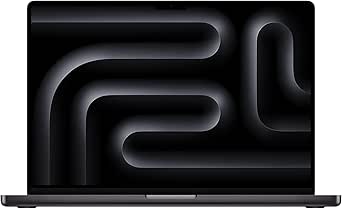


| MacBook laptop | Storage | Memory | Display | Chip |
|---|---|---|---|---|
| Apple 2021 MacBook Pro 14-inch | 2TB SSD | 64GB | 14-inch Retina, 2560 × 1600 | Apple M1 Max, 10-core CPU |
| Apple MacBook Pro 14-inch | 1TB SSD | 16GB unified memory | 14-inch Liquid Retina XDR, 3024 × 1964 | Apple M1 Pro, 10-core CPU |
| Apple 14.2-inch MacBook Pro wi | 1TB SSD | 16GB unified memory | 14.2-inch Liquid Retina XDR | Apple M5 |
| Apple MacBook Air 15-inch with | 512GB SSD | 24GB | 15.3-inch Liquid Retina | Apple M5 |
| Apple 2021 MacBook Pro 16-inch | 1TB SSD | 32GB RAM | 16-inch Liquid Retina XDR, 3456 × 2234 | Apple M1 Max |
| Apple MacBook Pro 16.2-inch wi | 1TB SSD | 48GB | 16.2-inch Liquid Retina XDR, Nano-Texture | — |
| Apple MacBook Neo 13-inch Lapt | 512GB SSD | 8GB unified memory | 13-inch Liquid Retina | Apple A18 Pro |
| MacBook Pro 14.2-Inch Laptop M | 1TB SSD | 16GB Unified Memory | 14.2-Inch Liquid Retina XDR | — |
| Apple MacBook Pro 14.2-inch wi | 2TB SSD | 48GB | 14.2-inch Liquid Retina XDR | — |
| Apple 16.2-inch MacBook Pro wi | 1TB SSD | 24GB unified memory | 16.2-inch Liquid Retina XDR | — |
| Apple 14.2-inch MacBook Pro | 512GB SSD | — | 14.2-inch Liquid Retina XDR | Apple M2 Pro |
| Apple MacBook Air 15-inch Lapt | 512GB SSD | 16GB unified memory | 15.3-inch Liquid Retina | Apple M5 |
| 2023 Apple MacBook Pro 16.2-in | 1TB SSD | 32GB | — | Apple M2 Max |
| Apple MacBook Air 13.6-inch wi | 512GB SSD | 16GB unified memory | 13.6-inch Liquid Retina | Apple M5 |
| Apple MacBook Pro 14-inch | 512GB SSD | 16GB LPDDR5 | 14.2-inch Liquid Retina XDR, 3024 × 1964 | — |
More Details on Our Top Picks
Apple 2021 MacBook Pro 14-inch with M1 Max, 64GB RAM, 2TB SSD (Renewed)
I’d put this renewed 14-inch MacBook Pro on the list for demanding workloads that benefit from 64GB of RAM and a roomy 2TB SSD. Its M1 Max chip pairs a 10-core CPU with a 24-core GPU, giving it a stronger graphics configuration than the M1 Pro MacBook Pro 14-inch elsewhere in this roundup. That makes it a more suitable fit for large creative projects and sustained multitasking, though buyers who mainly work in everyday apps are unlikely to need this much capacity.
The catch is its renewed condition: it is professionally inspected, but it is not Apple-certified, accessories may be non-original, and the stated battery threshold is only above 80% of original capacity. Compared with the newer M5 MacBook Pro 14.2-inch, it offers far more memory and storage on paper, but it is an older machine with less certainty about battery wear. I’d choose it for its unusually generous configuration only if the renewed terms suit you.
Pros:- 64GB RAM supports memory-intensive creative projects and heavy multitasking.
- 2TB SSD provides ample built-in space for large working files.
- M1 Max includes a 10-core CPU and 24-core GPU.
- Professionally inspected, tested, and cleaned before sale.
Cons:- Renewed rather than Apple-certified, with a 90-day limited warranty.
- Battery is only specified as retaining more than 80% of its original capacity.
- Compatible accessories may not be original Apple accessories.
Best for: Video editors, 3D creators, and other Mac users who need substantial memory and local storage for large projects.
Not ideal for: Buyers who want a new MacBook, Apple-certified refurbishment, or a clearly specified near-new battery.
- Model year:2021
- Chip:Apple M1 Max, 10-core CPU
- GPU:24-core
- Memory:64GB
- Storage:2TB SSD
- Display:14-inch Retina, 2560 × 1600
- Condition:Renewed; professionally inspected, tested, and cleaned
- Battery condition:More than 80% of original capacity
- Warranty:90-day limited
Our verdict“Choose this renewed 14-inch Pro if 64GB of RAM and 2TB of storage matter more to you than a new device and a precisely stated battery condition.”
Apple MacBook Pro 14-inch (2021) – M1 Pro Chip, 10-Core CPU, 16-Core GPU, 16GB RAM, 1TB SSD, Space Gray
This 2021 14-inch MacBook Pro is the more measured choice for professionals who want a Liquid Retina XDR display, dedicated ports, and capable performance without stepping up to the M1 Max configuration. Its M1 Pro has a 10-core CPU and 16-core GPU, while the renewed M1 Max 14-inch in this roundup adds a stronger GPU, 64GB of memory, and twice the storage. For many photo, audio, and video workflows, this model’s 16GB memory and 1TB SSD may be a more sensible balance.
Apple lists battery life of up to 17 hours, and the pro-port selection with MagSafe helps reduce the need for adapters. It is heavier than a compact Air, though, and its 2021 generation is older than the M5 MacBook Pro 14.2-inch. I’d favor this pick when the XDR screen and practical pro features matter more than owning the newest chip; buyers wanting more headroom should compare it closely with the 64GB M1 Max option.
Pros:- M1 Pro combines a 10-core CPU with a 16-core GPU for professional workloads.
- 14-inch Liquid Retina XDR display supports high contrast and dynamic range.
- 1TB SSD offers useful space for active work and project files.
- MagSafe and a versatile set of pro ports reduce reliance on adapters.
Cons:- 16GB memory is less suitable for especially large or memory-heavy projects than the 64GB M1 Max option.
- The 2021 model is an older generation than the M5 MacBook Pro in this roundup.
- At 1.6 kg, it is heavier than a MacBook Air.
Best for: Photographers, developers, and video editors who want a capable 14-inch pro laptop with 1TB storage and a broad port selection.
Not ideal for: Buyers who need very large memory capacity, the latest-generation chip, or the lightest MacBook for frequent travel.
- Model year:2021
- Chip:Apple M1 Pro, 10-core CPU
- GPU:16-core
- Memory:16GB unified memory
- Storage:1TB SSD
- Display:14-inch Liquid Retina XDR, 3024 × 1964
- Battery life:Up to 17 hours
- Weight:1.6 kg
- Wireless:Wi-Fi 6 and Bluetooth
Our verdict“Pick this 14-inch Pro if you want an XDR screen and professional ports without needing the M1 Max model’s much larger memory and storage configuration.”
Apple 14.2-inch MacBook Pro with M5 Chip, 10-Core CPU and GPU, 16GB Memory, 1TB SSD, Space Black
I’d rank this M5 MacBook Pro as the strongest fit for buyers who want a current-generation 14-inch Pro configuration rather than the older M1 models. The M5 chip, 16GB of unified memory, and 1TB SSD make a balanced setup for everyday professional work, while the Liquid Retina XDR display reaches up to 1600 nits peak brightness. Compared with the 2021 M1 Pro 14-inch, this model has a newer chip and a listed 12MP Center Stage camera; the older machine remains a viable alternative for buyers who prioritize its established pro-workstation configuration.
Its port selection is a practical advantage: three Thunderbolt 4 ports sit alongside MagSafe, HDMI, SDXC, and a headphone jack, so connecting common accessories is less fussy. The tradeoff is that 16GB of memory may constrain unusually large creative projects compared with the renewed 64GB M1 Max pick. At 3.41 pounds, it is also not as light as an Air. I’d choose it for a modern, well-connected Pro rather than maximum memory capacity.
Pros:- M5 chip with a 10-core CPU and 10-core GPU.
- 14.2-inch Liquid Retina XDR display with up to 1600 nits peak brightness.
- 1TB SSD gives more built-in capacity than a 512GB configuration.
- Includes Thunderbolt 4, MagSafe, HDMI, SDXC, and a headphone jack.
Cons:- 16GB memory is less suited to especially demanding projects than the 64GB renewed M1 Max model.
- Weighs 3.41 pounds, making it less travel-light than a MacBook Air.
- Some advertised capabilities depend on Apple Intelligence and macOS features.
Best for: Professionals who want a newer 14-inch MacBook Pro for mixed creative and office workloads, with a bright screen and built-in ports.
Not ideal for: Users handling memory-heavy projects who need substantially more than 16GB, or travelers who put low weight above pro-level ports.
- Chip:Apple M5
- CPU and GPU:10-core CPU and 10-core GPU
- Memory:16GB unified memory
- Storage:1TB SSD
- Display:14.2-inch Liquid Retina XDR
- Peak brightness:Up to 1600 nits
- Camera:12MP Center Stage
- Ports:Three Thunderbolt 4, MagSafe 3, SDXC, HDMI, headphone jack
- Weight:3.41 pounds
Our verdict“Choose this M5 Pro if you want a current-generation 14-inch laptop with a bright XDR screen and useful built-in ports, rather than maximum memory.”
Apple MacBook Air 15-inch with M5 Chip, 24GB Memory, 512GB SSD, Midnight
This 15-inch MacBook Air makes the most sense for buyers who want a larger workspace without moving to a MacBook Pro. Its 15.3-inch Liquid Retina display gives documents and side-by-side windows more room than the 14.2-inch M5 MacBook Pro, and its 24GB of memory exceeds that Pro’s listed 16GB. That extra memory can help keep a busy set of apps responsive, although this Air’s two Thunderbolt 4 ports and 512GB SSD make it a less flexible choice for a port-heavy setup or a large local media library.
Apple lists up to 18 hours of battery life, plus Wi-Fi 7, Bluetooth 6, and a 12MP Center Stage camera. Compared with the M5 Pro, this Air is the better fit for everyday productivity and lighter creative work; the Pro adds an XDR screen and HDMI and SDXC ports for more demanding workflows. I’d choose the Air for its large display and higher memory allocation, while accepting its more limited built-in connectivity and storage.
Pros:- 15.3-inch Liquid Retina display offers more workspace than the 14-inch models.
- 24GB memory is generous for multitasking and lighter creative workflows.
- Apple lists up to 18 hours of battery life.
- Wi-Fi 7, Bluetooth 6, and a 12MP Center Stage camera are included.
Cons:- 512GB SSD provides less built-in storage than the 1TB MacBook Pro options.
- Two Thunderbolt 4 ports offer fewer built-in connection choices than the 14.2-inch M5 Pro.
- The supplied specs list a 5.4-pound weight, which may feel substantial for frequent carrying.
Best for: Students, remote workers, and multitaskers who want a spacious screen and 24GB of memory without choosing a MacBook Pro.
Not ideal for: Video professionals who need an XDR display, built-in HDMI or SDXC, or more than 512GB of internal storage.
- Chip:Apple M5
- Memory:24GB
- Storage:512GB SSD
- Display:15.3-inch Liquid Retina
- Battery life:Up to 18 hours
- Camera:12MP Center Stage
- Ports:Two Thunderbolt 4, MagSafe, headphone jack
- Wireless:Wi-Fi 7 and Bluetooth 6
- External display support:Up to two displays
Our verdict“Choose this Air if screen space and 24GB of memory matter more to you than the Pro’s XDR display, extra ports, and 1TB storage.”
Apple 2021 MacBook Pro 16-inch with M1 Max, 32GB RAM, 1TB SSD, Space Gray (Renewed)
This renewed 16-inch MacBook Pro is the big-screen alternative to the renewed 14-inch M1 Max in this roundup. Its 16-inch Liquid Retina XDR display and 3456 × 2234 resolution give long timelines, layered creative projects, and split-screen work more room, while the M1 Max and 32GB of RAM target serious workloads. The 14-inch M1 Max listing offers twice the memory and storage, so buyers with exceptionally large projects should compare those configurations carefully; this 16-inch model is the more compelling fit when screen area is the priority.
Apple lists up to 17 hours of battery life, and the 1080p FaceTime HD camera handles video calls. The tradeoffs are its renewed condition, 5.9-pound weight, and conflicting product details for processor and memory. That uncertainty makes it harder to recommend than the M5 MacBook Pro for buyers who want a current, clearly specified model. I’d choose it only when a large XDR display and M1 Max performance outweigh the condition and listing ambiguities.
Pros:- 16-inch Liquid Retina XDR display provides a large, high-resolution workspace.
- M1 Max chip is designed for demanding professional workloads.
- 32GB RAM and a 1TB SSD suit many substantial creative projects.
- Apple lists up to 17 hours of battery life.
Cons:- Renewed condition brings more uncertainty than a new MacBook.
- Product details contain conflicting processor and memory specifications.
- At 5.9 pounds, it is considerably less convenient to carry than the 14-inch models.
Best for: Video editors, designers, and other creative professionals who want a large XDR workspace and can accept a renewed, older MacBook.
Not ideal for: Buyers who need a lightweight laptop, a new device, or fully consistent specifications before purchasing.
- Model year:2021
- Chip:Apple M1 Max
- CPU cores:Up to 10
- Memory:32GB RAM
- Storage:1TB SSD
- Display:16-inch Liquid Retina XDR, 3456 × 2234
- Battery life:Up to 17 hours
- Camera:1080p FaceTime HD
- Condition:Renewed
Our verdict“Choose this renewed 16-inch Pro only if its large XDR display is your priority and you are comfortable verifying the inconsistent listing details.”
Apple MacBook Pro 16.2-inch with M5 Pro, 18-core CPU, 20-core GPU, 48GB Memory, 1TB SSD, Nano-Texture Display, Space Black
This model stands out as the definitive choice for high-end creative professionals who need raw power without the bulk of the Max chip. The Nano-Texture Display is a significant differentiator, reducing glare for video editors and photographers working in unpredictable lighting, a feature absent in the standard MacBook Pro 14-inch options. With 48GB of unified memory, it handles complex multitasking and large project files far better than the 24GB configuration found in the M5 Pro 16-inch sibling. However, the 9.9-pound weight makes it a poor candidate for frequent travelers who prioritize portability over screen real estate. It is heavier than the 14-inch models and lacks the extreme GPU headroom of the M5 Max for 3D rendering.Pros:- Nano-Texture Display significantly reduces reflections for studio work
- 48GB unified memory allows for heavy multitasking and large file handling
- M5 Pro chip balances high performance with efficient power consumption
- Comprehensive port selection including HDMI and SDXC reduces dongle dependency
Cons:- Heavy at 9.9 pounds, making it cumbersome for daily commuting
- Nano-Texture screen can slightly reduce perceived sharpness compared to standard glass
- Higher price point than the 24GB memory variant of the same model
Best for: Video editors, colorists, and photographers who work primarily at a desk and need a glare-free, high-resolution canvas.
Not ideal for: Digital nomads or students who prioritize light weight and portability over screen size and anti-glare features.
- Processor:Apple M5 Pro, 18-core CPU
- Graphics:20-core GPU
- Display:16.2-inch Liquid Retina XDR, Nano-Texture
- Memory:48GB
- Storage:1TB SSD
- Weight:9.9 pounds
- Ports:Three Thunderbolt 5, MagSafe 3, SDXC, HDMI, headphone jack
Our verdict“This is the ultimate desk-bound creative workstation, trading portability for a glare-free display and substantial memory.”
Apple MacBook Neo 13-inch Laptop with A18 Pro Chip, 8GB Memory, 512GB SSD, Liquid Retina Display, and Touch ID (Blush)
This laptop targets the casual user who finds the MacBook Air or Pro overkill for basic tasks. Powered by the A18 Pro chip—typically reserved for iPhones—it delivers snappy performance for web browsing and media consumption while maintaining a 2.71-pound weight that dwarfs the portability of any MacBook Pro. The 16-hour battery life is its strongest selling point, easily outlasting many Pro models under light loads. However, the 8GB of unified memory is a hard ceiling; unlike the MacBook Air with M5, this machine will struggle with heavy multitasking or creative software. It is strictly a consumption device, not a creation tool, and lacks the port variety of the Pro line.Pros:- Extremely lightweight and compact design ideal for travel
- Up to 16 hours of battery life for all-day unplugged use
- Liquid Retina display offers vibrant colors for media consumption
- Touch ID provides quick and secure unlocking
Cons:- 8GB of unified memory limits multitasking capability significantly
- A18 Pro chip lacks the sustained performance of M-series chips for heavy workloads
- Limited connectivity options compared to MacBook Pro models
Best for: Students, travelers, and home users who need a lightweight machine for browsing, email, and streaming.
Not ideal for: Professionals who need to run virtual machines, edit video, or keep dozens of browser tabs open simultaneously.
- Chip:Apple A18 Pro
- Display:13-inch Liquid Retina
- Memory:8GB unified memory
- Storage:512GB SSD
- Battery life:Up to 16 hours
- Weight:2.71 pounds
- Material:Recycled aluminum enclosure
Our verdict“A perfect companion for light-duty users who value battery life and weight above all else.”
MacBook Pro 14.2-Inch Laptop M2 Pro 12-Core Chip 16GB Unified Memory 1TB SSD 19-Core GPU Liquid Retina XDR Display Space Gray
As a previous-generation model, this M2 Pro MacBook Pro offers a compelling balance of performance and cost compared to the newer M5 iterations. The 12-core CPU and 19-core GPU still handle 4K video editing and coding tasks with ease, making it a smart choice for professionals who do not need the absolute latest silicon. It shares the Liquid Retina XDR display with newer models, ensuring color accuracy remains top-tier. However, it lacks the Thunderbolt 5 connectivity and Wi-Fi 7 capabilities found in the M5 Pro models. With only 16GB of memory, it is less future-proof than the 24GB or 48GB configurations in the current lineup, making it suitable for users with fixed workflows rather than expanding needs.Pros:- Proven M2 Pro performance handles demanding creative workflows reliably
- 14.2-inch XDR display provides excellent brightness and contrast
- 1TB SSD and 16GB memory offer a solid baseline for professional tasks
- Significant price advantage over current-generation M5 models
Cons:- 16GB of unified memory may become a bottleneck for heavy multitasking
- Lacks newer connectivity features like Thunderbolt 5 and Wi-Fi 7
- Heavier than the MacBook Air alternatives at 5.8 pounds
Best for: Developers, designers, and editors who want Pro-level performance without paying the premium for the latest M5 silicon.
Not ideal for: Users who require the highest possible memory capacity or the newest connectivity standards like Thunderbolt 5.
- Processor:M2 Pro 12-Core
- GPU:19-Core GPU
- Memory:16GB Unified Memory
- Storage:1TB SSD
- Display:14.2-Inch Liquid Retina XDR
- Weight:5.8 pounds
- Model Year:2023
Our verdict“A reliable workhorse that delivers 90% of the current generation’s performance at a more accessible price point.”
Apple MacBook Pro 14.2-inch with M5 Max, 18-core CPU, 20-core GPU, 48GB Memory, 2TB SSD, Space Black
This configuration represents the peak of mobile computing power available in a compact form factor. The M5 Max chip dominates in GPU-intensive tasks like 3D rendering, machine learning, and complex simulations, far outpacing the M5 Pro found in the 16-inch model. With 48GB of memory and 2TB of storage, it eliminates the need for external drives for most professional workflows. The 14.2-inch size makes it more portable than its 16-inch sibling, though it still weighs significantly more than an Air. This machine is overkill for general users; it is specifically engineered for those whose time is money and whose workflows demand the absolute highest throughput and storage capacity.Pros:- M5 Max chip delivers uncompromising performance for GPU-heavy workloads
- 48GB memory and 2TB SSD provide ample room for large projects
- Compact 14-inch form factor offers better portability than 16-inch Max models
- Supports up to four external displays for expansive workspace setups
Cons:- Extremely high price point limits accessibility to niche professionals
- Overpowered for basic productivity tasks, resulting in wasted resources
- No customer reviews or hands-on performance details are provided
Best for: 3D artists, data scientists, and high-end video editors who need maximum GPU power and storage in a portable chassis.
Not ideal for: Writers, administrators, or students who do not require extreme computational resources or massive storage.
- Processor:Apple M5 Max, 18-core CPU
- Graphics:20-core GPU
- Display:14.2-inch Liquid Retina XDR
- Memory:48GB
- Storage:2TB SSD
- Camera:12MP Center Stage
- Ports:Three Thunderbolt 5, MagSafe 3, SDXC, HDMI, headphone jack
Our verdict“The ultimate choice for professionals who demand desktop-class power in a laptop form factor.”
Apple 16.2-inch MacBook Pro with M5 Pro, 18-Core CPU, 20-Core GPU, 24GB Memory, and 1TB SSD (Space Black)
This model hits the sweet spot for most power users by combining the large 16.2-inch screen with the efficient M5 Pro chip. Unlike the 48GB variant, the 24GB of unified memory is sufficient for typical professional workflows like coding, light video editing, and heavy multitasking, offering a more cost-effective entry into the large-screen Pro ecosystem. It retains the Thunderbolt 5 ports and extensive connectivity of its higher-end siblings. However, it lacks the Nano-Texture display option, meaning users in bright environments may experience more glare. It is a step down in memory capacity from the premium 16-inch model but remains far more capable than the 14-inch Pro or Air lines for those who need screen real estate.Pros:- Large 16.2-inch Liquid Retina XDR display enhances productivity
- M5 Pro chip provides excellent performance for professional applications
- 24GB memory handles multitasking and moderate creative work effectively
- Comprehensive port selection reduces the need for adapters
Cons:- Standard glass display is prone to glare in bright lighting
- 24GB memory may limit performance in memory-intensive future workloads
- Heavier than 14-inch models, reducing portability
Best for: Programmers, analysts, and multitaskers who want a large display and strong performance without the premium price of the 48GB model.
Not ideal for: Users who work in very bright environments requiring anti-glare screens or those who need massive memory buffers for AI tasks.
- Display:16.2-inch Liquid Retina XDR
- Processor:Apple M5 Pro with 18-core CPU
- Graphics:20-core GPU
- Memory:24GB unified memory
- Storage:1TB SSD
- Weight:4.71 pounds
- Wireless:Wi-Fi 7, Bluetooth 6
Our verdict“The most practical large-screen MacBook for professionals who need power and space without the highest-tier specs.”
Apple 14.2-inch MacBook Pro (2023) with M2 Pro
This MacBook Pro stands out for its balance of power and portability, making it a strong contender for video editors and developers. Compared to the MacBook Air 15-inch, the active cooling system allows for sustained performance during heavy rendering tasks without thermal throttling. The Liquid Retina XDR display offers superior color accuracy and brightness, essential for professional content creation. However, it is heavier than the Air models, and the 16GB memory configuration may feel limiting for users running multiple virtual machines or large datasets, where the 32GB options found in higher-tier Pros would be more appropriate. It remains a versatile workhorse for those who need pro-grade features without the bulk of the 16-inch model.
Pros:- Bright XDR display with over 1000 nits of brightness for HDR content
- Up to 18 hours of battery life
- Versatile selection of ports, including HDMI and SDXC
- 1080p camera and six-speaker audio with Spatial Audio
Cons:- Heavier and thicker than the MacBook Air alternatives
- 16GB memory may be insufficient for heavy multitasking or professional 3D work
- Significantly more expensive than entry-level Air models
Best for: Video editors and developers who need sustained performance and color-accurate displays
Not ideal for: Casual users who prioritize maximum portability and lower weight over raw processing power
- Chip:Apple M2 Pro
- CPU:10-core
- GPU:16-core
- Display:14.2-inch Liquid Retina XDR
- Unified Memory:16GB
- Storage:512GB SSD
- Weight:3.52 pounds
Our verdict“This pick makes the most sense for professionals who need a compact yet powerful machine for creative workflows.”
Apple MacBook Air 15-inch Laptop with M5 Chip
The MacBook Air 15-inch delivers a spacious viewing experience without the weight penalty of a Pro model. At just 3.32 pounds, it is significantly lighter than the 14-inch MacBook Pro, making it ideal for commuters who want screen real estate for multitasking. The new M5 chip brings enhanced AI capabilities and efficiency, outperforming the older M2 Pro in single-core tasks while maintaining silent operation due to the lack of fans. While it supports two external displays, the port selection is limited to two Thunderbolt 4 ports, requiring dongles for HDMI or SD cards, unlike the versatile port array on the MacBook Pro. This laptop is better suited to productivity-focused users than those needing sustained heavy compute loads.
Pros:- Lightweight design at 3.32 pounds
- Up to 18 hours of battery life
- Large 15.3-inch display
- Supports up to two external displays
Cons:- Only two Thunderbolt 4 ports
- Passive cooling may throttle performance during prolonged heavy tasks
- No HDMI or SDXC card slot
Best for: Students and office professionals who want a large screen in a lightweight, silent package
Not ideal for: Users who require HDMI or SD card slots natively, or those who need active cooling for sustained heavy workloads
- Chip:Apple M5
- Display:15.3-inch Liquid Retina
- Memory:16GB unified memory
- Storage:512GB SSD
- Camera:12MP Center Stage
- Wireless:Wi-Fi 7 and Bluetooth 6
- Weight:3.32 pounds
Our verdict“This model is better suited to those who prioritize screen size and portability over extensive connectivity options.”
2023 Apple MacBook Pro 16.2-inch with M2 Max (Renewed)
For users tackling massive projects, this renewed MacBook Pro offers substantial headroom with its M2 Max chip and 32GB of memory. Unlike the 14-inch models, the larger chassis accommodates a bigger battery, delivering up to 22 hours of life, and more robust thermal management for sustained performance. Compared to the newer M5-based Airs, this machine excels in multi-core rendering and large-scale code compilation. However, being a renewed product, it lacks the pristine condition of a new device, and its weight of over 4.7 pounds makes it less suitable for daily commuting. It remains a powerhouse for stationary workstations where raw capability outweighs portability.
Pros:- M2 Max chip with 32GB memory
- Large high-resolution display
- Up to 22 hours of battery life
- Wide selection of ports
Cons:- Renewed condition may not suit buyers seeking a new device
- Weighs 2.16 kg (approx. 4.75 pounds), limiting portability
- Older generation chip compared to the latest M5 models
Best for: Data scientists, 3D artists, and engineers who need maximum RAM and processing power
Not ideal for: Travelers who prioritize lightweight devices or buyers who require a brand-new, unopened device
- Model year:2023
- Display size:16.2 inches
- Chip:Apple M2 Max
- Memory:32GB
- Storage:1TB SSD
- Display resolution:3456 × 2234 pixels
- Battery capacity:99.6 watt-hours
Our verdict“This option stands out for professionals who need desktop-class power in a laptop form factor.”
Apple MacBook Air 13.6-inch with M5 Chip
The 13.6-inch MacBook Air is the quintessential choice for most users, combining extreme portability at 2.71 pounds with the efficiency of the new M5 chip. It handles everyday tasks, web browsing, and light photo editing with ease, often outperforming older Intel Macs in responsiveness. Compared to the 15-inch Air, this model is easier to carry on a plane or in a small bag, though it offers less screen real estate for split-view multitasking. The 12MP Center Stage camera is a notable upgrade for video calls. While it lacks the fan-cooled endurance of the Pro models, its silent operation and all-day battery life make it the definitive pick for students and remote workers.
Pros:- Lightweight design at 2.71 pounds
- Up to 18 hours of battery life
- 12MP Center Stage camera with Desk View
- Supports up to two external displays
Cons:- Limited to two Thunderbolt 4 ports
- Smaller screen may feel cramped for complex multitasking
- Manufacturer’s warranty must be requested from customer service
Best for: Students, writers, and general users who value extreme portability and battery life
Not ideal for: Power users who run heavy video editing software or need multiple external monitors
- Chip:Apple M5
- Display:13.6-inch Liquid Retina
- Memory:16GB unified memory
- Storage:512GB SSD
- Camera:12MP Center Stage
- Wireless:Wi-Fi 7, Bluetooth 6
- Weight:2.71 pounds
Our verdict“This pick makes the most sense for anyone who needs a reliable, ultra-portable laptop for daily tasks.”
Apple MacBook Pro 14-inch (2023) M3 (Renewed)
This renewed M3 MacBook Pro offers an accessible entry point into the Pro lineup, featuring the efficient M3 chip and a stunning Liquid Retina XDR display. Compared to the M2 Pro model, the M3 offers improved media engines and ray tracing, though with fewer CPU/GPU cores. It is lighter than the 16-inch models but heavier than the Airs, providing a middle ground for those who need pro features like HDMI and SDXC slots without the highest-tier price tag. The 16GB memory is sufficient for most creative tasks, but users upgrading from high-RAM Windows machines might find it limiting. It is a smart choice for buyers comfortable with renewed hardware who want modern display technology.
Pros:- M3 chip with 8-core CPU and 10-core GPU
- High-resolution Liquid Retina XDR display
- Includes a range of ports and MagSafe 3 charging
- Touch ID and backlit Magic Keyboard
Cons:- Renewed condition
- Memory is limited to 16GB
- Older generation battery compared to newer M5 models
Best for: Students and early-career creatives who want Pro features at a lower cost
Not ideal for: Buyers who insist on new, sealed products or those requiring more than 16GB of RAM
- Model year:2023
- Processor:Apple M3, 8-core CPU, 10-core GPU
- Memory:16GB LPDDR5
- Storage:512GB SSD
- Display:14.2-inch Liquid Retina XDR, 3024 × 1964
- Battery energy:49.9 watt-hours
- Condition:Renewed
Our verdict“This model is better suited to budget-conscious buyers who prioritize display quality and port selection.”

How We Picked
To curate this list of the best MacBook laptops, I evaluated each model based on processor generation, memory architecture, display quality, and long-term viability. I prioritized devices featuring the M5 and M4 silicon chips for their advanced neural engine capabilities, which are increasingly relevant for modern software. Renewed models were included only if they offered a distinct performance advantage over new entry-level options, such as the M1 Max’s core count for specific legacy workflows.
I also weighed portability against thermal performance. The ranking logic favors models that maintain performance under sustained loads, which is where the MacBook Pro line excels due to active cooling. However, for users who rarely engage in heavy rendering, the silent and lighter MacBook Air models were ranked higher for their daily usability and battery efficiency. This approach ensures that every recommendation serves a clear user profile, from students to high-end video editors.
Factors to Consider When Choosing Best MacBook Laptops
Selecting the right MacBook involves more than just picking the newest chip. It requires understanding how different components interact with your specific workload and how Apple’s ecosystem integrates into your daily life. Here are the critical factors to weigh before making a purchase.Chip Architecture: M5 vs. M4 vs. M3
The processor is the heart of the MacBook experience, and the jump from M3 to M5 is significant for future-proofing. While the M3 still handles everyday tasks with ease, the M5 chip introduces enhanced neural engines that accelerate AI-driven features in photo editing, video stabilization, and coding assistants. If you plan to keep your laptop for four to five years, investing in M5 silicon is a smarter long-term strategy. Conversely, the M4 offers a sweet spot for those who want modern efficiency without the premium price tag of the latest release. Do not underestimate the thermal efficiency gains; newer chips run cooler and quieter, extending battery life during intense sessions.
Unified Memory vs. Storage Priorities
Apple’s unified memory architecture means that your RAM is shared between the CPU and GPU, making memory capacity a critical bottleneck for multitaskers. In 2027, 8GB of memory is increasingly restrictive for professional workflows, with 16GB serving as the new baseline for smooth performance. Upgrading memory at the point of purchase is mandatory because it cannot be upgraded later. I often find that buyers overspend on storage they don’t need, neglecting memory that would actually improve speed. If you work with large datasets or multiple virtual machines, prioritize 24GB or 32GB of RAM over extra SSD space, which can be supplemented with external drives.
Portability and Screen Size Tradeoffs
The choice between a 13-inch, 14-inch, and 15-inch screen is largely about workspace versus weight. The MacBook Air 15-inch offers a generous canvas for multitasking while remaining thin and light, ideal for users who value screen real estate but dislike the bulk of Pro models. The 14-inch MacBook Pro strikes a balance, fitting into most bags while providing enough space for timeline-based editing. However, if you are a student or writer, the 13-inch models offer unmatched portability. Consider your typical working environment; if you frequently work on planes or trains, the smaller footprint and lighter weight of the Air or Neo models will reduce fatigue significantly more than a larger screen will help.
Active Cooling vs. Fanless Design
Understanding thermal management is key to choosing between the Air and Pro lines. The MacBook Air is fanless, meaning it is completely silent but may throttle performance during sustained heavy loads like 4K video rendering. The MacBook Pro features active cooling fans that allow it to maintain peak performance for longer periods, which is vital for professionals who render video or compile large codebases. For the average user, the Air’s lack of noise is a feature, not a bug. However, if your workflow involves long, uninterrupted processing tasks, the Pro’s ability to sustain speed without throttling is worth the extra weight and cost.
The Value of Renewed Models
Renewed MacBooks can offer significant savings, but they come with specific caveats. Older models like the M1 Pro or M1 Max still hold up remarkably well in raw power, often outperforming newer entry-level chips in multi-core tasks. However, they may lack the latest display technologies, such as higher brightness levels or improved color accuracy found in newer generations. Additionally, battery health in renewed devices can vary, so checking the cycle count and battery condition is essential. Buy renewed if you are a power user who needs cores and threads on a budget, but skip it if you prioritize the latest software features, camera quality, and display fidelity.
Frequently Asked Questions
Is the M5 chip worth the upgrade from the M3?
For most users, the M3 remains a highly capable processor that handles everyday tasks, web browsing, and light creative work with ease. However, the M5 chip offers improved energy efficiency and a more powerful neural engine, which benefits AI-driven applications and future software updates. If you already own an M3, upgrading to M5 is likely unnecessary unless you rely on specific AI-accelerated workflows. For new buyers, the M5 provides better long-term viability and slightly better battery life, making it a worthwhile investment if the budget allows.Can I upgrade the RAM or SSD after buying a MacBook?
No, Apple laptops feature soldered memory and storage components that are permanently attached to the motherboard. This means you cannot upgrade RAM or SSD capacity after the device leaves the factory. It is critical to choose the right configuration at the time of purchase, as under-specifying these components can limit the laptop’s lifespan. I recommend prioritizing memory upgrades over storage, as external drives are a more affordable and flexible solution for data storage than internal SSD expansions.Which MacBook is best for video editing?
The MacBook Pro 16-inch with M5 Pro or M5 Max is the superior choice for serious video editing due to its larger screen, active cooling system, and higher core counts. These models can handle 4K and 8K timelines with multiple effects layers without throttling performance. For lighter editing tasks, the 14-inch MacBook Pro offers a good balance of power and portability. The MacBook Air can handle basic 4K edits, but it may throttle during long exports, making it less ideal for professional video workflows.Are renewed MacBooks reliable for long-term use?
Renewed MacBooks can be reliable if purchased from reputable sellers who provide warranties and transparent condition reports. The key concern with older models is battery health, as lithium-ion batteries degrade over time and cannot be easily replaced by the user. Check the cycle count and battery condition before purchasing. If the battery health is below 80%, factor in the cost of a replacement. For models like the M1 Pro, the performance is still robust, making them a smart choice for users who prioritize raw power over the latest aesthetic or display features.Do I need a MacBook Pro for coding?
For most web developers and students, the MacBook Air with M5 is sufficient and offers better portability and battery life. It handles IDEs, local servers, and containerized environments effectively. However, if you work with large codebases, run multiple virtual machines, or compile complex native apps, the MacBook Pro‘s active cooling and higher memory configurations provide a noticeable advantage. The Pro line prevents thermal throttling during long compilation processes, ensuring a smoother workflow for heavy-duty development tasks.Conclusion
Choosing the best MacBook laptops depends entirely on your specific needs and budget. For the majority of users seeking a balance of power and portability, the Apple MacBook Pro 14-inch with M5 Pro is the Best Overall choice, offering professional-grade performance in a manageable size. If you prioritize value and mobility for everyday tasks, the MacBook Air 15-inch with M5 is the Best Value option, delivering a large screen and silent operation. For students or those on a tighter budget, the MacBook Neo 13-inch serves as an Entry-Level device for basic computing. Professionals requiring maximum rendering power should look to the MacBook Pro 16-inch with M5 Max as the Best Premium pick. Finally, for those needing high core counts on a budget, Renewed M1 Max models offer a Best for Power Users alternative, provided you accept older display technology and check battery health carefully.