TL;DR
An XDA Developers article published Nov. 15, 2026, argues that Samsung DeX is more capable and less expensive to try than many Galaxy owners may assume. DeX can run on a monitor with a USB-C-to-HDMI hub and compatible peripherals, but the article does not quantify how many owners use it or explain why they have not tried it.
An XDA Developers article published Nov. 15 argues that Samsung Galaxy owners may be overlooking DeX, the company’s desktop-style mode for using a phone with a monitor. The article describes a setup that can cost little beyond a USB-C-to-HDMI hub, while acknowledging that DeX is not a replacement for a full desktop computer in every situation.

Get the latest gadgets delivered free with Prime
- Fast, free delivery on millions of items
- Prime Video, Amazon Music and more included
- Member-only deals all year
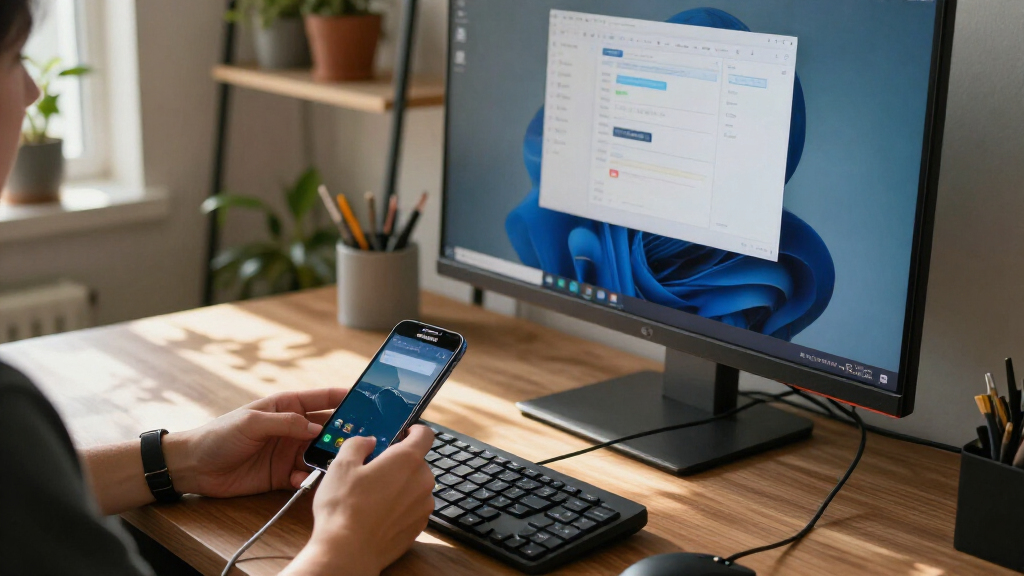
DeX has been part of Samsung’s phone lineup since the Galaxy S8 series, according to the article, and is available on many Galaxy models released afterward. When connected to an external display, it presents a desktop-like layout with an app launcher, search, recent-app controls, notifications and quick settings. Supported apps can run in windowed or full-screen modes, and users can place two app windows side by side.
The article’s author says apps including Chrome, Gmail and Google Docs work well in the mode, with Gmail and Docs making use of the larger display. It also says Microsoft Office and some collaboration apps run on DeX. App behavior varies, however, and the article notes that some regional apps may not adapt as well to a monitor.
For a wired monitor connection, the author describes using a USB-C-to-HDMI hub with power pass-through and an additional USB port for peripherals. The author says their adapter cost $10; that is a personal example, not a quoted price for all compatible hubs. A keyboard, mouse and power source may also be needed, depending on the setup. Samsung’s DeX Pad and DeX Station are mentioned as alternatives, but the article says those older docks can be expensive and may not work with newer phone models.
Why Galaxy owners may skip DeX with a monitor
A Samsung phone can offer a desktop-style experience on an external display. Whether it works for you depends on your phone, apps and available accessories.
What DeX offers
Supported Galaxy phones show a desktop-like layout on an external display.
A larger screen
Use apps such as Chrome, Gmail and Google Docs in windowed or full-screen modes.
Light tasks
DeX may suit browsing, email, group calls and basic document editing when your computer is away.
What a wired setup needs
The article describes a USB-C-to-HDMI hub that supports video output.
Confirm your Galaxy model supports DeX.
Use a compatible USB-C-to-HDMI hub; power pass-through may help.
Add a keyboard and mouse if useful, then check how your apps behave.
Where DeX may fall short
Compatibility varies across phones, apps and accessories.
- Short work sessions
- Browsing and media playback
- Some windowed apps
- Your phone model
- Hub video and power support
- Whether key apps adapt to a monitor
A Phone Can Cover Some PC Tasks
DeX may be useful for people who need a larger screen for email, web browsing, group calls or light document editing but do not have their computer nearby. It can also give an older compatible Galaxy phone another role as a basic setup for browsing, video streaming and local media playback. These uses could make a monitor and phone combination a practical option for short sessions or as a spare device.
That does not mean a phone running DeX will suit every PC task. The source describes it as a way to handle quick work and lightweight use, not as a universal substitute for a Windows or Linux computer. Whether it works for an individual depends on the apps they need, their phone model and the peripherals available. The main point is that a feature many owners may not have tried can offer a desktop-like interface without buying a new computer.
Products Worth Considering

LG UltraGear 27-inch QHD OLED Gaming Monitor, 240Hz

DJI Osmo 360 Motorcycle Handlebar POV Combo

Samsung 37-inch Odyssey G7 4K UHD Curved Gaming Monitor
As an affiliate, we earn on qualifying purchases.
DeX Has Evolved Since Galaxy S8
Samsung introduced DeX with the Galaxy S8 series, positioning it as a way to use a phone on a larger screen. The XDA article contrasts earlier skepticism about phone desktop modes with the author’s current experience, describing the present software as a closer approximation of a conventional desktop interface. That assessment is the author’s view rather than a formal comparison or independent test.
DeX can connect to displays wirelessly as well as through a cable, but the article focuses on the wired monitor setup. Since a Galaxy phone does not have a full-size HDMI port, the described approach uses USB-C video output through a compatible hub. The hub can also pass power to the phone and provide connections for accessories, reducing the number of separate adapters needed.
The article also points to possible entertainment and family uses. It says some high-end Galaxy phones can run certain PC games through third-party apps such as GameNative, particularly lighter titles. That is not presented as a guarantee of compatibility or performance across phones and games. The author also describes using DeX as a simple media and Android-game setup for a child.
““DeX mode is not a half-baked product.””
— Abhishek, XDA Developers author
How Many Owners Use DeX?
The article offers no survey or usage data showing how many Galaxy owners have tried DeX, or why others have not. Its framing that many users never explore the feature is not supported with a measured figure in the supplied material. It is unclear whether unfamiliarity, lack of a monitor, the need for accessories or limited app compatibility is the main barrier.
Compatibility also depends on the specific Galaxy phone, monitor, hub and applications. The source does not provide a complete model-by-model list, a benchmark of DeX against desktop operating systems, or a systematic assessment of third-party game performance. Its examples and hardware costs reflect the author’s experience and should not be read as guarantees for every setup.
Check Phone and Hub Compatibility
Readers considering DeX should check whether their Galaxy model supports the feature and whether their hub can pass video and power to the phone. They can then test the apps they rely on with a monitor, keyboard and mouse before treating the setup as a substitute for a computer. The article does not identify a forthcoming Samsung update or a scheduled product announcement; the next step it proposes is simply trying the mode with compatible equipment.
Key Questions
What is Samsung DeX?
Samsung DeX is a desktop-style mode that lets supported Galaxy phones present an interface on an external display. It includes an app launcher, system controls and support for app windows.
What do I need to use DeX with a monitor?
For the wired setup described in the article, you need a compatible Galaxy phone, a monitor and a USB-C-to-HDMI hub. A power source and keyboard and mouse may also be useful; available ports depend on the hub.
Can DeX replace a laptop or desktop?
Not for everyone. The article presents DeX as an option for short work sessions and lightweight tasks, while noting that a phone cannot perfectly replicate a standard desktop computer and that app support varies.
Does DeX work with every Galaxy phone and app?
No universal compatibility claim is made. DeX is available on many Galaxy models released after the Galaxy S8 series, but readers should check their specific phone. The article says some apps adapt better to the larger screen than others.
Source: XDA Developers